





Markeknows
Members
-
Joined
-
Last visited
Everything posted by Markeknows
-
Same same. Seemed to take 3 goes on different drives for it to finally complete. No way of being sure but it’s quiet and stable now. Still happy with 1941
-
I’ve had it a fair bit too, not the about to crash braking though. Sometimes whilst at 70mph approaching an overhead roundabout with a limit of 30. The crappy satnav obviously thinks I’m on the slip road not the main carriageway. Brakes on, not a slam on though. Happened even more in Spain perhaps getting rhd/lhd muddled. Became a liability there. Shame because it takes a lot of stress out of driving unfamiliar roads in busy traffic
-
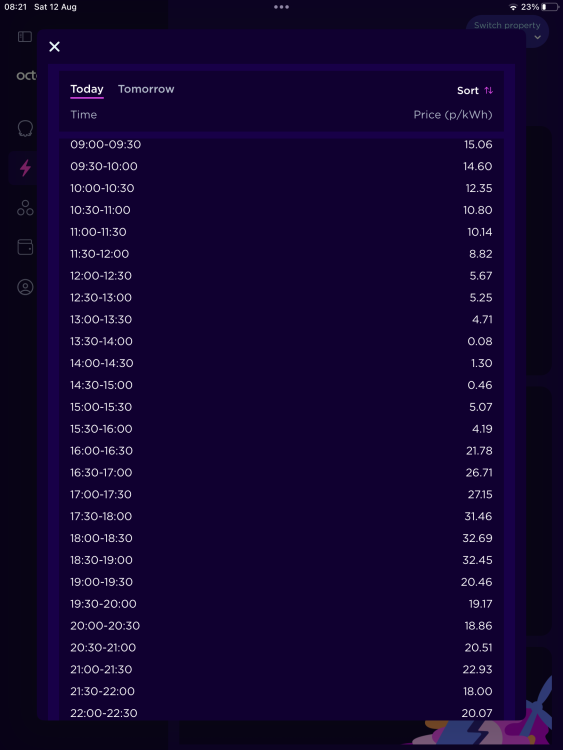
Many of us had this with 1896 after some OTA updates buggered it up. Firmware 1941 is the fix. See other v long thread ‘info constantly restarting’I had the same issues and Octopus acknowledge Intelligent is beta only for Skodas. So I dropped it and went back to the Skoda pulling charge when I see the rates are low on Octopus Agile. For example this afternoon when the sun is forecast to be out and it’s windy I’ll be charging at a couple of pence per kWh! But usually the middle of the night rates in the week are about 13p. Highly recommend Octopus Agile. Saturday 12th rates below, next days rates published about 4pm each day
 Check your inbox@sdolenec and @Artur111 check your inboxes. All those with the file could also host the download themselves on Google drive or something. The more the merrierin your inboxCheck your inboxAs with all batteries it’s weather dependent. Whilst in Spain a few weeks ago my predicted range was way better. Wait til winter…@haz0r @stripy007 @tomiss @Dillers @AdiKX @florian_ @SvenIngvarsson check your inboxes. READ THE INSTRUCTIONS on page 26 kindly put up by @TheWandererAdamK321, Ingi and just music all PM'dYup. Same here. Was happy with 1896 for ages, then the undertaking bug restarted with traffic sign recognition and nav gone. All fixed and back to perfect Octy hybrid again with 1941. To other newbies the very well written instructions are all in this thread page 26 from TheWanderer. Once downloaded from those who are hosting this, again read the thread not just the last page, it’s a 20 min job to regain a very well behaved carHah. Read the whole thread! Some of us have had this nonsense for ages so consider yourself quite lucky. Seriously though, there are very helpful peeps with download links. Again, read the last 5 or so pages of the thread for excellent instructions how to do it. It’s quick and solves SO many issuesAnd if you haven’t already… The more of us that email central Škoda and describe, complain and mention this enormous thread with SO many people saying they’ll never buy Škoda again then maybe, just maybe the head of VAG will break some heads together about the general and most recent OTA fiasco. So if you haven’t yet get onto support @ skoda-auto.comJust done my iV. Ignition on, 10 sec press on menu button, tapped update and selected the highlighted usb connector, easy, left a door open, lights off. Didn’t get the warning about it shutting down so all went sweetly in just over 20 mins start to finish! 1896 to 1941I’ve been following this and starting to wonder how my 21 iV on 1896 had got away without any problems after the recent OTAs. Until I was sat in the Q having come off the ferry to Spain from Plymouth. Immediately after changing to km and swopping CarPlay to my wife’s phone all hell broke loose. Skoda Satnav refusing to plan a route, reboots and various assists like road sign recognition stopping to work. Was it arriving in Spain or the different iPhone? Hell there is no chance of finding out so I think I need 1941! Vroom. HelpIf they know what they are doing this all gets coded at the time. Easy job to a decent fitter. Mines been no problem at all and a great (unofficial as no row weight on my vin plate) add on for a bike carrier to my iV. Needed the official cutout valence ordered, not a diy cut job that will weaken the one that’s already fittedToo right. I’m on 1896 but the last 2 or 3 ota updates in the last 2 weeks seem to have fixed my travel assist errors. Though occasionally I get the undertaking error again now, just once on a journey and then corrects itself after tapping the throttle.I find the app very useful. For setting charge times to my overnight cheap tariff. Pre-heating the car. Seeing where it is when it is at an off-site airport car park (miles away!) in case it ever got nicked. Gloating about the amazing mpg. if it isnt working contact the app developers via the app. They were v quick to respond in my experience (when I couldn’t turn the heated seats on-newer cars you can Oct 21 build you can’t). Otherwise get back to the dealer. VAG have to get our software sorted, and having said that I’m surprised there isn’t a class action against them for the dreadful and dangerous initial releasesAdding a charger is one of the things most likely to improve the saleability of your house. No more granny charger out the window. And on Bulb/Octopus tariff between 2 and 6 am it’s a ¼ of the normal charging price, although the day rate is a little more. So even for for the iV small battery I get to drive all my local errands and trips way cheaper than petrol. But, just don’t get a Project EV. Horrific app. I should have gone Podpoint or OhmeSadly OAA2 has made the infrequent errors more frequent! Daily now. I need a chat with dealer as I was thinking I’d missed most of the troubles so many others complained about. iV estate Nov 2021 buildThis guy got his done and that spurred me to get mine too. Mine went completely straight forward. Mark 4 iV estate for a bike carrier. No errors, no issues. Very pleased. I’m not a boat or caravan man so for me, despite VIN plate not having a towing weight I’m sortedI have a spare rear diffuser as I believe it’s called after having had a Towbar fitted, as the Towbar needs a special cut out one. Estate version. I’m in Poole so not far from you. Someone else here might know how they fit, I wasn’t watching the process I’m afraid


Important Information
Welcome to BRISKODA. Please note the following important links Terms of Use. We have a comprehensive Privacy Policy. We have placed cookies on your device to help make this website better. You can adjust your cookie settings, otherwise we'll assume you're okay to continue.