




Aldfort
Members
-
Joined
-
Last visited
Everything posted by Aldfort
-
I drive the 1.5 DSG and it'll return over 50 mpg on long runs at the legal limit and well over 40 mpg around town. I don't find I need to change driving mode, just a little prod on the throttle is sufficient. Bear in mind there were engine changes and only the EVO2 engine seems to have ironed out all the bugs.
-
Yep, if the camera behind the mirror is present then it can be done using VCDS. There are several firms that could do the coding. There are also a lot of folks who have the kit and can do it. You'll find dealers reluctant to do the adaptation. There is a VCDS forum on this site.
-
USB is the simplest way. I'd be worried about anything that needed to pull 3 amps! that's 36W!
-
Some wiring diagrams here: Skoda Kamiq Workshop manuals. Wiring diagram. DTC - Workshop Let us know if the wiring is present? NOTE: as well as the boot light somewhere there will be a tilt switch needed to tell the light the boot is open.
-
Might help to give the year of manufacture of the car. For sure anything built in 2024 the 12V socket is deleted. I've not look to see if it's easy to retrofit yet.
-
I may be wrong but I think you are conflating 2 things. Your car is built with certain hardware, you can't easily change this although it can be done. If your software is up to date then it's up to date as far as I know. However it is possible to code certain features in all VAG cars on or off. You need specialised equipment for this but many companies offer this service. For reasons best known to themselves VAG chose to code features on in some models and off in others while both are built with the capability. The classic one is needle sweep when the ignition is turned on. It possible in nearly all recent VAG models but only coded on in the sporty ones.
-
If there is a final "balloon" payment then generally, yes you can hand the car back and walk away or pay the balloon and the car is yours. There will be a deal on offer when the PCP comes to an end for sure. Until then just enjoy the car.
-
Anything can be retrofitted but the costs can soon spiral out of control. Rear camera is probably do-able. Park Assist uses radar which You probably don't have. Lane assist uses the camera behind the mirror, if you have traffic sign (speed limit) recognition then it might be possible to activate lane assist.
-
You need to differentiate between the action of the clutch and the pedal returning to it's "home position. If the clutch is working fine then the issue is likely in the clutch pedal or the master cylinder. AFAIK the master cylinder has a built in return spring. Possible this spring has cracked or has been mis-assembled.
-
The full electronic service history records the date, the mileage and the exact nature of the work carried out at each and every visit to a dealer. Thought you would have known that. I think your question is- does the service history part of the printout match the manufacturer recommendations.
-
Here is the whole answer: The Škoda Scala's TPMS (Tyre Pressure Monitoring System), also known as TPM+, uses data from the ABS wheel speed sensors to detect and alert the driver to a drop in tire pressure by monitoring changes in wheel radius, and some models also offer direct TPMS. Here's a more detailed explanation: Indirect TPMS (TPM+): The system uses the ABS wheel speed sensors to monitor the rotational speed of each wheel. It compares the speed of each wheel to determine if there's a change in the tire's radius, which can indicate a drop in pressure. If a tire pressure drop is detected, the system will alert the driver via a warning light on the dashboard. Direct TPMS (Some Models): Some Škoda Scala models may offer a direct TPMS system, which uses sensors mounted directly in the tires. These sensors measure the tire pressure and transmit the data to the car's computer. If a tire pressure drop is detected, the system will alert the driver via a warning light on the dashboard. Recalibration: Once the tire pressures are checked and corrected, the TPMS can be recalibrated through the infotainment system's options menu. Display: The display will indicate pressure for a single person occupancy in the car and also for a fully laden vehicle. If the car is using the ABS sensors I think all you get is a single warning and then you have to play find the tire yourself.
-
Wow, mine did 2 or 3 updates within a day of driving it off the forecourt. The SOS warning is a common issue on all VAG cars from 2020 to 2021. The fix is a combo of software and hardware replacement depending on the exact model. Ask if it's (a) ever been reported and (b) if so, has it been fixed? It'll be in the cars full digital service history so "don't know" is an unacceptable answer.
-
How do cobwebs get into and effect a sealed unit?
-
I think this is a good idea. I find my 18's give too firm a ride around where I live.
-
Try resetting the infotainment. (You should be able to do this with just the on /off button but this is what I do on all our VAG cars:) Turn it off using the on off button, ignition off, exit the car, lock the car, wait a little while. Then re-enter the car, ignition on , infotainment on.
-
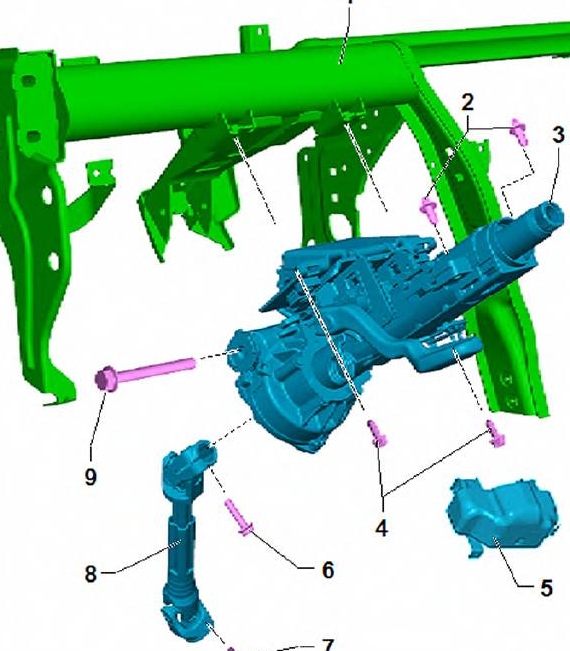
Here is a further picture of what is in the car. Component 3 is the steering column inside the car. component 8 is the one also in the previous picture which connects the column to the steering rack. You should also check that the steering column adjustment for steering wheel position is locked tight. (see the owners manual).
-
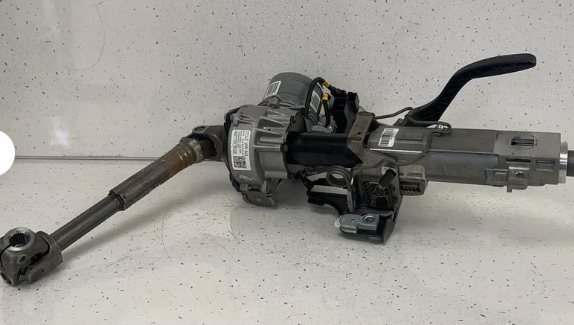
There is one under the car:
-
OK, I turned the sound way up an I can hear a noise. Can I ask are you moving the wheel lock to lock with the car stood still? Have you looked at the steering column joints, it sounds like a bit like something catching on a joint.
-
might just be me but can't hear anything?
-
What infotainment do you have?
-
-
A bit more on this, car (the Skoda) was at 10C in the garage yesterday. Reversed out to clean it. On starting the revs were increased to around 1300 rpm for maybe 20 seconds, then they dropped to around 1100 rpm for a further 20 seconds. After that they settled to idle at about 800 rpm. After cleaning re-started engine, idle revs at 800 rpm almost instantly. Went for a little dry-out drive and then put the (shiny!) car away.
-
What @Bigjohn says is pretty much spot on. Manufacturers are under pressure to conform to bureaucratic standards with little regard to the real world. So while I like the 50mpg on a run performance from the engine I have to live with little odd quirks like revving to 1400 rpm when cold and not quite understanding that torque demand on a fast A road is going to be very variable and that maybe not deploying ACT so quickly might be helpful to making smooth progress. (I'm still experimenting with this and I might start to use the flappy paddles and sport mode a bit more.)
-
For the Golf it is always less than one minute when the revs are increased. It only seems to do it from a fully cold start, so an hours shopping followed by an engine start and the revs settle to "idle" quickly. For the Kamiq, it's DSG so I have not really found it a problem as the reversing movement is controlled on the brake. I find I never need to touch the throttle pedal while doing this. The last manual Audi I had did this higher revs from a cold start thing, I would simply engage the clutch to get the car moving and then fully depress it to disengage so that I could manoeuvre safely. Often if I was just backing onto my driveway I'd knock it out of gear once it was rolling.
-
Skoda web site should have links to an accessory brochure, including one for wheels.


