Cairus
Members
-
Joined
-
Last visited
Everything posted by Cairus
-
You need this Firmware in the SD Card
-
Which Firmware was original?
-
That's not entirely correct. USB-C was successfully connected to the MIB2, but only AA works with it because the MIB3 has the CarPlay chip directly integrated.
-
-
-
-
-
-
-
Mib 2 IT also Works with This unit 08: Hardware-Nummer 5G1907044AG Hardware-Version H04 Software-Nummer 5G1907044AG Software-Version 2002
-
I Think i have the Arteon Dataset on unit 19
-
We have Hardware-Nummer 565907044BG Hardware-Version H04 Software-Nummer 565907044BG Software-Version 2002 Everything Works, New steering Wheel with Adapter
-
I Dont use qnx This solution is only SD Card Update's Easy for everybody. No ToolBox, No obd Tool, only SD Card
-
I say, you dont need ToolBox and the Green Menü. It seems you've reached your limit. I never said I wouldn't patch it. But it can be done differently.
-
What is the Problem?
-
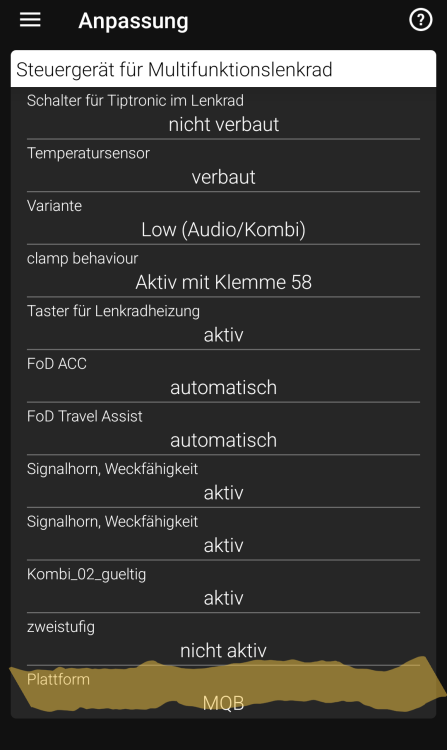
Gateway---> adjusment---> steering Wheel
-
IT is only "Menü" which dont Work without LIN Adapter
-
Page Not exist
-
Which Dataset? In our kodiaq i have Button steering wheel and mib. You have Code the Button in the Gateway?
-
Which Gateway you have?
-
This wasn't about the image, though. It was about files used to make firmware jumps without Toolbox or developer mode.
-
Then good luck.
-
No, this has nothing to do with the instructions from my colleague. Only I can open this zip folder with the password via remote access. I copy the contents to the SD card as needed and then delete everything again.
-
Here's the solution. As already mentioned, the audio signal is reversed left and right. This is due to the HW 02. https://mega.nz/file/w6MhzRTB#HuI0JKhHFbcuP60AyPIux8qmBcZ7eyhHIzoTJsXO7uY
-
No, 5 step Update solution with the SD Card. But No ToolBox and No Diagnostic Tool you need