



.jpg.68c7823d355ff3e5b20e82ddbf78398c.jpg)
.jpg.c170764e46da2c3c21f9cbb3a74ba3ad.jpg)
PetrolDave
Resident Member
-
Joined
-
Last visited
Everything posted by PetrolDave
-
Second that - which is why even when I had an Audi RS4 I kept my Citroen C1. Totally different driving experiences but just as involving, the C1 got driven at ten tenths whenever possible and always made me smile but the RS4 usually got driven at less than five tenths.
-
-
Just a normal VCDS Auto-Scan - take along a memory stick and ask them to save the .txt file that VCDS auto-saves as you'll probably be asked to share that if/when asking for help.
-
-
Find someone local to you who has VCDS and can do a fault code scan - then you'll know what the problem is rather than keep throwing parts at it. See List of VCDS Owners and VCDS Owners map
-
-
The map data has many (hundreds, thousands maybe) of very small files which always use the "cluster size" on the SD card even if they are only e.g. 1 byte long - so you can delay when the map data won't fit onto a 32GB SD card by manually selecting the smallest cluster size (I use 4K) when quick formatting it.
-
-
Much of that difference is down to how the size of disks, USB sticks, SD cards, etc. is specified. On an HDD, USB stick or SD card 32GB means 32,000,000,000 bytes; but when Windows reports the formatted size as 29.7GB it means 29.7*1024*1024*1024 = 31,890,132,172 bytes (the difference being the space taken up by the format information).
-
That's another bug that has been commented on several times in this forum, it also means that at night the headlamps dip into oncoming traffic!
-
IIRC @SashaGrace has used the CarPlay2Air.
-
I guess it might depend on what length drives you normally do, only short drives tend to be bad for the DPF on the diesels leading to them having problem regenerating unless you regularly (say weekly) do a long enough drive for a DPF regen to happen.
-
Neighbour over the road has an Abarth 595 - as soon as it starts up in the garage I know about it, the exhaust sounds like a completely empty piece of pipe and nothing like any of the other cars in our road!
-
Waiting with interest, hopefully it will have been properly tested this time
-
This is a long running fault from with VAG infotainment systems , even as far back as 2005 this was true in an Audi S4 I owned (RNS-E sat-nav)
-
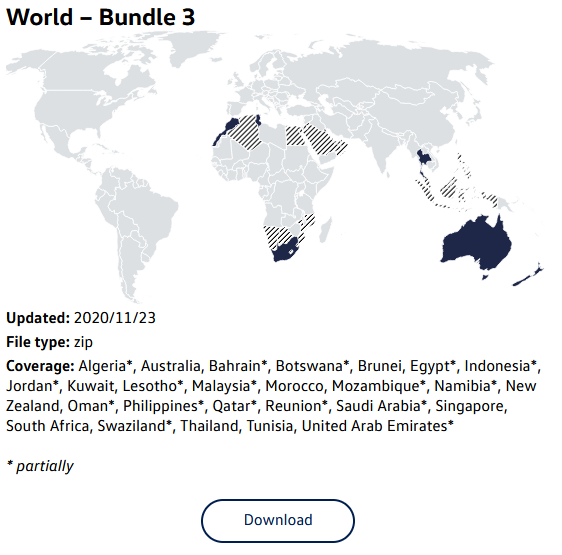
... or visit the VW map update website (the VW and Skoda maps are identical) https://app-connect.volkswagen.com/mapupdates/download/#download Select Golf from 2017, then Discover Media (VW name for Amundsen), and download World - Bundle 3
-
A new batch of software is being promised imminently, but what isn't being promised is that it will fix all, or even any, of the problems that are being experienced.
-
You can do it on a Mac BUT the Mac will install onto the SD card some temporary files that the Amundsen will not like and make it reject the SD card - so after copying the files onto the SD card you will need to remove the temporary files by running a Mac program such as Clean Eject or Blue Harvest.
-
Given that some members are still driving loan cars whilst Skoda try to develop/write/test software fixes it appears they don't actually have software/firmware updates available yet.
-
I did the same on my 1.4 Octavia 3, and also got a Skoda bonnet badge to fit on the cover as I didn't like the VW badge being visible when I opened the bonnet.
-
Is that since December 2020? all new Haynes Manuals made electronic only
-
But posting infotainment versions gives an incorrect impression that this gives a complete picture of the software version(s) of the car - at least that's how I'm reading the majority of posts in this forum? What's better? - incomplete and possibly misleading information or no information? It could be argued that no information is better than misleading information based solely on infotainment version numbers?
-
It can so long as you have either a HEX-V2 or HEX-NET and run the latest version of VCDS (which is free to download). Posts on the public part of the Ross-Tech forum exist of the Golf 8 - which is basically the same car (and there are many more posts in the non-public section, but I can't say any more than that due to a non-disclosure agreement).
-
I would suggest you ask on the Ross-Tech forum, they will ask for a full VCDS Auto-Scan and I would suggest you also post an adaptation channel map so they can see what adaptation channels exist in the engine ECU you have - not all engine ECUs have the same adjustments possible.
-
My impression is that you are in the minority in understanding that. Many driver and system updates are applied to Windows without the version displayed in the system info screen changing - the same applies to cars. What it means is that showing the infotainment software version is not a useful indicator of updates done by a dealer to the other systems - so isn't actually useful when comparing faults and fixes between different cars. Hence why I suggested that a VCDS or OBDEleven scan is actually what is needed to be able to see what the software state is of the car.
.thumb.jpg.f83a46b9b3c0d976b9dbffbb523c9874.jpg)


