




varooom
Resident Member
-
Joined
-
Last visited
Everything posted by varooom
-
Update to version 8755 is available, will PM a link over
-
I have updated my own to 0253, you can do this if you wish. They don't add features, but fix things like Bluetooth, or other general system stability. So just let me know if you wish to use firmware, happy to help if you need it.
-
Odds are 0253 is available, but you should hold down menu key for about 10 seconds to enter engineering menu, look for Software Train information and take a picture of that.
-
Try holding down your Menu/Setup button to get your software train value, and this is also the location to the actual firmware update button.
-
-
I can send 0253 via PM, next few minutes
-
Good luck in getting this finished off 🤞
-
You can do as above, or there's another free way if you wish. You do need access to VCDS to put the head unit into developer mode, otherwise it won't work. EDIT: Should you go down this route, and have VCDS access, then take a picture from your engineer menu (hold down Menu/Setup for 10 seconds) and post a picture of your software train.
-
It's 1hr to edit 💬
-
I will send link to 0369 update
-
Welcome to the forum, I tackled the problem from another direction, as I had existing system of F&R parking, where the rear developed a fault. A faulty rear loom (corrosion) caused only some of the sensors to go down (I could get measurements from some of them only) It lead me to make this post here, as I didn't need help in sorting it, but if you take a look you will see that each sensor has a common + and - shared by all, with only the s (signal) going to each individually. https://www.briskoda.net/forums/topic/505798-basic-how-to-read-wiring-diagrams/ So you are correct that Pin 1 = + feed (single common shared) Pin 2 = s for signal with a wire dedicated to each sensor, finally Pin 3 = - Earth shared on a single feed wire I had issues myself, as I sourced some new rear sensors from Aliexpress that matched perfectly the VAG OEM numbers, and not one worked at all. So were your sensors from there, or from VAG/donor scrap car? You shouldn't need to touch Gateway coding as it's aware already of you having PDC system, though might need coding elsewhere. With the forward movement, the system works at low speed, so it must be talking to another system via CANbus for sure, as it activates up to xx km/h in forward.
-
100% if nothing was swapped since leaving factory.
-
I can send a link to you
-
@pab567Do you know if the old system can have Apple car play loaded?
-
@pab567 You are requested for help I have the map, though never tried to use as mine is Amundsen unit. Welcome to download and try (needs dual layer DVD naturally)
-
The firmwares are supplied to the dealer network, so nope not really. There's no changelog provided, you have to do a best guess based upon TPI documents "Customer complains that screen goes black, cannot pair Bluetooth" and this gives you a clue as to what's fixed.
-
Software version 0369 is available, and clean your car! I can send link by private message.
-
Go with simple first, and easy to reproduce yourself in seconds 🤝
-
Did you leave indicator on left / right?
-
Yes you can load 0480, will PM a link over
-
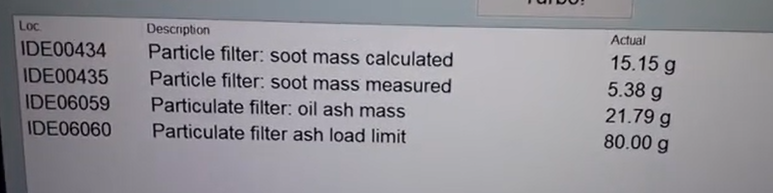
Oil ash levels is the permanant one, soot is just the temporary stuff as I am sure you know (typo) The top two you want under 20 g The oil ash values are taken from a VW Golf 7 at 100,000km to give you a rough lifespan estimate
-
I will send a link for you in a moment
-
No idea, never looked into towing caravans. Hopefully someone might know the correct answer.
-
Local Country laws do override the official Skoda documents mind you. I suspect that 1594kg is for you car's actual weight maybe?
-
Welcome, it looks good. Hope you can sort your eardrum issue out.



