




varooom
Resident Member
-
Joined
-
Last visited
Everything posted by varooom
-
Futher to your first post where you asked for OEM choices, here they are attached for you. You will find your current wheels in the 18" file SUP 2011(B) 601-060 16'' Wheel Choices.pdf SUP 2011(B) 601-070 17'' Wheel Choices.pdf SUP 2011(B) 601-080 18'' Wheel Choices.pdf
-
They are called LUNA
.png.758ec09e2fbaf86cbeefcd4ed529020b.png)
-
Damn that was very handy, and what are the odds of having that random part stashed away.
-
Private messages as always, link to follow in a few minutes.
-
-
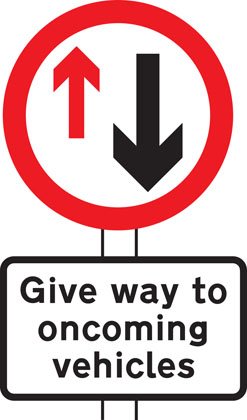
I could talk volumes about poor driving, been there wore the T-Shirt. You would think someone would hold back, use common sense, but sadly most seem to follow the lemming method of blindly following. How many times I have seen a narrowing in the road, where there is this sign... Only to find people carry on ploughing towards you ignoring priority (face slapped into palm moment)
-
Unless the highway code has changed, then neither has "right if way" it's down to the drivers to negotiate this themselves. I have had a clear road, and on opposite a small section of roadworks, someone decided to play chicken with me, was an interesting confrontation. I had to wait for 30+ cars to pass when I could have proceeded on and cleared it within a 4-5 car lengths.
-
The latest version is 0480 And to update, you need SD Card
-
Here are the options for your car I have attached MY2015 for an "F" VIN The parts are same for MY2014 with "E" VIN Octavia 2015(F) 092-050.pdf Beware of numbers taken from Google, the ones you provided don't always show in parts catalog. Part 1 in document is for a fixed tow bar, and won't fit Octavia Scout Part 2 in document is for removable tow bar 5E0 092 155 with PRCode: 7LM = Vehicle class differentiation -5E0- 5E9 092 155 is a removable tow bar for Scout only Best follow @langers2k advice to contact a dealer, get yourself a quote (email?) and supply VIN/Registration plate to price up the job. You can then use part list to order yourself if they send this in quote.
-
Firmware can be sent by me or Pab567 via PM Sat Nav I can send link to the one I used, has to live on SD Card 24/7 in glovebox
-
Not sure if this is the part you are talking about (5 - PHEV) 8V4 628 159 B I would email your local dealer for a quote, if you are lucky their reply might include the part number Supply Reg/VIN and see how you get on. Meanwhile link to look at... https://www.lllparts.co.uk/product/skoda-8v4862159b-throttle-control-element/mpn/8v4862159b
-
This is your installed firmware 0456, available 0480. You could update the software, but might not make AA work, never tried myself as just using Bluetooth. Something I should perhaps try to see if possible.
-
Dealer price for injector, £800-£960 for one (should have all the washers in theory) Mad money, here is a quick random part I chucked into google, and seems to be a fairly cheap UK source (though more extensive googling might yield more fruit, chucking your registration into EuroCarParts) https://turbo-diesel.co.uk/product/bosch-injector-audi-0414720302-038130073bq-038130080ax-038130073bk-new/ Under £300 for comparison. Need to either find the part off existing injector, or need VIN/Engine code. Labour wise, not sure 1 to 1.5hrs estimate with coding???
-
@dpen14 The first picture shows your current installed Software Train MST2_EU_SK_ZR_P0241T This is also the correct location for firmware update button Available is MST2_EU_SK_ZR_P0253T The second image is only showing you what update(s) that have been applied, and what version you have running in the system The third image, you should update via SD Card, I don't think anyone has ever had success with USB. Download is via a private message, and you copying the extracted files to an SD Card.
-
Might be a good idea to post your partial VIN number, as you will have a 1U or a 1Z chassis. Next is engine code off your V5, CBBB for example or 3 characters. Could then locate a price for a single injector.
-
Welcome to the forum, You need to hold down the menu button to enter the hidden menu, this contains the Software Train and the correct update flash button. Odds are software version 0253 is available.
-
Welcome 🤝
-
Could be, here is a TPI for USB socket damage. 2060718.2 MIB2 MIB2+ - Hardware and ESD damage to USB socket.pdf
-
@roottoot Bit large for a "car" must be one of the new large SUV things for the 1/4 mile school run. Maybe title needs adjusting 😁
-
Welcome, All is guess work until you plug in VCDS really, it might be XYZ but no closer to an answer.
-
@pab567 Picture available @VAGster_FIN your tag wasn't formed correct, but he will get signal now.
-
Thanks @pab567, very good advice as always
-
@VAGster_FIN Wouldn't hurt to try the SW flash, however you could do it yourself most likely if supplied firmware. @pab567 should be able to assist.
-
That was a baaaaaaaahd joke
-
VCDS will sometimes pop up login codes if they are known when you hover over. https://www.ross-tech.com/vcds/tour/securityaccess.php They do have a list of some you could try, but biggest question is why do you need access into the security? (if you are just playing around, then not something to muck about with)



