Breezy_Pete
Sponsor
-
Joined
-
Last visited
Everything posted by Breezy_Pete
-
Extremely wise to be worried about that. If you let me know the VIN, I can look and see if there's a previous correct version listed, that's been superseded by the suffix NA, which may be more recognisable by the aftermarket.
-
That's what I was expecting I might find. a number with 513 in the middle sounds right. The suffix NA is crucial, that's often the only thing that's different between all the different versions.
-
You don't have to drain oil if you leave the drive flanges in. Can be hard to get driver's side one out/in past the various obstructions when removing and replacing box. But you could drain it by removing that flange once it's out if you found it tricky removing the box with it still on. Driveshafts can stay in wheel bearings, but ensure you tie them up well out the way. I spent a while once not realising that the nearside shaft was getting in my way during refitting of the box, cos it had moved from where I had lodged it.
-
Reg number or VIN would let me check your rear part number.
-
Has a compression test been done at any point?
-
You'll have to excuse my hieroglyphics.
-
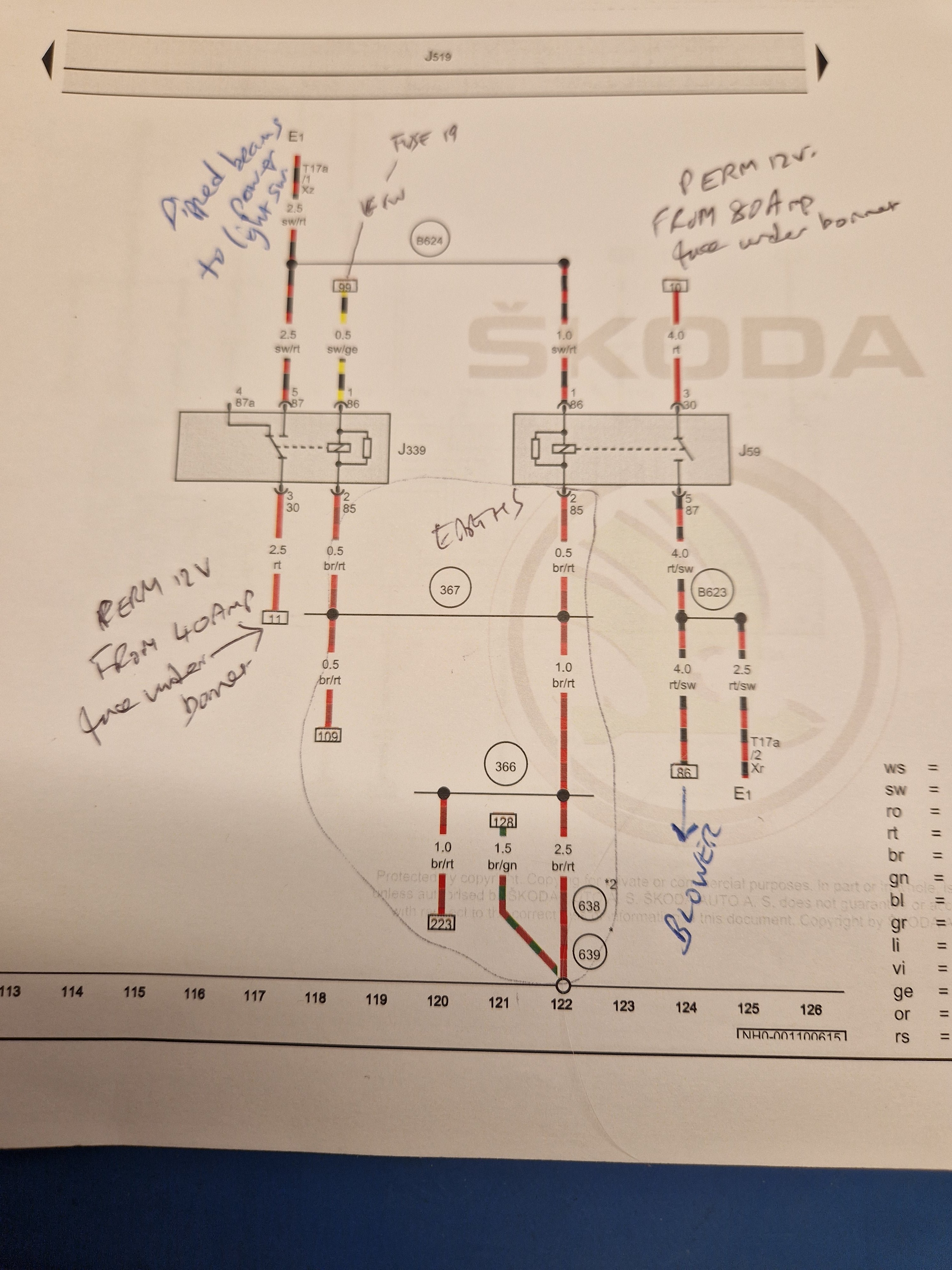
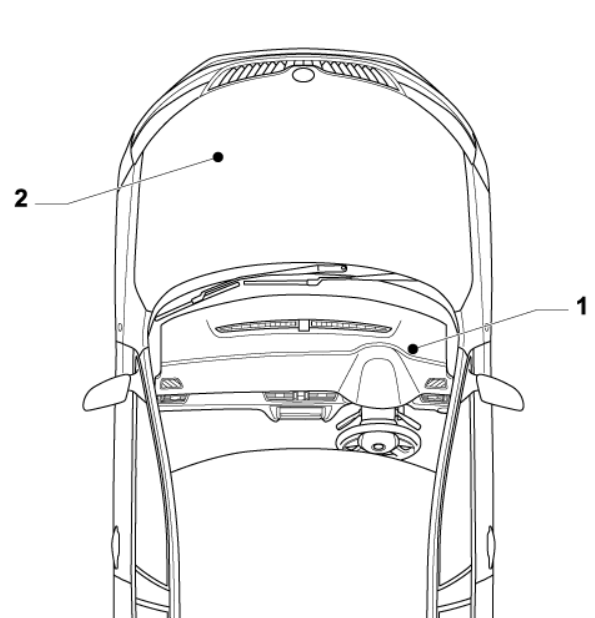
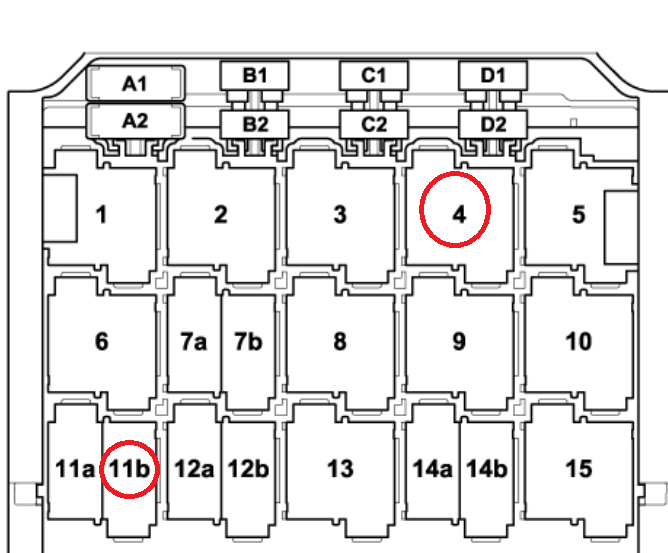
Position of cabin relay carrier in car for RHD vaguely indicated as 1 here, probably need to remove some lower dash trim from beneath the steering wheel to access. Relay layout shown here, with 4 and 11b marked up by me: Position 4 houses X contact relay J59, position 11b has X-contact relay 2, J339 The circuit diagram for these is a little strange, but as far as I can make out, the one in position 11b is energised when ignition is on, but not when cranking. This supplies one connection pole of the light switch which supplies the dipped beams, but also drives the coil of the other relay, in position 4, which powers both the blower motor and another connection of the light switch. So if J339 in position 11b isn't working right, it will disable the dipped beams, and the other relay, supplying the blower. Maybe it has just become loose? Fuse 19, that I suggest you double check, supplies the coil power to J339, when ignition switch is on (but not cranking).
-
I'll have another look at wiring diags shortly. Should have a location for relay panel.
-
From what I remember of the relay panel layout, position 11 is subdivided into two half-width relay positions, labelled 11.1 and 11.2, or 11a and 11b? Not near a computer this second to double-check. Got a photo of what you're finding?
-
@jo0lz Or a warning light on the dash, which you can enable with a simple soft coding change to the onboard supply control unit. The unit picks up the change in circuit impedance from the added indicator bulbs, and flashes this second dash light if indicating whilst trailer is connected. No need for anything to be added.
-
Perhaps the latch on the connector is broken, so it is not being held positively in full engagement?
-
No, it comes as a complete assembly.
-
24mm ARB. 👍
-
Check cabin fuse 19, rated 7.5 Amp before doing anything else. Does the car have start/stop? I'd guess not.
-
Gimme the reg number or VIN and I can find it for you.
-
Is there a removable panel somewhere below the light switch?
-
Not much cranking power required for a 1.2 HTP so I'd say just go with something with a decent length guarantee, above all else.
-
Are you certain that one bulb had not failed before this? Anyway, checking bulbs and if failed changing them would be my approach.
-
A problem with one of the relays that are supposed to switch off these items while, and only while, the starter motor is cranking the engine, I believe. These relays are in position 4 and position 11b on the cabin relay carrier.
-
Do a compression test.
-
If you're lucky, those codes may be on a sticker in the boot, next to spare wheel well.
-
Yes, it must be frustrating. I hope that you will find some wiring damage somewhere soon, which may explain all of this stuff.
-
It seems very, very unlikely to me that there would be anything wrong with the blue wire(s) that connect relays 14 and 10.1 to one side of fuse 30, but it may be easier to probe such connections from the front side of the fusebox and relay panel?
-
I don't believe this is true. Some of the wiring comes from the Onboard power supply control unit, pins 2 of the white 52 way connector and pin 43 of the black 52 way. These get to the wiper motor pins 2 (INT) and 3 (WW) via a couple of intermediate connectors, a pink one at the left C-pillar and a black one in the rear lid. The wire colours are green/red and green/white respectively, all the way. the other two connections at pins 4 and 1 of the rear wiper are an ignition switched supply (black/violet) and an earth (brown). The washer pump motor is solely connected in parallel with INT and WW connections, for both front and rear wash functions, and as well as not being labelled as CAN wiring, this is more evidence in my mind that these wires are nothing to do with the CAN comms system.
-
I don't know. Don't think so. did you check the fuse mentioned yesterday: