pab567
FREEDOMTech
-
Joined
-
Last visited
Everything posted by pab567
-
I sent you PM
-
What is the unit? Pls post the picture
-
So now you have Bolero MIB1, with Bluetooth, without DAB, without MOST, without RVC support, part number 5E0035819A, with Media In port and, as you mentioned, fortunately you don't have CANTON sound system. You can install one of four different OEM glove box units: - MIB2 Bolero - MIB2 Amundsen - MIB2 Columbus - MIB2.5 Columbus You also need to replace display unit: - for MIB2 Bolero you can use either 6.5" model number 5E0919605H or 8" model number 5E0919605N - for MIB2 Amundsen and MIB2 Columbus you can use listed above display as well as 6.5" model number 5E0919605J, 8" model number 5E0919606, 8" model number 5E0919605M - for MIB2.5 Columbus the only display unit that works is 5E0919606D Media In interface must be replaced with USB port, either with or without CarPlay support. The question is what is your budget and which of listed below features are "must have": - Video playback from DVD, USB, SD - CD playback - OEM navigation - displaying OEM maps in Virtual Cluster (Active Info Display). All units support SmartLink (Android Auto, Apple CarPlay, MirrorLink), rear view camera, voice command. features that differ them: - MIB2 Bolero - no OEM navigation, no CD/DVD drive, no video playback from SD/USB - MIB2 Amundsen - OEM navigation, no CD/DVD drive, no video playback from SD/USB, support for displaying OEM maps in Active Info Display (Virtual Cluster) - MIB2 Columbus - OEM navigation, CD/DVD drive, video playback from SD/USB, no support for displaying OEM maps in Active Info Display (Virtual Cluster) - MIB2.5 Columbus - OEM navigation, CD/DVD drive, video playback from SD/USB, support for displaying OEM maps in Active Info Display (Virtual Cluster)
-
All check your PMs. Pls keep in mind that IF your unit has SW patch applied then upgrading firmware will have it killed - your unit will be locked with Component Protection and activations might be lost as well. Let me remind you upgrade procedure: 1. format SD (best max 32GB) under FAT32 2. unpack to root (metainfo2.txt and all the folders must be placed directly on SD, not in any folder) 3. insert SD card into the slot 4. enter Service Menu (long press MENU button)
-
I sent you download link on PM however I hardly believe this could help you.
-
Pls share VIN and part number of the unit you bought.
-
Probably it will requires firmware reflash. Pls post the picture of label fro upper housing and, if possible, a link to some video showing the behavior.
-
PM
-
-
I sent you link to SW upgrade on PM but unfortunately I can't hel you with SmartLink unlocking.
-
You have simplifies version of SWING, without DAN and without built-in Bluetooth. If Bluetooth is all you need then you can replace it with full SWING version. New unit must have Component protection removed by Skoda dealer. If you would also like to have Android Auto or Apple Car Play then you must swap to Bolero or Amundsen but in this case new unit must be patched.
-
I only have MEN2_EU_SKGPx_P0080L_8755 :(
-
Yes, this is the right connector pins 1 and 7 are for microphone (1 - signal, 7 - GND), 6 and 12 for RVC (6 - signal, 12 - GND).
-
Check your PMs
-
The first question is on the equipment you have now so @Diixiie87 pls have it posted.
-
Some coding might be required to match your car euqipment (e.g. warning lights in the door that lits when the door is open).
-
@RichCz check your PM
-
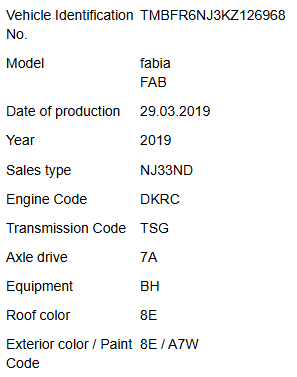
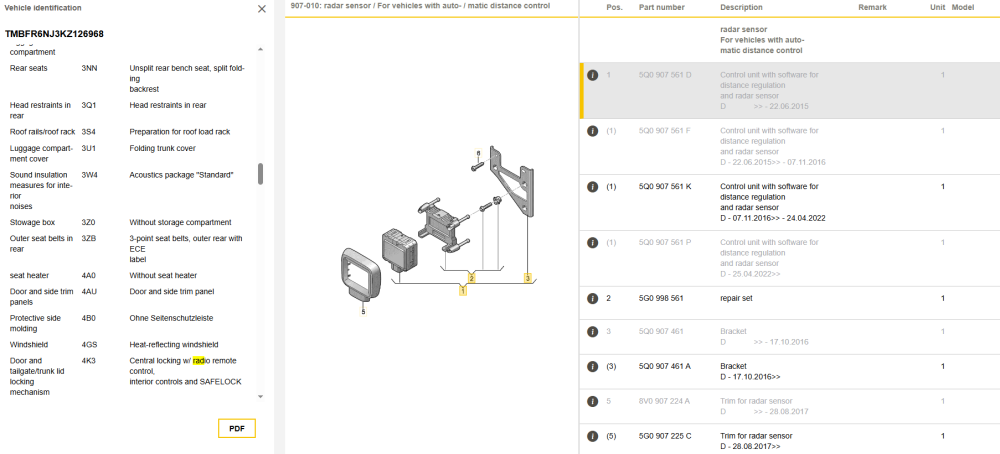
Your Fabia was manufactured on March 29th, 2019: It's equipped with speed limiter only but it has radar installed as it is equipped with forward collision warning - it has options: 6K2 - Forward collision warning incl. autonomous emergency braking, without adaptive cruise control 8T9 - Speed limiter without cruise control system and without adaptive cruise control You car has the same radar as used in cars with adaptive cruise control - part number 5Q0907561K. IMHO Skoda dealer should be able to add cruise control to your car
-
Link sent on PM. AFter reflashing you will need to load maps but unfortunately I can't help you with this.
-
So now you have Amundsen MIB1, with Bluetooth, with DAB, part number 5E0035874A, with USB 5Q0035726B and fortunately you don't have CANTON sound system. For display unit 5E0919605M you can use either Amundsen MIB2 5Q0035874x / 565035874 or MIB2 Columbus 3V0035020x (without SIM/LTE) or 3V0035021x (with SIM/LTE - in this case you also need to add antennas for LTE). If you woulkd like to use Apple CarPlay then you also have to replace USB port. The question is what is your budget and which of listed below features are "must have": - Video playback from DVD, USB, SD - CD playback - displaying OEM maps in Virtual Cluster (Active Info Display). Both units support SmartLink (Android Auto, Apple CarPlay, MirrorLink), rear view camera, voice command. Features that differ them: - MIB2 Amundsen - OEM navigation, no CD/DVD drive, no video playback from SD/USB, support for displaying OEM maps in Active Info Display (Virtual Cluster) - MIB2 Columbus - OEM navigation, CD/DVD drive, video playback from SD/USB, no support for displaying OEM maps in Active Info Display (Virtual Cluster)
-
Indeed, 5E0919605M works ONLY with MIB2 units. Pls share your your VIN so I can check for compatibility issues if any.
-
As I mentioned previously: BT module is located inside the infotainment reader. What is your location?
-
Both PMs sent
-
Check your PMs
-
Yes, they do :) Are you going to retrofit your current unit?