langers2k
Resident Member
-
Joined
-
Last visited
Everything posted by langers2k
-
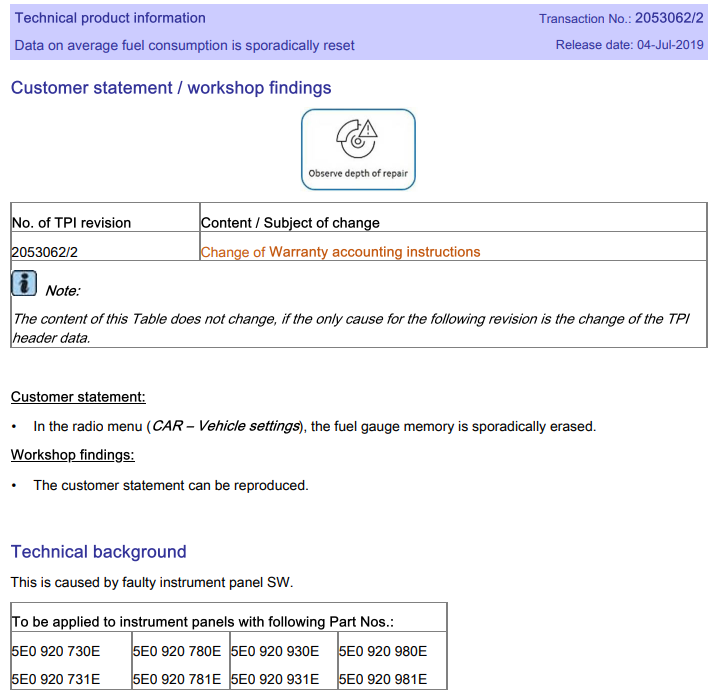
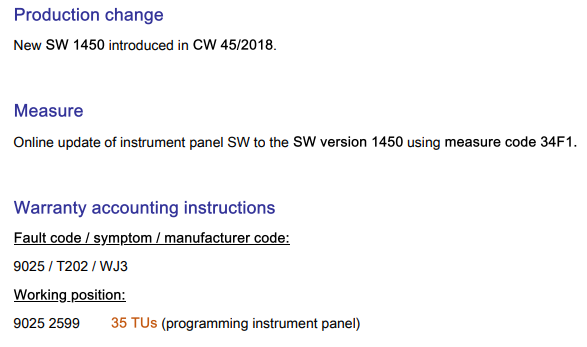
There was a TPI back in 2019 for a similar issue on the Octavia which was resolved by a software update Given they tend to share SW across models, there's a good change there is a similar TPI and update for the Karoq. You'd need to log in to erwin to check Octavia TPI:
-
Mib2 maps won't work on an rns315. You need a one time map update SD card. It'll update the maps in the internal storage and then wipe itself. The latest release is v12 from around 2020. That's the final release for the rns315 so as new as you'll get I'm afraid.
-
57'c certainly doesn't feel hot for a LED in what could be 30'c ambient temperatures at the moment. Can't say I've ever checked what temperatures mine hit so I don't have much context for 'normal'. Looking at 4B, the only obvious adaption channel that differs is "Presentation run dynamic AFS light" which should be 'not active'. For reference, these are the stock values for my car and I'd expect yours to be the same, I've bundled some values together to make it easier to read. Feel free to compare against your own and check they match. I've hidden them in spoilers to make my post more readable. There are loads of differences between our cars (expected) but nothing is standing out. These are 4b: As for 09, I've attached the obvious headlight related channels below but I can't see any glaring errors with your current values. Please note, VCDS calls them "Stationary cornering lamp" whereas OBDeleven calls them "Static AFS light".
-
Not had a chance yet. I'll report back when I do.
-
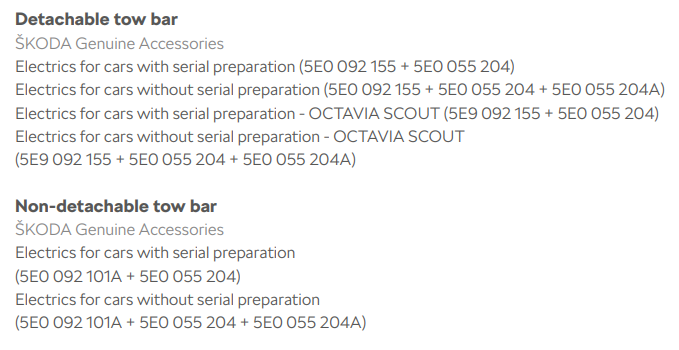
The part you've link looks to be for a MK4 despite the description. Accessories brochure list this part numbers for a MK3: Get the proper kit, wire it as per the instructions and then have it coded. That way it'll integrate properly with the rest of the car
-
-
Glad to hear the faults have gone for now. I expect everything I need is probably inside the history log. Can you add it as an attachment?
-
OBDeleven calls them backups and you need to select adaptions then save. Some how it is then possible to get that info out of OBDeleven as others have previously. 4B is the multifunction module you've been recoding...
-
Because it's not enabled. Nor was it in the original lcode you posted in this thread. Assuming it's correctly coded in the other modules, try setting 4B to: 000000070100046600003D41010000000000000000000000000000000000 The change is highlighted and is in byte 11 if it helps. No idea. As it can't be deleted that would suggest some kind of fault is still present. Nothing in 4B should cause the overheat error although it's possible the changes we've made have stopped the errors being hidden. This is all somewhat of a guessing game given I have no idea what has been to this car previously to get it in this state. You really need to figure out how to create and post adaption maps. I'd really like to see them for both 09 and 4B. If you know anyone with VCDS, an adaptation map from that would be even better as it's much easier for me to work with. For context, 4B isn't too bad at just over 100 channels but 09 is much less fun to translate with over 2000.
-
It won't be G12, that's ancient. Most likely G13 or G12evo from factory, I'd use G12evo to top up as it's the newer tech and compatible with G13.
-
6R0915105B looks to match a 096 battery. Back to Halfords for you I'm afraid 🙄 I can't see any issue with replacing a 69Ah battery with a 75Ah either so I've no idea what the previous chap means by 'your car can't handle it'. Just make sure it's correctly coded for the larger capacity.
-
Check your PR-codes to see if it matches or exceeds the factory fitted battery and if the battery monitoring system info matches the fitted battery. Assuming both are true, then it'll be fine and you don't need to worry about it. I don't have much more to add so I'll leave you to it
-
Heh - it's certainly quite hard to follow at points From a very quick skim, it appears it was fitted with a 096 battery and now has a 013. I'm not sure what was fitted previously. Using a couple of random reg plates from Autotrader, Halfords/ECP suggest 013, 027 or 096. I've no idea which is 'correct'. Hopefully the OP took note of the original battery... The PR codes for the car won't tell you much, for example I have PR-J0T "Battery 360 A (69 Ah)". Someone with access to the parts database might be able to offer a better suggestion based on the OP's VIN: TMBBC7NE9J0155483
-
It depends what headlights are fitted and which address they appear on. As yours are D6/D7, they need light control 2 enabled Go back to Halfords and tell them they've fitted the wrong part. Then have them fit the correct part....?
-
Please set the lcode back to the one I gave you: 000000070100046600003D01010000000000000000000000000000000000 It's more likely to be correct given no other scan online shares your current coding. I have the same headlights on my FL MK3 and have a similar lcode to the above apart from the suspension coding. Once that's done and you've rerun basic settings, please try changing these adaption channels: - Light Control Left 2 to Yes - Light Control Right 2 to Yes
-
Good start. When you say no luck getting rid of that fault code, do you mean the "Additional installations detected" code? If so, you're going to need to post the adaption channels for me to check. When you try the backup, only have "adaption" selected and see if that works. Otherwise, try and find these channels adaption channels and see what they are set to: Installation list, specified installations: Multifunction Module: Multifunction module on the second bus connection: Light Control Left: Light Control Right: Light Control Left 2: Light Control Right 2: You can also look at the list I made previously to see what differences you have, please don't make any changes yet, just note down the differences Don't use the lcode in the other thread, it's for a vRS with independent suspension rather than the beam your car has.
-
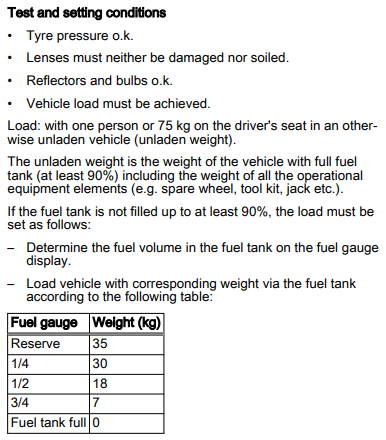
It does, otherwise D6 and D7 wouldn't appear in the scan. They aren't, as they never existed for the MK3 Octavia. Ask VAG 🤣 These descriptions are generally created by the scan tool manufactures as they don't exist in ODIS (VAG tool). Ross-tech must have spotted that whatever byte 03, bit 2 does, it was only set on cars with LED headlights and labeled it as such. I expect it does... Based on the wiring diagram and leuchte channels, the BCM (09) will be in charge of turning them on/off. It's most likely channels 7 and 8 which are responsible for low beams. However, the 'multifunction' module (4B) is charge of things like headlight leveling and possibly AFS so there is a chance automass doesn't have self-leveling at the moment. I hope that helps explain my though process, feel free to ask if anything is unclear Most likely, just click start and the OK/acknowledge - I have zero idea how OBDeleven will present this. Ross-tech state the following: http://wiki.ross-tech.com/wiki/index.php/VW_MQB_Headlight_Regulation Please double check you're in module 4B before you hit basic settings. In an ideal world, you then need to perform basic settings on a flat, level surface, whilst meeting these requirements: Edit: Turns out there is even a video for OBDeleven, just remember it's 4B not 55:
-
You'll need to perform basic settings after changes to 4b. So you'll probably get an error until then. You already know what the coding was so worse case, you set it back.
-
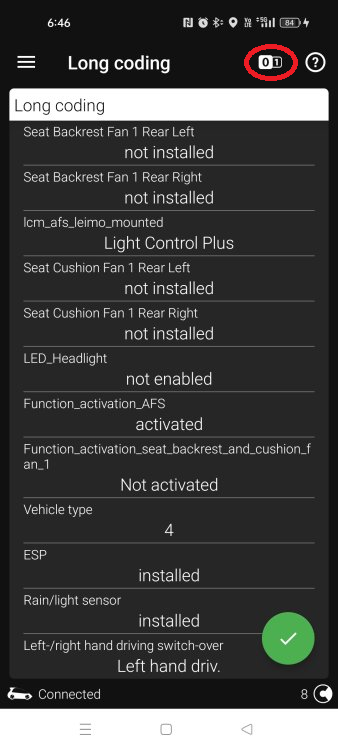
Complete guess, but maybe try hitting this button: I have a feeling that'll then change to the proper lcode rather than their descriptions. You can then follow these instructions: https://support.obdeleven.com/en/articles/5608788-long-coding You need to change: - byte 03 from 03 to 07 - byte 10 from 3F to 3D As that's probably easier than typing out the entire lcode
-
Post the full lcode and adaptation map from 4B. I think OBDeleven calls this a 'backup' and should be available after entering 4B...? It appears the OP does have LED headlights based on their scan: D6 LED Module Left System description: LED1L Software number: 7P5941591AD Software version: 0005 Hardware number: 7P5941591A Hardware version: H06 ODX name: EV_LED_PLUS_L_KEBODAVW416 ODX version: 001003 Trouble codes: No trouble codes found --------------------------------------------------------------- D7 LED Module Right System description: LED1R Software number: 7P5941591AD Software version: 0005 Hardware number: 7P5941591A Hardware version: H06 ODX name: EV_LED_PLUS_R_KEBODAVW416 ODX version: 001003 Trouble codes: No trouble codes found Edit: Just checked the 4B lcode in the scan: 000000030100046600003F01010000000000000000000000000000000000 This appears to be incorrect, especially as no other scan online shares the same lcode. I would suggest trying: 000000070100046600003D01010000000000000000000000000000000000 As per this reference scan: https://forums.ross-tech.com/index.php?threads/11938/
-
I've never used Carista but this is a pretty common occurrence as it'll happen after every firmware update. It might be worth contacting their support to see if it can be cleared with their tool. That being said, it has zero impact on anything so it's completely safe to ignore
-
Completely normal, you need to follow these instructions to clear it:
-
Try this: Otherwise, there is also a video:
-
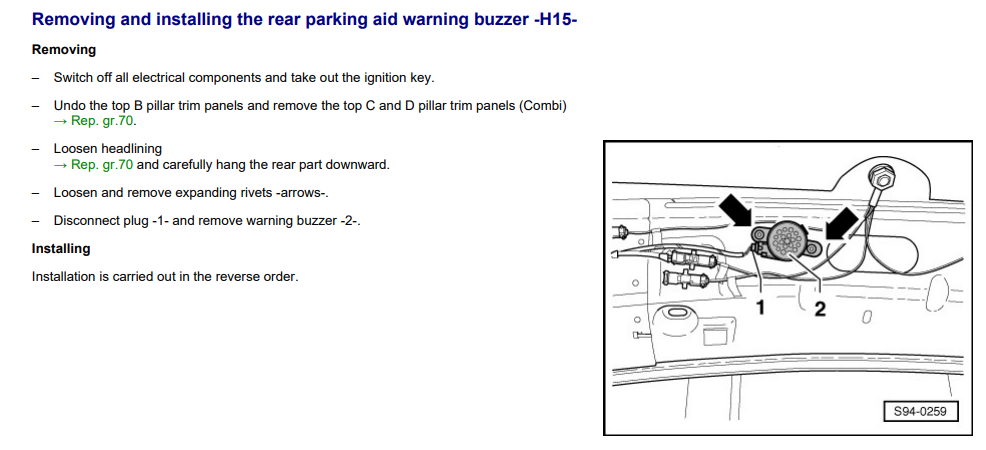
The boot, not a passenger door The nut style object in the picture below is the roof antenna to give a sense of it's location.
-
Based on the other thread, it'll be above the roof liner, at the rear of the car in the middle of the car. No where near the side air bags