




langers2k
Resident Member
-
Joined
-
Last visited
Everything posted by langers2k
-
What's the tank arrangement like on a 4x4 Superb? Assuming it has saddle tanks, could it be a transfer pump issue?
-
Auto will also change where the air is directed to. AC will also help dehumidify the cabin. I would suggest leaving both turned on and altering the temperature as required
-
If I remember correctly, front camber isn't independently adjustable on each side. Instead, you can balance the camber between the two sides by moving the front subframe
-
There is a setting to choose if unlocking does just the drivers door or all of them. You just need to change it back 👍
-
It's not specific to "new" Skoda's, it's been the case for 15 or more years... My old MK2 Octavia would have done exactly the same when unplugging the airbag switch I'm not aware of any other method apart from removing the battery. Given the explosives in the airbag system, you should really be removing the battery and giving the system time to discharge before touching any airbag system related component...
-
Removing the airbag switch with the battery connected will flag a fault. You'll need VCDS or similar diagnostic equipment to clear the fault code and which in turn will turn off the airbag light
-
I only recall this being mentioned once previously: https://www.briskoda.net/forums/topic/511878-octavia-iii-randomly-braking-on-the-highway/ No clear resolution but the the last assumption was the brake disc drying system was causing it. Might be worth finding a local VCDS user to perform an autoscan and possibly turn it down or even off. It looks like there is a measuring block stating when it last activated so that's worth checking assuming you can replicate the problem on a rainy day @L_W hasn't been online for a while but hopefully they'll receive a notification I've mentioned them and let us know if they resolved it. edit: BDD is configured in 03 - ABS, adaption channel: IDE04456-Brake disk drying Mine is set to medium from factory. Likely related measuring blocks in 03 - ABS: IDE04456-IDE04775 Brake disk drying-Odometer reading of last activation IDE04456-MAS03095 Brake disk drying-Function status
-
I believe you would need: - 4x extra sensors - a replacement parking controller - an extra button for self parking - wiring looms for all the above - factory wiring diagram to check the wiring looms are correctly fitted I'm not 100% but you might also need new rear wheel speed sensors but it'll depend whats fitted. This appears to be a kit for LHD models: https://www.aliexpress.com/item/1005004523206436.html I assume a RHD would just need a different self-park button...
-
He basically said, if there is a 'Nav' button on the display, then it should have satnav fitted from factory. Obviously there is a chance someone has replaced the screen given it's a second hand car. If you can provide your cars VIN number, he'll check the build data to confirm if it should have satnav fitted or not What happens when you press the nav button?
-
It's the front and rear fogs. They are activated by pulling the switch out rather than anticlockwise. I'm sure your yeti has at least rear fog lamps which are also turned on by pulling the switch out 👍
-
Assuming it's not completely broken.... It's a push in and slight turn to the right, it'll then lock and pull out. Much like this around the 20s mark:
-
The upgrade will have likely removed whatever component protection patch was installed. Downgrading is unlikely to help... You need to reapply a component protection patch along with any FEC unlocks etc required Might be worth speaking to whoever you got the headunit from, I'm not sure if it can be done remotely by @pab567 or not.
-
Skoda don't give out software updates and the latest maps will only update the maps. However, if you add your headunit details to this thread https://www.briskoda.net/forums/topic/477657-amundsen-mib2-firmware-update/ I'm sure someone will provide you with the latest 0480 update. Yup, you can enable the GEM (Green Engineering Menu) with VCDS/ODBeleven etc. There is no hardware support for wireless AA or CarPlay on this generation. A 3rd party adapter is the only option I'm afraid 😞
-
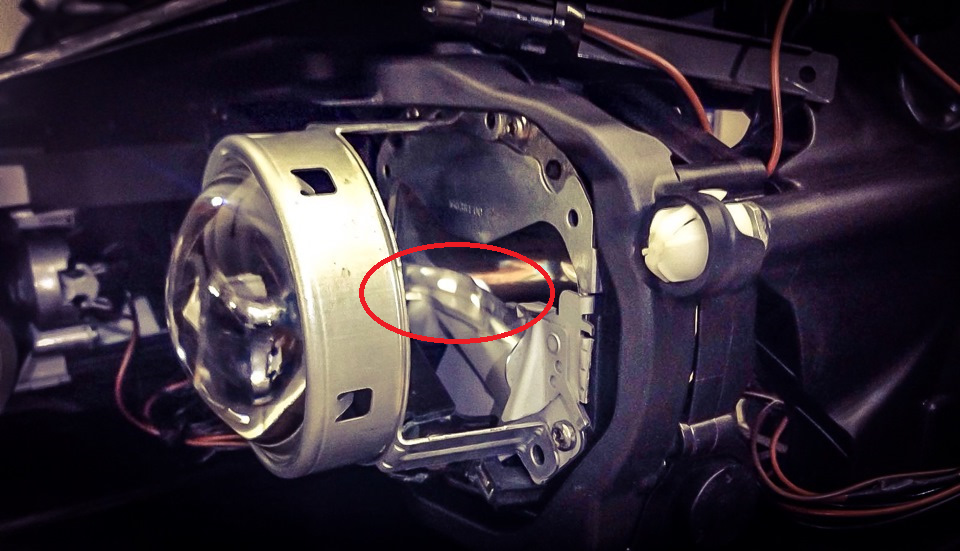
The shield is fixed - it cannot create a straight cut-off pattern. The halogen version has a moveable shield to flatten the cut off but this does not exist on the xenon version. You can see the fixed shield circled in red below.
-
At least on the FL MK2, LHD and RHD xenon's have different shields to create the cut off pattern, it's not possible to change this without taking the headlight apart to replace it....
-
Might be worth spending a few quid (€7 + tax) to get the workshop manuals from Skoda? Official source is https://erwin.skoda-auto.cz/erwin/showHome.do
-
No such issues with my '18 vRS. It has plenty of grip and feedback... I'd suggest having the tracking and suspension checked for anything obvious. Other than that, what tyres and pressures are you running?
-
Maybe start by posting an autoscan and an adaptation map from the bcm (09).
-
As @ApertureS mentions, it probably just needs cleaning - I had to do mine recently. Not a hard job
-
That means the remote fob has been correctly paired with the car. It doesn't mean the immobiliser has been programmed correctly to start the engine
-
I'd suggest checking for a brand and seeing if they offer a foot pack for your car
-
Same here - I forgot to update sorry!
-
I assume that's just a compiled version of this: https://github.com/lprot/MIB-Tools/blob/master/nds2sqlite.py If so, it's unable to convert Maps\V12\maps\00\nds\PRODUCT\E3\TI.NDS or Maps\V12\maps\00\nds\PRODUCT\E3\OVERALL.NDS stating "Coversion failed. The file is encrypted!". The PRODUCT.NDS and ROOT.NDS in the parent directories converted though
-
Although the Columbus can use any SD card, the Amundsen will only accept genuine cards or cards with the CID modified to match a genuine one
-
Had a very quick compare of the V12 and V18 maps, I think the important file is: - Maps\V12\maps\00\nds\PRODUCT\E3\TI.NDS That's because: - It's the only obvious file that got significantly smaller rather than larger - The E3 directory is only present in map packs including the UK - TI could easily stand for Traffic Information Unfortunately, based on info from the SEAT forums, it's not simple to replace files in the E* directories as they are protected by encrypted NDS files.


