




langers2k
Resident Member
-
Joined
-
Last visited
Everything posted by langers2k
-
Nods, seems it is ET51 I got ET49 from https://www.skoda-parts.com/spare-part/5e0071497c8z8-aluminium-rim-17-dorado-skoda-43502.html which must be a mistake on their site
-
There is a good chance being a 2016 TDi, it'll have smaller 312mm front disks which will open up a range of 16" alloys too... That aside, the OP said "In my country changing the tire size is not an option as it is not allowed". That means they can only choose from the alloy/tyre sizes the car has been certified against making most options suggested here invalid.
-
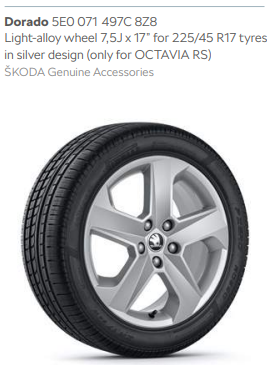
The 'correct' 17" alloy for a vRS would be the Dorado (7.5Jx17 ET49) with a 225/45 R17 tyre fitted... It's in both the 2017 and 2019 brochures and listed as specifically for the vRS
-
Most likely a dying bulb or a bad connection somewhere: - http://wiki.ross-tech.com/wiki/index.php/01499 - http://wiki.ross-tech.com/wiki/index.php/00978 I'd probably replace the bulbs as they aren't expensive and then check the wiring/connectors are in good condition whilst the headlights are out Also check any ground points around the headlights look OK...
-
Part number looks to be 5E0941700H. Not that it's much cheaper online: - https://www.cars-equipment.com/en/shop/fog-lights-3/oem-5e0941700h-fog-light-octavia-3/ - https://www.skoda-parts.com/spare-part/5e0941700h-fog-lamp-right-rs-skoda-31619.html
-
-
@pab567 might have some ideas
-
I'd expect Smartlink to be activated from factory on a 2018 model. If it does need activation, there is a pretty obvious error message:
-
Looks like a MIB1 Amundsen. It has a particular CID which is like a serial number and normally cannot be changed. If you try and use a non-Skoda/VAG card, the CID won't match and it won't work.
-
If changing the coding doesn't clear the fault, then the LED's you have don't match what the BCM expects so will always flag a code. Either get better LED's or use load resistors. There is no security code required for this... Please add a full autoscan to your next post and add exactly what instructions you're trying to follow
-
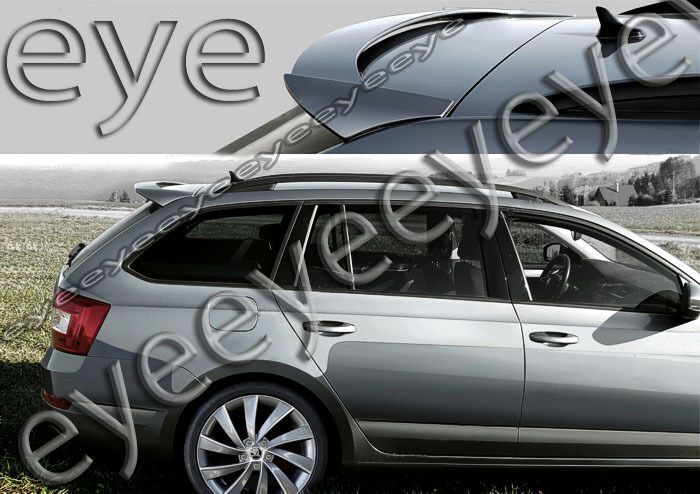
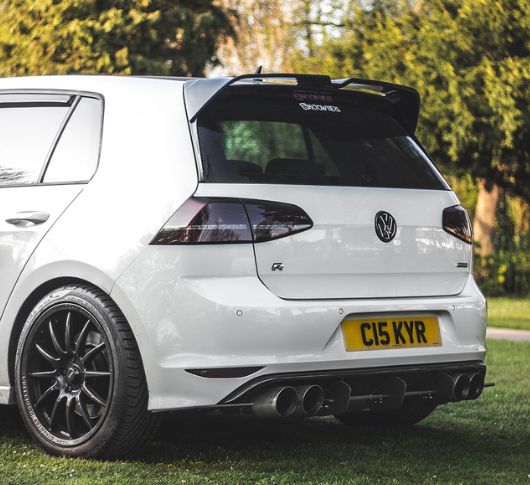
The Golf and Octavia have completely different lines around that area. I suspect you'd need to completely rework the area where it connects to get a nice blend and keep it level. More or less straight on a Golf: Much more rounded on an Octavia:
-
You probably have G12++. You can top-up with G12++, G13 or G12 evo. Given G12 evo is the latest, I'd suggest that. If you get pre-mixed coolant, you can add it directly to the tank. If you get concentrated, it'll need to be mixed with distilled water to the correct ratio. Any VAG dealer should stock it (Audi, Seat, Skoda, Volkswagen)
-
I'm not sure what you mean...? Pretty sure a 2017 car should support Smartlink. If you connect your phone via USB, Carplay should work and allow you to use Apple/Google maps or Waze via the headunit. If you mean to actually run Apple software on the headunit without the phone connected, then yes, that will never happen
-
Trafficmaster have stopped broadcasting TMC over FM in the UK Plenty of threads about it. Depending on your headunit you may be able to switch to Inrix or use a very old map version:
-
@JR RS - I'd try disabling EasyEntry_Enable_Passenger_Over_DriverMMI as I don't think the passenger side supports easy entry and I don't have it set. My related 5F channels are: ENG122227-ENG117556-Car_Function_Adaptations_Gen2-menu_display_seat_configuration,activated ENG122227-ENG117560-Car_Function_Adaptations_Gen2-menu_display_seat_configuration_after_disclaimer,not activated ENG122227-ENG117557-Car_Function_Adaptations_Gen2-menu_display_seat_configuration_clamp_15_off,not activated ENG122227-ENG117558-Car_Function_Adaptations_Gen2-menu_display_seat_configuration_over_threshold_high,activated ENG122227-ENG117559-Car_Function_Adaptations_Gen2-menu_display_seat_configuration_standstill,not activated ENG122229-ENG117722-Car_Function_List_BAP_Gen2-driver_seat_0x10,activated ENG122229-ENG117723-Car_Function_List_BAP_Gen2-driver_seat_0x10_msg_bus,Comfort data bus Although I have a MY18 car so the modules might be slightly different...
-
The OP stated they have no buttons on their wheel so that might prove hard 😉
-
Completely normal, the old module used mono whereas the new one uses stereo. You'll need to add some extra wires between the BT module and your headunit to carry the other channel of audio.
-
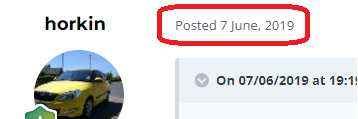
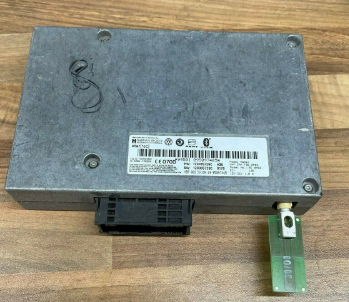
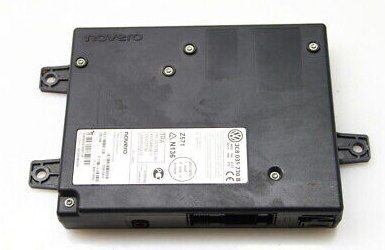
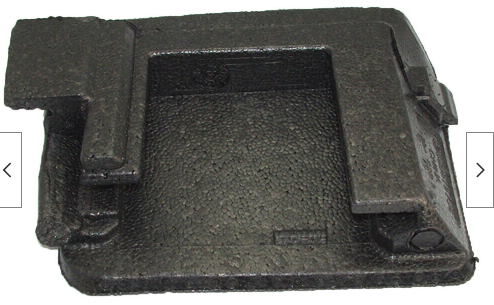
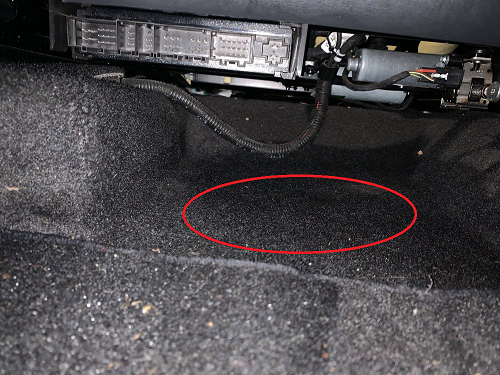
Each post has a date above it as shown below:, it's always worth checking: If it is an old post, then it's worth clicking on the users name which will give you some useful info: I have no idea what your mates car is as you've not said. I'm assuming a MK2 Octavia guessing from the picture but it would be great if you could confirm that's correct? I'm reading that as there is no BT related menus on the headunit and when you try and pair the phone, you're not seeing any obvious BT devices to pair to? In which case yes, its quite likely you have no BT module. There are quite a few styles but I'll attach a few example pictures, it may be hidden under a cover or some foam: If present, it should be on the floor, under the front seats. If you move the seats fully back it should be obvious in either the driver or front passenger footwells. It should be more or less where I've circled in red: The part number should be on this list: http://wiki.ross-tech.com/wiki/index.php/Telephone_Retrofitting

-
Please don't capitalise topic titles - it's the internet equivalent of shouting That looks to be a MIB2 Amundsen so can probably take SW:0480. Add your details to the thread below and I'm sure someone will be along with a download for you:
-
Take a look in the VCDS section, there is both a map and list of folk with VCDS: - https://www.briskoda.net/forums/topic/224376-vcds-owners-map/ - https://www.briskoda.net/forums/topic/262215-list-of-vcds-owners-previously-known-as-vag-com-vcp-owners/ Find someone local and drop them a PM politely asking if they can help 👍 I think some cars had the chirp from factory but you need to go through the car menus to turn it on/off.
-
@Keyfixer - you're trying to use some very very old info. This thread hasn't been touched for 4 years and most the folk you've quoted haven't been on the site for 10+ years. Unfortunately, http://www.octavia-vrs.com/ shut down long long ago too... Lets start with some basics. Your profile states you have a 2002 Polo but that very much looks like an early MK2 Octavia. What have you actually tried to do, stating "The phones don’t pick up the stereo" isn't super informative or useful. As standard, that age of Bolero doesn't include BT. Instead, it uses a separate module that's normally fitted under the front passenger seat. Please can you check for such a module and add a picture of the label.
-
As above, sounds like you have ACC rather than CC. Might be worth reading the owners manual: https://manual.skoda-auto.com/210/en-GB/Detail?model=Octavia_5E&edition=11-2018&market=&manualLang=en Adaptive Cruise Control (ACC) section starts on page 234 (page 236 of the PDF)
-
The car will have more than enough power to run both the antenna and 12v socket. They aren't high amp devices... It's much more likely the phone charger is spitting out electromagnetic interference causing the radio to drop out. Quite common amongst some dashcam manufactures. I'd try a better charger
-
@MunsterScot - as per TPI 2049942/3 you likely need a firmware update for the seat controller to SW:0022
-
There are no specific wires for HBA. The front camera uses CAN-bus and once coded, will just request the high beams are turned on/off 👍 It's about 3 or 4 changes you need to make if I remember correctly. Certainly not a difficult thing to activate and is well understood.

