langers2k
Resident Member
-
Joined
-
Last visited
Everything posted by langers2k
-
All I can do is repeat myself. If your stock byte 18 is 00 (00000000) don't mess with it! The lighting configuration on this age of car is mostly contained within some 40-50 bytes in the BCM EEPROM. If you set byte 18 to a non zero value, it will overwrite this section of EEPROM with a new configuration. If your stock byte 18 is 00, this typically means that none of the byte 18 values contain the correct lighting configuration for your car and instead, the factory tool had to set the lighting configuration directly in the EEPROM. If you change it, you CANNOT get the original configuration back using VCDS as it's unable to directly access the EEPROM. Just as an example, the Yeti came with multiple lighting options which would require different configurations and yet there is only single byte 18 option for a Yeti. I would expect 1D is close to your original config but given your byte 18 is 00, it will not match it identically. As for 1C, I expect that just zero's the entire lighting config. It will not clear lighting fault codes... If you really want to mess with the lighting config, you need VCP or ODIS as they can backup the original config and allow targeted changes to each lighting channel. I have nothing more to add. You've been warned so good luck 👍
-
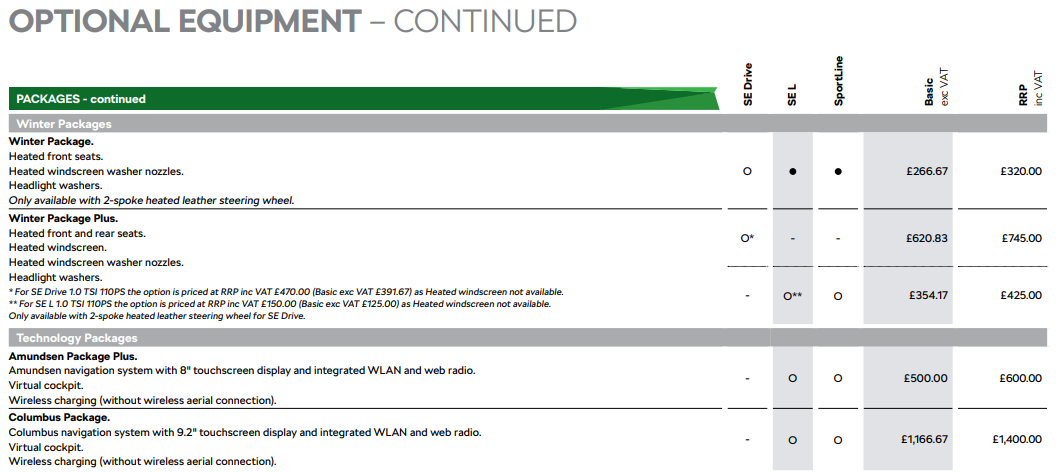
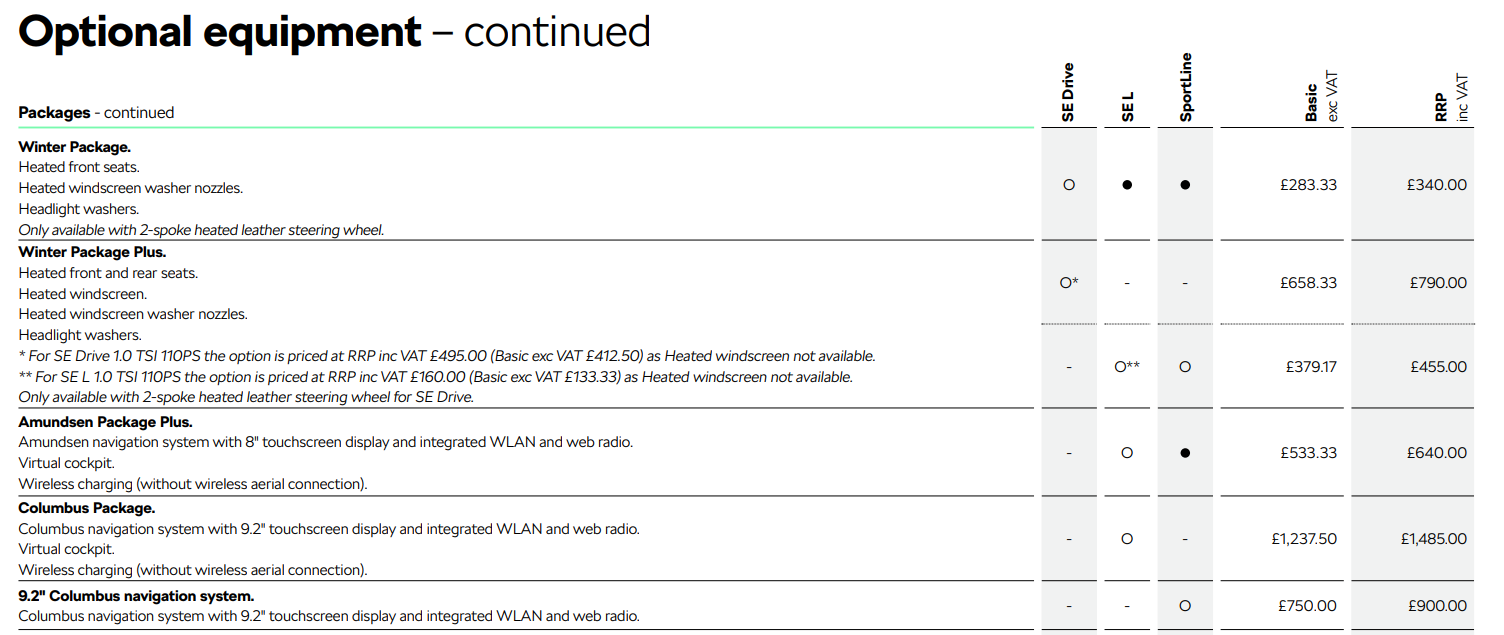
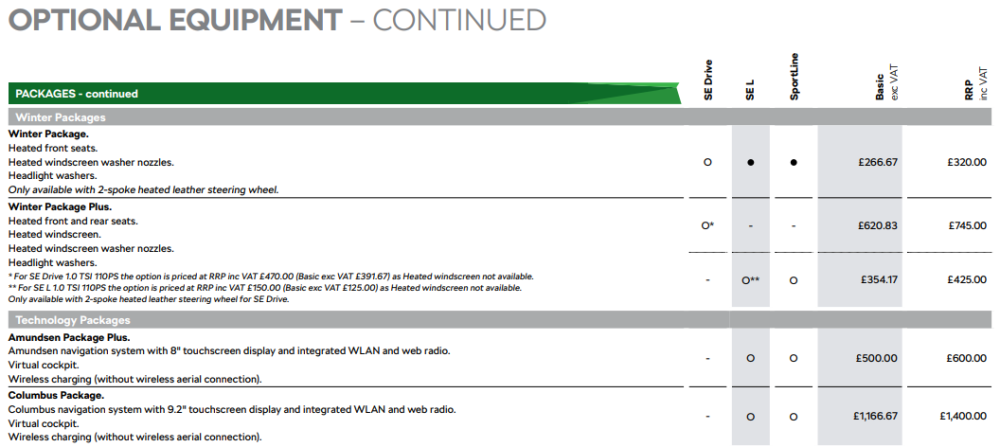
Just found a December 2022 brochure, at that point the virtual cockpit was an option on the Sportline.
-
I can only imagine there was a spec change at some point. Having a quick look at used approved cars, earlier ones seem to have digital displays but later ones have virtual cockpits. At a guess, I'd imagine cars with a build date (not registration date) after around May probably get a VC whereas previously they didn't.
-
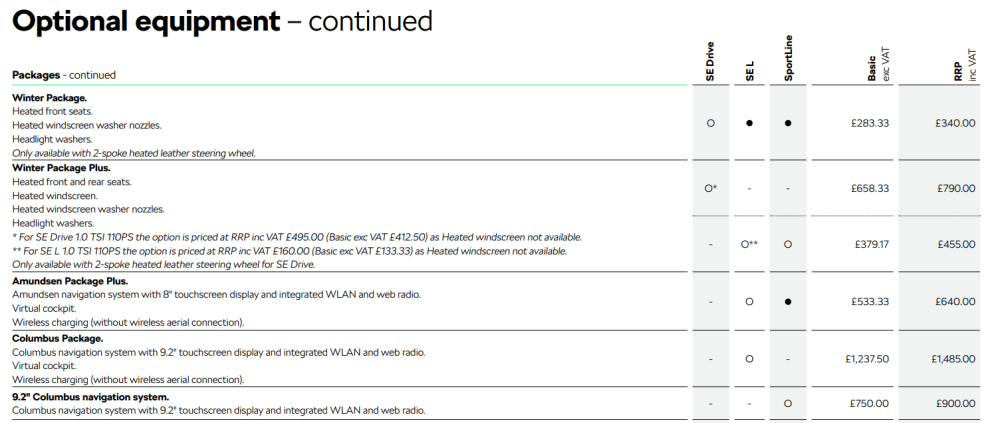
Looking at the latest online brochure and owners manual, there are three instrument cluster options: - Analog instrument cluster with MaxiDot display - Digital display - Virtual cockpit The Amundsen Package Plus or Columbus Package should include the virtual cockpit. The former appears standard on a Sportline. Brochure: https://www.skoda.co.uk/_doc/c63f4efb-a760-4a48-931f-baad88d42aa6 Manual: https://digital-manual.skoda-auto.com/w/en_GB/show/9806f7dd179233d9a8f4adffa86b1a5f_2_en_GB
-
That depends what your original byte 18 value is. If it's 00, it means none of the 'defaults' are completely correct for your car and you should not change it. If it's some other value, then you can probably restore the config by changing it back to the default. Still - some people have had issues even after restoring the original value which is why it has such a large warning now
-
Your VCDS is out of date and needs updating. There used to be a massive warning regarding byte 18 so I wouldn't suggest messing about with it. To fix the bulb out warnings properly, you'll need something like VCP or ODIS which can directly edit the lighting EEPROM. VCDS cannot do this
-
VCDS keeps a log of every change you've made, I'd suggest reversing each change in turn until the original behaviour returns
-
Ignore what Marcii is saying, I'm not sure why they are quoting my post from another forum regarding enabling cornering fogs but it certainly won't have any relevance to your issue, That being said, the behaviour you've described does sound a little odd. - Is this a new issue? - Have you had any coding performed? - Any errors on the dash/infotainment? - Do you have access to VCDS or similar to perform an autoscan to check for any fault codes etc?
-
There are three options for TSR changed by setting Road sign detection fusion mode in A5: - Electronic horizon which only uses satnav data - Sign recognition which only uses camera data - Fusion which combines the two, this is the factory default When the camera does pick up a speed limit sign, that'll normally override the satnav data as it's likely a temporary speed limit (roadworks/traffic etc). If it doesn't see a repeater after some distance, it should resort back to the satnav data. If you haven't already, make sure the satnav has the latest maps installed... Annoyingly it can sometimes pick up signs from side streets, parallel roads and once even from the back of a truck Given your original description, it does sound like the above may have occurred and it's working normally.
-
Welcome. You need to become a freedom member to sell and then you can start a post here: https://www.briskoda.net/forums/forum/333-wheels-tyres-for-sale/ Freedom lite is just £6 for the year: https://www.briskoda.net/forums/subscriptions/ Pretty sure there used to be a selling only freedom tier bit I can't see it anymore.
-
I think doing it via the menu will disable them until you go back into the menu and activate them. Whereas doing it via the remote is probably temporary and only effects that lock/unlock cycle.
-
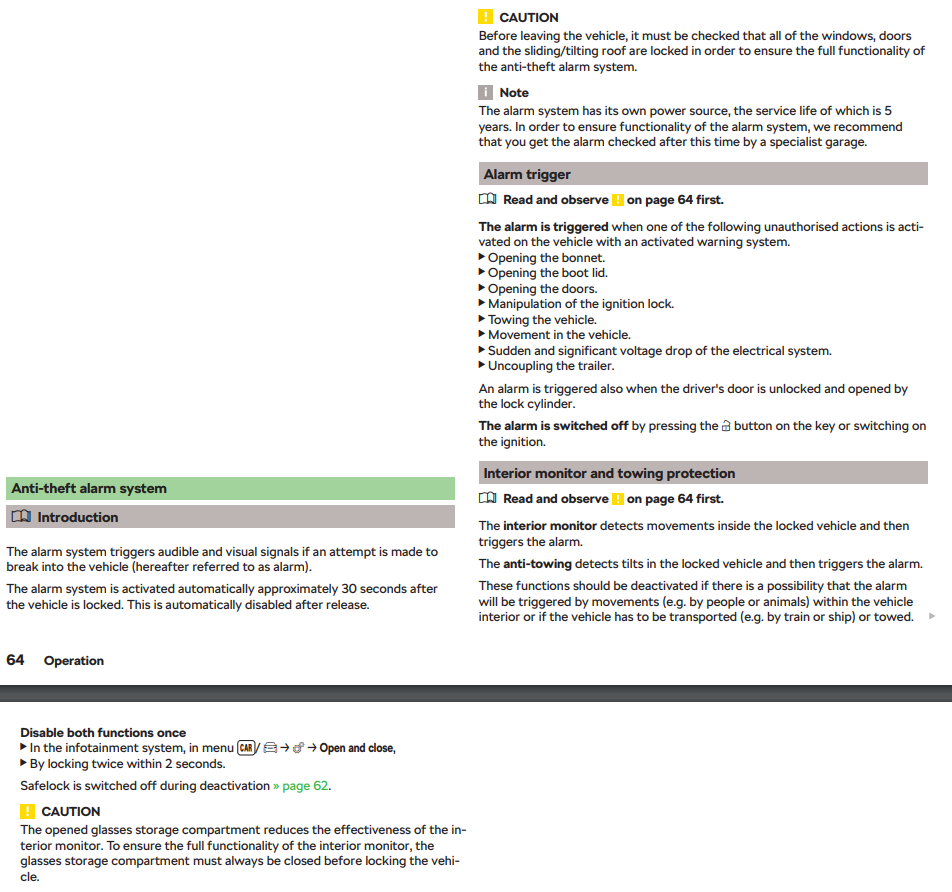
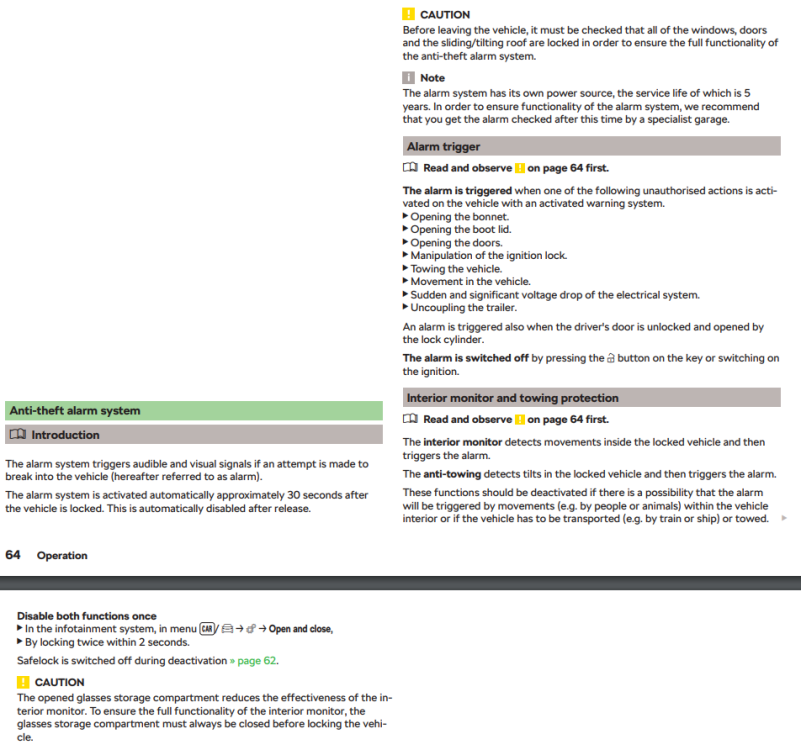
Relevant section from a November 2019 owners manual: If it does turn out to be the interior sensors, it might be worth cleaning them as dust etc can build up causing false activations.
-
There is a very similar thread here: https://www.briskoda.net/forums/topic/518076-electronic-drivers-seat-fault-mk3-business-se-20tdi If those buttons don't work, it wouldn't surprise me if they haven't got some water damage or something and maybe causing your issue...
-
Some FL models get the VAQ as my 2018 245 edition has one From a previous thread:
-
-
-
Interesting, I only have the Octavia WD so maybe the Superb WD can give some clues!
-
It might be worth posting a VCDS autoscan along with an adaption map from 09. Your profile suggests you have a Citigo which will be quite different to an Octavia electrically.
-
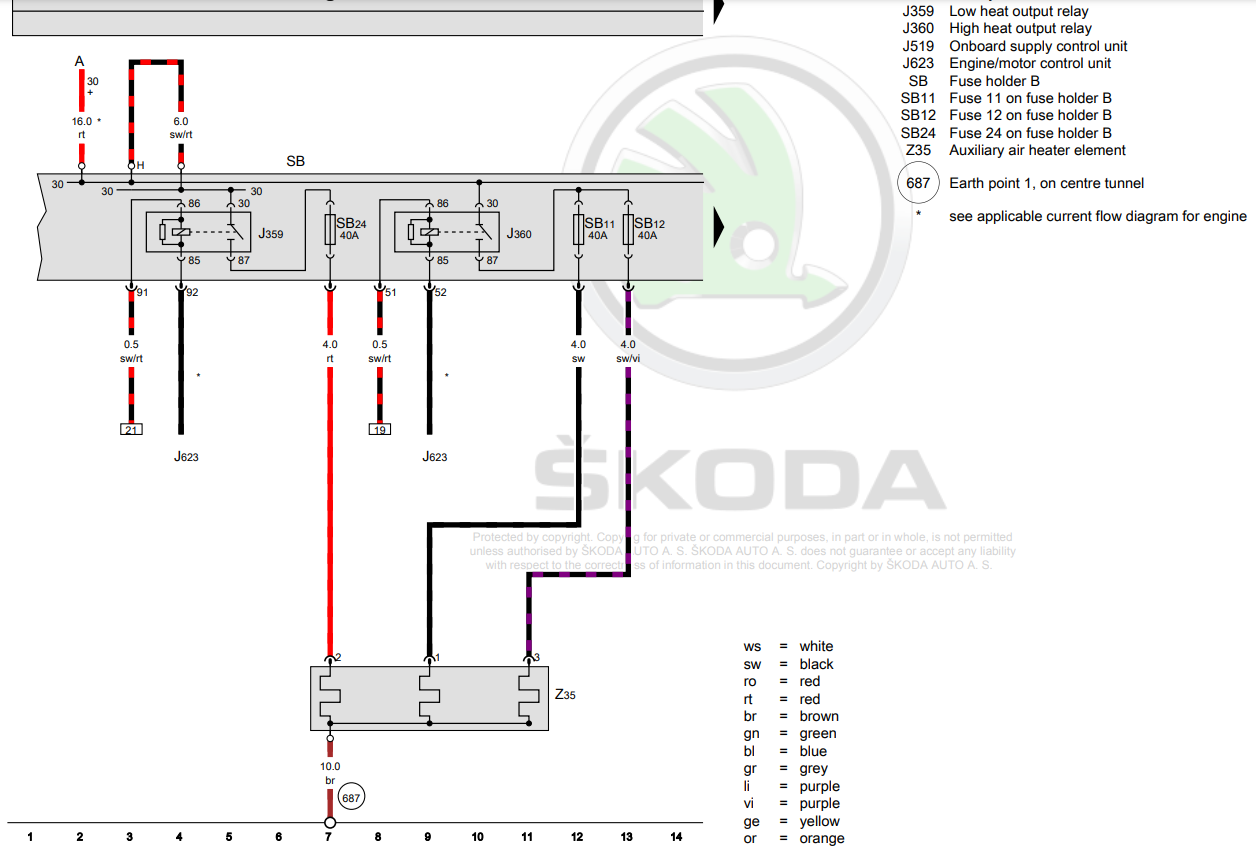
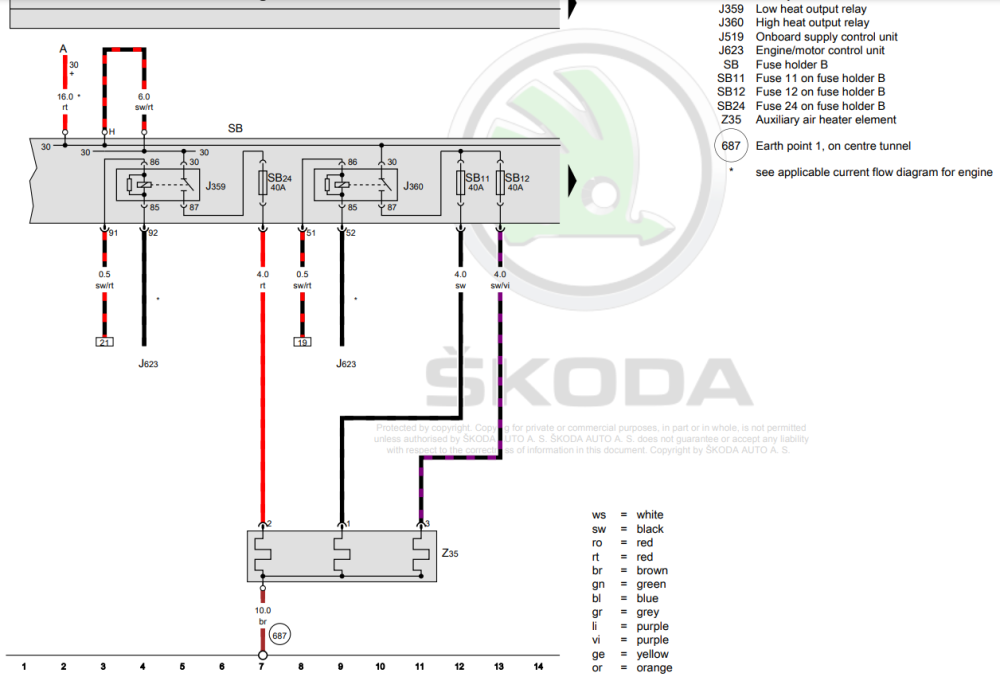
Looking at the factory WD, the connections vary by engine: However, in the same document the connections are only listed for diesel engines which suggests petrol engines don't support PTC heaters. It's not surprising, a petrol engine will probably warm up in 5-10 mins whereas a diesel may take 20-30 mins depending on outdoor temperatures.
-
Quite the opposite based on other folks experiences. Seems like just because it worked on one year/config of car, OBDeleven expect it to work on all of them A5 camera is easy to spot, it'll have a triangular cutout on the windscreen to look out of. It'll only have been fitted from factory if you have either lane assist or traffic sign recognition. If you only have high beam assist, you'll have a lowline 20 camera instead. Personally I wouldn't bother with the throttle mod, plenty of folk then get an error code which disables cruise control.
-
That would normally tell you to contact a dealer. Looking at the picture, it's very much pointing at the phone and/or connection. Assuming the OP has correctly followed the Apple advice, I'd probably try factory resetting the headunit next. If that fails, the cars USB socket or even USB wiring may have an issue 😕
-
As in you'd expect them to use one of the many addressable LED standards like WS281x? The issue with that is it's only one-way communication so although you've set a colour/brightness, you've no idea if it's actually worked or if an LED is even present. Even more so in the relatively electrically noisy environment of a car causing potential interference. At least with LIN-bus the controller will get a reply confirming the state change etc... Anyway - the footwell lights I used are: - 8W0947415A - 8W0947415B - 8W0947415C - 8W0947415D Someone over on drive2 took both an OEM footwell light and Chinese clone apart to show what's in them here; https://www.drive2.ru/l/599712675525567704/ Amongst the other work they've done, they also spent some time decoding the LIN-bus messages too: https://www.drive2.ru/l/627181224766488475/
-
You can get the owners manuals for both the car and stereo from Skoda. At a guess, these might be correct for that age of Octavia: https://www.skoda.co.uk/apps/manuals/Detail?model=Octavia_5E&edition=05-2014&market=&manualLang=en A picture of the headunit will help ID it
-
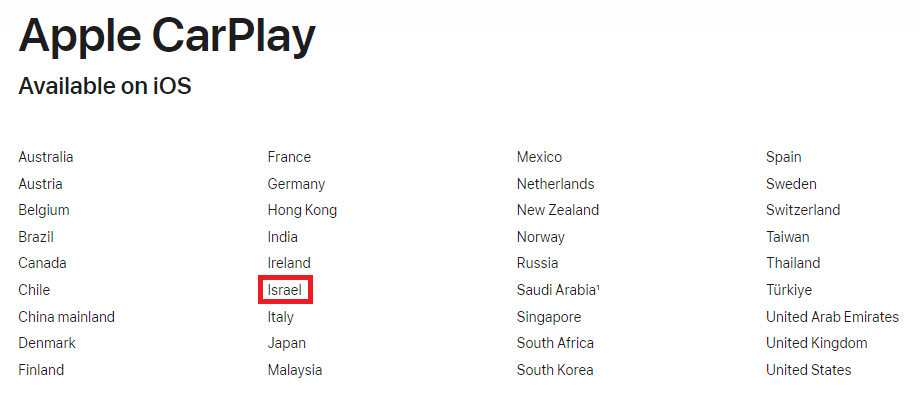
Should be fine, I'd suggest going through everything else on that apple link
-
You posted in a topic about TMC, that's traffic report data which your satnav can use to reroute you. The firm who provided this data no longer do via FM which is why people are upset and discussing other options in that thread. At this point, folk got confused about what your problem was and gave you TMC information rather than TP TP which is voice traffic updates via FM is still working and should work on your Karoq If they aren't, it could be related to bad/low signal or the last FM station you used doesn't use TP. I'd suggest tuning into whichever station you'd normally use for TP and then switch to whichever audio source you'd normally listen to.