langers2k
Resident Member
-
Joined
-
Last visited
Everything posted by langers2k
-
Plenty of places will do free alignment checks so it might be worth it for piece of mind.
-
It depends if you have a rear beam or multi-link suspension at the rear Given the OP has a 4x4, that'll mean they get multi-link and the full range of adjustments.
-
The link is for your order so only you can access it Still, at a guess you bought this: https://www.ebay.co.uk/itm/175161616367 If so, it'll probably work but.... - you will need to find someone with VCDS or similar to recode your car - the headunit doesn't have an RCA plug so you'll either need an adaptor or to chop it off to put the correct pins/connector on - it should be powered off the reverse lights but it'll likely have interference without a relay kit I'm also not sure what video format a MIB2 headunit expects, maybe someone else can confirm if it's correct.
-
I'd probably look for a local member and see if they can take a look first: - https://www.briskoda.net/forums/topic/224376-vcds-owners-map/ - https://www.briskoda.net/forums/topic/262215-list-of-vcds-owners-previously-known-as-vag-com-vcp-owners/ Might help to find someone.
-
You mention you have lane assist in which case, someone with VCDS or similar can probably enable it for you. Without seeing an autoscan an adaption map from 09, it's hard to given any specifics
-
Pretty sure the first four adaption channels I mentioned should get the VC options to display on the headunit. At least it did for me
-
The following screens all run at the same resolution: - Amundsen MIB2 with buttons - Amundsen MIB2.5 with glass screen - Columbus MIB2 The only screen which is a higher resolution is the 9.2" MIB2.5 Columbus which requires a MIB2.5 Columbus to make it work. I've had no issues with scratching the glass screen on the MIB2.5 in my Octavia (factory fitted).
-
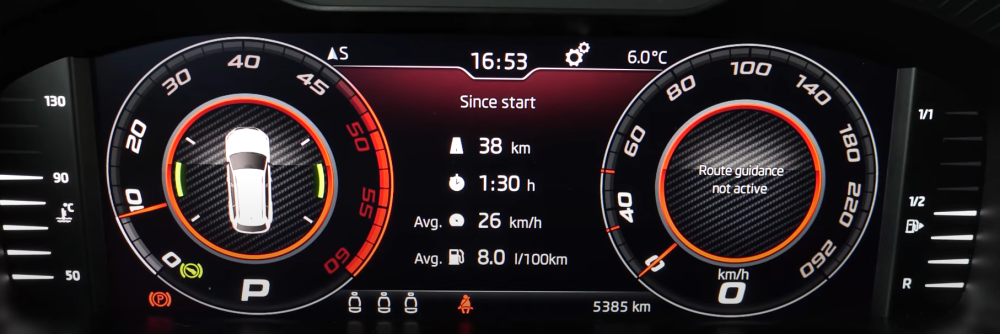
At least on the generation the topic was started about, it should be easy. If I remember correctly... Select any view which allows you to select the middle, for example classic and go to "Driving data" then "Overview" which should look something like this: By clicking the right (?) roller, that should change from since start, since refuelling or long term. When you return to your favourite view, it should show the same data
-
Nice... The best option would be to reconnect your old cluster or power it up on a test bench to get the coding/adaptions. Otherwise, you can compare against some other Superb clusters coding and adaptions maps: - 2018 1.4 TSi: https://forums.ross-tech.com/index.php?threads/14800/ - 2018 2.0 TDi: https://forums.ross-tech.com/index.php?threads/13792/ Hopefully one is close enough to fix your issues - just make sure you note everything that you change
-
Official source would be from erwin, it costs €7 + tax and also has all the workshop manuals etc: https://erwin.skoda-auto.cz/erwin/showHome.do Various eBay sellers will provide a list for a small fee, for example: https://www.ebay.co.uk/itm/224631127243 I think some people on the forum can also provide lists, possibly @Breezy_Pete At a guess, it'll be 8G1 but there might be a few variants with different PR-codes.
-
Compare the current adaptions to the backup you took before fitting the VC, that should give you some good clues what you've missed regarding tank levels. It might be worth posting a backup of your current adaption channels As for maps, my Amundsen is running the same 0480 software but was 04xx from factory. I've no idea if the 03xx >> 04xx upgrade makes any difference. Anyway, I made the following changes to enable map display. Coding: Enable byte 19, bit 5 (enable MOST) Disable byte 22, bit 0 (graphics via MOST rather than CAN) Adaptions: channel ENG122227-ENG142087-Car_Function_adaptations_Gen2-menu_display_Display_Configuration adapted from not activated to activated channel ENG122227-ENG142089-Car_Function_adaptations_Gen2-menu_display_Display_Configuration_over_threshold_high adapted from not activated to activated channel IDE11524-ENG137043-Vehicle function list BAP 2nd generation: expansion-display_configuration_0x45 adapted from not activated to activated channel IDE11524-ENG137044-Vehicle function list BAP 2nd generation: expansion-display_configuration_0x45_msg_bus adapted from not activated to Databus Infotainment channel ENG122230-ENG142097-Dashboard_Display_Configuration-ability_switch_nav_maps adapted from OFF to On channel ENG122230-ENG122343-Dashboard_Display_Configuration-call_picture adapted from OFF to On channel ENG122230-ENG122341-Dashboard_Display_Configuration-coverart adapted from OFF to On channel ENG122230-ENG122342-Dashboard_Display_Configuration-stationart adapted from OFF to On channel ENG122230-ENG122338-Dashboard_Display_Configuration-navigation_map_compression_mode adapted from RLE to H264 channel ENG122230-ENG122339-Dashboard_Display_Configuration-navigation_map_resolution adapted from resolution_1 to resolution_3 channel ENG122230-ENG127005-Dashboard_Display_Configuration-navigation_map_transmission_mode adapted from OFF to MOST_streaming
-
Correction inline:
-
Pretty sure MIB1 don't support CarPlay/AA regardless of software version. @pab567 or @varooom might be able to help with the update/conversion
-
I very much doubt VAG would open source the headunit software... I'd suggest spending some time converting your collection to mp3 or equivalent and putting them on an SD card 👍
-
It'll likely need coding and the correct dataset/parameter file uploading.
-
It'll be a 16gb card so should be fine for ece1 maps. Try formatting the SD as per this guide:
-
You need to get a list of PR codes for your VIN as that'll confirm if the car had it from factory.
-
Yeah, the GPS antenna is part of the sharkfin on the roof. They can suffer from water ingress... Easiest/cheapest fix is to buy an aftermarket GPS puck with a fakra connector and try that. I think they are less than a tenner and will at least confirm the fault
-
More likely an antenna issue
-
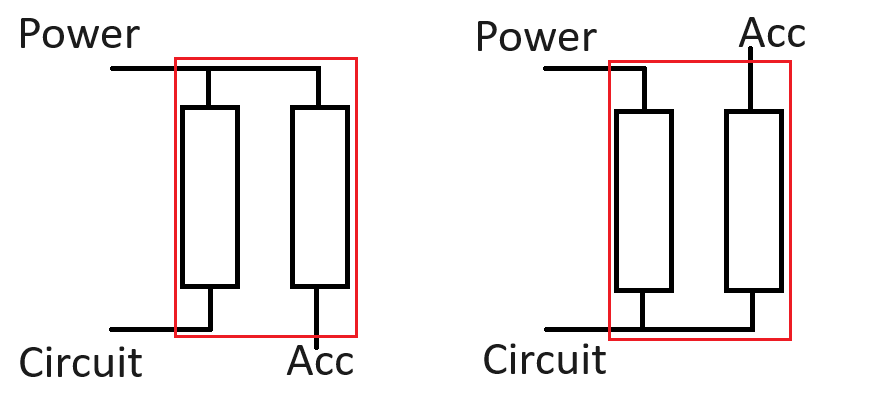
Directional is probably a strong word... They are very simple things. Quick sketch: So yes, it fitted 'upside down', both the circuit and new accessory will be drawing power through the original fuse. It 'could' cause nuisance tripping but given how much power a dash cam uses, it's quite unlikely to cause any issues. If you remove the original fuse and the accessory still works, you got it right. If you remove the original fuse and the accessory doesn't work, you got it wrong. Simples If you do want to use a multimeter, remove the original fuse and the tap, then see which of the fuse connectors on the board has 12v. That'll confirm which side is power...
-
Pretty sure this was never a Skoda factory option
-
Being able to support one feature has little to do with the support for another. A quick google found this thread which also implies 04xx clusters are too old for this 😞 https://forum.skoda-club.ru/viewtopic.php?f=99&t=106491 Via google translate:
-
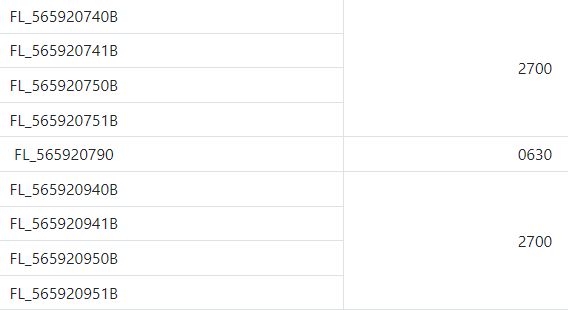
Been a while since I've used it but if I recall, you need to enter your VIN and then you can access all the TPI which are valid. There certainly appear to be some updates for Karoq clusters but you'd need a scan tool to confirm what is fitted to your car and it's software version:
-
Your coding looks OK from what I can tell. Looking back at when I had this enabled, I had the following modules: Address 03: ABS Brakes (J104) Labels: 1K0-907-379-60EC1F.clb Part No SW: 1K0 907 379 BJ HW: 1K0 907 379 BJ Component: ESP MK60EC1 H31 0121 Address 17: Instruments (J285) Labels: 5K0-920-xxx-17.clb Part No SW: 1Z0 920 943 Q HW: 1Z0 920 943 S Component: KOMBI H05 0608 Address 19: CAN Gateway (J533) Labels: 7N0-907-530-V2.clb Part No SW: 7N0 907 530 BG HW: 7N0 907 530 AN Component: J533 Gateway H56 1674 I'm afraid I'm not sure which of your modules is causing your issues 😞 At a guess, it might be the cluster which needs to be running 06xx.
-
Does it work with AA if you press and hold the voice button?