langers2k
Resident Member
-
Joined
-
Last visited
Everything posted by langers2k
-
The Aliexpress listings for a DUDU7 all show a mic included... I would suggest you use that
-
Stock microphone only has two wires. It's an active microphone using 'phantom power'. Basically the OEM headunit applies voltage to the two wires to power the microphone and then uses the same two wires for signal back. You might want to look at this thread:
-
This post on rosstech feels about right https://forums.ross-tech.com/index.php?threads/30780/#post-258952 Certainly the changes to 03 and 17 seem to match my old logs - although it looks like I might have disabled address 17, byte 11, bit 1 as well as enabling bit 2. It was three years ago and I haven't got any notes weirdly 🤷
-
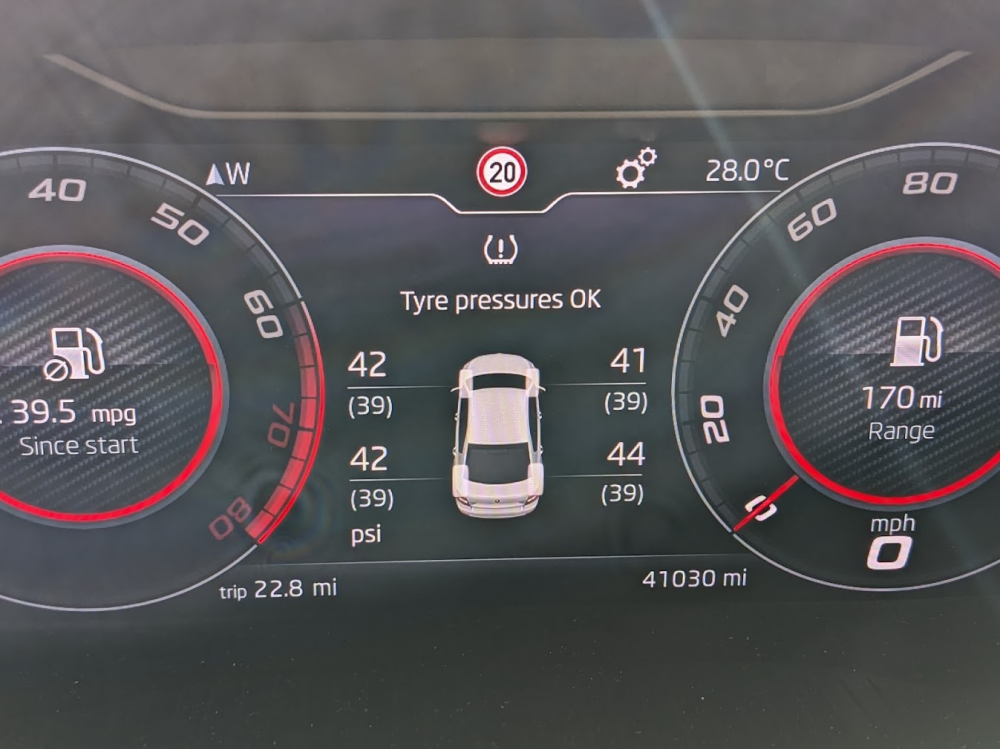
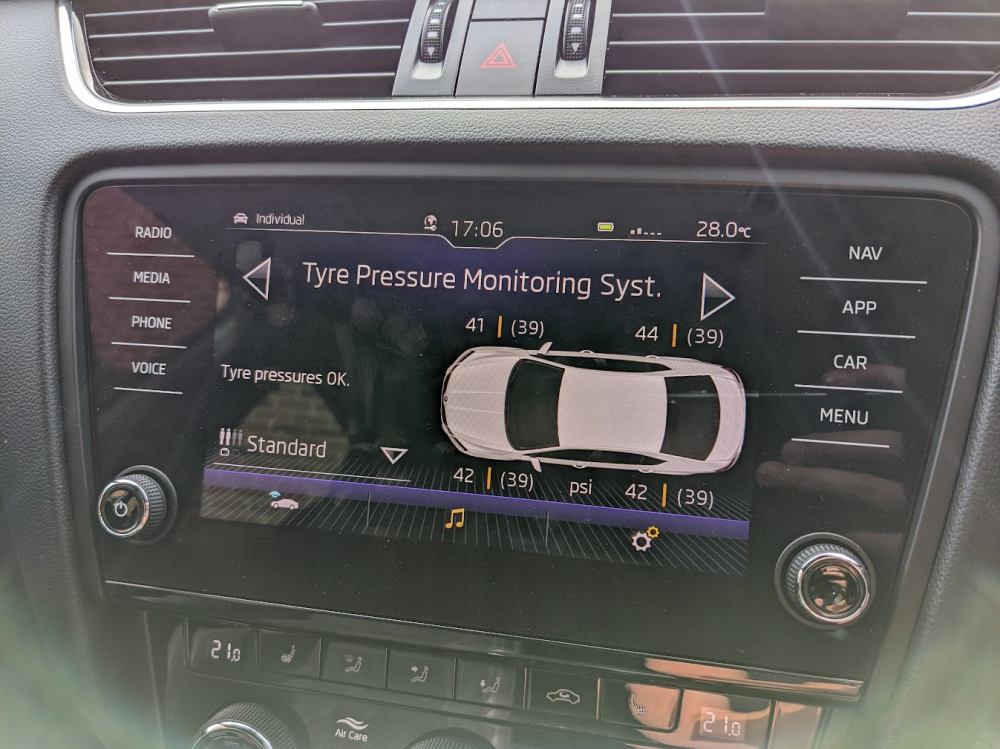
My TPMS retrofit on a MY18 Octavia works on both the headunit and virtual cluster at the same time...
-
Skoda release TSB and TPI to cover common faults so that dealers can repair them over warranty. They include the symptoms, any fault codes, what hardware/software it effects and how to fix it. It's anything from misting headlights, head unit upgrades, suspension squeaks all the way to dieselgate ECU upgrades and indeed seat controllers not remembering positions. In this case, given the modules you have installed they will be replacing. The firmware update only applies to newer hardware in afraid. Skoda might offer goodwill or a free replacement as it's a known issue. If the car had warranty I'd very much expect it to be fixed for free....
-
There is a service TPI with the exact symptoms your having, same fault codes and your HW/SW match too... If grease was a long term solution, the TPI would tell the dealer to grease something rather then replace or update a module.
-
It's a common issue covered by TPI 2049942 (at least on the Octavia). However, as you have HW06 and SW09, you might need a replacement controller: https://www.briskoda.net/forums/topic/504340-superb-mk3-memory-seat-issue/#findComment-5663079
-
0480 is the newest for that unit...
-
Did you read the second post in this thread... That contains the how I coded a genuine RVC on my Octavia. You might need to do some extra coding as you have a trailer module so please also add a full autoscan from VCDS.
-
Completely normal. It's to remind you to turn the lights on...
-
IIRC, when there are enough button presses while the key is out of range of the car, they will lose sync with each other. The car will relearn if you use the key in the door lock and then press the buttons. I guess the question is, did the button get pressed repeatedly or is there a fault with the fob causing false presses. There have been plenty of instances where a key fob in a pocket has caused buttons to be pressed, normally resulting in the windows opening I had it once when I got off a flight and couldn't remember where I'd left my car. Whilst wondering around the car parks, I pressed the fob enough times to lose sync so had to do the relearn via the drivers door lock...
-
-
The eBay auction states: Genuine 'Fully Licensed' VCDS software with our VCDS HEX-NET Interface £20 seems fare enough, if it's already a VIN unlocked cable it doesn't actually cost them anything apart from their time to do a scan. They are likely hoping you'll then want more work doing and can make some money that way...
-
I bought a 790A. Not sure I understand the second part? I'm not a seller so I don't have any for sale. My cluster was free due to some issues with it I had to fix.
-
A Skoda dealer should sell one but it might be very expensive. I bought mine from UK eBay but it just depends if there is anything being sold that isn't flagged as stolen etc. Prices vary as they are quite a rare option. You should contact some online retrofit companies to see if they can do remote immoboliser/component protection with VAS6154a. You might even be able to do it yourself using https://t.me/vwservice_bot for a temporary ODIS online account. It certainly worked for me when I wanted to remove CP from a headunit I retrofitted.
-
It's pretty easy with ODIS and can be done remotely if you have a VAS5054a or similar for very little money. The answer was in the other thread you just posted in...
-
The two GSM/LTE antenna normally go behind the rear bumper, I think it's part number 3V0035497. You'd also need to wiring as that will not be fitted as standard but there are plenty of fakra cables on amazon/eBay which should work once you decide on the length.
-
Have you asked the professional who fitted it? I believe it should be possible to enable the SIM assuming you add the extra antenna and wiring required.
-
It might be worth considering having ACC retrofitted... Probably cheaper than changing car if it's the only thing you're missing. @East_Yorkshire_Retrofits might be able to help.
-
If it's a generic OBD reader it might not show manufacturer specific codes... You need something designed for VAG vehicles like VCDS or OBDeleven.
-
Are you saying the entire washer tank has emptied and now isn't holding fluid? If you only damage the headlight washer, then a little fluid will drain from the pipe but it will not empty the tank or effect the windscreen washer...
-
The 9.2" display is only compatible with a MIB2.5 Columbus. Anything else won't work so the glovebox unit will need replacing. Others have updated MIB2 Columbus into MIB2.5 but as the OP has a Bolero, this is not an option.
-
It won't work... The 8" and 9.2" screens use different resolutions so you will need a new glovebox unit too.
-
Very quick search showed this: https://www.briskoda.net/forums/topic/450851-looking-at-a-roofbox-for-our-superb-estate/#findComment-5065816 Which is a 210x100x42cm 680L roof box on a Superb... https://www.roofcarriers.co.uk/roof-boxes/667-farad-roof-box-marlin-680l.html
-
Either physical inspection to see what's printed on it. Otherwise most diagnostic equipment should tell you (carscanner, obdeleven, vcds, vcp, odis etc etc). Just a warning, if the classic car bulbs do fool the bulb warning detection, it's because they have internal load resistors. This could cause issues with bulb sockets melting depending how the bulb is used 🫠