langers2k
Resident Member
-
Joined
-
Last visited
Everything posted by langers2k
-
I think it's quite an uncommon headunit unfortunately, looks like 3V0035869C to me... As it's an all-in-one unit, a dealer will only be able to offer a complete replacement hence the price. If it were me, I'd be tempted to open it up and replace the LCD. You might be able to find a part number sticker attached to the rear of the LCD and then try Aliexpress/eBay or find an identical used headunit to get the screen from. There is one hopefully version but the description and photos don't match so you should check before buying: https://www.ebay.co.uk/itm/335358189693
-
-
I'm afraid not - the inbuilt nav can only use releases from VAG. They are currently updated every ~6 months but as you can see, the actual map data is normally ~1 year older. I believe there is an online portal to request updates to the maps but it'll probably have an 18 month lead time between your request and finally making it to a release. I would suggest connecting your phone and using Android Auto or Apple CarPlay as 'connected' nav apps such as Waze or Google maps tend to be much more up to date
- 51 replies
-
- amundsen
- discover media
- maps
- mib
-
Tagged with:
-
The buttons tend to work across multiple cars so there is a good chance they will just work given both are MQB platform. At least assuming they have the same buttons on them. Swapping them is also pretty easy but the plastic frame is easily damaged so if be tempted to try the new buttons first if they look suitable. No idea what colour lighting they'll have in afraid. I think both those years are using the older airbag design so it should all be pretty easy...
-
Correct, when it first released it was only wired. A later upgrade added the wireless functionally. Depending on the age of the headunit, it may support wired only or indeed both wired and wireless. There are both OEM and aftermarket headunits which support wireless android auto without a dongle
-
Yup, that's correct. There is a changelog here too: https://www.aawireless.io/en/support/firmware-changelog
-
It enables wireless android auto on a headunit which already supports android auto. If your headunit doesn't already support android auto, it won't do anything I'm afraid...
-
I've been using a AAWireless Two for the last week or so. Not had any issues yet, seems pretty quick to connect and is completely stable/lag free so far
-
I've used https://www.lllparts.co.uk/ previously, just depends where has stock and the price
-
At a guess, you need - but please check! - 5E0949102 - 5E0857532 Probably around £30-35 for both It's certainly not a hard task to replace them. Water ingress might fry the indicator electronics but the wing mirror is designed to have water coming in.
-
It looks like something has triggered component protection to kick in but I can't imagine what. I'd probably start by finding a dealer or local independent using ODIS with online access to reset CP. Guess you could try disconnecting the battery for a few minutes to see if restarting everything helps first. Certainly isn't anything obvious to suggest the BCM is faulty...
-
-
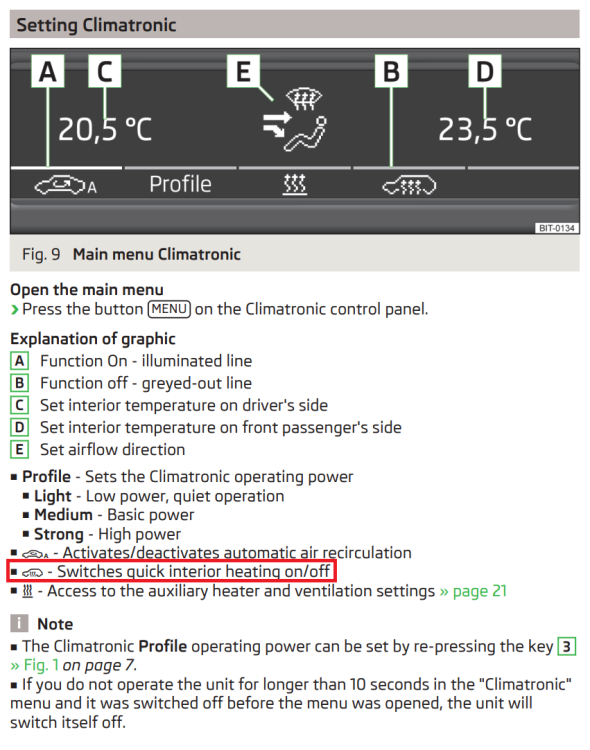
From a Blues owners manual:
-
MIB2.5 Columbus runs at a higher resolution than the MIB2 Amundsen so the larger screen is not compatible.
-
If you're only getting a Component Protection error, then the BCM might be fine but something has caused CP to get upset. Post a full autoscan up from VCDS
-
Do you have DCC (Dynamic Chassis Control) aka electronical adjustable suspension - most obvious sign would be a 'comfort' mode in the driving modes options. If so, a pair of genuine DCC front shocks are the best part of £600 which is the bulk of the cost. I recently had mine changed for a similar price. However, it you have normal suspension, that feels quite expensive as the shocks as much much cheaper...
-
-
-
It might help if you actually posted the errors
-
I would be surprised if the MIB2.5 firmware had graphics for the pre-FL as I don't think it's an official combo... Pretty sure you can extract the graphics from the MIB2 using MIB2 toolkit and then insert it into the MIB2.5
-
I've not done it on a pre-FL mk2 but I don't think there is anything complex involved... The only real danger is leaving it plugged into the car due to the voltages used. As long as it's disconnected, it should just be the three screws you can see and the two connectors. They will probably be quite stiff. Before buying anything, I'd try swapping the headlights over and possibly the ballasts. Just to confirm if it's the car wiring, ballast or bulb that's at fault
-
First hit on google https://forums.ross-tech.com/index.php?threads/269/
-
Both headlights should be the same height so number 2 is correct - assuming that the headlights are at the right height which is impossible to tell from a picture Much like these images:
-
Wrong firmware on the camera... Same issue here: https://www.briskoda.net/forums/topic/445448-rear-view-camera-retrofit/?do=findComment&comment=5656532 Resolved by flashing the correct firmware/parameters using VCP: https://www.briskoda.net/forums/topic/445448-rear-view-camera-retrofit/?do=findComment&comment=5663610 Might be worth contacting the seller as they probably sent the wrong one out
-
You have a Bolero which does not support satalite navigation... Adding the SD card won't change this 😞