




langers2k
Resident Member
-
Joined
-
Last visited
Everything posted by langers2k
-
Maybe look at the vcds owners list and map. An autoscan might give some clues as to why the parking module is unhappy. Could be a sensor or even just the buzzer it uses.
-
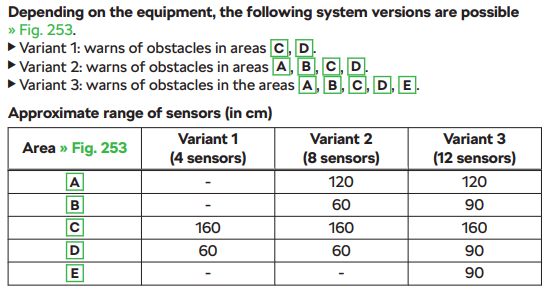
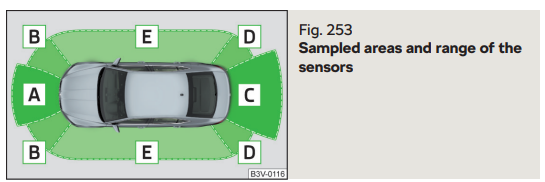
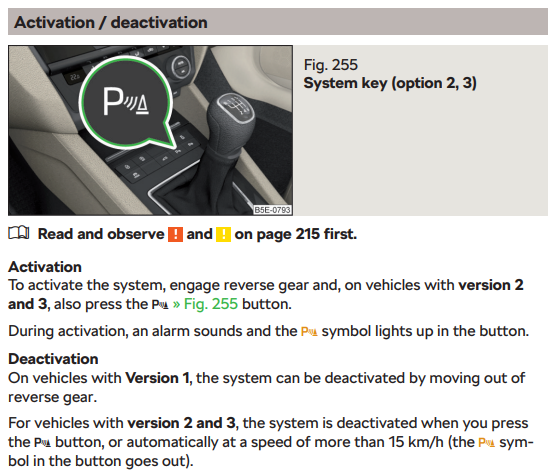
If it's only rear sensors, there is no button You only get the button with front/rear or 360 systems: As for the OP issue, without a proper code reader it could be anything 😕
-
They still offer it for some cars. It's probably worth contacting them directly as it's certainly within their skill set.
-
A proper catalogue would also show the PR codes for each type: 12 5E0857521 Mirror glass (convex) with carrier plate For heated and electric adjustable exterior mirrors left 1 PR:5SJ,6XD,6XE 12 5E0857521A Mirror glass (convex) with carrier plate For heated and electric adjustable exterior mirrors left 1 PR:5SR,6XD,6XE 12 5E0857521C Mirror glass (convex) with carrier plate For heated and electric adjustable exterior mirrors left 1 PR:5SJ,6XK,6XL 12 5E0857521D Mirror glass (convex) with carrier plate For heated and electric adjustable exterior mirrors left 1 PR:5SR,6XK,6XL 12 5E0857522 Mirror glass (convex) with carrier plate For heated and electric adjustable exterior mirrors right 1 PR:5RQ,6XD,6XE 12 5E0857522A Mirror glass (convex) with carrier plate For heated and electric adjustable exterior mirrors right 1 PR:5RT,6XD,6XE 12 5E0857522C Mirror glass (convex) with carrier plate For heated and electric adjustable exterior mirrors right 1 PR:5RQ,6XK,6XL 12 5E0857522D Mirror glass (convex) with carrier plate For heated and electric adjustable exterior mirrors right 1 PR:5RT,6XK,6XL PR code meanings: PRCode: 5RQ = Right exterior mirror: convex PRCode: 5RT = Right exterior mirror: convex (AGCC) PRCode: 5SJ = Left exterior mirror: convex PRCode: 5SR = Left exterior mirror: convex (AGCC) PRCode: 6XD = Exterior mirrors: electrically adjustable/heated PRCode: 6XE = Exterior mirrors: electrically foldable and electrically adjustable/heated PRCode: 6XK = Exterior mirrors: automatically dimming electrically foldable/adjustable/heated PRCode: 6XL = Exterior mirrors: with memory function automatically dimming electrically foldable/adjustable/heated Your picture does look like a auto-dimming type but there are various websites which will decode your VIN to show which PR codes you have and therefore, which you need
-
A quick google gave a selection for different lcodes for a 3Qx camera fitted to a 2016 Superb. 020408020000040100261345C050A10010000E100020 https://forums.ross-tech.com/index.php?threads/25322/ 0204080200000401002223458040A00010000E100000 https://forums.ross-tech.com/index.php?threads/17752/ 020408010000010100221346C046800090000E100020 https://forums.ross-tech.com/index.php?threads/25972/ 020408010000040100062346C040A00098000E100040 https://forums.ross-tech.com/index.php?threads/42545/
-
Ignoring the spacers, the inner rim will be 20.1mm closer to the suspension and the outer rim will be 18.1mm further out with the new alloys vs stock. Compared to your current setup with spacers, that means the fronts will poke out by an extra 3.1mm (18.1 - 15) and the rears will poke in by an extra 1.9mm (18.1 - 20) so pretty close. I'd be a little concerned about the inner spacing so I'd suggest you remove the spacers and double check you have clearance inbound...
-
Still worth finding a local VCDS/OBDeleven user... The airbag fault can be cleared but if the fault still exists or happens again, it will illuminate the light again. However, both of those code readers should give enough detail to figure out what caused the fault code which will help fix any future issues. I'd suggest trying the list or map so you can PM someone local rather than hoping they see this thread https://www.briskoda.net/forums/topic/224376-vcds-owners-map/ https://www.briskoda.net/forums/topic/262215-list-of-vcds-owners-previously-known-as-vag-com-vcp-owners/
-
Pretty sure that screen is transparent on mine... Does hitting the black triangle in the middle of the screen hide it?
-
The two functions are not achieved by dimming... Take a look at a H15 bulb, there are two separate filaments, one for each function 👍
-
Probably the parking/side lights.
-
Oh - found a November 2016 brochure with the Sportline spec... Skoda-Superb-Range-2016-UK.pdf
-
Post from back in 2016 seems to agree that most of that is standard...
-
Should work fine on that age and camera. Can you add an autoscan along with an adaption map from 5F. It might also be worth saying which guide you're using...
-
I've used eBay without issue for 32gb cards 👍 It needs to have the correct CID (like a serial number) on the SD card so a generic one won't work.
-
It's just a text file Although the channels I mentioned are no longer present so I think the 28/29/D6/D7 stuff is now controlled elsewhere. File contents: 2306,Activating and deactivating all development messages,00 11561,Activate left/right hand drive switch-over,00 11543,Presentation mode,00 11542,Presentation run dynamic AFS light,00 11558,Adaptive light functions,01 11583,Matrix light, total dimming,3F 11584,Matrix headlamp, function at standstill,00 11617,Bit pattern of individual segment activation, left headlight,000000000000000000000000 11618,Bit pattern of individual segment activation, right headlight,000000000000000000000000 1276,Deactivate production mode,000000 1278,Production mode,000000 1296,Reference_Run_Start_Condition,00 1297,Reference_Run_Activation_Effect,00 1298,Order_Reference_Run_Activation_Effect,00 2942,Headlights left, low beam segment actuation,000000 2943,Headlights right, low beam segment actuation,000000 2917,Antenna 1 for short-range communication,ERROR 2918,Antenna 2 for short-range communication,ERROR 1520,NFC_FS_debug_switch,ERROR 1521,NFC_MiKo_debug_switch,ERROR 3039,Cornering lamp in operation,00 3040,Matrix head lamps, steering angle,07D0 3162,Wireless charging, functions,ERROR 2778,Rear seat fan, characteristic curve,1E1E1E1E323232324B4B5050 5580,Fan 1 for left rear seat cushion,ERROR 5605,Fan 1 for right rear seat cushion,ERROR 5581,Fan 1 for left rear seat backrest,ERROR 5606,Fan 1 for right rear seat backrest,ERROR 5582,Reset_Rear_left_seat_cushion_fan_1,ERROR 5607,Reset_Rear_right_seat_cushion_fan_1,ERROR 5583,Reset_Rear_left_seat_backrest_fan_1,ERROR 5608,Reset_Rear_right_seat_backrest_fan_1,ERROR
-
Can you get the adaption channels from 4B and post them here? edit: I was hoping to find: IDE01996-SFT00041-Installation list: specified installations-Left light control,No ,1 IDE01996-SFT00057-Installation list: specified installations-Right light control,No ,1 IDE01996-SFT00075-Installation list: specified installations-Multi-function module,Yes ,1 IDE01996-SFT00214-Installation list: specified installations-Light Control Left 2,Yes ,1 IDE01996-SFT00215-Installation list: specified installations-Light Control Right 2,Yes ,1 But looking at the 4B adpmap on Ross-tech from a similar controller, they are now missing: https://forums.ross-tech.com/index.php?threads/27115/ Might be worth asking VCP for support or finding a local user with VCDS to see if they can recode the gateway installation list?
-
The MK3 Octavia never got an electronic handbrake so they are normal calipers 👍
-
Pretty sure there are already two holes with plastic inserts for you to screw into rather than hitting the metalwork.
-
-
I think it's meteor grey in the UK but might be called steel grey in other markets. Example supplier: https://www.kopacek.com/octavia-iii/emblems/octavia-iii-original-skoda-emblem-i-n-t-version-colour-f7a-steel-grey
-
Pretty sure it should be about here:
-
I would not expect the power wire from fuse 8 or the LIN wire from the BCM (T73c/29) to be present if your car does not have ambient lighting from factory. Based on that, you will likely need to add the following: - power wiring from fuse 8 to all four door connectors (T27a/15, T27b/15, T27c/15, T27d/15) - LIN wiring from the BCM (T73c/29) to all four door connectors (T27a/16, T27b/16, T27c/16, T27d/16) - power wiring inside each door from the door connector pin 15 to the LED's pin 1 - LIN wiring inside each door from the door connector pin 16 to the LED's pin 2 - ground wiring inside each door from the LED's pin 4 to a suitable ground within the doors wiring harness The ground wiring is shared by multiple components in the door so I would expect pin 18 on the door connector to already have wiring installed.
-
Mine has certainly been misclassified previously so it's 'probably' the VAQ...
-
Turns off personalisation on the headunit. Pretty sure the welcome message can't be displayed on the sport mode screen so it changes to one which can display it 👍 That worked on my 2018 Octavia at least.
-
As far as I know, all 245 have the VAQ diff fitted. Super easy to check if you have diagnostic equipment as it'll show up 👍


