26DIPP
Members
-
Joined
-
Last visited
Everything posted by 26DIPP
-
ICE coding in STG 17 worked now. I used both, the 47115 login and the 02 instead 0f just 2. So I am not sure what did the trick.
-
I have not seen the access key. I have tried different values. I will try yours. Thanks.
-
Yes, the bonnet was open.
-
I tried to change the temperature warning in the dashboard as below 23.04.03 OK ** ICE Warning threshold 17 Dashboard Adaptation -> outside_temperature ---> p_ice_warning_entry_temperature: 4 °C -> 2 °C ---> p_ice_warning_exit_temperature: 6 °C -> 3 °C BUT I just get an "out of Range->33" message and nothing changes. Are there any other steps required?
-
The Yeti one has got the small plug, the other is the large plug like yours. Just pull the switch out and compare the pin outs in the picture. On the pins you will see the abbreviations for the various light switch functions.
-
You just need to unplug the connector from the switch and fit the new Auto one, then feed the light sensor near the front windscreen. There is nothing to code.
-
Are yours going up and down by 1 or 10 Km/h? I cannot remember if I have have a Mode sign on mine. What does it do?
-
The FL does not have the CC / ACC on the indicator stalk but on a separate one below. When you pull this stalk forward it activates ACC, LA and whatever else... The increments are in 5 MPH / Km/h up or down. I was wondering whether there was a setting in the adaptation when coding the controller that I have missed.
-
Hi, I have another couple questions about the FL models. 1. Is there a way to get the ACC / CC adjusted in single MpH / Km/h steps rather than the 5 MPH steps as it is now. and 2. is there a good FL guide to code the Traffic Jam Assist?
-
Hi, I do not have the TA button on the steering wheel of our 2023 Superb L&K. I coded the capacitative steering to check if I had one and the car came up with an error or would simply not accept the coding. Can anyone tell me part numbers for 2-spoke steering wheels for a Superb which I can use that have a TA button and are capacitative? I have seen some steering wheels for Superbs, Octavias and Karoqs. Would they all be compatible?
-
Hi, Does anyone know if I can ditch my 2Q0 A5 camera and fit a 3Q0 camera instead if this is codeable without swap/fec palaver? I contacted Skoda customer service and it seems impossible for them to even get me a code for money.
-
Hi, Are you saying you CAN activate TSR with official authorization codes? I wanted it to be activated by our local dealer and their reply was that I was the first person asking this question and they cannot see how. Do you happen to know any company that can do these retrofits in the east midlands?
-
Thank you
-
Hi ApertureS, Do you work at a Skoda / VAG dealer? Why would a software upgrade impossible for a dealer with access to VW mothership?
-
It is a FL 2023 with a 2Q0 camera. I have gone through the various coding sites tried myself - just error messages. That is why I called the dealer.
-
I would like to get TSR / VZE. As it cannot be currently coded easily or at all I rang the local Skoda dealer to get a quote. Apparently I am the first customer inquiring about this. The very helpful parts manager did not find it in possible retrofits nor did he find a partnumber. It was a cost option when the car ordered new. Has anyone had TSR activated by a dealer or knows about part numbers for it?
-
An ABS sensor would leave a DTC though.
-
HI, When you revert back to factory setting, how basic does the car become, i.e. are all the standard features back but all your modifications gone?
-
Another coding question. Can I set the driving mode so that it remembers the last setting and does not reset to "Normal" again?
-
Hi, What I mean, is there an option in the controller to code in a light that comes on in the virtual dash?
-
Hi, Can anyone tell me if I can activate an indicator light in the virtual dashboard (AID) to show that the headlights are on. I know the car should do it in Auto setting of the light switch. I just miss it from my previous Superb.
-
As above, these warning all light up when there is undervoltage in the controllers. Were you actually driving and had the lights come on then? Does your alternator still work o.k.?
-
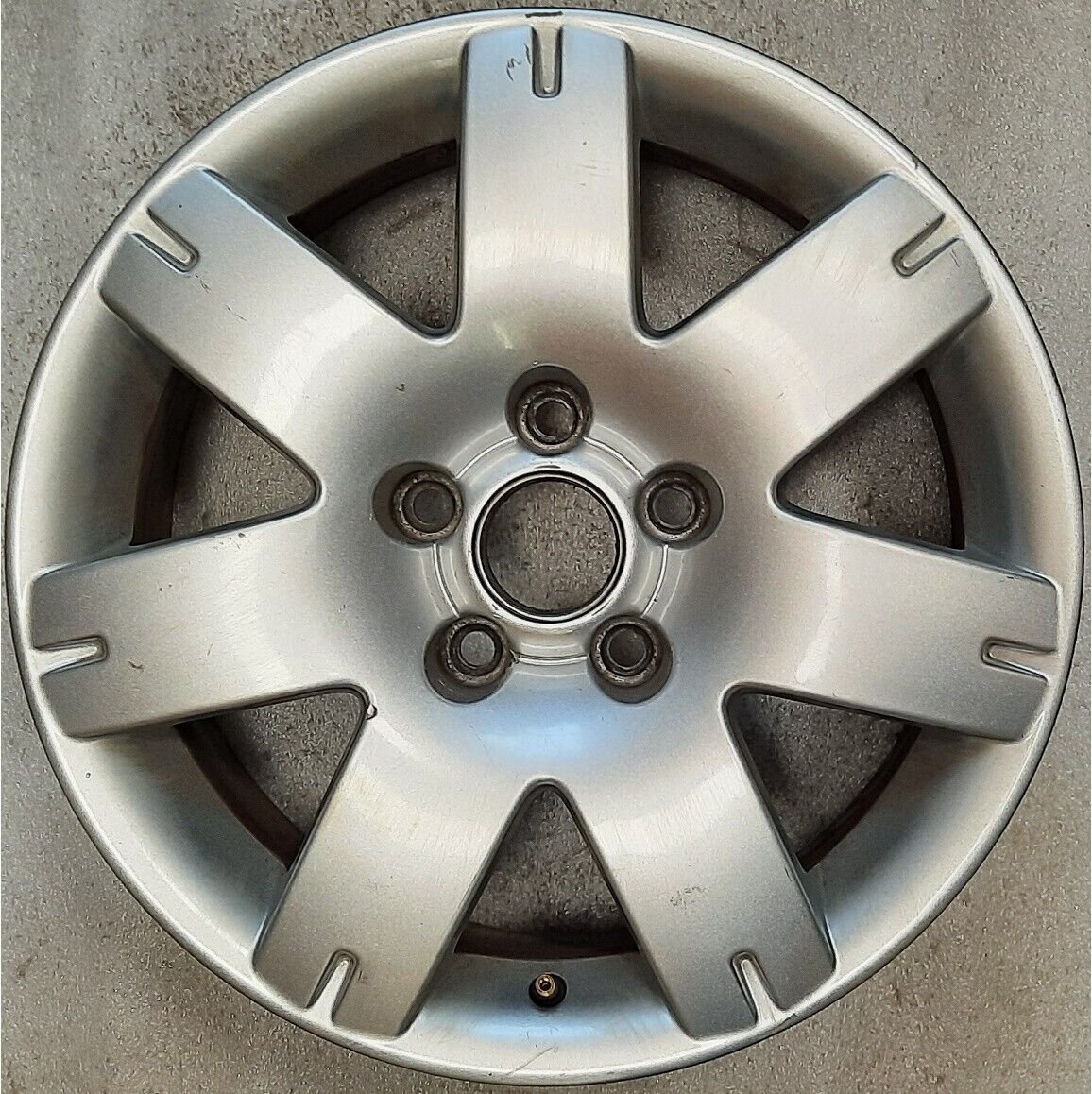
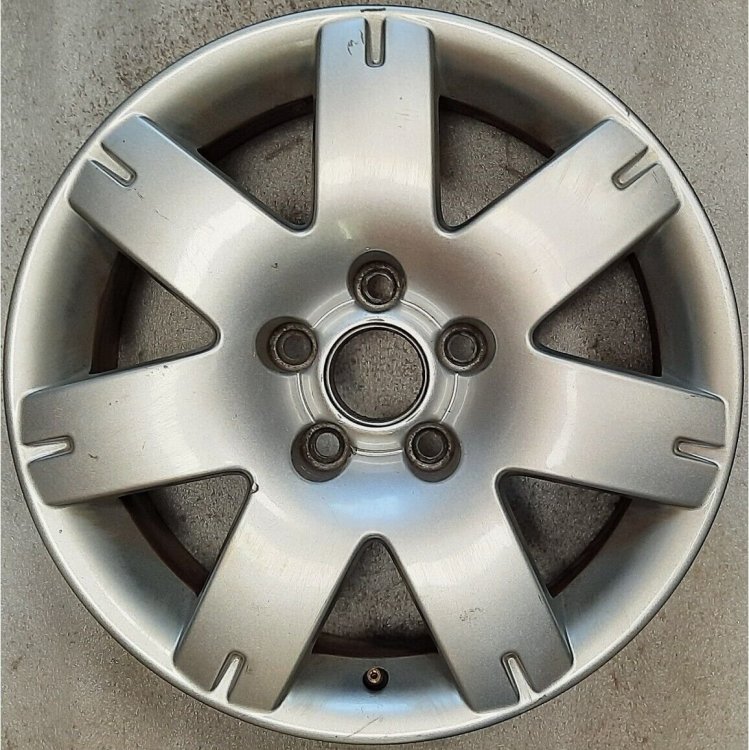
Hi, They are the old Road America wheels from a Passat. They "fill" the wheel arches nicer as they have a smaller ET. 3B0601025L Z31 The centre hub is not the standard Skoda size. You can get 63mm Skoda centre hubs though. I repainted mine and they are still on a SIII now. I do not have a picture with them on the Superb though - I think.
-
Got the DCC menu back.
-
Hello, Skoda Superb 3V5 L&K TDI 2023. I tried to code in 5F - Yes VZE .... which does not work - and because I had some error messages in the dashboard display, I decided to revert and go back to zero. I copied the coding string from the start autoscan and pasted it into the STG which accepted it...... Afterwards some of the adaptations seem to have disappeared, among which some of the displays settings in e.g. car settings for wipers, lights, tyres, units.... and I also do not get the DCC display of the driving modes when I press the Mode button by the gear shift. I have managed to get most of the settings back, but the DCC display is still not showing. Does anyone with a VCDS know which setting will reactivate this display or can anyone with a VCDS and who owns a late SIII L&K TDI maybe from 2023 please run the adaptation channel map as a csv file. I have managed to get the DCC Modes to show in the dash, just not in the head unit. I coded in VCP and I do not think the VCP has an adaptation map recording option. Below is theVCP readout from the autoscan Adressword : 5F (Information Control Unit 1} - J794 MU-O-ND-EU VAG no. : SW: 3V0035816K HW: 3V0035816K SW version : 0330 # Coding : 34820008000020000000000000000000000000000000000000 ASAM: UDS, EV_MUOIMQB 001001 DATASET: V03935377LP >>> No faults found