Tell
Members
-
Joined
-
Last visited
Everything posted by Tell
-
It won't be on the portal since Skoda will make you wait for it.... Fat32 is on my Windows 11 and it's up to date. You can't format above 32gb in Fat32 hence where exFat comes in. There are some utilities that will do the business if you really want Fat32 on a big drive. https://www.sdcard.org/downloads/formatter/ However since 32GB is the current recommended size and you have that card then Fat32 is fine. If you use the more fancy formats on the 32GB card the file allocation method takes up space and you won't get the image onto it. Germanic boards were rattling on about this last time round. Anything other than Fat32 isn't suppose to be used since you are suppose to stick with a 32GB SD card. Off pista if you move away from that.
- 155 replies
-
- columbus
- discover pro
- maps
- mib
-
Tagged with:
-
As long as its reading the FeC correctly. That's the life long navigation FeC. If that wasn't presented correctly it may not see the update. I never did see updates on my Seat before I got the FeC adjusted, so a dubious container file could give you that result I reckon. If it's on the FeC list you would think it was fine, but may be not... limit of my knowledge on whether what the screen shows tallies with what it does.
- 155 replies
-
- columbus
- discover pro
- maps
- mib
-
Tagged with:
-
I always use a 32gb SD card in Fat32, £7-50, class 10. No Mac involved?. Some infotainment units seem to be sensitive to slots used. I always pop the SD cards out and use slot B... Some have reported A only... but having other devices poked in may not help. That's come up in the past. Switch on, allow it to boot up push in just the card with the rest out, or the USB I guess.
- 155 replies
-
- columbus
- discover pro
- maps
- mib
-
Tagged with:
-
The Mib collective as I call them probably know them. I think it's been fully understood. They just got Mib3 now which VAG doesn't understand 🤣. Probably should move their money from chasing down enthusiasts into sorting out their own software. Bentley's in that list as well. They have seven revealed under operations: https://en.m.wikipedia.org/wiki/Volkswagen_Group Audi, Bentley, Lamborghini, Porsche, SEAT, and Škoda. Volkswagen AG. They lost one 🙄. VW owners don't realize it's all about branding.... recycling the same systems atleast.
- 155 replies
-
-

- 1
-
-
- columbus
- discover pro
- maps
- mib
-
Tagged with:
-
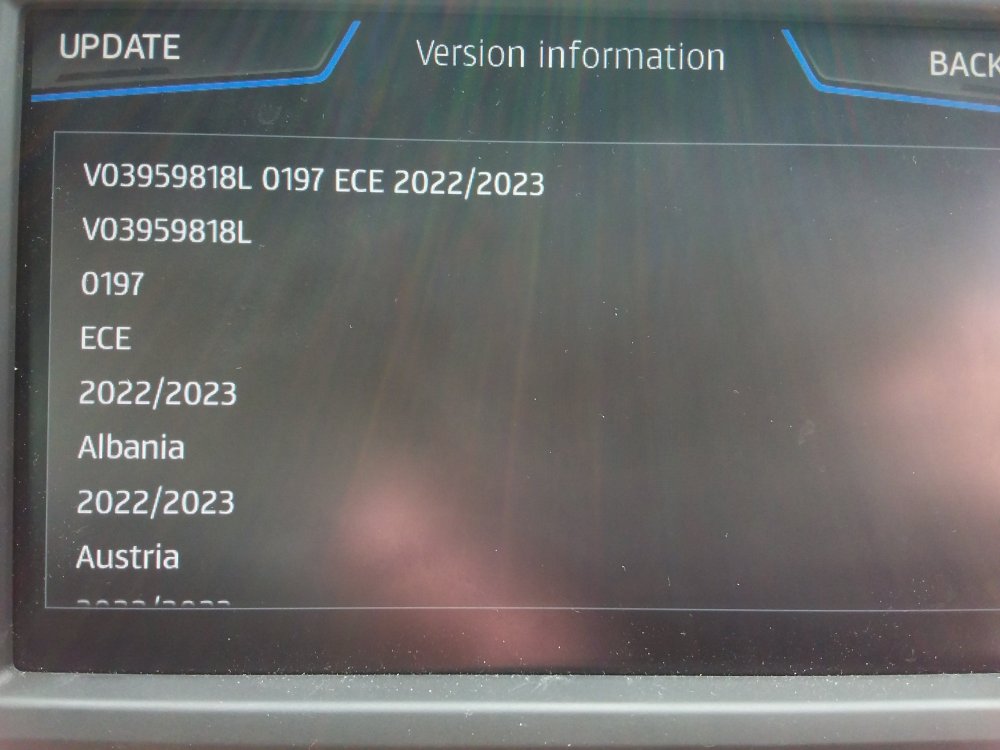
Oh yes.. what it looks like on a Seat 😂 It swaps in the Seat part number 🙂
- 155 replies
-
-
- 2
-
-
- columbus
- discover pro
- maps
- mib
-
Tagged with:
-
I see Skoda have sorted out their unzipping issue with this release on 7zip. All signatures correspond as well between the VW and Skoda release before anybody says they are different releases.
- 155 replies
-
-
- 1
-
-
- columbus
- discover pro
- maps
- mib
-
Tagged with:
-
Well done. I see the German Skoda board had fell asleep on the job ;).
-
MartiniB eagle eyes reported on Seat side this... New "AS" maps V16 2023 https://vw-maps-cdn.lighthouselabs.eu/vw-maps/DiscoverMedia2_EU-AS_1910_V16.7z or https://navigation-maps.volkswagen.com/vw-maps/DiscoverMedia2_EU-AS_1910_V16.7z So we are off now on the June updates a month early. I see they had your 197 high release. Test them tomorrow.
-
Oops. The mib2 high for Seats you just add the Skoda FeC using Mib Tool / change the firmware Mibsolution etc. I'm hoping if they fiddled with the standard release by messing up the FeCs then a similar solution would be found. People like a challenge. Seat currently have messed up the international web page where the map updates sat... all may not be lost, just their web people might not be very good. We'll see.
-
They have to hold it back so VW drivers feel special 😂. See whether they leave the Seat FeC out of this June's 2022 mib2 high release. I'm keeping the additionsl Skoda one in, just in case. Excitement.
-
Suggest you use MartiniB's VW link in the first post of the thread. All the same files, just zipped differently. Skoda had a weird compression on this year's release which causes unzipping programs to stumble. Since you are using Mac the VW recommendation is: If the map update is performed using the Apple® OS X operating system you may find that Discover Pro does not recognise the map material or displays it incorrectly. This is due to a lack of compatibility between the “7 zip” program and the OS-X operating system. In addition, the OS-X operating system has a tendency to create hidden additional files on external data media. We therefore recommend that OS X users use the “Keka” unzipping program. We also recommend using the “CleanMyDrive” program to remove any hidden files. You use Keka as the unzip program and you must use CleanMyDrive app run on the SD card. The unit does a full signature check on the map material import. MacOS can add additional characters into the file which then leads to the validation failing. CleanMyDrive hoovers out all of the Mac bloat characters stuff put in the file by the Mac system. Just one character variation will knock the import out. In your case its stumbling on the unzip, but you still need the CleanMyDrive in.
-
It does do. That's how people normally do their map updates on mib2 high units driving too and from destination although the sat nav is not available during the process. The overrun of the car's systems being powered on for 20 minutes after ignition off, the wind back in the up date if power lost eventually leads to the full update going thru. A 20 minute drive plus 20 minutes after gives you 40 minutes. Truncate the drive from 20 minutes, some wind back, recommence from a restore point in that, plus 20 minutes and the restore point difference gives you the 40 minutes 😍. It's the restore point that it uses in the normal update that works differently to using the developers SWDL menu where you need for power for the duration since the restore point is zero minutes into the process e.g.. start over again. Front menu you can break the update into parts which it handles automatically.
-
Fat32 is good but if a bigger card to 32GB then exFat. If 32GB Fat32. You can do it without the engine running if you open the door every 20 minutes. I do it in 15 minute goes since I use the backend developers menu (SWDL) since it shows what's going on and I just like to get it out of the way. I'm sure on the front menu you can switch off, lock-up and revisit the car every 15 minutes as I do. The system powers down at 20 minutes why you got caught out at 30 minutes. 5 minutes leeway to get your shoes on, spend a penny etc. On the normal update menu it remembers where it got to so continues from there, the back end menu forgets and you have to start again from scratch.
-
June is when we expect to see the next one unless MartiniB finds it early.... that's available on direct links to servers of the respective brands, whilst Skoda, VW and Seat take a time to wrap their web page around it. So nothing unusual, all is still good. Wouldn't expect to see anything till atleast mid May but definitely mid June.
-
Sounds like it will be fine. You run CleanMyDrive once it's on the SD Card. As I said some people get away without using CleanMyDrive, that will be where it unzips directly to a clean SD card removing the Mac dross within the unzip where the program is clever enough to do it. Keka can't be why VW say use CleanMyDrive as well. Suspect the Mac unzipping software would have moaned about the Skoda file if there was an issue. PC one does, where the inbuilt file explorer one didn't. Tripped a few PC people up.
-
The only issue will be how the Mac apps for unzipping work with the new variable compression method Skoda used on 195. If that fails uses MartiniB's VW link for 195, your Mac unzip but I bet you will still have to use CleanMyDrive although some report in the past that they can get away without using CleanMyDrive. I sorted out a Seat owner last week you was doing it in a Windows shell in a Mac but still had to use CleanMydrive at the end. The Mac issue was why VW had their own app but discontinued that now... was not updated in a timely fashion so people just stuck to the Mac instructions where they could get the latest off the servers than wait for VW to update it.... If only I remember the name of that 🙄. I deleted it myself, was a PC and Mac version that took out the unzipping / file preparation stages. You poked the card in and it did the lot.
-
Suppose to use Keka and CleanMyDrive. Mac's produce garbage characters at the of the data rows. CleanMydrive run on the SD card after getting the files onto it wipes that out. However there were / are issues with the compression used on the latest maps (195). See MartiniB's thread. Possible that the Mac software can handle the unzipping without throwing up errors but is highly likely you will need to give the resulted output a good buffing with CleanMydrive. Keka and CleanMyDrive are the recommended VW Mac tools. If you still have an issue unzipping use the VW download. That's zipped without the variable compression that causes issues with Skodas 195 release. Refer you to MartiniB's thread. Footnote. Why the Mac random characters cause an issue is that the mib2 high unit performs an sla1 signature check before importing the map so stops in its track if one byte is out. I know this since I spent a long time trying to edit the import file, it's cryptographically signed. Mac's don't get on well with these files.
-
Possibly why with mib3 they made it so "easy" it's useless 😉. Mib2 does contain a proper traditional navigation system which you can augment into a proper navigation system with bells and whistles.., whilst mib3 ain't. I'm waiting for mib5 myself 2030 🤣. I'm hoping by then VAG will have returned to its roots or I'll by a Chinese MG from the garage up the road. Poinspector came into its own again after VW pulled the POI import website. They have a habit of doing that, they did it with RNS the unit before mib1. They dont support the customer base. There is / was a Skoda alternative but that was ropey. There are some Excel sheet macro people about that offer the same functionality of Poinspector but don't give you pretty screens. The db3 database it writes for import is well documented.
-
Mine takes it in either slot I reckon... I pull both cards out then put the map card SD in so it doesnt get confused. I'd give you the Poinspector site where I'm Radas the programmers official technical author so it seems. Does take some effort setting it up then you use Pocket GPS World POIs. Problem with freebies and rip off you don't know their pedigree and may well get out of date. https://poinspect0r.blogspot.com/?m=1 The advantage is you can use the old Skoda trick of importing a destination as a POI. Tap on it and then save as a destination. That way your sat nav looks like a traditional one with destinations shown up on the screen. What would we do without practical Skoda drivers 😉. I got 350 destinations imported that way. Useful when revisiting places. Some GPS knowledge of x,y coordinates useful for that.
-
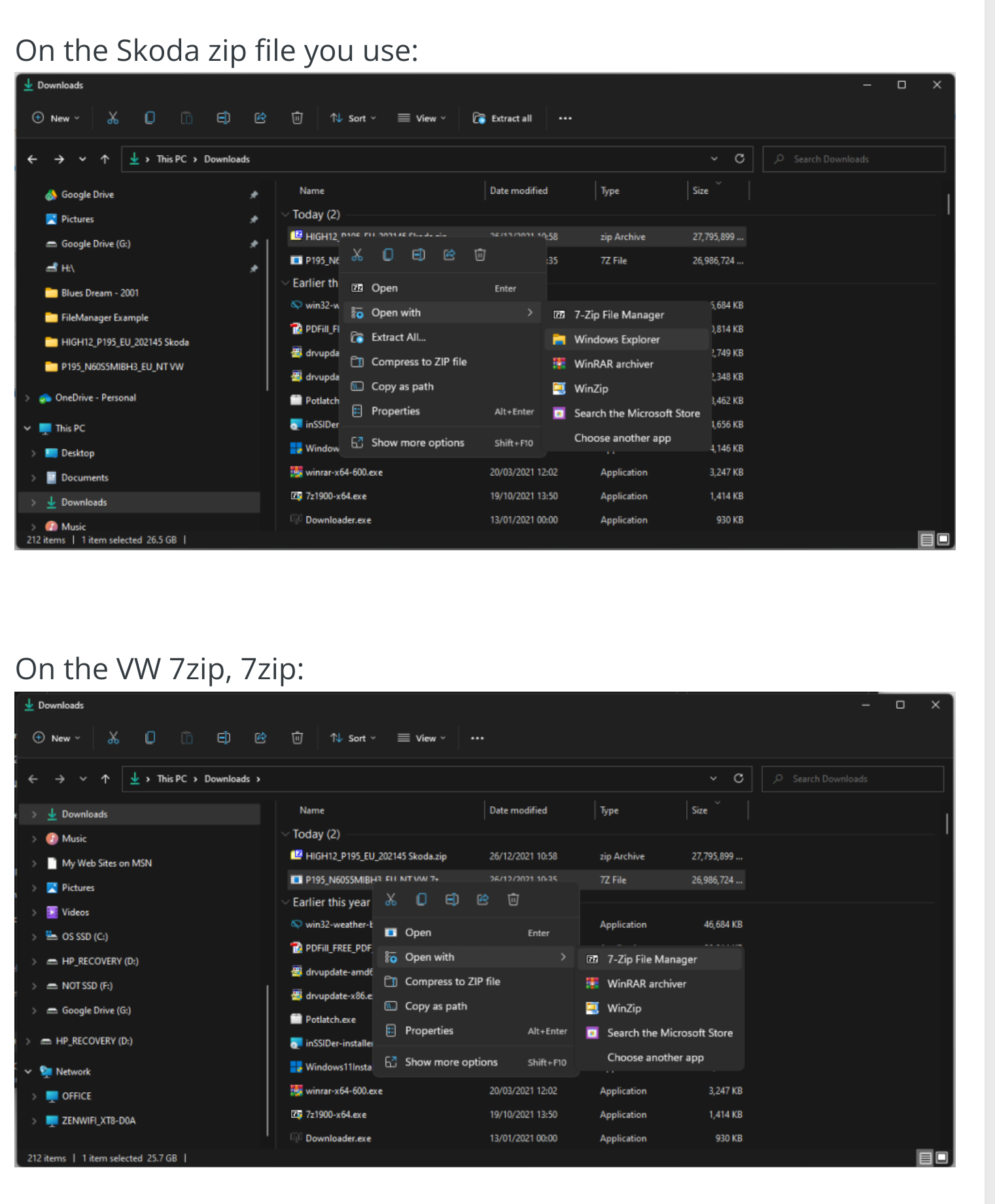
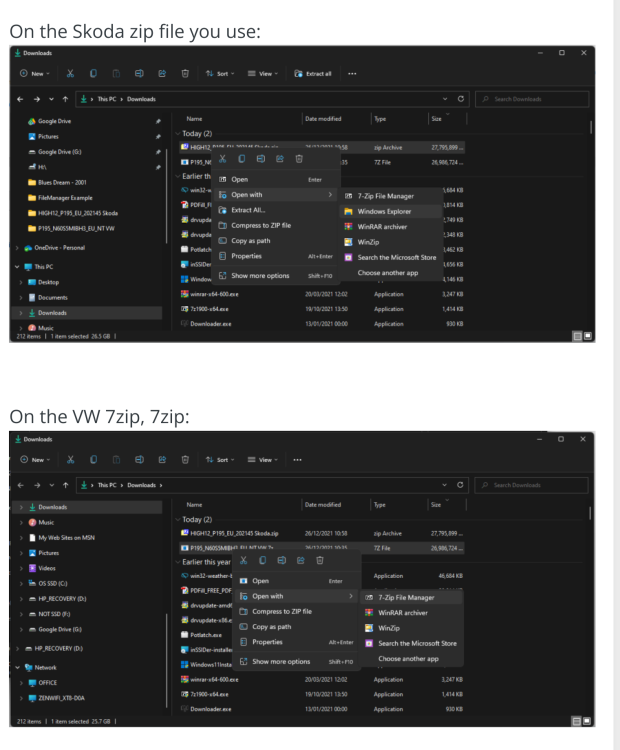
Read down from this post. Known issue with 7zip on the Skoda site. You can use the built in unzipped in Windows Filemanager or use the VW download with 7zip. Skoda changed their compression software so it throws up errors on 7zip since they use variable levels of compression. The built in Windows tool is more accepting. MartiniB uses another tool as he says. It then comes up latter in the thread with naysayers checked it again and posted up the analysis. Probably best to still to the VW download that MartiniB posted at the top of the thread with 7zip or use the Filemanager build in one. See also this link. Two images. If you use the Skoda file, open as that example that uses the built in Windows unzipped, right click. Second image if VW file, open with 7zip. Zip files, sit on it. Right click, Click Windows Explorer... that's the built in one which comes free with Windows, it does the job. Drag and drop to a directory you created for it. Then copy all of that onto a blank SD card, fat32, 32gb. No issues. Posted that up before when people got confused. Basically Skoda are zipping the files in a way that 7zip throws up errors but we knew that at the start of the thread. So we don't use 7zip on them but use the Windows built in method. No issues or in MartiniB's case his favourite unzipping software 😉.
-
Was it in Fat32 on a 32gb SD card and not using a mac. Following the Vag guidance I attached further up. Stick to the VW download, unzip using 7zip, you shouldnt have problems. It uses the signature on the files. If you open them about resave it will fail. Use a mac but not use CleanMydrive on the SD card it will fail. Both lead to the signature failing so it won't see the update.
-
There are a bunch of ones called Mib Toolxxxx it's the mib tool one you want written by Chillout not any xxxx ones, he does write another one which I don't think you want. You find that on a Google, the one he wrote for this was for the Mib2 Collective as I call them or they used his code and adapted it. The collective are not for profit individuals who hate retrofitters making money out of quite simple programming as they see it. They write in Bash. I will look later to see which firmware releases of Audi are listed within it. The tool makes a backup of a key module of the firmware then replaces it with its own one. If it hasn't got that module it invites you to send the backup to the "collective" (as I call them). They then study what has been sent and give you a module back. It realises on helpful people with Bash skills. I'm not sure the helpful person I communicate with covers Audis but he sorted out my Seat and someone else's for free. The latter one was in a pickle where a retrofitter had made a pigs ears of what they had done. They then remotely sorted it out giving them a new module to clear out the rubbish left by the retrofitter. I got into using the tool when Vag on one release dropped Seat from it, so you populated the car with the Skoda navigation FeC as well as the Seat one. They are happy to run with other brands FeCs. I'd spotted a couple of posts bragging about they had that release on their Seat car, one was Chillout the programmer himself who said he wasn't bragging... and a Spanish board Seat mod who's retrofitter had populated the car with every lifetime navigation FeC from every VAG brand. Then it became clear. During lock down couldn't drive to a retrofitter to get it done so reverted to Mib Tool and DIY. Some retrofitters are rubbish eventually found a decent one but reverted to DIY. Retrofitters method put the unit on a bench and use a program called whatthefec to change the FeC. Mib Tool delivers the retrofitters methods as DIY in the car using the green screen. It uses a back door that was found to add FeCs into the unit. There are retrofitters in Australia I've seen it being discussed, depends how good the one is if you go that route. The first one I used just extended the navigation FeC by a year but pretended it was a lifetime FeC as Skoda and VW. Had to get them to "correct" this a year later. Photographing the FeC screen before and after and his Polish mumbling about a FeC. I subsequently decoded the Seat ones from the before and after pictures, so it became apparent how it worked. Posted up a table so that people with Seats could understand when their Mapcare was up. My message was if using a retrofitter make sure they don't short change you for repeat business. The collective know all the FeCs now so put them in their not for profit tool. The lifelong FeC is just a hex code at the end 30+ years away. mib2 map releases will probably stop in 2025 in any case based on VAG mib1 published time table. They give 5 years free map updates after the model is superseded so puts it at 2025 for mib2, as mib3 was 2020. There is a German DEB board, Digital Elite Board search under Audi and Mib Tool all in German but worth a read. If it says GEM as well you are in the correct area (Green menu). That's where the German speaking collective hang out. The Seat link on the Google covers the Seat English speaking one. A pan European project 😉. Probably like Eurovision Australia would be allowed. https://www.google.com/search?q=digital-eliteboard mib tool%3Aaudi&ie=utf-8&oe=utf-8&client=firefox-b-m
-
Ok see other thread where if it's a mib2 high and you want to trick it.
-
Post crossed answer your other question on the mib2 standard thread. Having read that and what you have said you are in Australia. If it's an original Australian car not an import then you would use the RoW file for mib2 high. That is this thread, but as I said on the other thread Mapcare will limit you on an Audi. Traditionally you got a retrofitter to hack the navigation FeC, on vehicles which use Mapcare, Audi and Seat still do, VW and Skoda don't. A more recent approach is Mib Tool which had been developed by hobbyists in Europe which cuts out the retrofitter since its done in the car. Only works with specific firmware but the hobbyists adapt it if not supported. You need to be on a board with the hobbyists to help for that. Not sure if they post around here. Basically you need to be quite clear about whether you have a mib2 standard with map card, or mib2 high with the maps held on the SSD in the unit. If it's a mib2 high and Audi Australia don't want to sell you at map update or you don't want to buy it then a retrofitter is required to adjust up the navigation FeCs to "lifetime" then the RoW import will work or you go down the Mib Tool route. I know where the Seat enthusiasts hang out for this but not the Audi ones. Think you'd need an enthusiast since the fragment of code for your Australian firmware release would not exist unless you got Ozzie enthusiasts (files in the tool reveal what it works with). Unless you got a European import car that an expat imported then head scratching on getting the map in if mib2 high. Mib2 standard can be done. Covered in the other thread albeit mib2 standard Mapcare workaround.
-
I noticed you have posted on both of the threads. Does your vehicle run with a map card in it, this thread or with the maps held internally in the unit. That unit is otherwise called a mib2 high. Mib2 standard for this thread. I've answered you mib2 high question on the other thread. As far as Audi is concerned a fly in the ointment is that Audi still uses Mapcare which limits your ability to free updates. VW and Skoda scrapped it. There are technical ways around it for mib2 high and mib2 standard a trick. But before getting into that which unit is in the car. One that uses a map card or one that runs the maps within the unit with no map card in and the maps show.