john999boy
Honorary
-
Joined
-
Last visited
Everything posted by john999boy
-
Just as a guess, the radio code 'belongs' to the old instrument cluster so now you need to find it out and input it into the new one.
-
Slightly OT but from when did keyless entry include the rear doors? Is that just on the Kodiaq?
-
Lol. No I'm saying that the absolute convenience outweighs the audiophile gains which wouldn't be perceivable.
-
Your Escort wouldn’t have had the tape player as standard either IIRC as I can remember fitting a double fitting under the dash to accommodate my auto reverse tape deck and graphic equaliser in my Mk1 Mexico. Glory days….
-
Unfortunately it's time to embrace the future and make use of other digital forms of music storage as I don't think CD playback has been around for quite some time now. Once you get in to it, you'll be amazed at how much better the new system is. There will be an initial setting up learning/acquiring curve prior to that though! BTW, enjoy your new car.
-
I can only say that I've not seen this mentioned elsewhere. If you run AA purely on the phone then it definitely can't use the car's GPS - or are we talking about some sort of AA wireless? In saying that, AA could still be used when nowhere near a car so........
-
Android Auto should always use the phone's GPS.
-
OT but really as a reply to @smipx. Did you know there was a plethora of deals available for about £5 which would give unlimited calls and SMS with loads more data? I appreciate PAYG might be better for some people but thought I'd mention it - just in case...
-
On previous models it was possible to do this by a prolonged press on the lock button.
-
ACC is brilliant and you will find yourself using it regularly. It is even a benefit to manual cars but to a lesser degree.
-
Have you downloaded the relevant Google map to your phone to stop it doing so each journey? That way GM would only need to keep the traffic information updated.
-
I would also be interested to hear what the connection is.
-
You shouldn't be able see any wires in the windscreen.
-
Just had a chance to look and can confirm what @kentphil1 says. Hopefully it solves your problem.
-
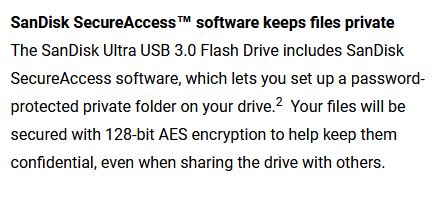
USB.
-
I have a SanDisk Extreme which comes with it's own locking program. It may work on other makers sticks but maybe check their website to see?
-
Doesn't that depend upon faster charging being an added option?
-
You've had your car 7 days and not updated your profile! Did you opt for the faster charging capability on your car? If so, how much extra is it?
-
I was a little bit further up the same valley last weekend too.

-
Have you also removed all previous phones from your car?
-
Have a look in the Styling section. You might find that it wants polishing before waxing though.
-
The Classifieds section was ‘an extra’ bolt on and is different to what we started with. That’s why there’s different sections in your profile regarding your subscription preferences to each part. I also don’t know if this is why the extra thread is generated or not? Maybe @DeanVRS20VT has an answer?
-
Each new ad (by whoever) in the Wanted section will notify you of it’s presence but you also want to see replies to your own Ad. I have replied to your Ad thread but you still haven’t subscribed to your Ad Discussion thread to which I linked above. They are different entities.
-
I can see that at this moment in time you’re not following the discussion thread for your advert.
-
Generic info. It should only be screwed to the A pillar - in one particular place. Just remove the trim (with some trim removal tools and maybe by unscrewing the airbag indication clip) and then you should be able to remove the poor, inoffensive item.