




jjc
Members
-
Joined
-
Last visited
Everything posted by jjc
-
Hi, Do not use caps as this can damage the control module, there is no "noise" as such on the supply to the reverse light over and above what is normally present on the 12V supply which the camera can cope with. On "smart" cars like the Skoda there is monitoring if the bulb has died, it does this with a clever module and pulses the supply to the bulb so the voltage is pulsed. You will not notice this on the bulb but the camera does not like this pulsed voltage hence the module that langers2k posted above which uses a relay to provide a steady 12v from another source but triggered by the reverse light cct. You can connect the camera feed to the rear wiper feed (think it my be purple) the camera will be powered whenever the ignition is on but it only shows on infotainment when in reverse. John
-
May be a bit late but if you can connect a lead to the starter cable you can charge from here or if you use jump leads you may then be able to open the door. John
-
Hi, Hate to say but get a better phone, I have a Samsung S10 and it has a protective case on and have never had this issue. How many apps do you have running in the background as each app will generate some heat, close all the apps you are not using. If you have a case on it? Try without to see if this helps. If not it is just a case of what you are trying to do your phone cannot handle. Other option is to charge from the cable and see if this is OK. John
-
-
Correct, you can get some on eBay or Amazon but the supplied cable is fixed John
-
Hi, I do not think so as the charger will limit the current to 10A as it has no idea what it is plugged into. If you use the type 2 cable in a proper charger you will be able to get the max charge rate (still limited to 3.6Kwh) Or if you have a fitted charge point at home but the max 3.6 still applies. john
-
-
Hi, have you ticked the option to let it use the battery? If not it will only work if you are plugged into the charge point. Have used mine a few times and works well. I often set the screen and heating to come on by setting in the trip section to have the car ready by a set time. There are a few different options you can set you just need to play to set it to be the way you want. Worked well in the summer as well by cooling the car for me ready to come home from work (blue light worker so still had to go in occasionally) John
-
Hi, I have a Superb so not sure it is exactly the same but when I put travel assist on then engage ACC the car will drive itself apart from me having to hold the wheel, the speed is set automatically to the sat nav/speed signs, and the system slows down if it thinks the bend ahead can not be taken at the posted speed limit. If also slows down for roundabouts (though does not automatically stop) It will maintain the distance from a vehicle in front and in traffic jams follows the vehicle in front braking and steering to keep just behind, this causes people to look on motorways when crawling as I do not need to touch anything as the car does it all. John
-
Hi, I have had my iV since Mar and could easily get 20 miles on a charge with the gauge still showing 25% left and that is on EV only. However as the weather has got colder and the evenings/mornings dark I would say that the range has dipped sometimes down to about 16 miles as have used the screen defrost without having it plugged in on the way back from work. I will be interested to see if I can get a software update that may improve range. However as during the winter months there are many more calls on the battery power so you cannot expect the same range as during tepid months. I am very happy with mine so far, there are niggles, the obvious anomalies with the infotainment system and a manual that does not represent the car's configuration. I would love the charge system to work above 3.6Kw so as to charge quicker but doubt this can be changed. As this is the first year I have connect and so the eSIM is active which means the maps auto update (you do not seem to get any indication they are doing it other that looking at the SW page, they seem to do it once a month. John
-
John
-
Hi, Had not even noticed that they did that, just checked and mine do that as well, looks good John
-
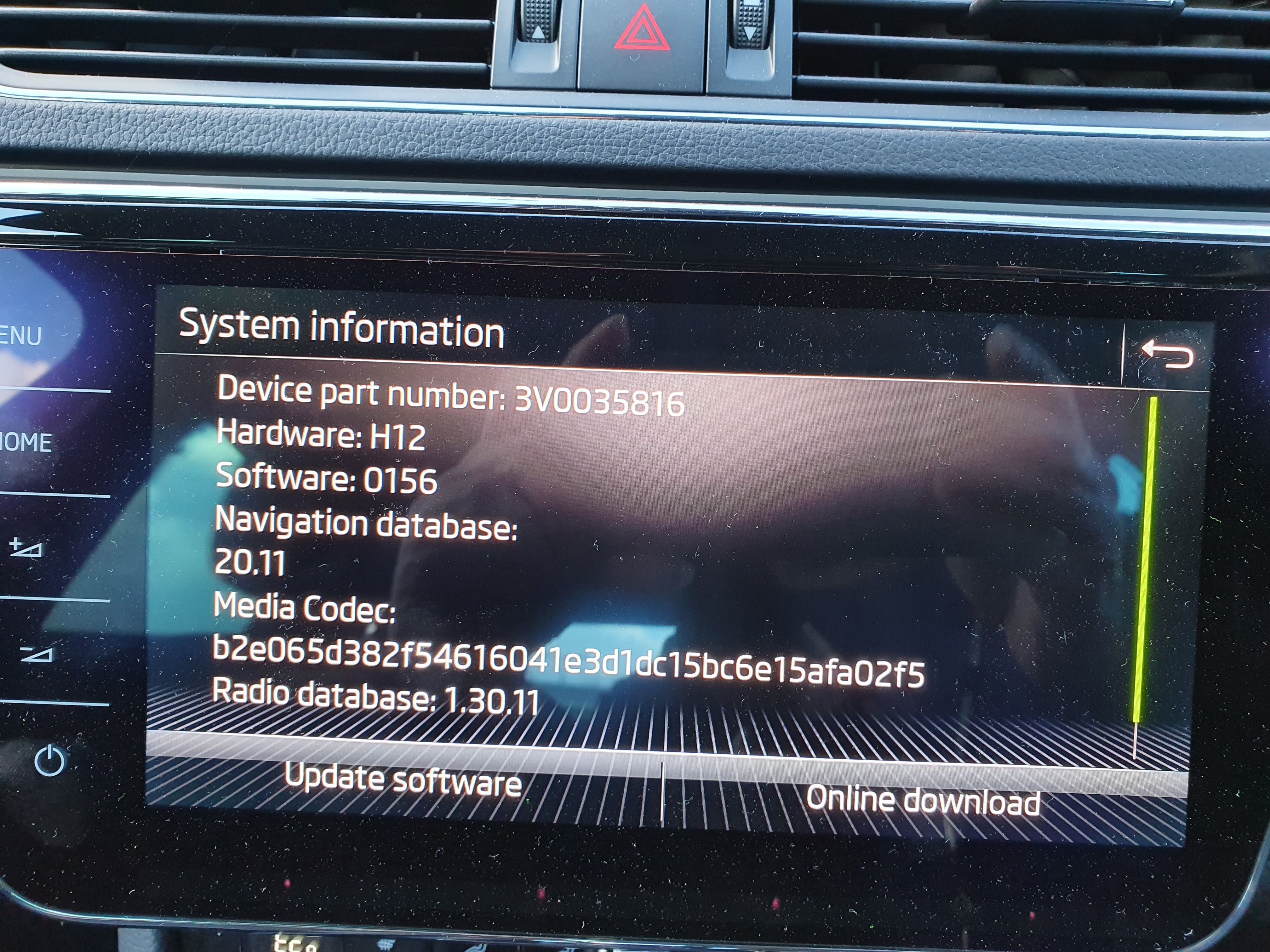
Hi, it looks like it will want to do a map update as as far as I can see it is on 19.11 which is very old as it should be at least 20.10 possibly even newer. I may be wrong but that looks to be a very early version. I would take a look at the VIN to see when that indicates it was built. The maps seem to update roughly each month or two. Johnsame would love to know how to do this, was dead easy on my previous one :-( JohnHi, I may be wrong but I think you can only have one "car" account and this is the one you use on the app. You can have a different in car setup for each of the keys. This "person" can adjust things in the car that are related to their comfort but cannot change "car" functions only the primary user can do this. Hope this makes sense JohnHi, Hope you enjoy the car, mine is still great though have noticed that the range has dipped a bit with all the extra needs due to it being dark now for most journeys and it is cold. JohnHi all, does anyone else have the "OK Laura" function on their system? If so what have you used it for and how well did it work? JohnHi, Agile has not been great over the last week but hopefully it will be back to normal soon, I switched onto Agile in June and we have had a few "plunge" days which is great as you can get paid to use up the power. One thing I have found great over the last few days where it is cold in the morning I set the car to heat up to 23 for when I am ready to leave. The issue I have found with the cold dark days is the battery range has dipped quite a bit :-( Still very happy with mine and manage to do most of my journeys on only battery. I have an OpenEVSE charger as I admit to being a bit of a geek and have integrated the system into their total monitoring system as I have solar and it integrates with this and lots of other smart bits around the house. The Skoda app is a bit flaky but when working is great for adjusting/monitoring the car. JohnHi, have had this a couple of times and it looks to be when the unit is doing an auto update of its software but has not finished when you turn the car off. The way I got it to happen less was to pair the car to my home wifi which is much faster than the eSIM so it updates quick and easy when it gets home. This may be why when the dealer did a reset it all started to work again. Noticed if you do a scan when it is in this position it shows a software mismatch the same as I use to get when updating the software on my older Skodas before you change the hex value. JohnHi, as above try it on manual and turn the fan control up a bit at a time and you should hear the fan. If you only here it on max then the "resistor" pack may be faulty. Both the fan and the pack are easy to change, they are underneath the glove box. JohnHi, I know nothing about that software but am not too far from you I suspect, and am happy to reset your light for you JohnHi, one thing to note for the transfer to USB (if you are using one) is that if your device is V2 it will be much slower than a V3. Also even if it is V3 but your PC is a V2 port it will still be slow and not run at V3 speed. JohnHi, This is the same on the Columbus very annoying JohnHi, you could ask the Audi/VW centre, they are close to you and may be able to do this for you. John




Important Information
Welcome to BRISKODA. Please note the following important links Terms of Use. We have a comprehensive Privacy Policy. We have placed cookies on your device to help make this website better. You can adjust your cookie settings, otherwise we'll assume you're okay to continue.