




Breezy_Pete
Sponsor
-
Joined
-
Last visited
Everything posted by Breezy_Pete
-
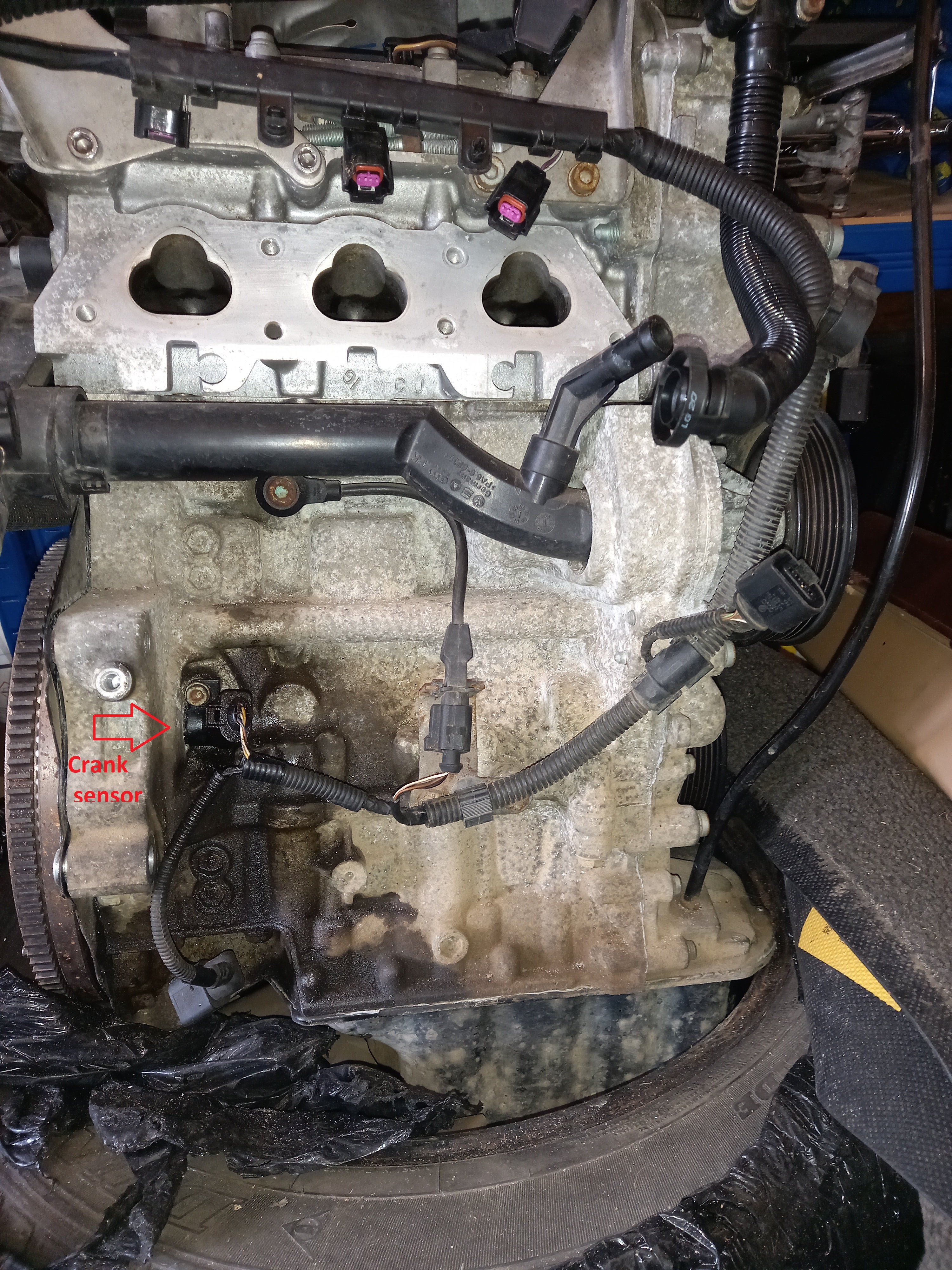
Crankshaft sensor is likely to be a lot lower on the engine. Crankshaft is near the sump.
-
On such a complex engine, I imagine you're more likely to introduce a problem doing the work than prevent one. Do these chains ever cause trouble? @Ootohere will know.
-
-
-
Why did I get a groan reaction!?
-
MK1 or Mk2?
-
Probably, I can't remember it being difficult.
-
Easier, but still not easy, from below, I think. USB endoscope-type camera can be helpful.
-
I'd be trying to bypass the EGR cooler to rule that out before anything else.
-
That's a photo of the back of the engine, taken when not in vehicle. Voids are the intake ports.
-
Strange. That seems in direct contradiction to the fault code above. Even if the relay is faulty, that code doesn't make sense to me, if the supply to relay contact is present.
-
No, not camshaft sensor: crankshaft sensor, much harder to access sadly. Vertically below throttle body, mounted in engine block, 'looking' at back of flywheel.Probably easier to undo and withdraw the sensor from the outside/rear of backing plate, and examine that way.Near crank sensor connection or the wiring to it would be my highest priority.I don't know. I think you should look for other similar damage elsewhere in the engine bay.The rectangle just below the wheel cylinder in this image. (Ignore the red-ringed bits, they were illustrating the 'glide pieces' which the shoes rest against.)Because the wheel speed sensor pokes into the drum through the backplate, to point at the inner face of wheel bearing.Also, you found a loose bit kicking around in the drum at one point, I seem to remember? That could have collided with sensor head, perhaps?Check the wiring near the sensor connectors, could easily have been damaged while freeing wheel cylinders/brake pipes/bleed ripples if you weren't aware of their presence.No, if you've been that thorough with the strip fuse no need to do more. It's just such a common cause of ABS light on this platform that it's not worth doing anything else first, unless you have fault codes pointing at a speed sensor. Find that scan tool.If you're certain (they sometimes crack so imperceptibly that only undoing the nuts makes it evident when they fall into two pieces); then I'd imagine you've knocked and damaged a rear sensor or wiring to one whilst doing the brake work. Check the side you changed the cylinder on first. Did you remove hubs/bearings while changing shoes, or work around them?Check the fuse, please!Intermittently.No problem, I quite understand, even though I'm a lot smaller. Got any children you could invite to help or coerce?




Important Information
Welcome to BRISKODA. Please note the following important links Terms of Use. We have a comprehensive Privacy Policy. We have placed cookies on your device to help make this website better. You can adjust your cookie settings, otherwise we'll assume you're okay to continue.