Breezy_Pete
Sponsor
-
Joined
-
Last visited
Everything posted by Breezy_Pete
-
Go to spritmonitor.de where you'll probably find a fair bit of crowd-sourced data. Just need to pick a language and enter the details of the model of interest to you.
-
Can you message me the VIN? That will enable me to tell you the current part number for the cluster as a minimum. Wouldn't mind a look at it myself though, as you're not a huge distance away. Cluster is still at repair place, or back with you?
-
Whereabouts are you Lee?
-
Received, and yes, the part number you quoted is correct and current. A mere £85 + VAT each from Skoda. 😆 The part number should help with finding aftermarket match-ups.
-
What's the VIN? PM if preferred.
-
-
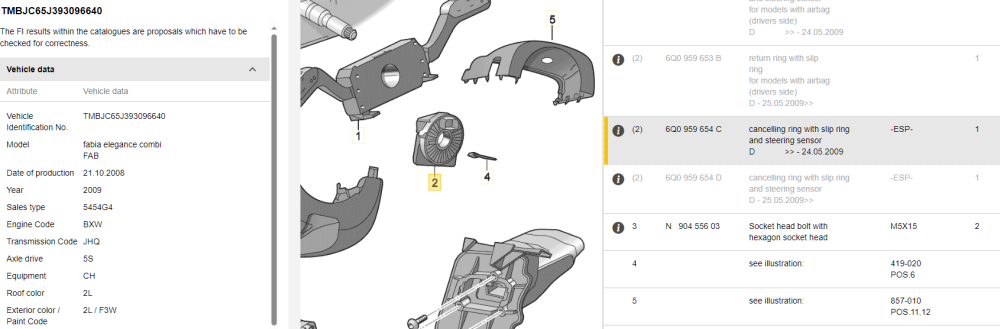
Ah, you've just led me to where the G85 is, shown as item 2 here, current part number for your VIN is 6Q0 959 654C. Frightening price new from Skoda: £225 + Tax here in UK. Are the tyres exactly the same size between sides, and worn approximately the same amount? Going in a straight line?
-
There's not an emergency keyhole on passenger front door, hiding under a plastic cover, by any chance?
-
That VIN does show a normal rack-mounted steering angle sensor, but wiring info suggests it should have a G85 sensor as well. I don't currently know where that is normally found in the parts catalogue, to check whether you VIN says it should be there or not.
-
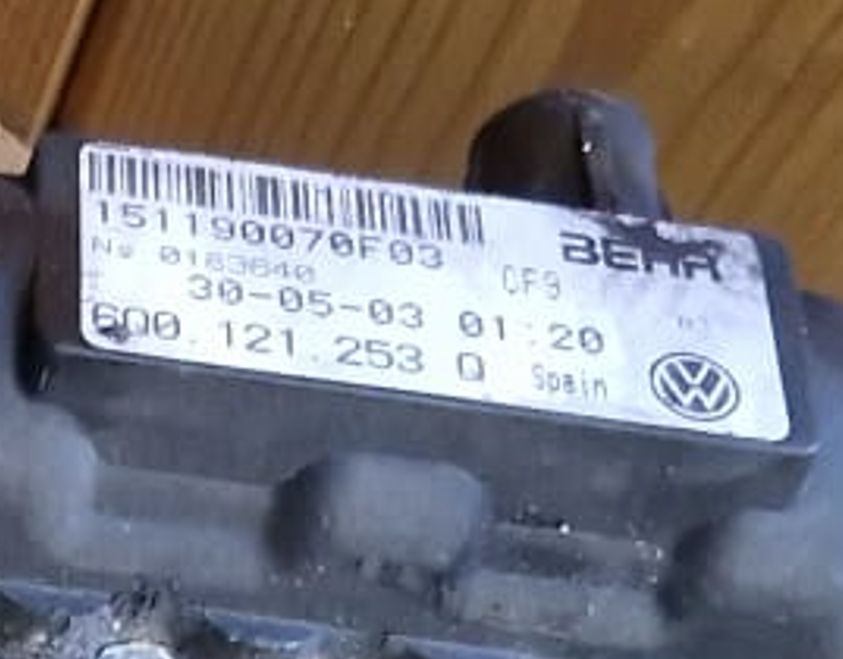
I took a suffix-Q one to bits the other day out of my Polo, manufactured by Behr:
-
Can you share the VIN/Chassis number, so I can see what was factory fitted, please? I think G85 was only used on cars with ESP, at the time yours was built. I believe on cars without G85, the correct module address for PAS is 44, steering assist. Maybe even for cars with G85.
-
The lambda sensor can give temperature info, via its PTC heater whose resistance changes. Definitely not normal to see it that hot.
- 69 replies
-
- 1.2mpi
- 3 cylinder
- fabia2
- skoda fabia
-
Tagged with:
-
Have you (or anyone else reading) had this done? Approx cost? Sounds like a great workaround to me, and I've just suggested it to someone I know with a leaky one.
-
What numbers were the codes? That's the key info anyone needs, in order to try to help.
-
Find someone local to you with VCDS, a diagnostic system used by many amateurs and some professionals.
-
I believe both of the front door modules are connected to the convenience CAN network, but each rear door is only LIN connected to its same-side front unit. So for the whole passenger side to be affected I would think it will be front passenger side wiring problem, causing the front module to not be 'playing nicely' with the car as a whole. That in turn will mean the rear doesn't work due to the absence of LIN communication to tell it what it should do. Having said all that, I haven't actually looked at the relevant circuits for the OP's car, but at that age/recency, I believe that is the general norm for VW group.
-
I would expect it to be in the front passenger side I'm afraid. Still well worth looking at the driver's side though.
-
Yes, still doing these. Currently keen to improve low/zero stock of exchange units of the following types: Polo 6Y1959801 (VW240D2DRS or DDRS) T5 6Y1959801 (VW750DDRS) Roomster 6Y1959801 (SK258DDRS) If anyone is sitting on broken ones that they don't need I'd be happy to hear from you. 🙂
-
Knackered! I don't know much about airbag problems, never had any dealings. Don't know anything about parking sensor problems either! V68 fault might cause unpredictable cabin temperature issues.
-
Which car? Profile says 2013 Yeti, but this the mk2 Fabia subforum.
-
^ Yes, but just the input signal that tells the control unit that horn sounding has been requested, as opposed to a power supply for the horn. It's what I would suspect too, given the lack of any relay clicking, and the OP having mentioned doing something with steering wheel.
-
I think it might be one of the output tests you can run on that module, if you have VCDS/VCDS Lite (registered).
-
Horn relay is built (soldered) into the Onboard Supply Control Unit above the accelerator pedal. I doubt it's that though. Check fuse 40 is present, intact, not loose and has clean connections. Possibly a switch/input problem following the steering wheel replacement, rather than anything on the output side, if you don't hear relay clicking?
-
Handy that I did get round to checking before MOT; an inner pad on left side and outer pad on right were both 'vanishingly thin'.
-
I can confirm that the gap labelled here on the inner pads is normal, having checked ours today.