Skip to content

Breezy_Pete

Sponsor
  • Joined

  • Last visited

Everything posted by Breezy_Pete

  1. The valve/rocker cover is not something you can remove easily, as I told you above. In fact, it's a huge job on this engine. So it's not the best thing to do at all. Instead, you need to find out if there is lots of oil leaking or going elsewhere, and why you got that red warning light. I think your assumption that it was because 'almost all the oil was gone' might be wrong. Please check the oil pressure switch as also described above,
  2. Message me with your VIN, or post it here. I can check what the 'real' part number of your rear shocks should be, sometimes those labels can be deceptive.
  3. Check your oil level, make sure it hasn't risen unexpectedly. I'm wondering if there's a fuel problem resulting in oil dilution, with corresponding lowering of viscosity when cold?
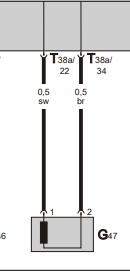
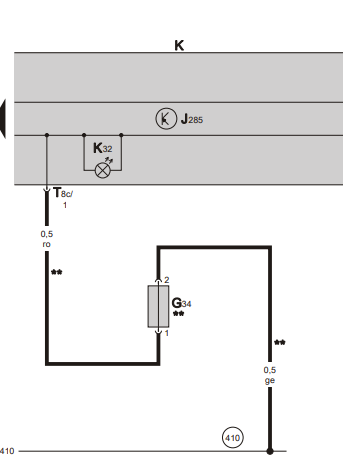
  4. I wonder if the red oil light reported was an oil pressure warning, in fact I think it must have been. Level sensor (if even fitted) only gives yellow warnings, I think? Now the oil pressure could be low if there really was a hell of a lot of oil loss, but probably more likely to be a false alarm caused by a failing pressure switch. Classic symptom is oil inside the electrical connector of the pressure switch. This is mounted on the front of the engine just near the items 1a, 1b, 1c in the diagram above, green plastic body, single wire connection. Disconnect this and see if oil weeps out from within. If unfamiliar with releasing such connectors, watch this: How to undo VW wiring connectors. - YouTube
  5. The pin 3 signal goes to engine ECU and BCM, now that I look again, but the pin 1 signal has opposite sense, 12V when pedal not pressed, open circuit when braking. Pin 4 and 2 as you say @Orchid70, supply and earth for the brake switch module. @xman, the bulb monitoring is inside the BCM, I believe, on facelift mk2s.
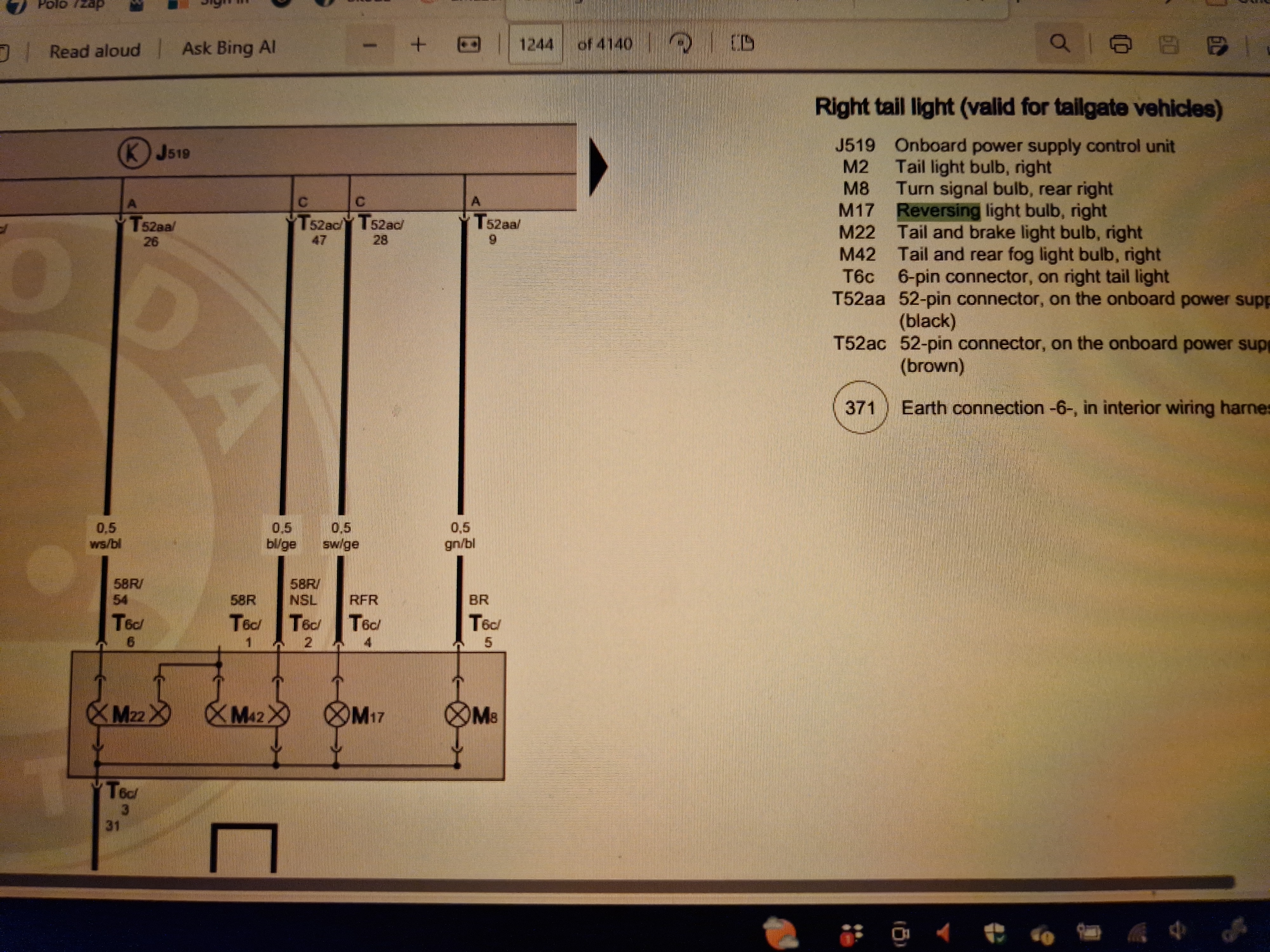
  6. Only foglight and maybe reversing light I think JR, and the fault is probably just to do with the battery having gone flat.
  7. Become a freedom member to fix this: Membership Options (Freedom) - BRISKODA
  8. As far as I can see, on this vehicle the 12V signal from the brake light switch goes into the BCM on pin 43 of the black 73-way connector, on a thin black/red wire. The output that actually drives the bulbs is on pin 16 of the white 73-way on a thicker black/red wire. So look for the presence of both while pressing the pedal with engine running. You may see the former but not the latter, which would narrow it down to a BCM issue, I think.
  9. The sealing is done with RTV silicone, but unfortunately I think it's a pretty big job to get the cam carrier off in order to re-do this sealing. I believe it would entail removing the timing chain cover, the chain, then the cam carrier, then cleaning everything up, reapplying the sealant and putting everything back together. It might well be worth renewing chain and chain tensioner at the same time as this would add little to the (extensive, I'm afraid) labour time, and could future-proof the engine a little. Sealant is shown here as item 8. I wonder if it's worth trying to bodge some sealant in via the spark plug orifices? Maybe worth a try to save hundreds, but would require some ingenuity to even attempt in a meaningful way I think. I would think there must be another way oil is getting consumed, as said above.
  10. See https://www.briskoda.net/forums/topic/511390-a-common-error-with-vag-part-numbers/
  11. Yes. Match everything. Why do you need one?
  12. 6R2721503D is a current part number that hasn't been superseded. I wouldn't bet on an older (6Q) variant working right, and a 6Q1 part will be a LHD pedal I think, so probably not going to even physically fit.
  13. For the fitting kit, I think.
  14. Skoda is part of VW so I'd expect lots of commonality.
  15. One option for genuine new https://www.ebay.co.uk/itm/125978801142. Many, many aftermarket alternatives available if you search that part number on ebay, or elsewhere, no doubt. Dealer would be able to order in if they were being more helpful, retail price currently £22.50 + VAT.
  16. @Bazmcc to get the switches to work the right (correct) windows with the LHD motor module in place, you'd need to cross over the wires coming from switches E40 and E81 in the lower left corner of this pic to the window motor (J386) connectors. They are white/black and black/green wires. You could also correct the direction of motion of the driver's side window by rotating the metal motor housing 180° so the label faces the other side. There are permanent magnets inside which give the field a polarisation. The disadvantage of this is that the electronics will probably still think it is lifting the glass when it's actually lowering it, and vice-versa. The anti-pinch function that stops you trapping fingers/limbs in the window while it's going up will likely not work (cos I can't see why it would be programmed to work on downward glass motion). Do at your own risk, and ideally tell any subsequent owners about it. If you decide to try this, you can probably do as follows, for minimum risk of damage: 1. Defeat (simultaneously) the 6 plastic clips that hold the circuitboard section in and pull that out and clear. 2. Undo the 4 torx screws that hold the motor housing to the plastic casing. 3. Gently pull the motor housing with rotor and brushpack away, wiggling/turning the beige gear in the appropriate direction will help it come out 4. Leaving the rotor where it is, pull the brushpack carefully away from the motor housing enough to be able to turn the latter relative to the former. 5. Turn the motor housing by 180° 6. Refit brushpack, easing the brushes into place on the commutator. Take the opportunity to clean things a little first if there's tons of carbon dust about. 7. Refit motor with opposite direction wiggle/turn of beige cog to help It's best to leave the rotor shaft fully in the metal casing, rather than pull it plus brushpack out to rotate the housing. The bush/bearing at the end of the metal housing can easily be knocked round out of position as the rotor shaft is refitted, due to the magnets pulling the rotor out of alignment. If the rotor shaft doesn't go back in right this bush tends to get destroyed as the motor housing is bolted back up. Let me know if you want me to repair a correct module instead.
  17. Measure voltage drops between alt output stud and battery positive, with loads on. Then do same from alt body to battery negative. That should tell you which half of the wiring is responsible for the majority of the voltage drop. How old is the battery?
  18. Find and improve the bad connection you probably have. Disconnect main chassis to engine earth cable and clean both ends as a first step. Usually goes from chassis leg to one of the two starter motor mounting bolts.
  19. Was only thinking of the private plates with mis-spaced characters trying to spell out stuff really.
  20. If they could start on the spurious foglights and mis-spaced reg plates too, they coud really make me happy.
  21. Ah, OK. The one on its own is from a LHD Roomster. The other two are normal RHD mk1 Fabia units. Can almost certainly fix those for you. PM me to discuss and work something out if you like.
  22. @mk1Tom I have to say it seems rather unlikely that TomBate will reply, not having visited the forum for almost exactly 10 years. Check the things suggested by people who replied ten years ago, and go from there.
  23. What happened to the Fabia, or is that pending?
  24. I guess you could ask the person who repaired the loom if they did it with it in situ, which seems likely, or removed it. If done without removal, there's unlikely to be any issue with the lock connector. Can you look at the connector at the A-pillar again, to see if he fitted a whole new connector (as per something like this fabia door loom repair for sale | eBay) or just repaired individual busted wires on the existing connector?

Important Information

Welcome to BRISKODA. Please note the following important links Terms of Use. We have a comprehensive Privacy Policy. We have placed cookies on your device to help make this website better. You can adjust your cookie settings, otherwise we'll assume you're okay to continue.

Account

Navigation

Configure browser push notifications

Chrome (Android)
  1. Tap the lock icon next to the address bar.
  2. Tap Permissions → Notifications.
  3. Adjust your preference.
Chrome (Desktop)
  1. Click the padlock icon in the address bar.
  2. Select Site settings.
  3. Find Notifications and adjust your preference.