SteveTheElder
FREEDOM
-
Joined
-
Last visited
Everything posted by SteveTheElder
-
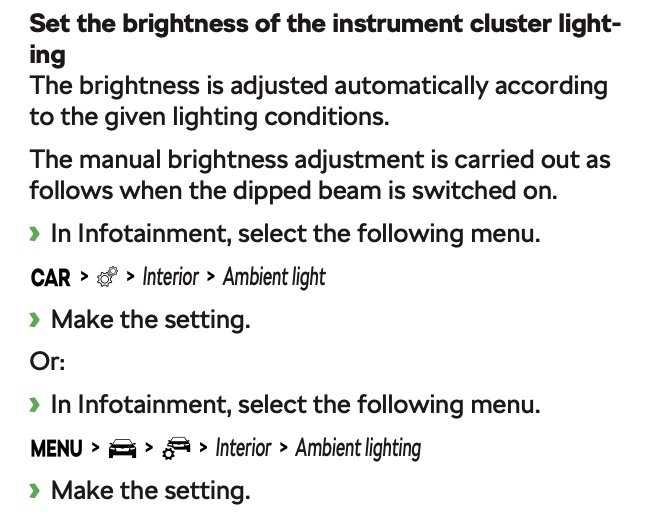
Yes, there is an automatic adjustment of the VC brightness based on the brightness or otherwise inside the car. There is also a manual adjustment (in my 2020 SEL FE at least) under the menu Car - Settings - Interior - Ambient light. My guess is that the update fitted in yours was set to a different default to the previous.
-
Have you tried using voice control? In mine I just ask Laura to “play album name” and it plays all tracks as expected. I note you’re in France, I don’t know if voice control supports the French language as well as it does English; hopefully it does.
-
I drove a 1.0 e-Tec Octavia for about five months a few years ago. It had a similar behaviour to that which describe; but as it was a loan car I never tried to work out exactly what it was doing, just assumed a quirk of the e-Tec system.
-
If I remember correctly, your Škoda ID has to be verified before it can be used as main user. Worth a call to a local dealer. I think it's all to do with privacy and security - the Main User can unlock the car from the app.
-
I just had a look at my car in the app. The digital certificate includes a section entitled "Standard Equipment" - pages 4 and 5 just after the service history.
-
Try forcing a reset - hold the on/off button for at least 10 seconds until it begins a reboot.
-
Blimey, how much?! When I first looked for mine four years ago it was £99 - and I decided that was too much!
-
The app has quite a bit of functionality, especially with models built more recently than mine, and AIUI, for the iV can manage charging times etc. There is a link to a shop through which additional features or services can be purchased. Auto headlight dip being one of them )assuming the vehicle supports it - which it should). Well worth having the app on your smartphone
-
Either a usb-c stick, CarPlay/Android-Auto, or some other Bluetooth source. No internal storage, no SD slot. I normally use CarPlay and stream audio but also have a usb stick in one of the front ports.
-
Quite different to the pre-FL virtual cockpit, more options yet less options! Or rather, just different options.
-
As you scroll through the options for each of the zones do you get a Settings item? In my pre-FL I do which allows for selection of items to show or hide in the scroll list.
-
Nope. Just USB-C ports; the two in the front console are for charging and media, any in the rear and the one by the mirror for charging only. A simple USB-C - USB-A adapter may well be enough, depends on whether the car sees the iPod as a media source (which IIRC, the iPod can be setup to emulate a USB drive so should work OK).
-
Could this work? https://www.smarthomesounds.co.uk/sonos-era-line-in-adapter
-
Mine’s not updating this evening
-
Mine is on v1941, not pushed for an update yet ‘cos it is working fine; no software issues at all. Adaptive cruise control on mine, an SE L First Edition; can’t remember if back in 2020 when the mk4 was launched if the SE L had ACC or if it was the First Editions that got it. The SE and SE FE didn’t have ACC as standard. It should be obvious if you try it on a test drive. And yes, very happy with my car.
-
IIRC the very early builds of the Octy4 on early versions of the infotainment system required a wired connection for Android Auto. Only later was wireless support added. As @RobL50 mentions, get the seller to update the s/ware prior to purchase (any Approved Used Škoda from a main dealer should be updated anyway - or at least that’s what the blurb on the website says).
-
So I think the Travel Mode applies only to Matrix headlights not the standard LEDs, for which Eurolights et al sell deflectors with fitting guides. From experience, the Eurolights version is very good - but finding the correct fitting position is critical. Out of five trips I only managed a perfect position for them twice. First attempt looked ok but basically had no effect, moving them about 5mm and they were fine. But moving them kills the adhesive, both flew off on the autoroute 🙄
- 12 replies
-
- disappeared
- headlight
- missing
- mode
-
Tagged with:
-
-
Not yet ☹️ I will chase them (again!)
-
You’ve probably seen the recent thread about the amazing economy of the manual 1.5tsi ACT. On long motorway runs my manual estate will comfortably return 60mpg. In the four years I’ve had mine the relative economy of the 1.4IV and 1.5tsi ACT has been debated in this forum but from memory not in threads which are obviously titled. A bit of time searching will hopefully reveal them. IIRC, some folk with the IV get 90+mpg on shortish runs where a reasonable proportion is on battery. Conversely, the long motorway runs give high 40s mpg. Caveat - those numbers are from memory, but should be in the right ballpark. It will come down to the mix of journeys you do. For me, the petrol wins because the vast majority of my mileage is long runs (Hampshire to N Wales or Scotland), and like you, about 16000 miles/year. Most of our short runs are the domain of the other half’s CityGo. The 1.5 drives nicely, plenty quick enough without the excitement offer by a VRS. It will cruise all day fully loaded at motorway speeds and surprisingly (to me) quiet & comfortable. For context, before this Octavia I had a manual mk2 1.4tsi Superb hatch (twin door boot/hatch).
-
Totally agree. Ever since getting mine, some 50k miles ago, I’ve been amazed at the fuel economy. Frequently top 60mpg on long motorway runs at/near the legal limit, and it’s often at or near @spcdust figure. Constant speeds help massively, and the ACT cylinder shutoff which @Ootohererefers to must make a big difference - it seems implausible to be on a near level motorway, sat at 70mph, running on two cylinders with an indicated 100+mpg.
-
That’s the style of headlight I have on mine; no means of adjusting the left/right hand drive setting for the headlights - only range (up and down). When I first got the car (nigh on four years ago) I fiddled with the Travel Option in the menus; made no difference. Since then I haven’t looked for that setting so don’t know if it’s there or not.
- 12 replies
-
- disappeared
- headlight
- missing
- mode
-
Tagged with:
-
Don't forget, to use your phones voice control, you need a long press, then google assistant (or whatever it's called) to take requests to play music. Laura would be good to play music from a USB stick.
-
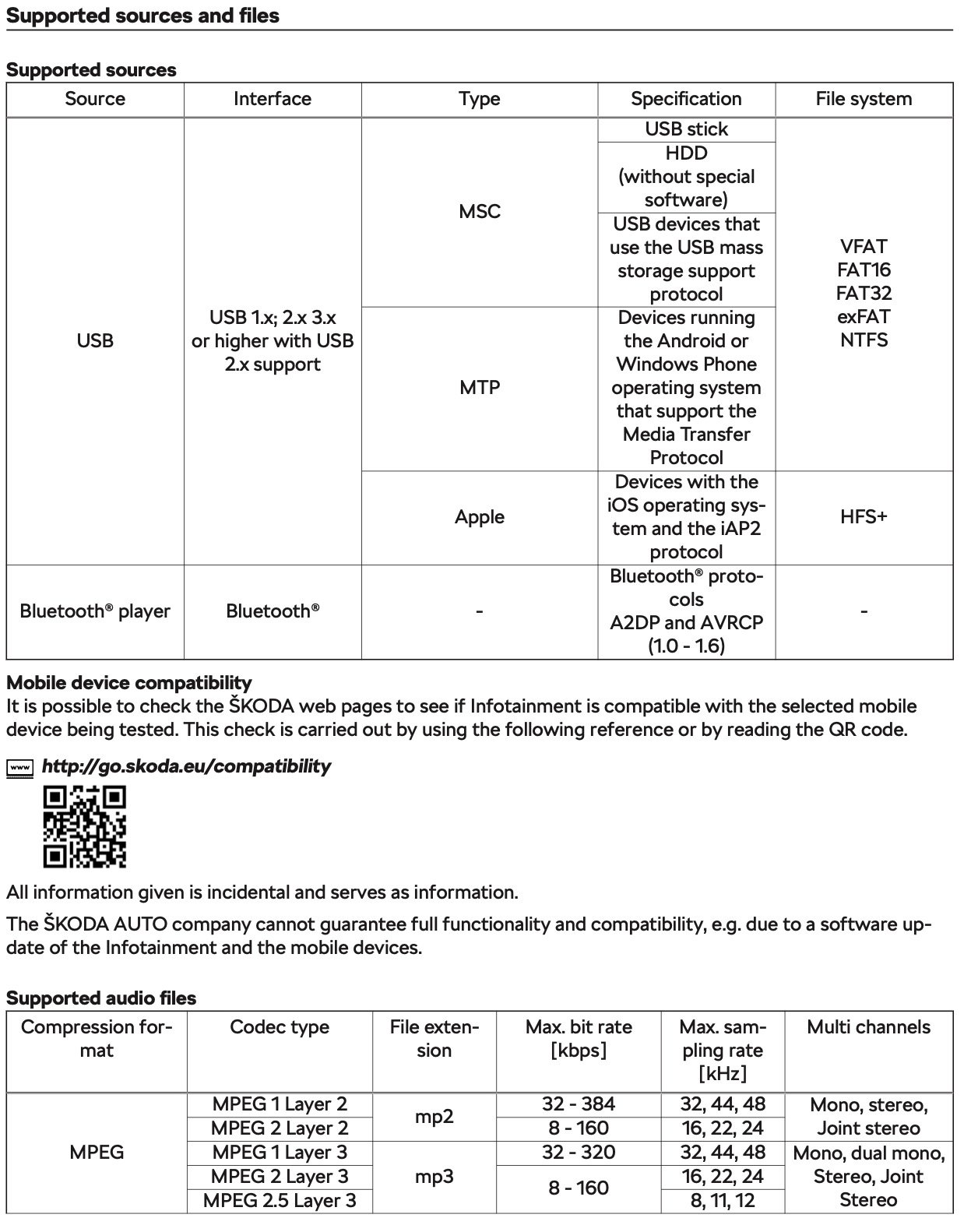
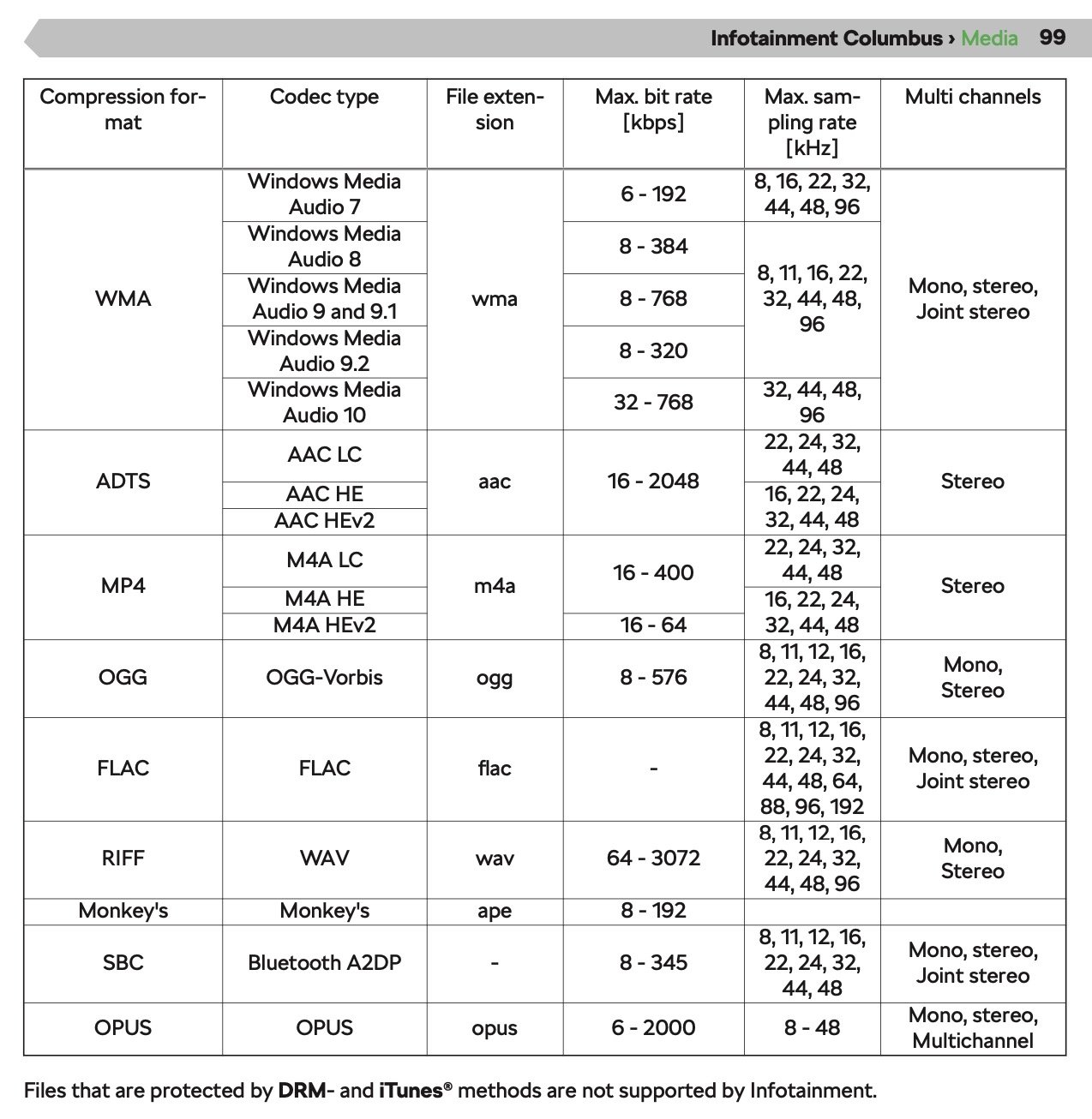
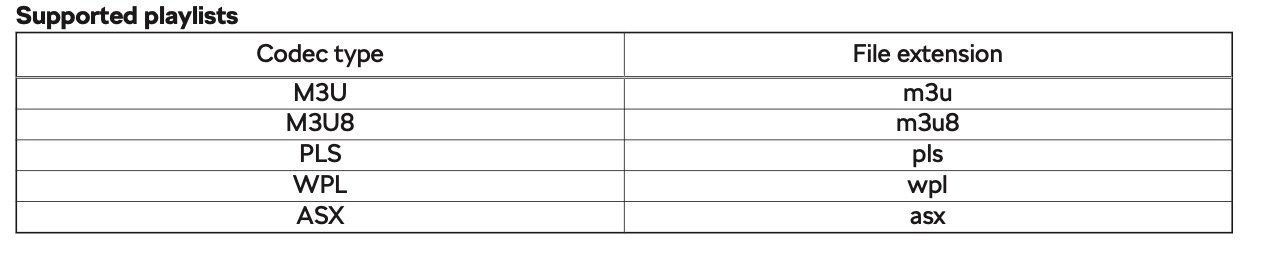
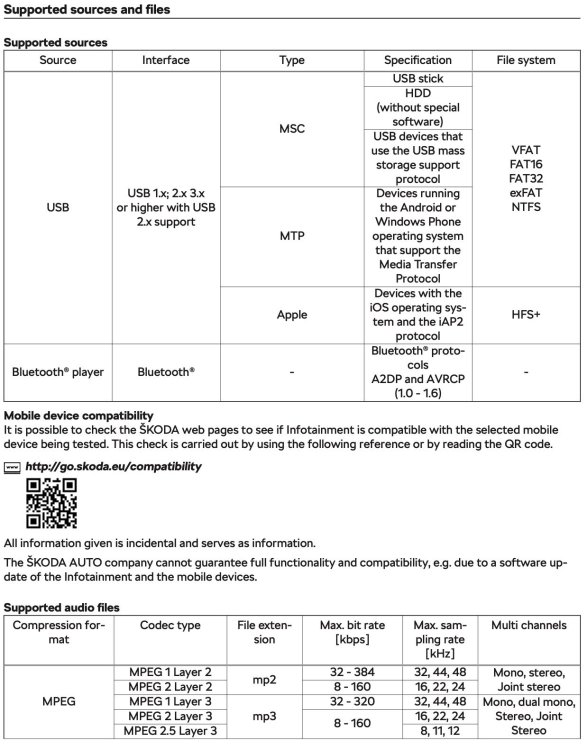
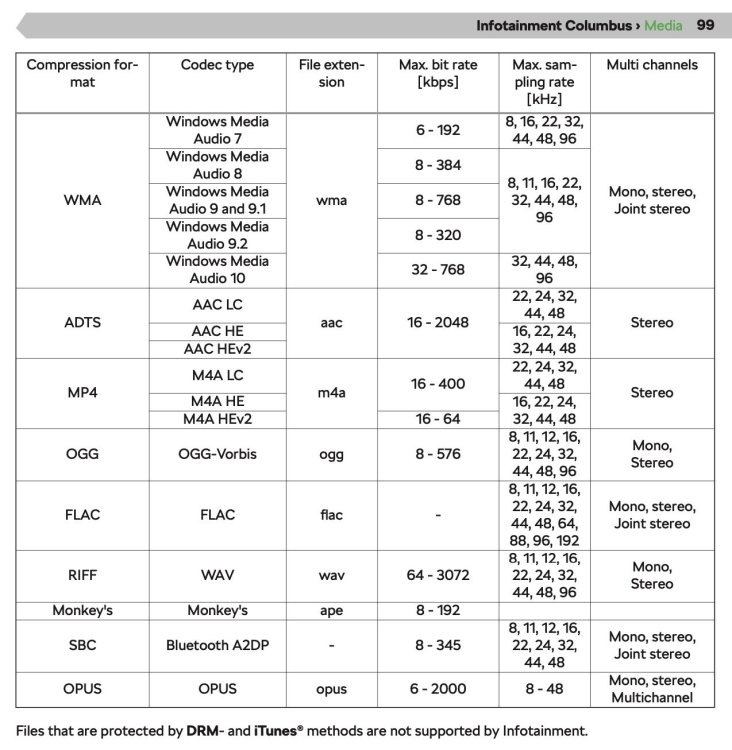
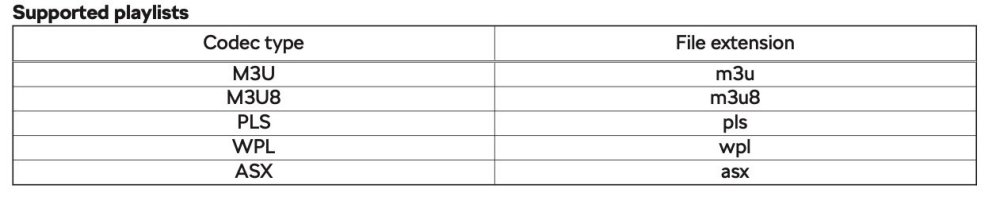
Welcome to the forums and your new Octavia. I'm not familiar with Android phones (I use an iPhone) but I think the Pixel 3a supports Android Auto (AA). That is probably the easiest way to access music, apps etc on your phone from the car. The voice control should work with your phone too. Once AA is set up, press and hold the steering wheel button until the phone asks for input (a short press will initiate Laura, the cars own voice control system). I've not had any issues using USB sticks for media. A simple FAT or FAT32 filesystem and folders full of mp3 files seems to work fine for me. I don't have any playlists though, but the car, in theory, supports several formats, for example m3u. A few screenshots from a pdf version of the manual below. Also, there have been a few threads about the best format for media files on USB sticks in the Octavia Mk4. Try using the search function within the Skoda Octavia Mk4 forum.
-
Open Navigation app in the infotainment system. Then… Settings: Route guidance settings: scroll down to Road signs: Speed warning. Choice of Off, Display, Display and sound.