pab567
FREEDOMTech
-
Joined
-
Last visited
Everything posted by pab567
-
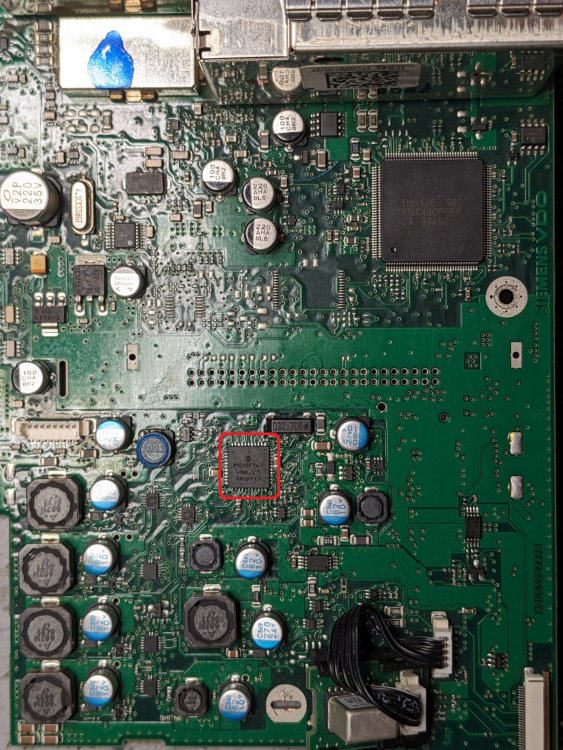
I'm in Poland so it does not make any sense to send it to me due to high costs. The IC that needs soldering is 8-bit microcontroller PIC16F747, I marked it red on the picture below.
-
It's not the issue of wiring, it's probably the well known problem of breaking soldering points of one of ICs. If I am right then the repair is quite easy - it's enough to have this IC resoldered.
-
It's enough to drive external aftermarket PA
-
In original setup: 8 speakers means front 2 tweeters and 2 woofers, rear 2 tweeters and 2 woofers 6 speakers means front 2 tweeters and 2 woofers, rear 2 wideband
-
SmartLink - fully understood. It can be activated in your current unit. BUt what do you need oem sat nav,which is always outdated and offline, for if you have SmartLink and can use online navigation, which usually is actual and has traffic information available?
-
-
I sent you on PM link to download firmware. Pls note it will requires maps re-installation after the upgrade.
-
According to parts catalogue, your car is equipped with MIB2 Bolero unit with DAB, part number 5Q0035842A and display unit 5E0919605H. What are you missing in this unit?
-
I'm sorry I don;t have any such message in my message folder 😞
-
Your VIN?
-
Glove box unit is MIB1 Amundsen and diaply unit is MIB2 - deifferent resolution,will not work.
-
-
No need to replace, try to reflash it. What is the current software version?
-
Nope
-
@Slink check your PM @donny_tsi you have the lates SW version @Pikolo follow below scheme: 1. format SD under FAT32 2. unpack to root (metainfo2.txt and all the folders must be placed directly on SD, not in any folder) 3. insert SD card into the slot 4. enter Service Menu (long press MENU button)
-
There is no emergency start procedure.
-
Contact Skoda dealer
-
Yes
-
Yes, it is
-
yes
-
Activated adaptation channels with word "google" and "apple"
-
It drives the ouptut level down to 5V to match external aftermarkjet amplifier input.
-
Have you tried to make a full reset of your stereo?
-
MIB STD2 PQ unit, no matter with or without OEM sat nav built-in
-
Do you have VCDS or any other diagnostics tool?