



RicardoM
Resident Member
-
Joined
-
Last visited
Everything posted by RicardoM
-
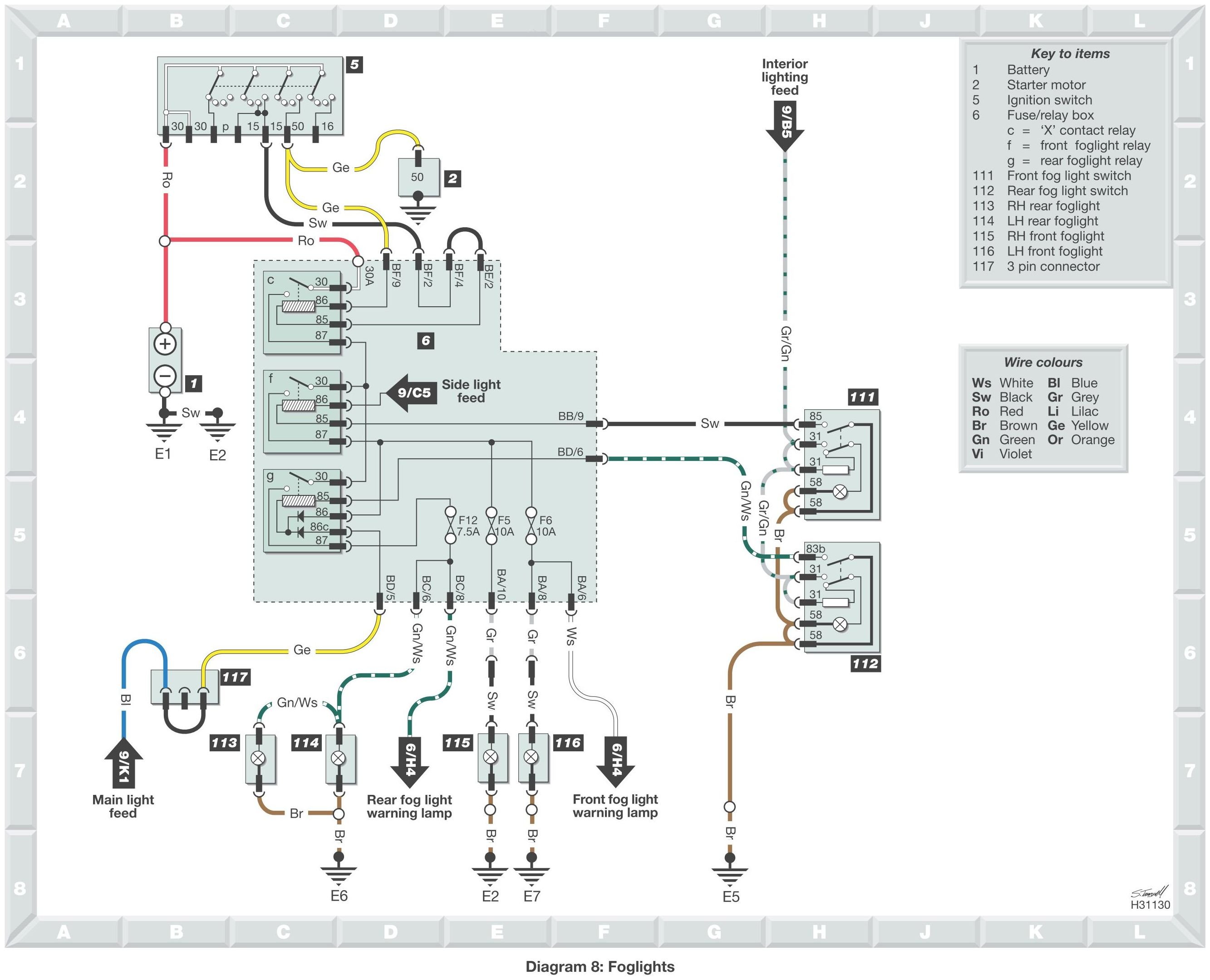
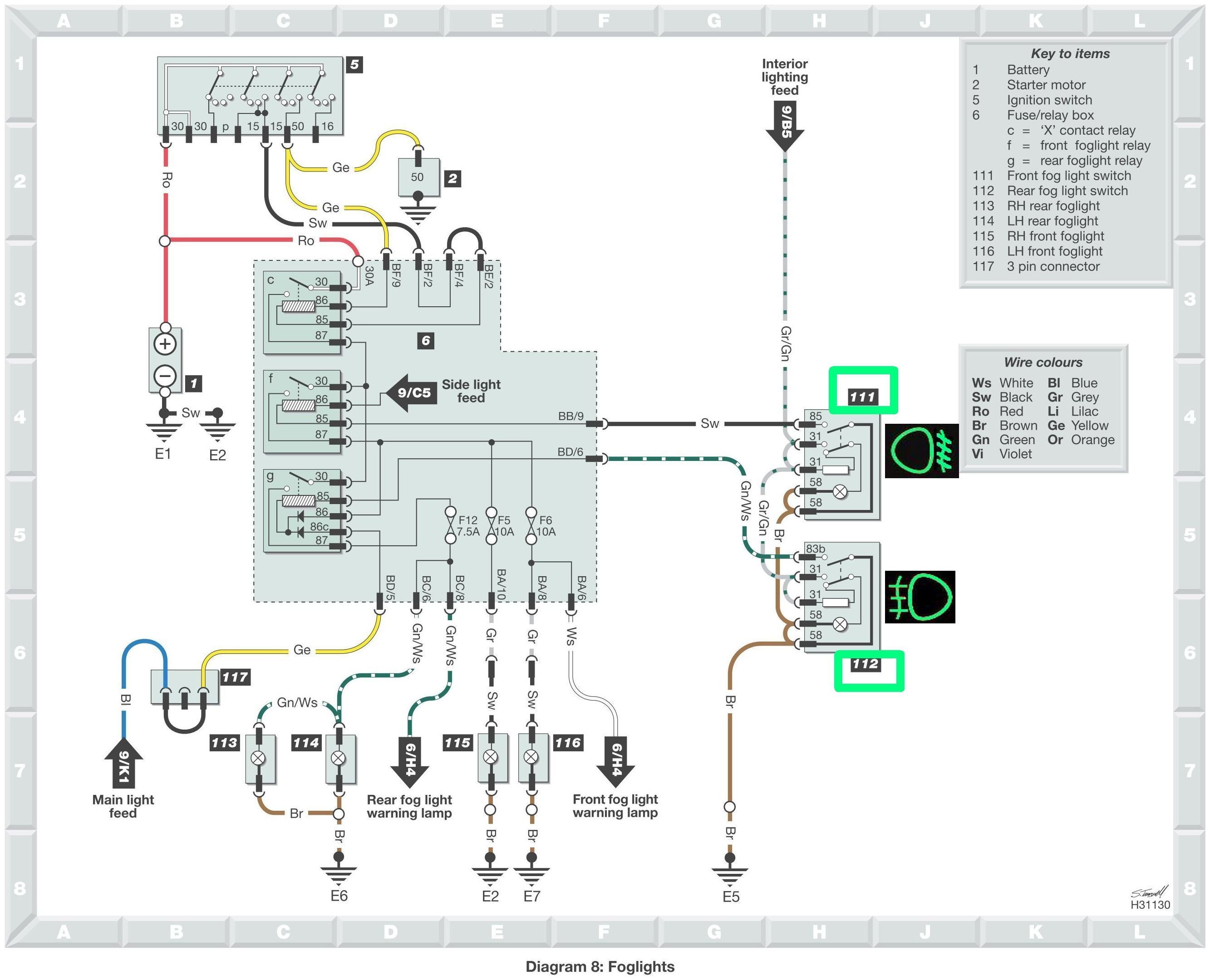
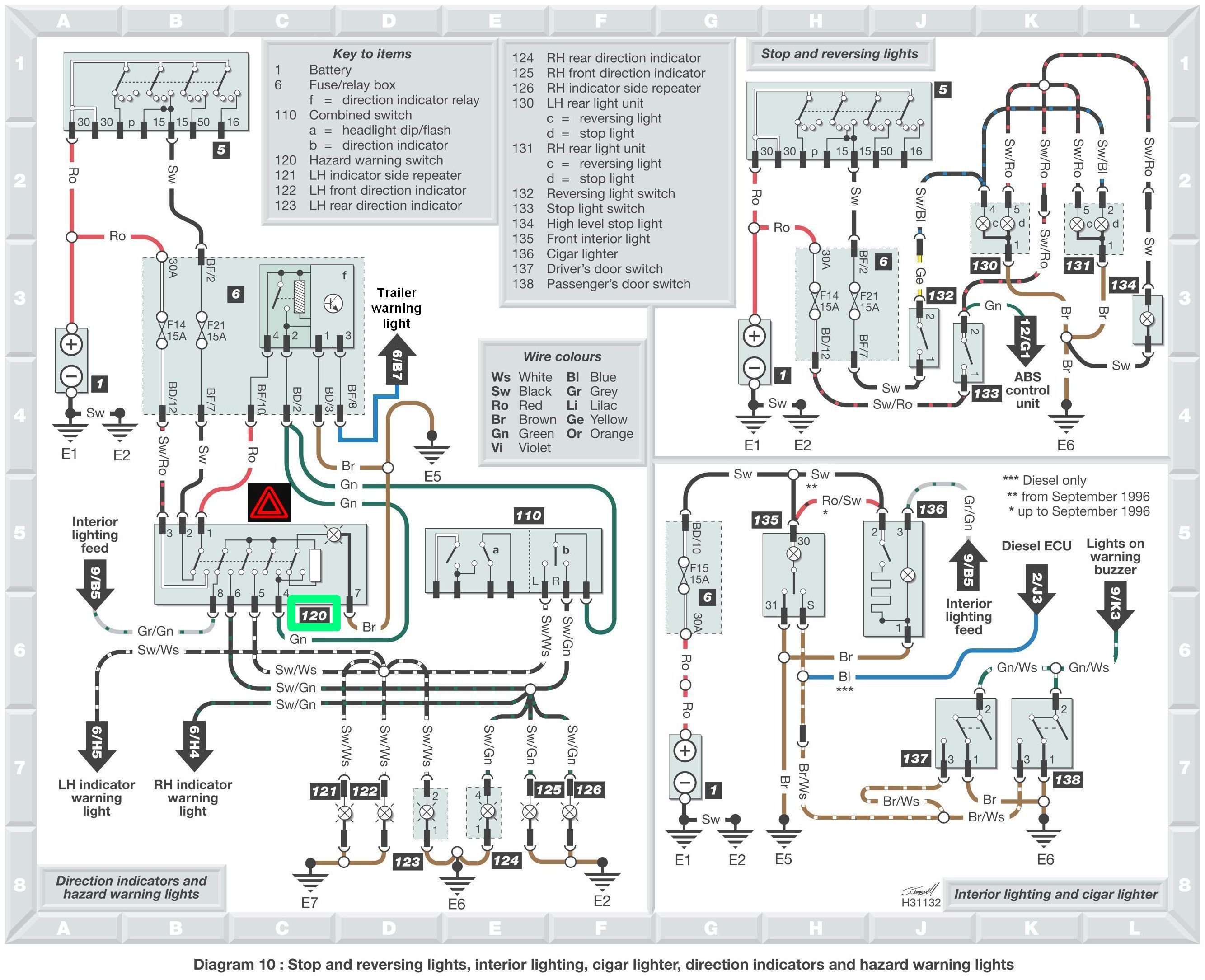
@Ledningen posted he has a Pickup from year 1997. No engine type, because who cares, isn't it? If you look in any wiring diagrams for 1997 Pickup (chapters 5/10, 30/10, 34/10 depending on engine type) you will see there is NO rear fog lights switch using 7 pins. Only 5 pins are used. Only after January 1st 1998, Felicia cars started to have 7 pins on the rear fog lights switch. Your Czech diagram (chapter 38/12) is for cars after January 1st 1998. Somebody is clearly mistaking. And it is not me.
-
I am talking about 5 INSTALLED pins from 8 slots of the switch. Duh... All switches on the dashboard have 8 slots. The hazard lights switch is using all 8 of them. The rest have 5 pins except side lights switch that has 4 pins. The wiring diagram is perfectly fine. Feel free to prove me wrong and provide OP the 'correct' diagram. How about posting a photo of your rear fog lights switch (pins side) ? What engine has your car? Does it have DRL?
-
-
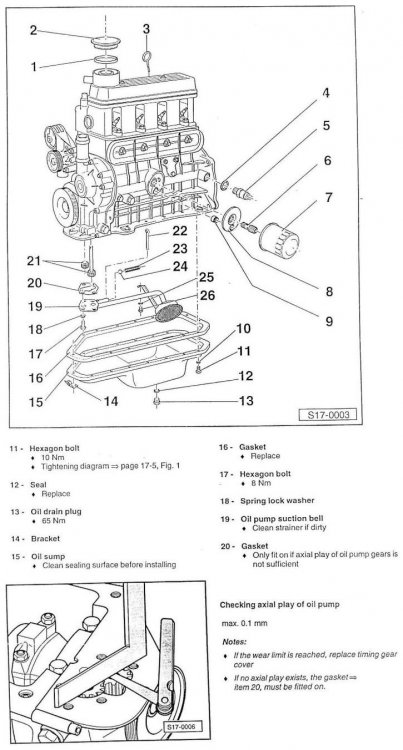
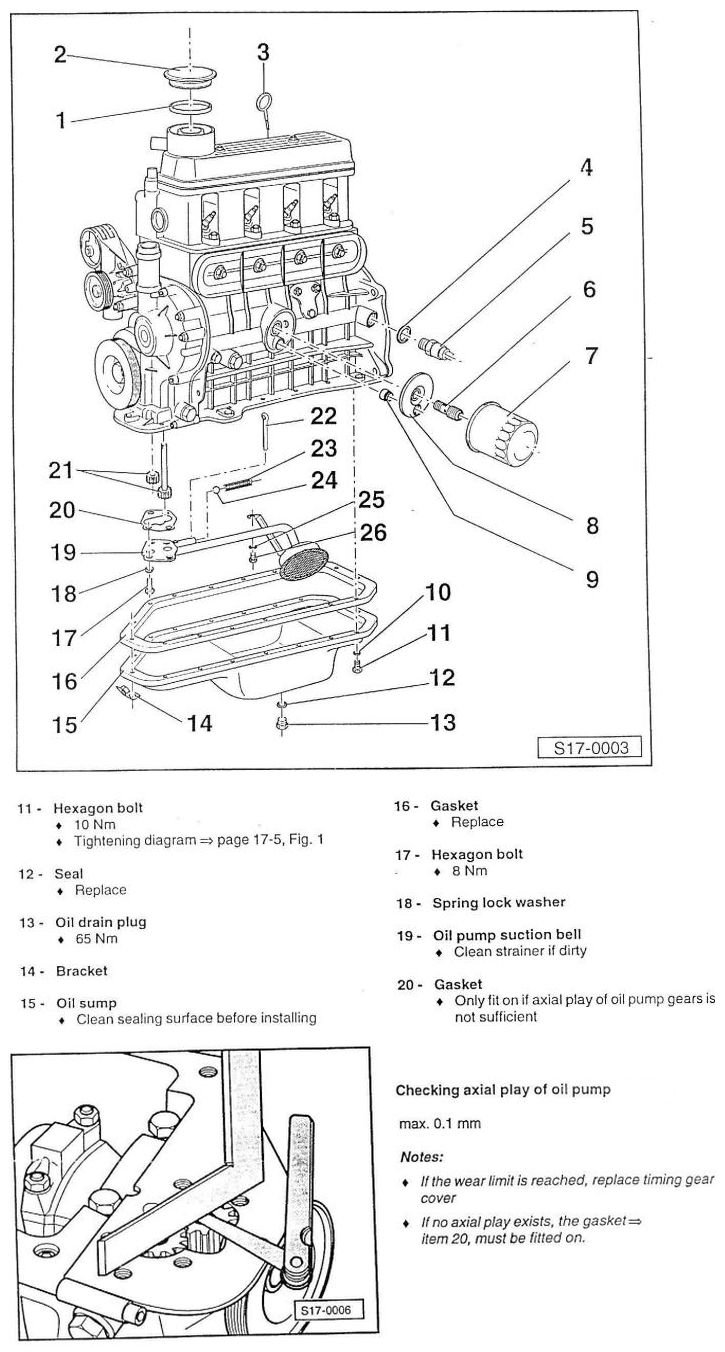
Probably the lack of that gauge is true only on some lower end Fabia 2 cars.You mean Fabia does not have a coolant temperature gauge??Relax and drive. Cars technology, engine oils, etc evolved a lot. Your car is modern.Modern cars require you start the engine and drive immediately. As for the blue engine light, leave it alone. The engine should warm up as soon as possible. Only at 90 C its performance is optimal and the consumption is minimal.That is quite a different kettle of fish. Now, to be clear about the throttle valve getting dirty, here is an explanation. As carbon deposits build up on the sides of the throttle plate and on the throttle body itself, the valve doesn't close as it should. That makes the idle erratic or lower in time as the air flow is disturbed. The ECU has a limited amount of possibility to adjust the idle automatically in relation to the angle of the valve at idle. Now, after cleaning the valve, the new values of the throttle plate angle (closed, middle, fully open) need to be relearned. That is called a throttle body reset.That cable will work, except it is not OBD2 as advertised but OBD1. It is a cheap China clone (read hacked) of VAG-COM from Ross-Tech. It may or it may not have the "registered" (read cracked) software (VAG-COM release 409.1) on a CD.None. Felicia complies only to OBD I.By the way, that is total nonsense.Throttle Body Alignment (TBA)Connect a VAG-COM scanner and look for stored errors.I thought that you don't know where is the second pin of the sensor. I don't have the temperature/resistance characteristic for CTS used on BMM engine cars. The alternative is to use the VAG-COM scanner to check the temperature with engine cold then with engine warm.The second pin is the ground/chassis.RicardoM replied to Mohamedelbana's topic in Skoda Favorit, Skoda Felicia, Skoda Fun and Skoda FormanMy car has AC from factory. It has bigger radiator, same fan as non AC cars. It is standard for countries with tropical climate.Debris from where? Do you have evidence for that? I mean an oil pan is not exactly a recycle bin if the car has been serviced well. The oil pressure builds using the teeth, not the sides of the gears. You can try resurfacing the cover of the pump using fine sandpaper fixed on a flat, hard surface (a sheet of glass will do too). Start with 120-grit then go up to 400-grit. The idea is to have a maximum axial play of 0.1 mm.
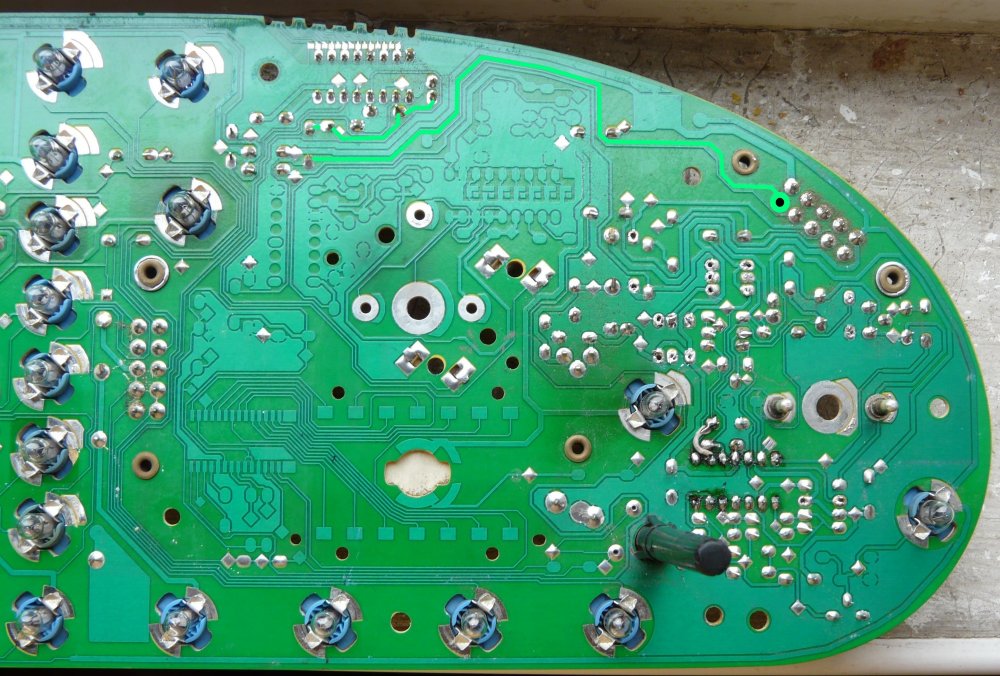
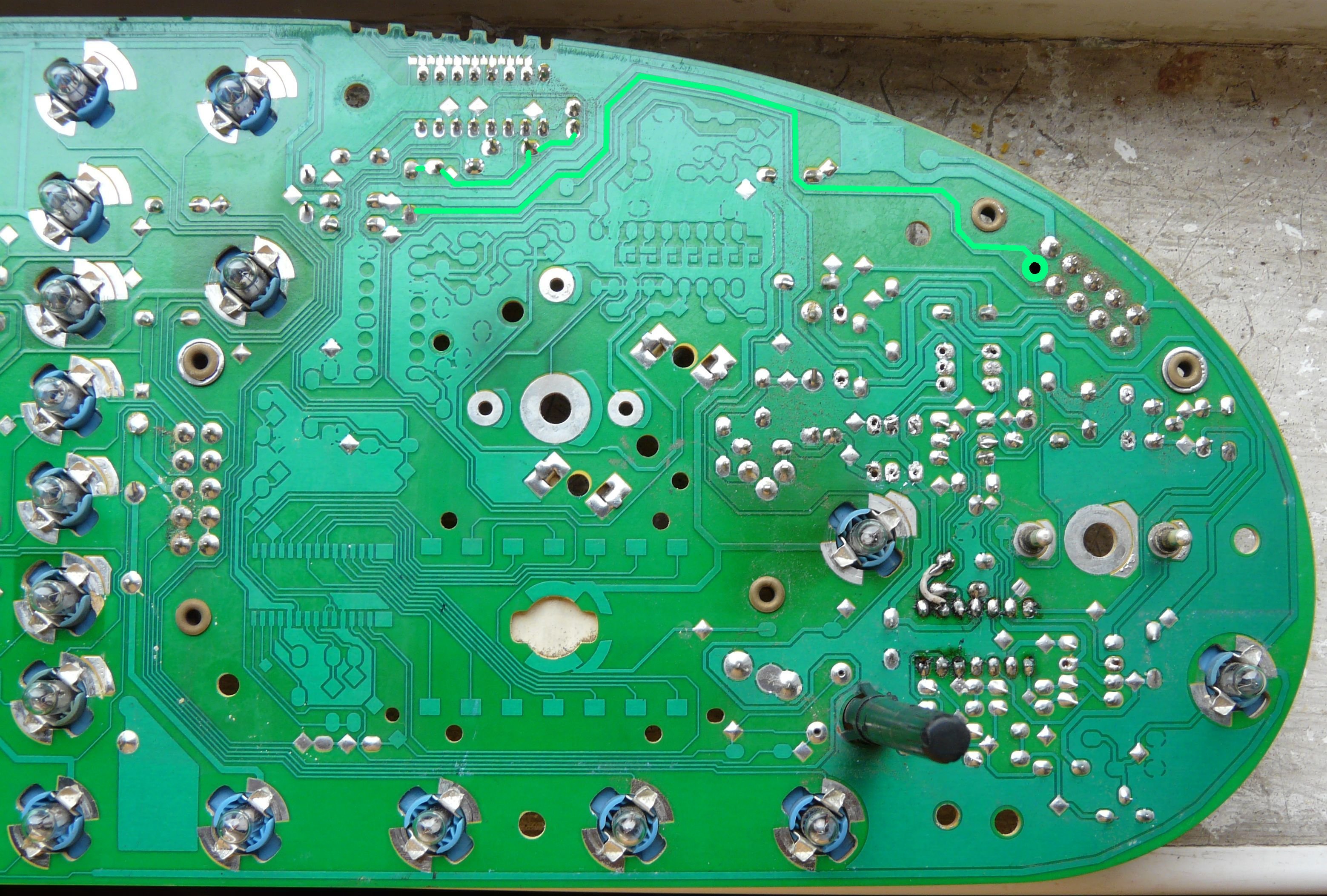
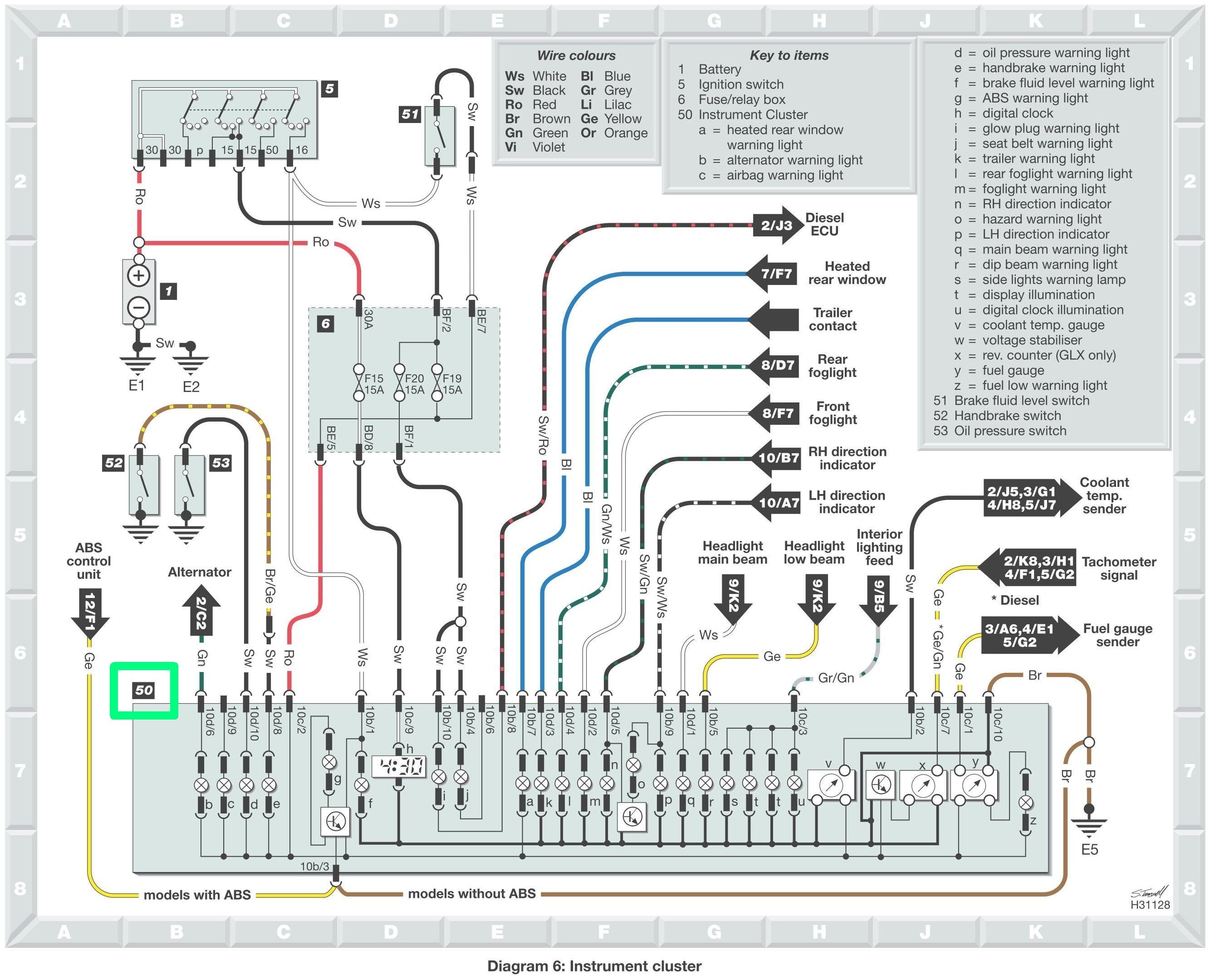
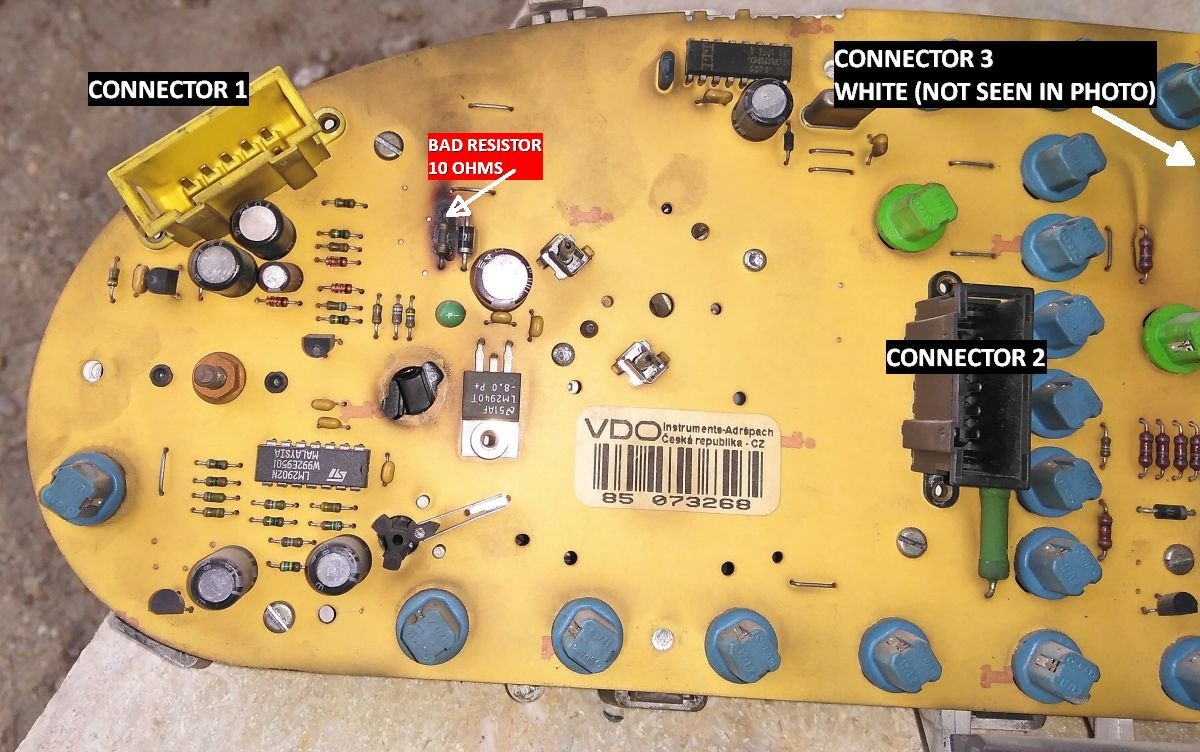
 One more thing. The resistor got burnt because you reversed the wires at fuel sender. Before connecting the repaired PCB, you have to connect the wires correctly to fuel sender.I haven't seen oil pumps for Felicia 1.3 sold as a whole. Try searching by components: gears, cover. More worrying is the cause for the scuffing and wear of the metal parts. The pump didn't have enough axial play.I marked for you the copper trace and the connector pin for the clock. Resolder the traces, joints, or use a fine piece of wire to restore the continuity. Also check if the pins of the clock make good contact with the board.
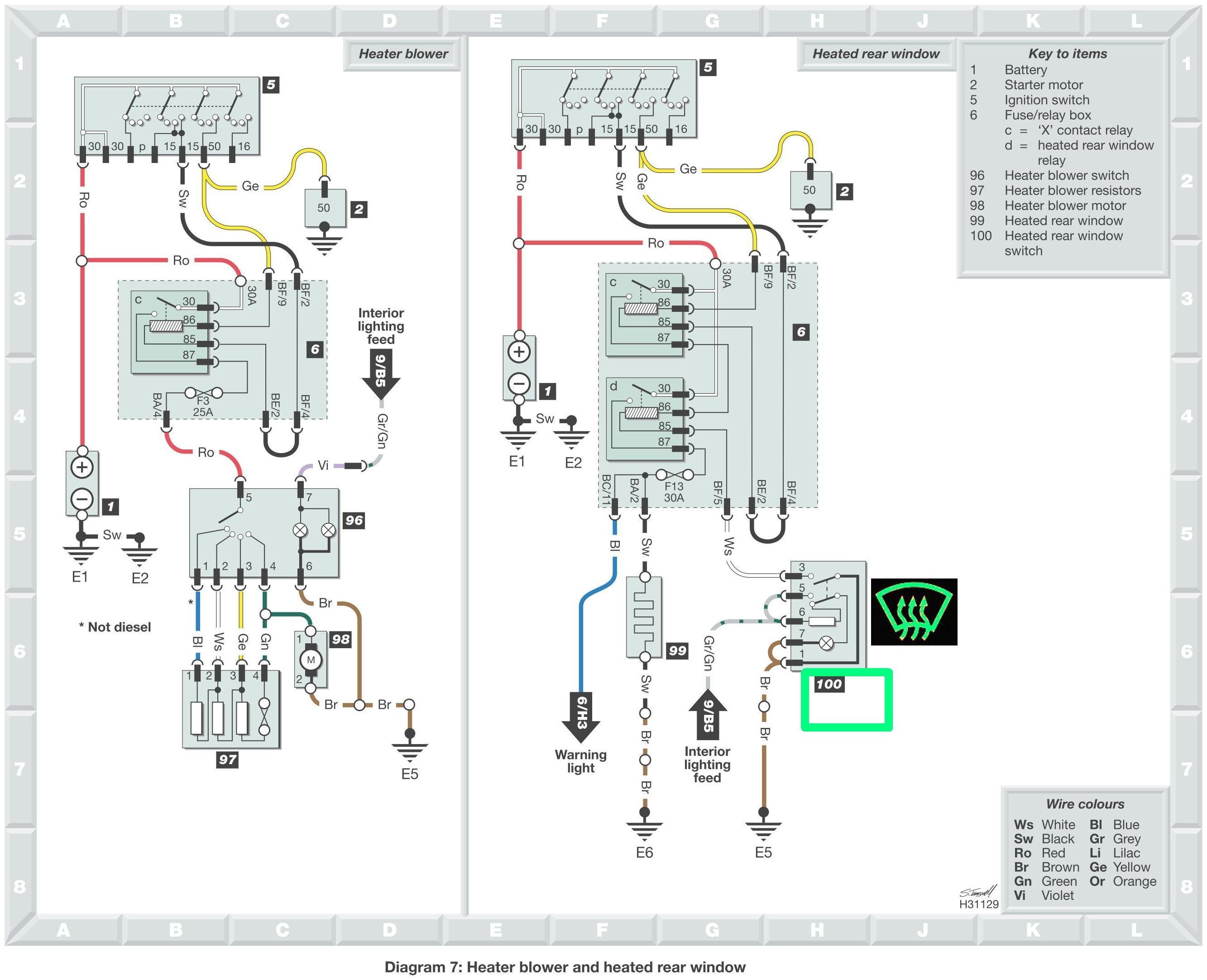
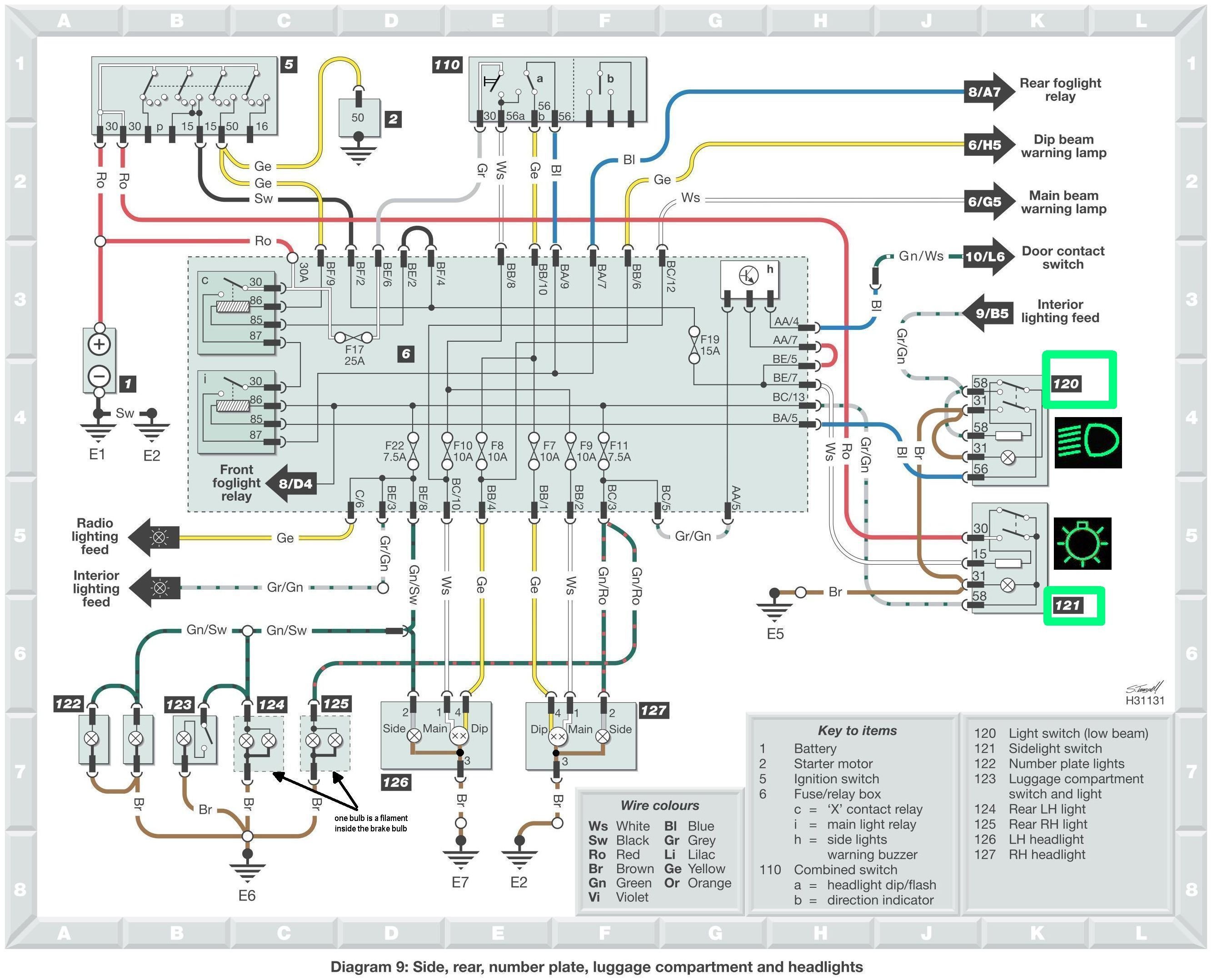
 I will send you later the wiring.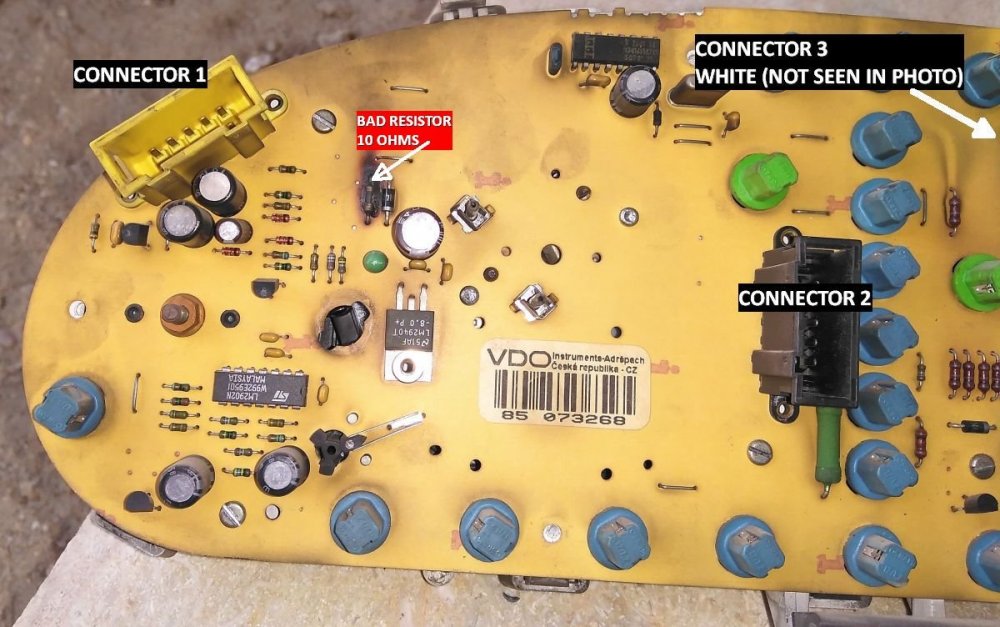



Important Information
Welcome to BRISKODA. Please note the following important links Terms of Use. We have a comprehensive Privacy Policy. We have placed cookies on your device to help make this website better. You can adjust your cookie settings, otherwise we'll assume you're okay to continue.
Account
Navigation
Configure browser push notifications
Chrome (Android)
- Tap the lock icon next to the address bar.
- Tap Permissions → Notifications.
- Adjust your preference.
Chrome (Desktop)
- Click the padlock icon in the address bar.
- Select Site settings.
- Find Notifications and adjust your preference.
Safari (iOS 16.4+)
- Ensure the site is installed via Add to Home Screen.
- Open Settings App → Notifications.
- Find your app name and adjust your preference.
Safari (macOS)
- Go to Safari → Preferences.
- Click the Websites tab.
- Select Notifications in the sidebar.
- Find this website and adjust your preference.
Edge (Android)
- Tap the lock icon next to the address bar.
- Tap Permissions.
- Find Notifications and adjust your preference.
Edge (Desktop)
- Click the padlock icon in the address bar.
- Click Permissions for this site.
- Find Notifications and adjust your preference.
Firefox (Android)
- Go to Settings → Site permissions.
- Tap Notifications.
- Find this site in the list and adjust your preference.
Firefox (Desktop)
- Open Firefox Settings.
- Search for Notifications.
- Find this site in the list and adjust your preference.