langers2k
Resident Member
-
Joined
-
Last visited
Everything posted by langers2k
-
A 2017 Superb is a MK3 pre-FL and would have either halogen or bi-xenon headlights depending on spec. If it has smart light assist I think it can also change the beam shape. Completely different to the LED system in a MK3 FL Octavia
-
You should get it scanned for faults, it does feel like there might be a comms issue between the headunit and CAN gateway though
-
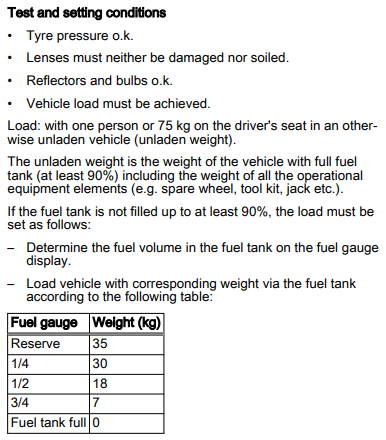
I'd forgotten how much I dislike OBDeleven output 😆 Looks like you've been messing with almost everything in that module at some point, what are you trying to achieve? Anyway, I don't think the lcode has been restored properly, it should be: 000000070100046E00003D01010000000000000000000000000000000000 It doesn't look like these adaption changes have been reverted either: Adaptation Control unit: 4B Multifunction Module Name: Installation list, specified installations Values: Light Control Left: Old value: No New value: Yes Light Control Right: Old value: No New value: Yes You then need to perform basic settings on a flat, level surface, whilst meeting these requirements: If you think it's still low, pop to someone with a headlight alignment device to check and adjust as necessary. For reference, this is a full list of what I think you're original adaption channels should be: Adaptations: Activating and deactivating all development messages: ---: not active Presentation mode: ---: not active Activate left/right hand drive switch-over: ---: not active Presentation run dynamic AFS light: ---: not active Adaptive light functions: ---: active Matrix light, total dimming: ---: 100 % Matrix headlamp, function at standstill: ---: not active Bit pattern of individual segment activation, left headlight: ---: all off Bit pattern of individual segment activation, right headlight: ---: all off Rear seat fan, characteristic curve: ---: all 0 % Production mode: ---: not active Deactivate production mode: ---: Deactivating Reference_Run_Start_Condition: ---: Engine start Reference_Run_Activation_Effect: par_Reference_Run_Activation_Effect: Activation effect disabled Order_Reference_Run_Activation_Effect: par_Order_Reference_Run_Activation_Effect: No dependency Installation list, specified installations: Multifunction Module: Yes Multifunction module on the second bus connection: Yes Light Control Left: No Light Control Right: No Light Control Left 2: Yes Light Control Right 2: Yes
-
That's normal. The LEDs fitted to a MK3 Octavia can only move up/down and can't change the beam pattern or direction. Maybe start by posting an autoscan so we can see what modules your car has, how they are configured and any fault codes you might have. It might also help if you say what you've been changing in 4B too
-
Maybe start with an autoscan, adaption map from 09 and a list of what you changed?
-
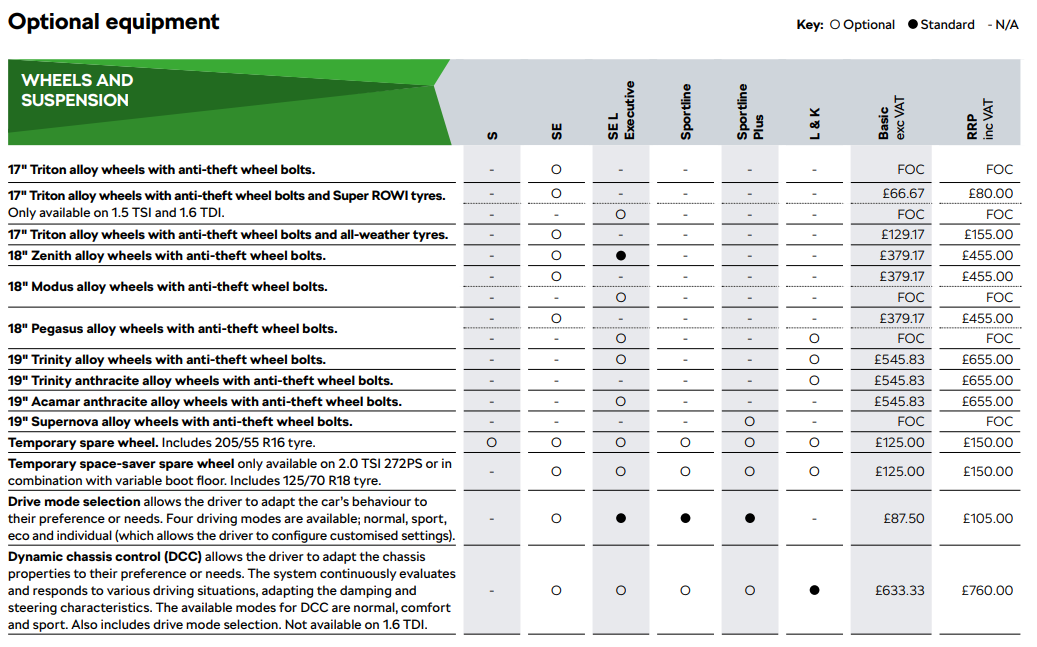
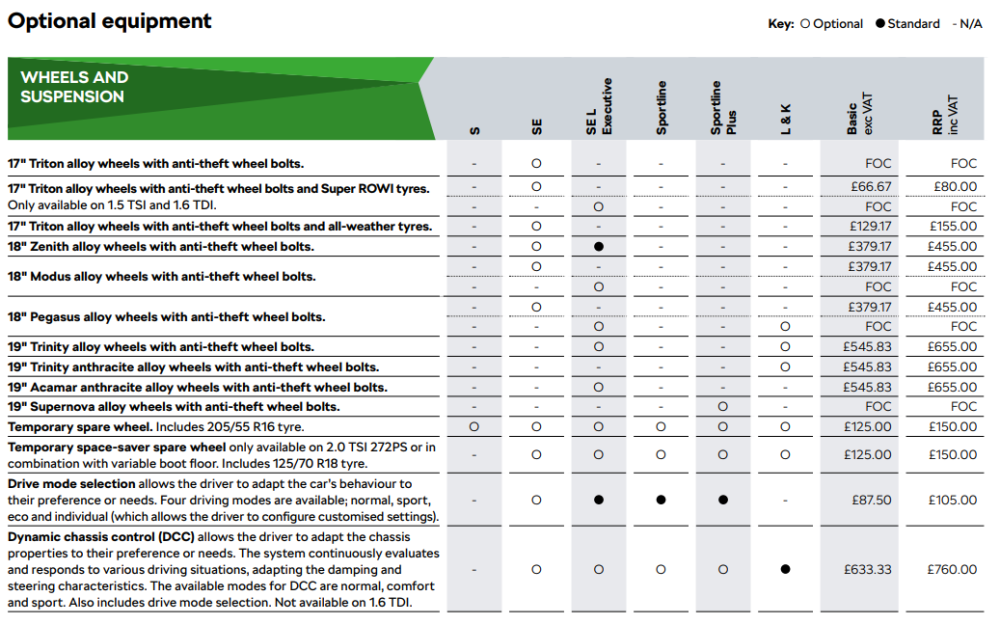
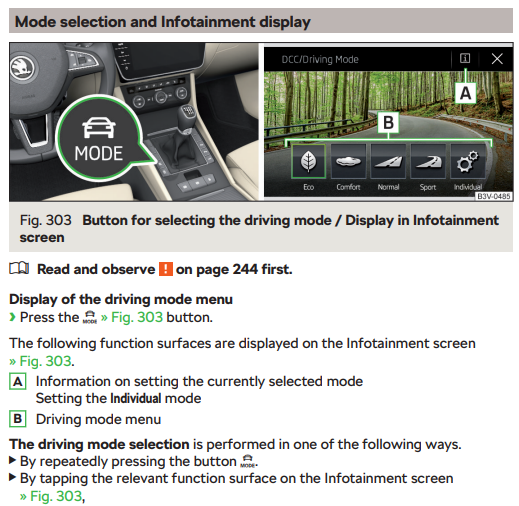
Your car probably doesn't have "Drive mode selection". It's not fitted to all cars - do you have a button? From a 2019 UK brochure showing which spec levels get driving modes:
-
ACC is adaptive cruise control, the driving mode will change how aggressively the car accelerates to keep the distance you've set. It has nothing to do with DCC (dynamic chassis control).
-
Probably not. I'm not familiar with Romanian/European spec levels but at least in the UK, I think only the L&K got DCC as standard in 2019 (it was an optional extra on the SE/SEL/Sportline). If you wanted to retrofit it, you'd need to replace the dampers/shocks, add wiring, add a DCC controller and do any relevant coding. Quite a task
-
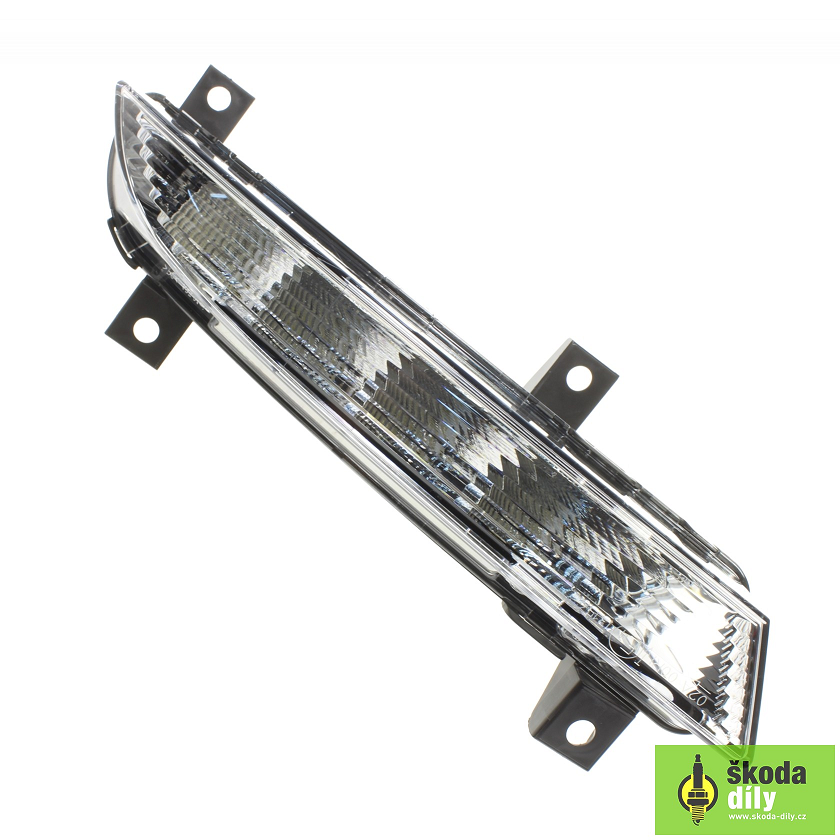
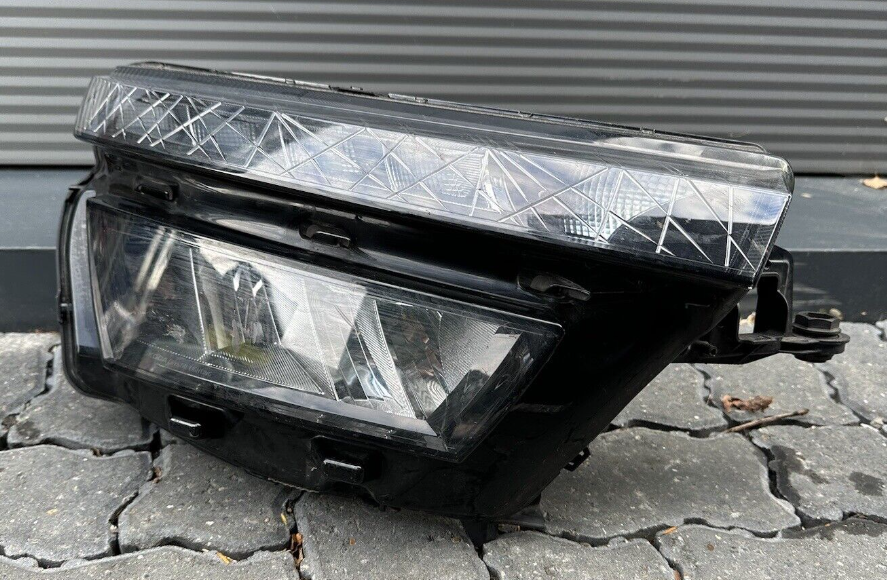
The DRL and headlight are all one unit, you can't split them: It'll take considerable force as it's a moulded part of the headlight housing. Although there is a designed weak spot, it won't be easy to snap/lever out which is why it's a bumper off job to get good access. Please make sure you've sourced the repair cap before you remove it
-
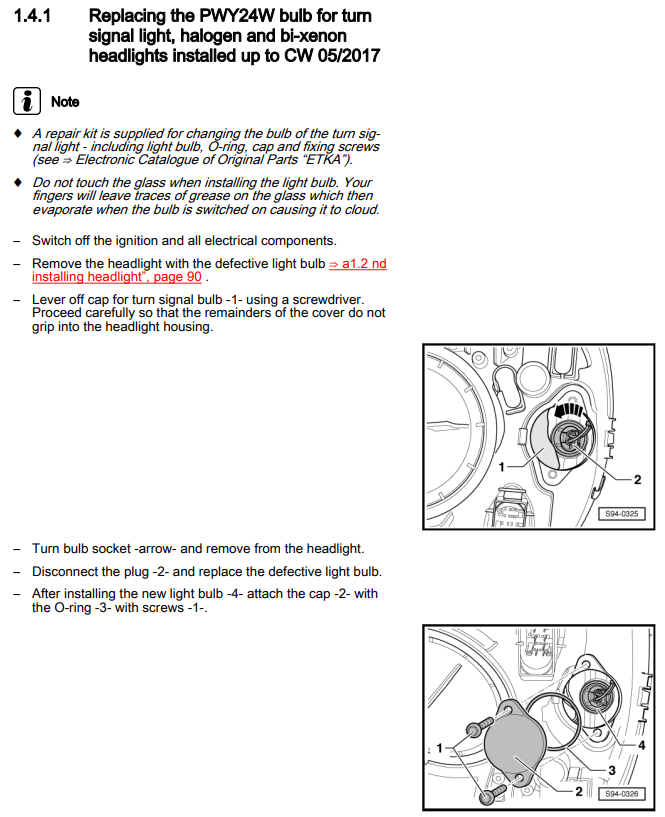
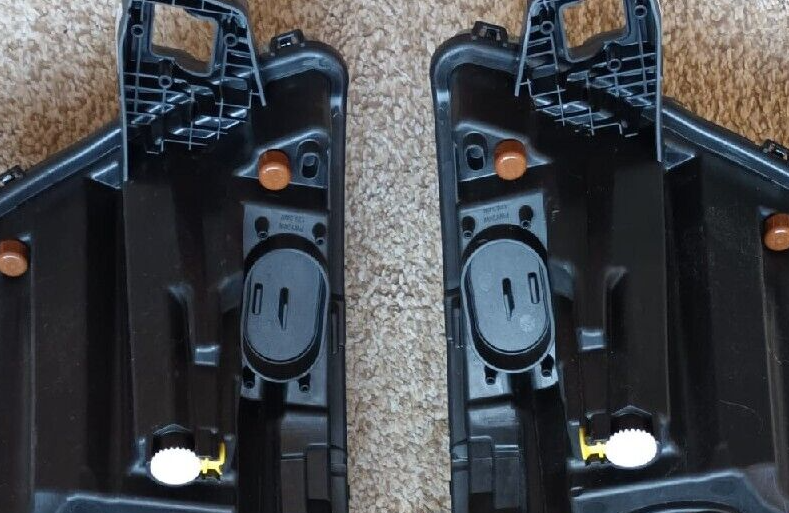
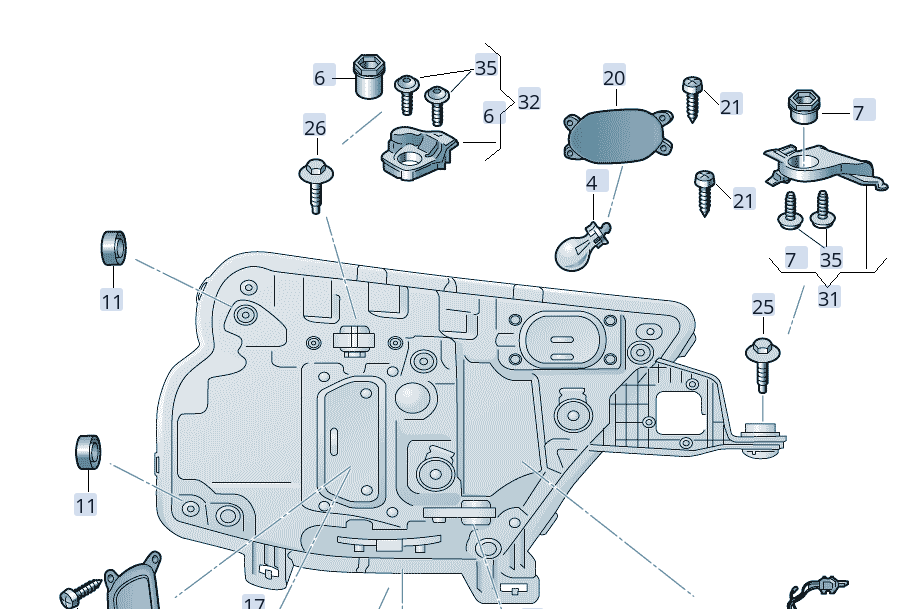
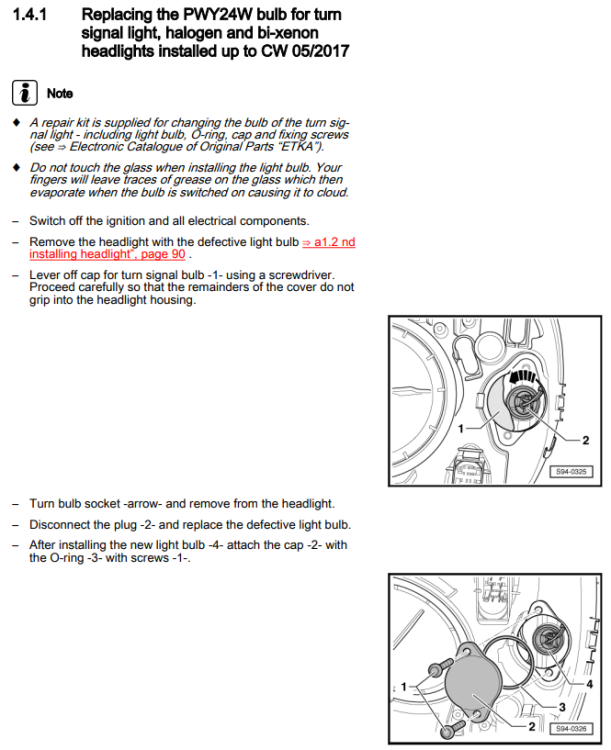
I'm afraid to say, the official method is likely to be removing the bumper and then the headlights. It appears to be similar to the Yeti and MK3 Octavia where there is no access panel for the indicator: You'll need to cut/snap that panel out then find a repair cap (part 20) plus screws to cover the hole: To give an idea of what's likely to be involved, the Erwin instructions for a Yeti can be found here: https://www.briskoda.net/forums/topic/177401-indicator-bulbs-replacement/?do=findComment&comment=2137088 MK3 Octavia is pretty much the same, namely remove bumper, remove headlight, snap out panel, fit new bulb, fit repair panel and reinstall everything:
-
They are designed to come out very easily so you can replace the bulbs. It should all covered in the owners manual. I'd probably remove the damaged one to check the part number and source a good quality used one, as you might find a brand new one looks odd compared to the original one on the other side. Whilst it's off, check the indicator bulbs as the yellow can flake off with age 👍
-
It depends. If it had driving modes from factory and there are no wiring/button faults. Any dealer/garage using ODIS with an online connection to VAG can restore the original dataset/coding/licenses which should fix it. If it didn't have driving modes and someone has just added the button. Then you'll need to find a third party retrofitter to apply any dataset/licenses required.
-
It'll depend on the circuit but if I remember correctly, most internal fuses are either standard or mini blades.
-
I tend to use Anker cables, they seem good quality and relatively inexpensive.
-
It probably depends what headunit you have. I would expect some are in the glovebox as normal, others will be behind the screen like this:
-
The LED bars are dual use for both sidelights and DRL on the vRS. Might be worth putting your dipped beams on to see if they function as sidelights otherwise you'll still have MOT issues I'm afraid.
-
Perhaps try messaging local VCDS owners to see if anyone can help There is a map here: https://www.briskoda.net/forums/topic/224376-vcds-owners-map/ And a list here: https://www.briskoda.net/forums/topic/262215-list-of-vcds-owners-previously-known-as-vag-com-vcp-owners/
-
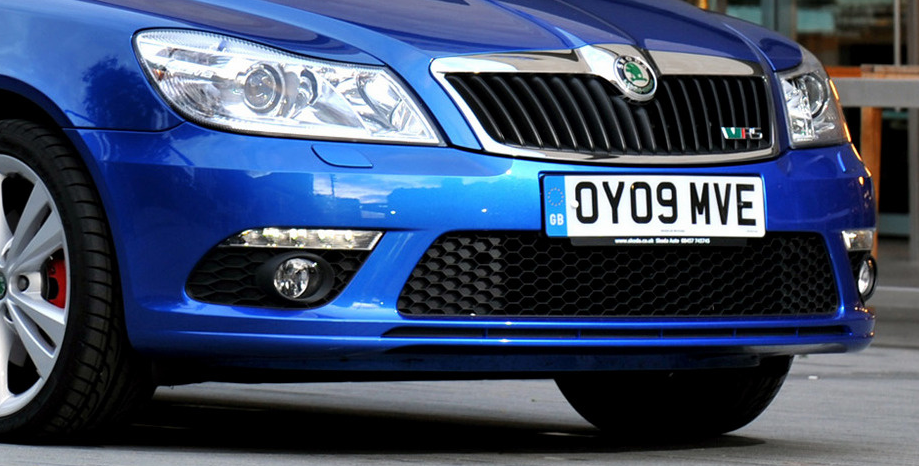
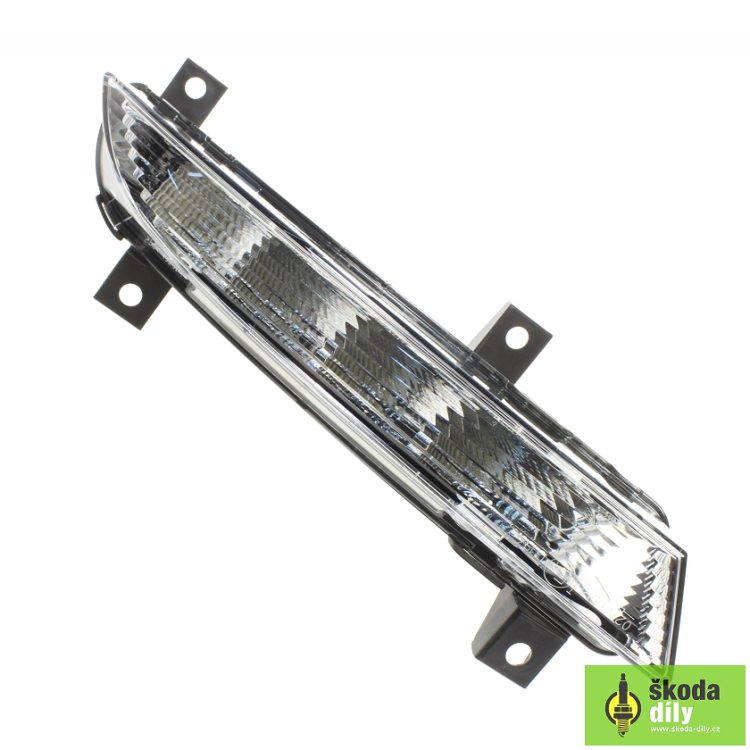
As above, your link isn't working I'm afraid. A 2010 vRS should be a MK2 FL and have a frontend like this: If so, the LED sidelight/DRL bars above the fog lamps are stock and fitted to all vRS of that age. I believe the correct part numbers are: - 1Z0 941 067 (left) - 1Z0 941 068 (right) They are attached by screws to the inside of the bumper: Which means the official removal method probably involves removing the front bumper for access
-
I expect it's genuine, they asked the same on the Yeti forums and based on their username/profile picture, they are a dealer. It's quite possibly this car they are having issues with: https://orbitautos.co.uk/vehicle/name/skoda-yeti-se-tsi-dsg/
-
Are the part numbers not stamped/molded into the trim/switches? If they are none on eBay, a dealer should be able to order them direct for you
-
Unlock the steering wheel with the lever on the underside. Pull/push to adjust. If it's never moved since new, it might be quite stiff but should free off quickly
-
The screen won't fit. The glovebox unit should fit but I think you'll need to change the HMI. Maybe @pab567 can add more info.
-
I'd be tempted to check the voltage input to the two ballasts to see if that matches the battery/alternator voltage or not. Just be careful not to go near the high voltage side!
-
At a guess, your car has a MK60 based ABS pump. When you swapped the clusters, the ABS pump will have noticed the VIN mismatch and wiped it's own coding. The easiest solution is to have Skoda or someone with ODIS online recode the module pulling the correct coding data from the VAG servers. You can try and generate a working code yourself but there is no guarantee it'll be 100% correct. A VCDS autoscan or similar will help confirm the issue and may help folk suggest a working coding.
-
You mention the bulbs are new, did you have the same issue before you swapped the bulbs? Also, where did the bulbs come from as there are lots of fakes out there...