langers2k
Resident Member
-
Joined
-
Last visited
Everything posted by langers2k
-
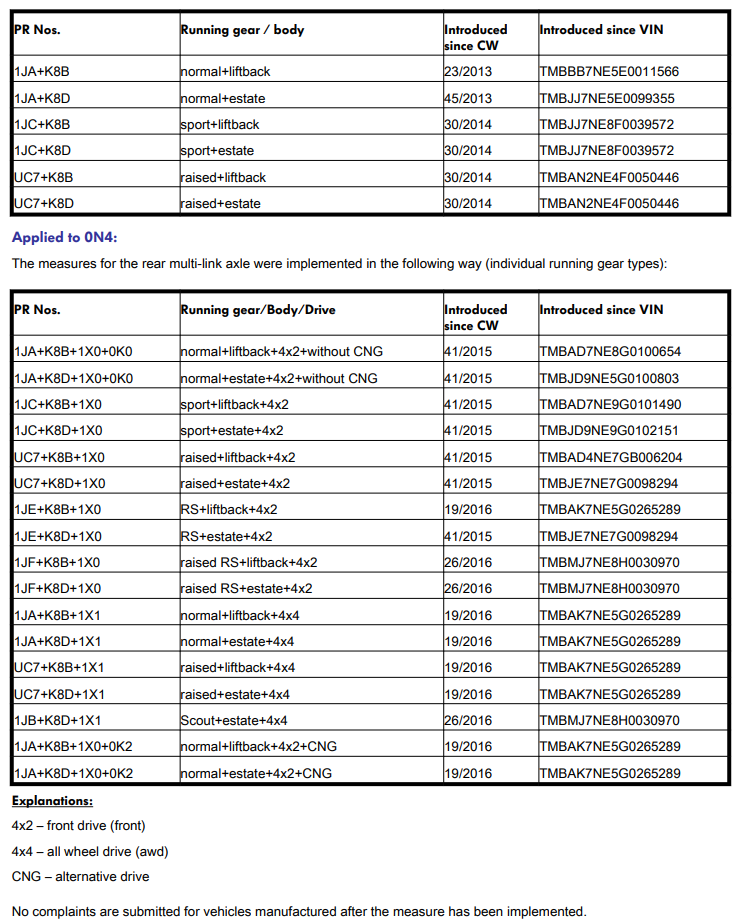
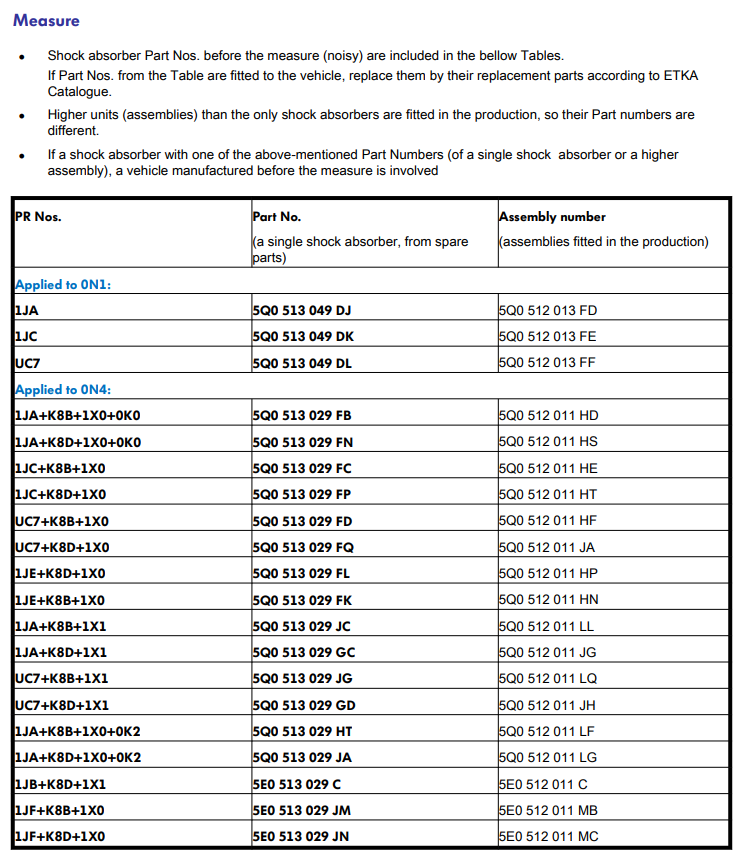
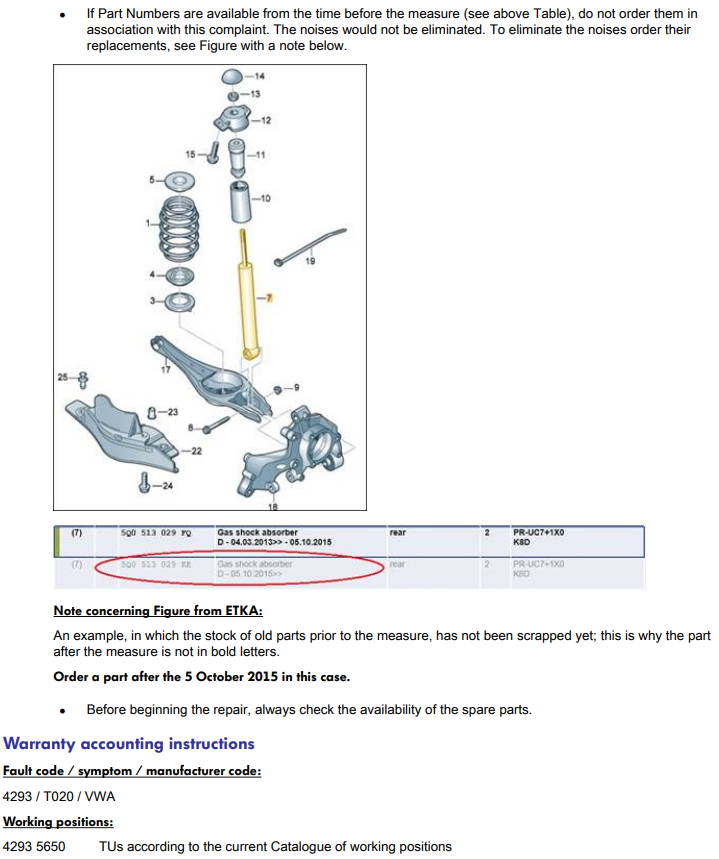
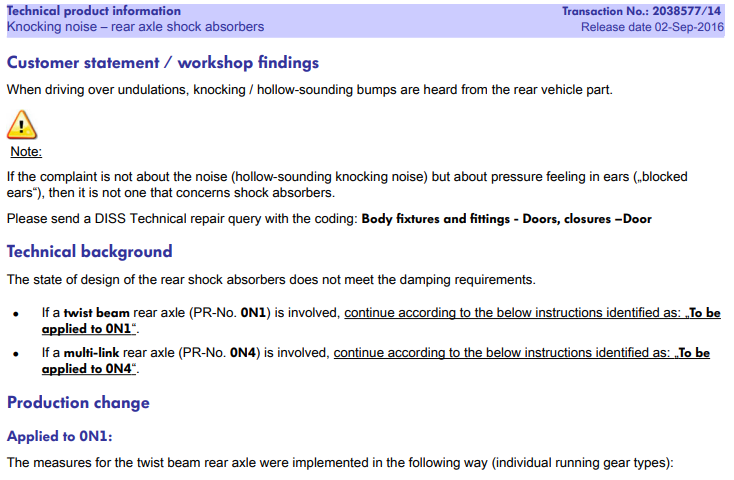
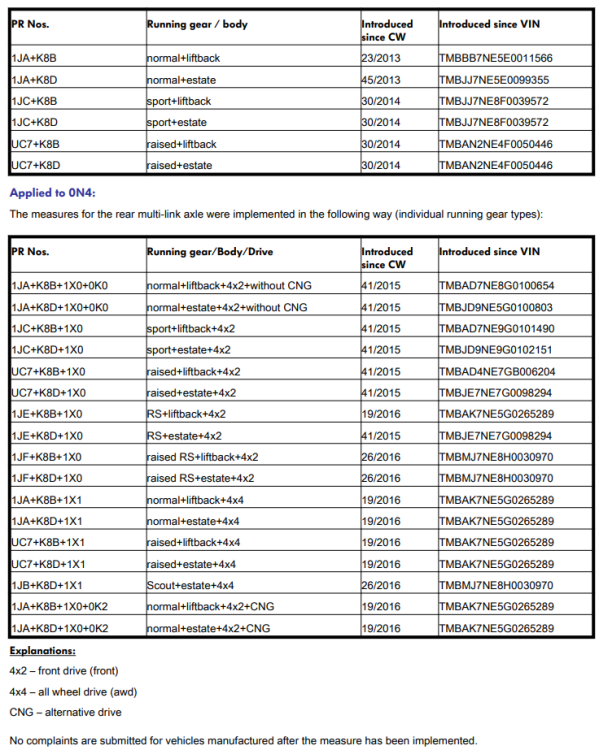
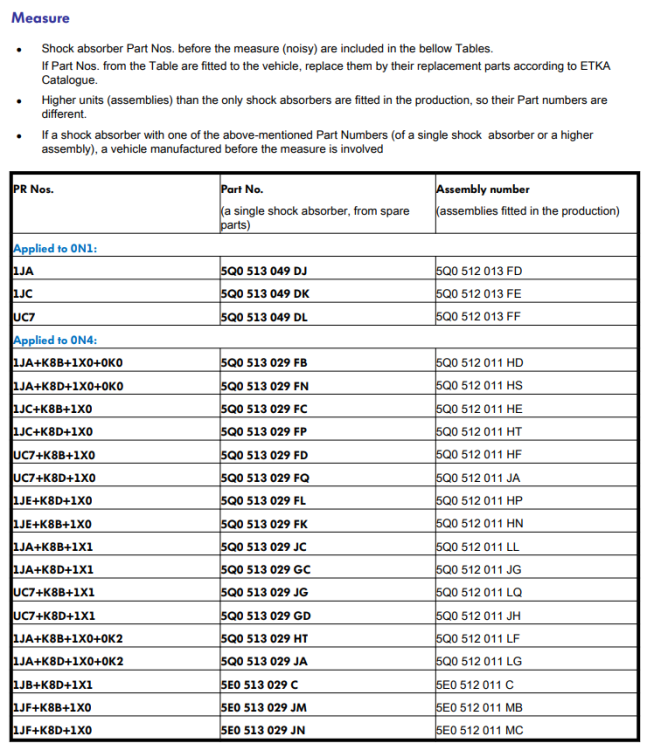
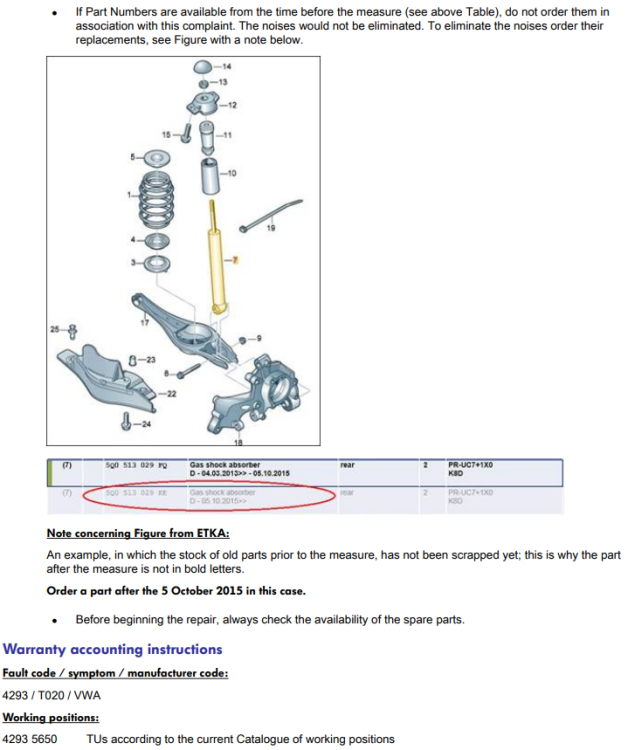
There is a TPI regarding this issue as mentioned in this thread: https://www.briskoda.net/forums/topic/446755-new-rear-shock-absorbers-on-warranty
-
You probably need an account but the app will likely walk you through the process. No idea what kind of phone you have but you probably want this app: - Apple store: https://apps.apple.com/us/app/philips-hue-bluetooth/id1456604186 - Google play store: https://play.google.com/store/apps/details?id=com.signify.hue.blue&hl=en_GB&gl=US&pli=1
-
What SD card did you buy? Was it a Skoda/VW one designed for a MIB2...?
-
If I remember correctly, it depends how old the bulb is. Older ones need a hue hub to work Newer ones have bluetooth and can work without a hub.
-
For context, I have retrofitted a VC to my 2018 245 vRS so it should be pretty similar to yours. Both a new and used VC will need the following after installation: - component protection unlocking - coding - adaptions - immobiliser pairing - odometer correcting Adaptions can be copied from the old cluster. Coding is pretty similar but I think one or two bits needed to be flipped. CP and immo will need ODIS with an online subscription. Quick note regarding the odometer: - With a new cluster, you can just set the correct odometer reading. - With a used cluster, this is not possible... As far as I know, it's only possible to increase the odometer on a used cluster so make sure it has a lower mileage than your car! Most the mileage increase solutions will do the it at a certain MPH, the one I bought can do ~4000 miles per day... Physical side was super easy: - cover under the cluster pulls out - remove the two screws - pull the cluster out and remove the connector The trim piece under the cluster should be changed as it's a slightly different shape, part number 5E0857053B. If the MFSW buttons don't have a 'view' button, for an full factory fitted experience, they should also be changed, I used part number 3V0919719E (manual gearbox). For map display on the VC and radio logos etc, you'll need to add a MOST (fibre optic) between the VC and headunit/amp. There are a few extra coding changes to get it working afterwards.
-
Awesome, comparing the latest CSV with one I have here looks spot on. Glad to hear it's all working as expected too! While I appreciate the PayPal offer, I enjoy the challenge of figuring out what has been messed with so don't worry about it Instead, maybe consider helping support Briskoda by becoming a paid up member for a year: https://www.briskoda.net/forums/subscriptions/
-
That CSV is so much easier to work with! New list of changes below but I've added your current value so you can double check before making changes They are almost identical to the above. Bit of an explanation of what each set are: - Leuchte0 and Leuchte1 will be the indicators, the dunkelphase will be part of your out of sync issue and them being used as DRL. - Leuchte2 and Leuchte3 changes will be making the sidelight/DRL flash and probably to power the LED bar you removed. - Leuchte8 and Leuchte9 look to be cornering fog lamps, I'd leave the lichtfunktion alone but the lampdefektbitpostition looks wrong. ENG116936-ENG115887-Leuchte 0 BLK VL B36-Dimming Direction EF 0 change from 'minimize' to 'maximize' ENG116936-ENG115882-Leuchte 0 BLK VL B36-Dimmwert CD 0 change from '35' to '0' ENG116936-ENG115876-Leuchte 0 BLK VL B36-Lichtfunktion A 0 change from 'not active' to 'Blinken links Hellphase' ENG116936-ENG115881-Leuchte 0 BLK VL B36-Lichtfunktion D 0 change from 'Standlicht allgemein (Schlusslicht: Positionslicht: Begrenzungslicht)' to 'not active' ENG116936-ENG115884-Leuchte 0 BLK VL B36-Lichtfunktion E 0 change from 'Blinken links Dunkelphase' to 'not active' ENG116937-ENG115906-Leuchte1BLK VRB20-Dimming Direction EF 1 change from 'minimize' to 'maximize' ENG116937-ENG115901-Leuchte1BLK VRB20-Dimmwert CD 1 change from '35' to '0' ENG116937-ENG115895-Leuchte1BLK VRB20-Lichtfunktion A 1 change from 'not active' to 'Blinken rechts Hellphase' ENG116937-ENG115900-Leuchte1BLK VRB20-Lichtfunktion D 1 change from 'Standlicht allgemein (Schlusslicht: Positionslicht: Begrenzungslicht)' to 'not active' ENG116937-ENG115903-Leuchte1BLK VRB20-Lichtfunktion E 1 change from 'Blinken rechts Dunkelphase' to 'not active' ENG116938-ENG115928-Leuchte2SL VLB10-Dimming Direction GH 2 change from 'minimize' to 'maximize' ENG116938-ENG115913-Leuchte2SL VLB10-Lichtfunktion A 2 change from 'aktiv 100%' to 'Standlicht allgemein (Schlusslicht: Positionslicht: Begrenzungslicht)' ENG116938-ENG115914-Leuchte2SL VLB10-Lichtfunktion B 2 change from 'not active' to 'Parklicht links (beidseitiges Parklicht aktiviert li & re)' ENG116938-ENG115925-Leuchte2SL VLB10-Lichtfunktion G 2 change from 'Blinken links Hellphase' to 'not active' ENG116939-ENG115947-Leuchte3SL VRB21-Dimming Direction GH 3 change from 'minimize' to 'maximize' ENG116939-ENG115932-Leuchte3SL VRB21-Lichtfunktion A 3 change from 'aktiv 100%' to 'Standlicht allgemein (Schlusslicht: Positionslicht: Begrenzungslicht)' ENG116939-ENG115944-Leuchte3SL VRB21-Lichtfunktion G 3 change from 'Blinken rechts Hellphase' to 'not active' ENG116944-ENG116558-Leuchte8FL LB39-Lampendefektbitposition 8 change from '4E' to '38' ENG116945-ENG116559-Leuchte9FL RB2-Lampendefektbitposition 9 change from '4F' to '42'
-
You can't import a CSV. Instead, it should be possible with a raw hex adaption map 👍 can't say I've ever tried to restore one though.
-
Your scan showed faults on the rear but not the front. Although there are intermittent and last happened 300-400km ago. I'd wait until the lights are working correctly before worrying too much about bulb out warnings. As I mentioned, quite a few light channels seem not to have a lamp type set which could cause issues. Just noticed two more channels I'd suggest you change at the same time as those above: ENG116944-ENG116558-Leuchte8FL LB39-Lampendefektbitposition 8 38 ENG116945-ENG116559-Leuchte9FL RB2-Lampendefektbitposition 9 42
-
That adaption channel map is a bit of a mess in terms of formatting - in future attaching the CSV from VCDS might be better 👍 Anyway, can you try setting the follow adaption channels to the values shown: ENG116936-ENG115876-Leuchte0BLK VLB36-Lichtfunktion A 0 Blinken links Hellphase ENG116936-ENG115881-Leuchte0BLK VLB36-Lichtfunktion D 0 not active ENG116936-ENG115882-Leuchte0BLK VLB36-Dimmwert CD 0 0 ENG116936-ENG115884-Leuchte0BLK VLB36-Lichtfunktion E 0 not active ENG116936-ENG115887-Leuchte0BLK VLB36-Dimming Direction EF 0 maximize ENG116937-ENG115895-Leuchte1BLK VRB20-Lichtfunktion A 1 Blinken rechts Hellphase ENG116937-ENG115900-Leuchte1BLK VRB20-Lichtfunktion D 1 not active ENG116937-ENG115901-Leuchte1BLK VRB20-Dimmwert CD 1 0 ENG116937-ENG115903-Leuchte1BLK VRB20-Lichtfunktion E 1 not active ENG116937-ENG115906-Leuchte1BLK VRB20-Dimming Direction EF 1 maximize ENG116938-ENG115913-Leuchte2SL VLB10-Lichtfunktion A 2 Standlicht allgemein (Schlusslicht: Positionslicht: Begrenzungslicht) ENG116938-ENG115914-Leuchte2SL VLB10-Lichtfunktion B 2 Parklicht links (beidseitiges Parklicht aktiviert li & re) ENG116938-ENG115925-Leuchte2SL VLB10-Lichtfunktion G 2 not active ENG116938-ENG115928-Leuchte2SL VLB10-Dimming Direction GH 2 maximize ENG116939-ENG115932-Leuchte3SL VRB21-Lichtfunktion A 3 Standlicht allgemein (Schlusslicht: Positionslicht: Begrenzungslicht) ENG116939-ENG115944-Leuchte3SL VRB21-Lichtfunktion G 3 not active ENG116939-ENG115947-Leuchte3SL VRB21-Dimming Direction GH 3 maximize ENG116944-ENG116028-Leuchte8FL LB39-Lichtfunktion B 8 not active ENG116945-ENG116047-Leuchte9FL RB2-Lichtfunktion B 9 not active Just be careful as the channels have similar names. I'd use the search function for the ENGxxxxxx-ENGxxxxxx names to help. You may also need to translate the German into English depending on the module and VCDS versions. There are a few light channels which appear to be missing the light type. I'll wait until you've made the above changes and provided a new adaption map as a CSV
-
Completely different software but it doesn't make much practical difference. If I remember correctly, only the A rev gets the 'sporty' display which is probably the most obvious difference.
-
Someone has almost certainly messed with various settings... Post a full autoscan and adaption map from 09.
-
Can you post: - a full VCDS autoscan - an adaption map from 09 - a list of changes your pro has tried That'll give us an idea of your cars config and what's been tried
-
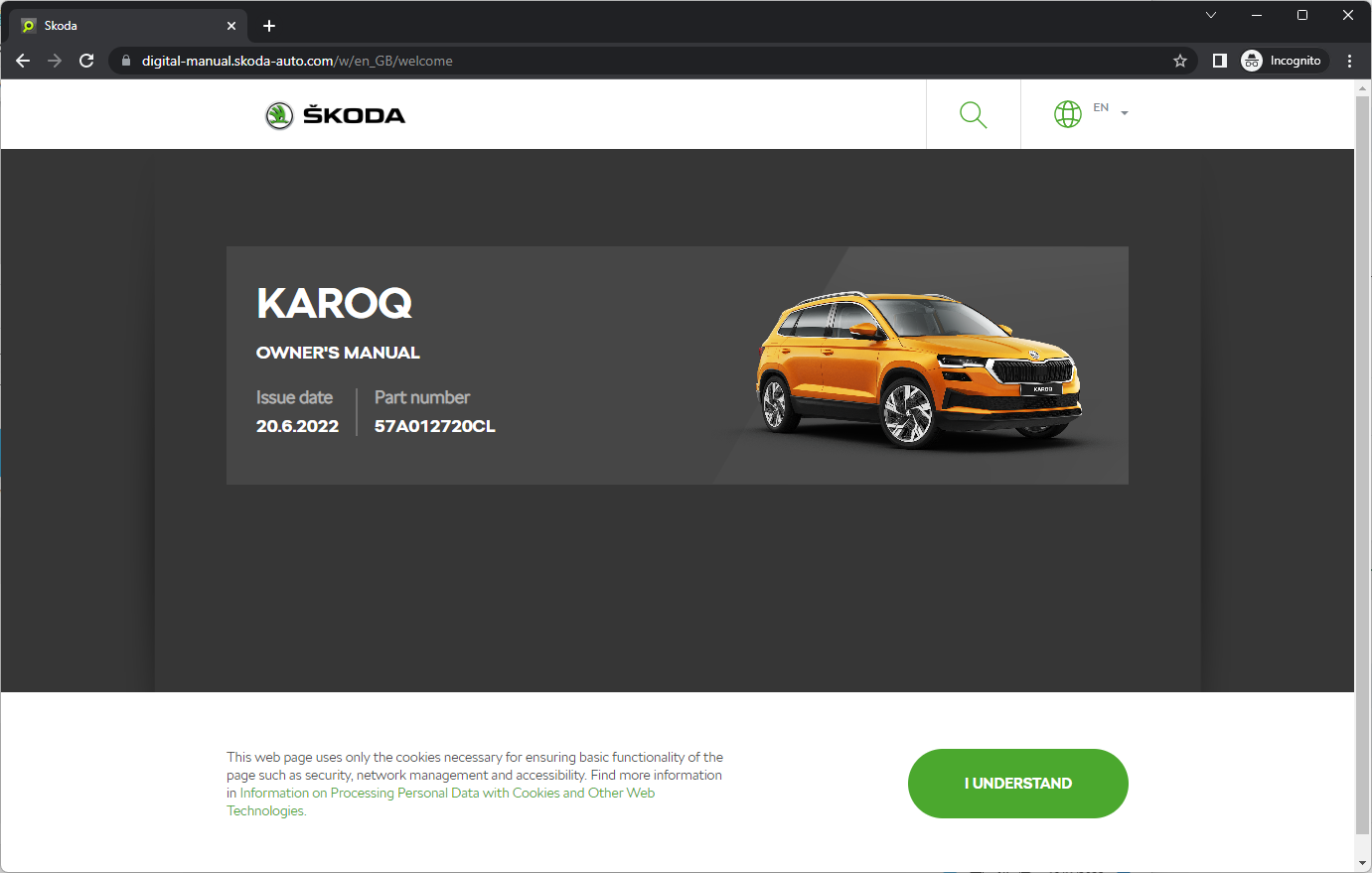
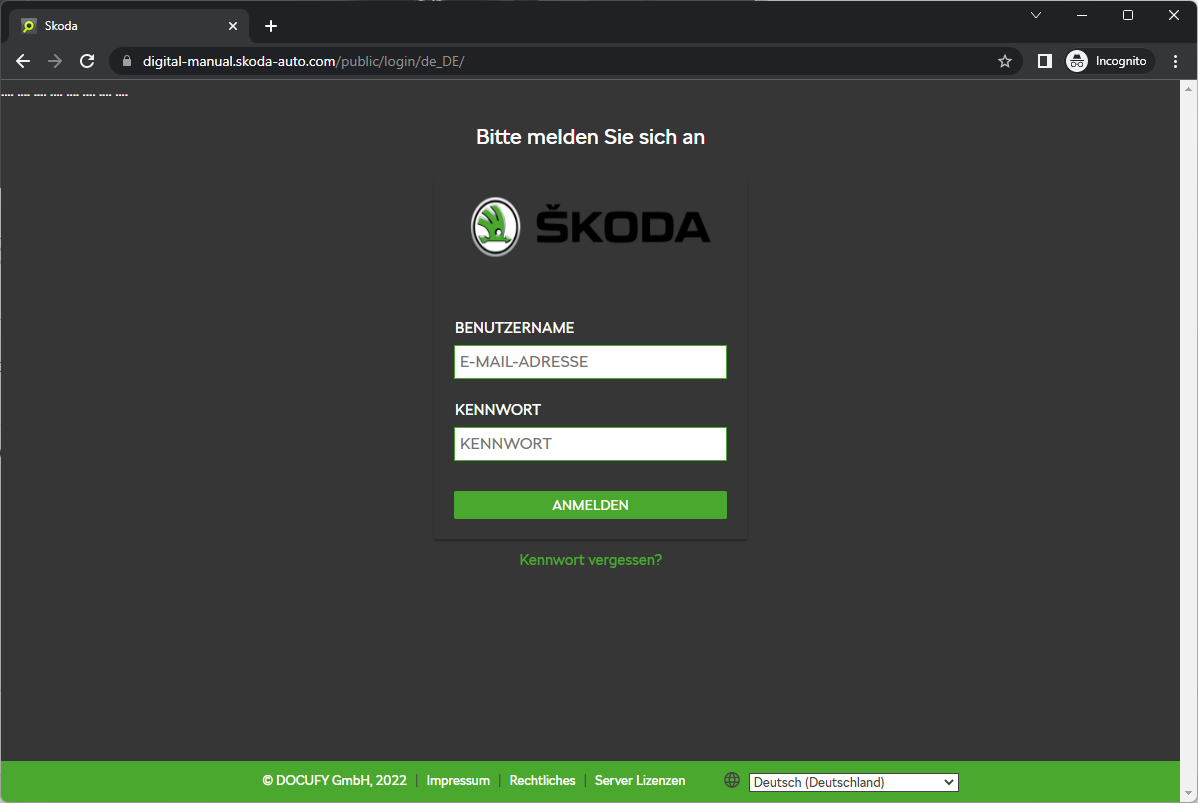
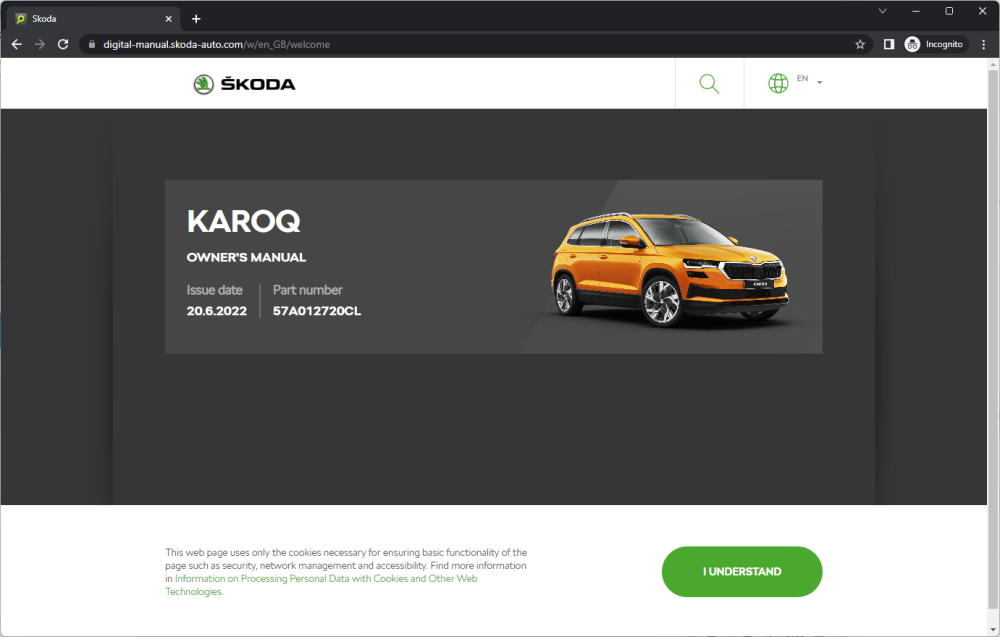
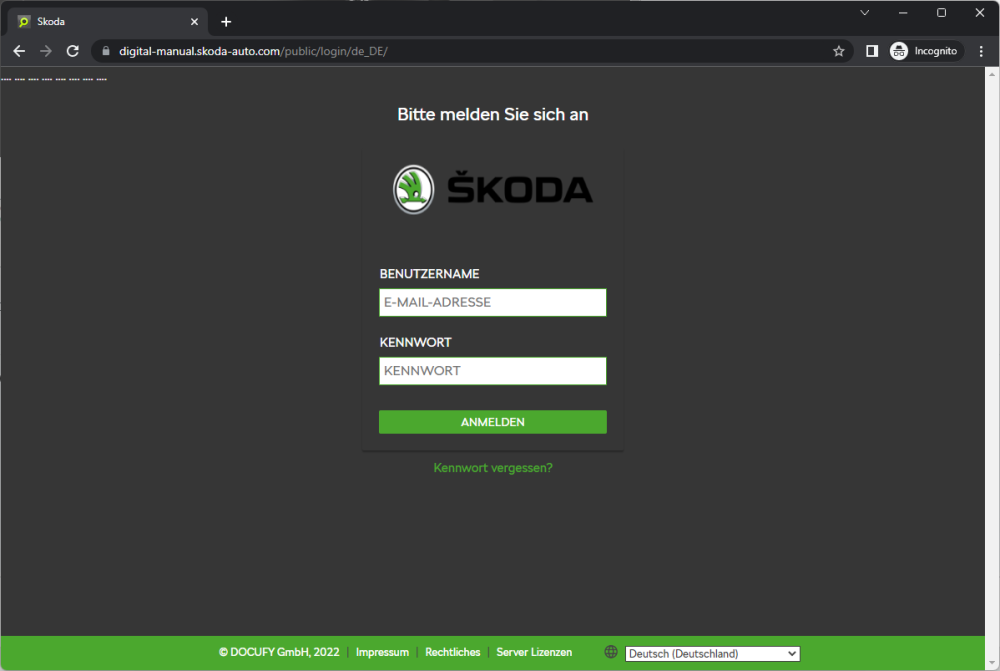
My experience... Going to https://digital-manual.skoda-auto.com/w/en_GB/welcome directly showed a German login prompt. Going to https://manual.skoda-auto.com/004/en-com/Models first and selecting a model etc would redirect to https://digital-manual.skoda-auto.com/w/en_GB/welcome but show an owners manual. Subsequent visits to https://digital-manual.skoda-auto.com/w/en_GB/welcome then continue to show the model I last selected rather than the German login prompt. At some point the cookies etc set will expire and you will be shown the German login prompt until you reselect a model. Nobody is trying to mislead you, the webpage behaviour will change based on your previous browsing 👍
-
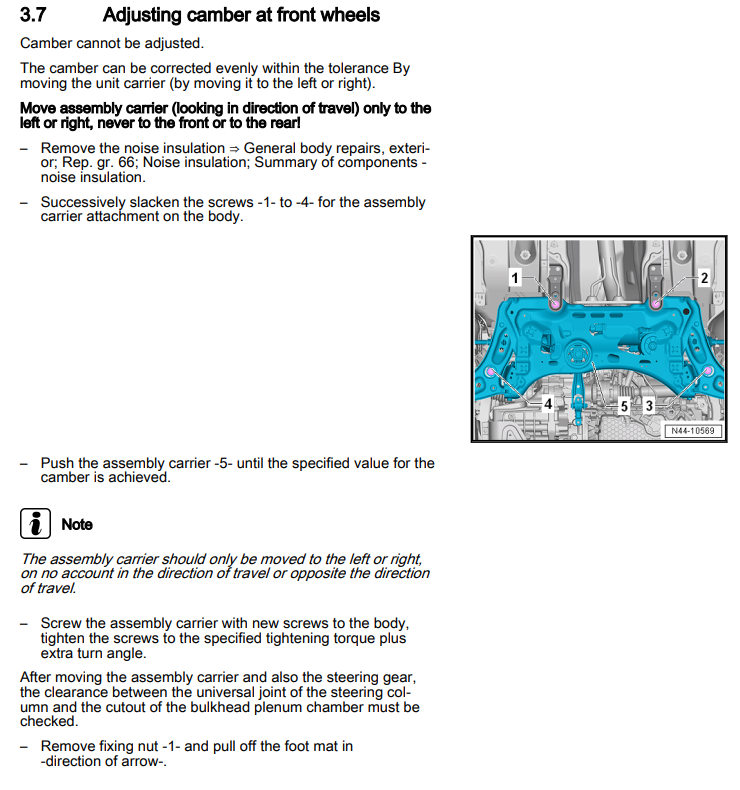
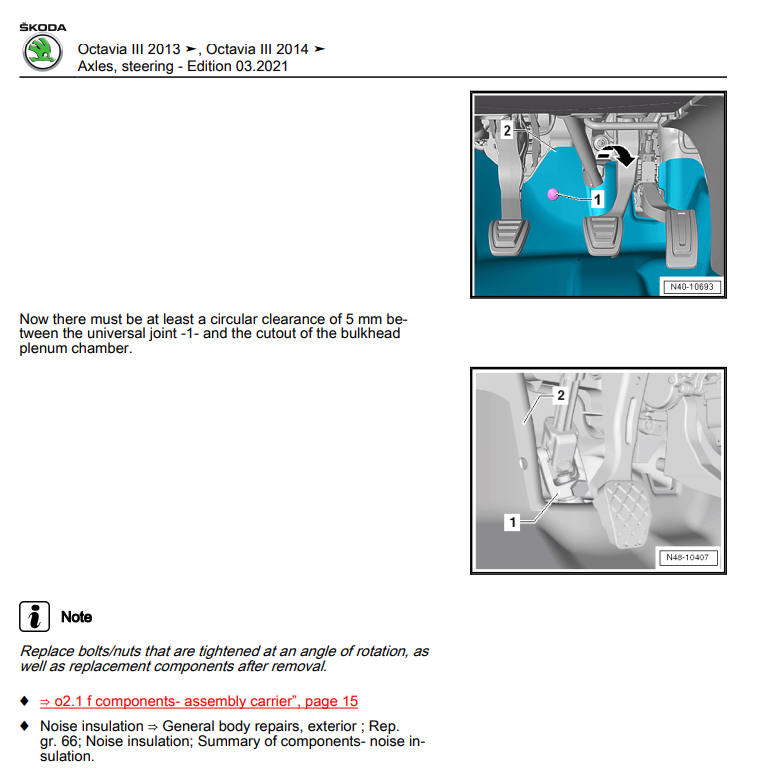
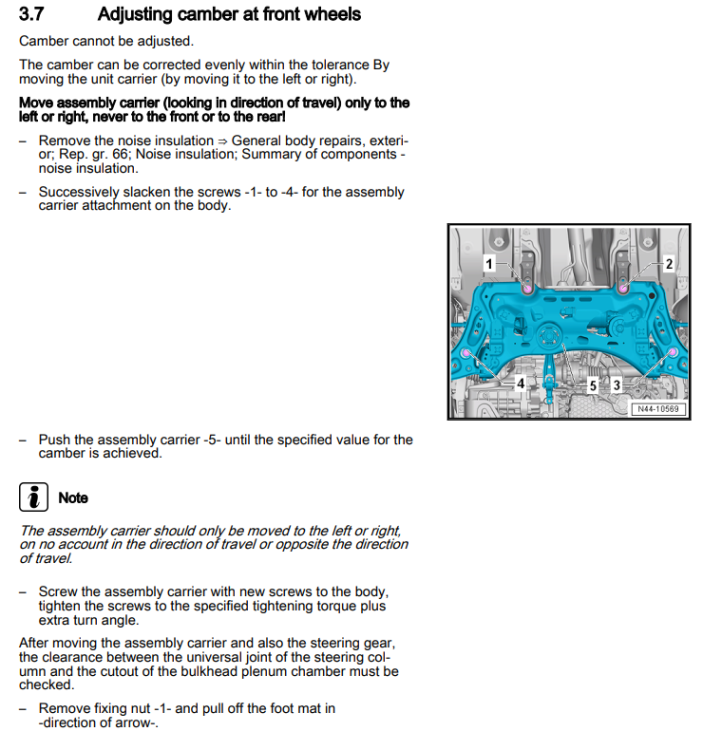
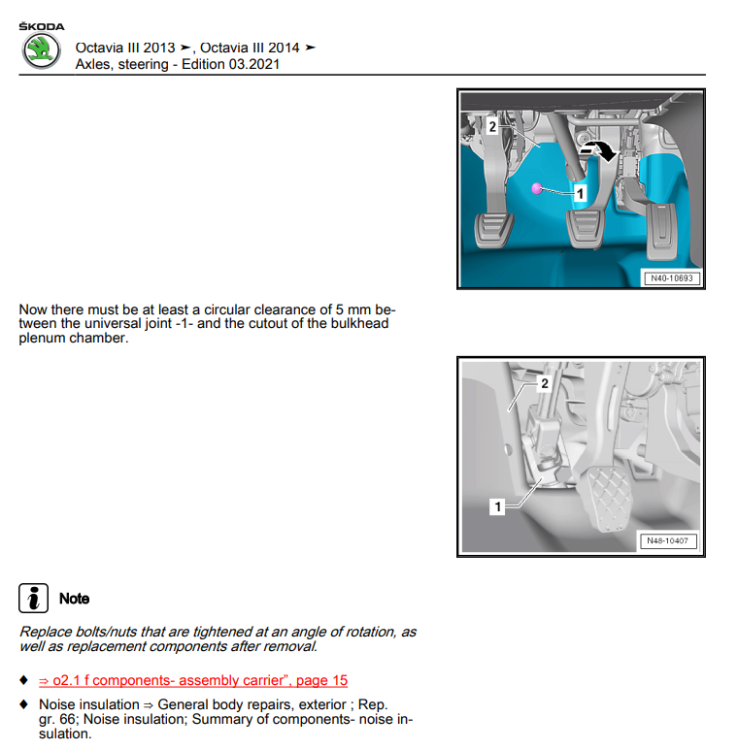
From the service manual:
-
This should give you some idea of potencial cost, not sure if it includes a new windscreen: https://www.vw-retrofit.co.uk/product/front-lane-assist-camera-retrofit-kit/ The actual cost will depend on who does the work and exactly what parts your car spec requires
-
There is a guide here: https://www.briskoda.net/forums/topic/491705-how-to-update-maps-on-mib2-or-mib25-amundsen/ The latest full EU maps are already too big for a 16gb SD card. I'd suggest you choose one of the smaller selections instead. If you do need full EU coverage, you should buy an appropriate 32gb SD card 👍
-
I could view it for free but as I mentioned previously, it's an old manual from 11.2017
-
That's an old manual, the last page gives the date as 11.2017 The newest PDF is dated 11.2018 and can be found here: https://ownersmanuals.blob.core.windows.net/ownersmanuals/en/Karoq_NU/11-2018/OwnersManual.pdf There are no newer ones from what I can find.
-
As I noted above, going directly asked me for a login but going to https://manual.skoda-auto.com/004/en-com/Models first, making a selection and getting redirected to it, makes it work - although doesn't help with the OP's issue When I tried using the link direct, I got the login prompt you mentioned:
-
@johnboy60 - that link is the same as the previous ones mentioned. Yes it shows an owners manual but it does not provide a single downloadable PDF or something easily printable/savable. If you try and use it directly without having previously selected a model/year/etc it bizarrely asks for a login. Going to https://manual.skoda-auto.com/004/en-com/Models and selecting those details will then redirect to https://digital-manual.skoda-auto.com/w/en_GB/welcome without a login prompt. That's a question for Skoda... I can only imagine Skoda have decided that the majority of customers have a laptop/tablet/smartphone and are happy to use it to view the manual. Whilst I would also prefer a single downloadable PDF, it's not something offered for newer cars at the moment. Did you try accessing the manual via the headunit?
-
There was probably an error code stating which are (or have been) low. I would expect the car to warn you, maybe try using the other two keys and see if that shows a warning?
-
I'm happy for you... If everyone's experience had been the same we probably wouldn't be having this conversation
-
I would strongly suggest avoiding the one touch apps... OBDeleven don't tell you what is being changed and they have been known to mess up various settings when the vehicle identification isn't up to scratch. Given the backup functionally and support aren't great, I would suggest manual changes are a better plan. It can be a great tool in the right hands but equally you can really mess things up through it's 'friendly' UI. At least with VCDS there is an obvious log of changes made. You can still mess things up but at least it's normally pretty easy to back track 😉
-
I'd suggest looking at the following adaption channels in your BCM: - Left value is from my 2018 vRS - Right value is from your history.txt It should be as simple as changing each channel from the right to left values. You might need to do some translation as I think VCDS and OBDeleven can show slightly different terminology ### Pin 45 leuchte12nl lb45-dimmwert ab 12 ['0', '100'] leuchte12nl lb45-dimmwert cd 12 ['0', '110'] leuchte12nl lb45-dimmwert ef 12 ['0', '100'] leuchte12nl lb45-fehlerort mittleres byte dtc-dfcc 12 ['00', '22'] leuchte12nl lb45-lampendefektbitposition 12 ['00', '38'] leuchte12nl lb45-lasttyp 12 ['not active', '10 - allgemeine scheinwerfer'] leuchte12nl lb45-lichtfunktion a 12 ['not active', 'nebellicht links'] leuchte12nl lb45-lichtfunktion c 12 ['not active', 'abbiegelicht links'] leuchte12nl lb45-lichtfunktion e 12 ['not active', 'tuerausstiegslicht links'] ### Pin 5 leuchte13nl rb5-dimmwert ab 13 ['0', '100'] leuchte13nl rb5-dimmwert cd 13 ['0', '110'] leuchte13nl rb5-dimmwert ef 13 ['0', '100'] leuchte13nl rb5-fehlerort mittleres byte dtc-dfcc 13 ['00', '23'] leuchte13nl rb5-lampendefektbitposition 13 ['00', '42'] leuchte13nl rb5-lasttyp 13 ['not active', '10 - allgemeine scheinwerfer'] leuchte13nl rb5-lichtfunktion a 13 ['not active', 'nebellicht rechts'] leuchte13nl rb5-lichtfunktion c 13 ['not active', 'abbiegelicht rechts'] leuchte13nl rb5-lichtfunktion e 13 ['not active', 'tuerausstiegslicht rechts'] ### Pin 10 leuchte2sl vlb10-dimmwert ab 2 ['100', '0'] leuchte2sl vlb10-fehlerort mittleres byte dtc-dfcc 2 ['25', '0'] leuchte2sl vlb10-lampendefektbitposition 2 ['42', '0'] leuchte2sl vlb10-lasttyp 2 ['4 - led tagfahrlichtmodul signal', 'not active'] leuchte2sl vlb10-lichtfunktion a 2 ['nebellicht rechts', 'not active'] ### Pin 21 leuchte3sl vrb21-dimmwert ab 3 ['100', '0'] leuchte3sl vrb21-fehlerort mittleres byte dtc-dfcc 3 ['24', '0'] leuchte3sl vrb21-lampendefektbitposition 3 ['38', '0'] leuchte3sl vrb21-lasttyp 3 ['4 - led tagfahrlichtmodul signal', 'not active'] leuchte3sl vrb21-lichtfunktion a 3 ['nebellicht links', 'not active'] ### Pin 4 leuchte4tfl lb4-dimmwert ab 4 ['127', '0'] leuchte4tfl lb4-fehlerort mittleres byte dtc-dfcc 4 ['23', '0'] leuchte4tfl lb4-lampendefektbitposition 4 ['42', '0'] leuchte4tfl lb4-lasttyp 4 ['1 - led tagfahrlichtmodul versorgung', 'not active'] leuchte4tfl lb4-lichtfunktion a 4 ['nebellicht rechts', 'not active'] ### Pin 32 leuchte5 tfl rb32-dimmwert ab 5 ['127', '0'] leuchte5 tfl rb32-fehlerort mittleres byte dtc-dfcc 5 ['22', '0'] leuchte5 tfl rb32-lampendefektbitposition 5 ['38', '0'] leuchte5 tfl rb32-lasttyp 5 ['1 - led tagfahrlichtmodul versorgung', 'not active'] leuchte5 tfl rb32-lichtfunktion a 5 ['nebellicht links', 'not active'] Not sure if the 'fehlerort mittleres byte dtc-dfcc' or 'lampendefektbitposition' channels need touching. I'd ignore those for now and concentrate on the other channels.