Tell
Members
-
Joined
-
Last visited
Everything posted by Tell
-
It's the VW link VW portal: https://vw-maps-cdn.lighthouselabs.eu/vw-maps/P350_N60S5MIBH3_EU.7z That's proven to be fine for November 2023 (ECE 2024) aka the "lighthouse link". The Skoda one has had issues and was withdrawn from the webpage wrapper to it’s link to 350 back to 330. German Skoda community hacking that Skoda 350 file around to make good but the VW link above is fine. Map files are interchangeable between VAG brands so you use the first one that works.... why I've got my Seat mib2 high running on the Audi release from 6 weeks ago 🤣.
- 142 replies
-
-

- 2
-
-
- columbus
- discover pro
- maps
- mib
-
Tagged with:
-
-
& thanks to MartiniB's hard work. He doesn't have a mib2 high now (don't reckon) whilst I was sticking with the Audi release of 350 not wanting to mess up what I had. It was tricky with the German Skoda board to work out who was using what. Sorted now. 👌
- 142 replies
-
- columbus
- discover pro
- maps
- mib
-
Tagged with:
-
Not familiar with POI.DB3 but suspect it's a commercial program or user developed or knock off. How POI import works is that VAG has a specification and each unit has to be specified within the parameter file that it uses to import the file into the unit. VW often didn't populate the file parameters as new units came out. Often with the VW website when it was up. there were moans about it not seeing the car. After VW pulled the plug on their website import for POIs, Seat mib2 standard units with wifi it didn't see the import. Both the commercial suppliers and developed apps were not working with this unit. POInspector was the one I was using. https://poinspect0r.blogspot.com/ With these package solution you have to load up your own POIs. I did provide documentation that the author of the program used: https://www.seatcupra.net/forums/threads/uploading-speed-camera-safety-camera-user-pois.444799/#post-4780168 https://www.seatcupra.net/forums/resources/uploading-speed-camera-safety-camera-user-pois.12/ This package is backwards compatible but you have to put the work in yourself. Back to story. Spanish Seat forum uses published Spanish speed cameras that were imported into the VAG format and distributed by the forum. The guy that did the work was one of the mods. The missing infotainment identifiers were found by a German user. The system IDs appear in the firmware uploads so by studying those you can identify what is missing. There were / are two import files for the mib2 standard and high. I suspect that's the issue. it's a missing variant ID. I suspect you haven't got it. If you happen to have the firmware file for your system and visually check your POI import meta file I suspect you won't have the unit listed. Worth a check. Then go back to whoever supports POI.DB3 and say you need it added. Alternatively you could have the wrong upload. The latest meta file looks like this: ################################################################################# # # This is the description file for the Software Update of Volkswagen components # ################################################################################# [common] Vendor = "Volkswagen" Variant = "FM?-H-*-*-*" Variant2 = "17206" Variant3 = "17207" Variant4 = "37206" Variant5 = "37207" Variant6 = "47203" Variant7 = "47204" Variant8 = "17216" Variant9 = "17217" Variant10 = "37212" Variant11 = "37213" Variant12 = "47208" Variant13 = "47209" Variant14 = "17212" Variant15 = "37208" Variant16 = "47205" Variant17 = "17222" Variant18 = "47210" Variant19 = "17224" Variant20 = "37214" Variant21 = "17210" Variant22 = "17220" Variant23 = "17245" Variant24 = "17246" Variant25 = "17250" Variant26 = "17251" Variant27 = "17247" Variant28 = "17252" Variant29 = "17254" Variant30 = "17255" Variant31 = "17268" Variant32 = "17269" Variant33 = "17270" Variant34 = "17271" Variant35 = "47213" Variant36 = "47214" Variant37 = "47215" Variant38 = "47216" Region = "Europe" Region2 = "RoW" Region3 = "USA" MetafileChecksum = "d3f9e1f47675003e96331df6202b162c7c407a88" [common_Release_1] Name = "MIB 2 High Personal POI" Path = "./PersonalPOI/MIB2HIGH" Variant = "FM?-H-*-*-*" Region = "Europe" Region2 = "RoW" Region3 = "USA" [common_Release_2] Name = "MIB 2 Standard Delphi Personal POI" Path = "./PersonalPOI/MIB2DE" Variant = "17245" Variant2 = "17246" Variant3 = "17250" Variant4 = "17251" Variant5 = "17247" Variant6 = "17252" Variant7 = "17254" Variant8 = "17255" Variant9 = "17268" Variant10 = "17269" Variant11 = "17270" Variant12 = "17271" Region = "Europe" Region2 = "RoW" Region3 = "USA" [common_Release_3] Name = "MIB 2 Standard TechniSat Personal POI" Path = "./PersonalPOI/MIB2TSD" Variant = "17206" Variant2 = "17207" Variant3 = "37206" Variant4 = "37207" Variant5 = "47203" Variant6 = "47204" Variant7 = "17216" Variant8 = "17217" Variant9 = "37212" Variant10 = "37213" Variant11 = "47208" Variant12 = "47209" Variant13 = "17212" Variant14 = "37208" Variant15 = "47205" Variant16 = "17222" Variant17 = "47210" Variant18 = "17224" Variant19 = "37214" Variant20 = "17210" Variant21 = "17220" Variant22 = "47213" Variant23 = "47214" Variant24 = "47215" Variant25 = "47216" Region = "Europe" Region2 = "RoW" Region3 = "USA" [Signature] signature1 = "9880af1b5d5456de15affd708b3b74b2" signature2 = "3cf0dbe1d0baf902e43229a07cfb9281" signature3 = "3c76dea04775d174ac4f937445ae538b" signature4 = "84d056d12279144f13341a7ccec3a7a2" signature5 = "39120b41cbf137351aa6a08c732b3521" signature6 = "5a224666234d8700e6c46bf2a943452c" signature7 = "b06daa662fc8d9a1aee981c0a5df7c1a" signature8 = "4bcd566ead66604069d58ab0a9f77d14" ----- It was two of those variants missing. The variants cover every mib unit to mib2. Either way if you have a copy of the firmware with the variants and check your import meta file and you are missing variants that's the issue. That's the problem with knock off files doing the rounds they aren't kept up to date as well as breaking copyright of the POIs they are using.
-
Interesting the mibsolution.one board I noted yesterday had a code fragment to fix the Columbus download. Didn't mention it just not to cause confusion. So someone has the fix which they copy back into the Columbus download. Best to use the first VW link on the top. Waiting for the first puff of smoke to say the VW link works. I'm sticking with the Audi 350 copy not re-running the import. Motto get in early with updates where the knowledge of what works is known. Those that delay find the knowledge gone later 🤣.
- 142 replies
-
- columbus
- discover pro
- maps
- mib
-
Tagged with:
-
Think those are the ones that MartiniB posted up this morning. Post #1. He's editting them in as they come up but a few false turns with problematic Skoda releases 🤔🙄. They are. The second link wasn't working. The first one was this morning.
- 31 replies
-
- columbus
- discover pro
- maps
- mib
-
Tagged with:
-
Use the first link on MartiniBs page This file: https://vw-maps-cdn.lighthouselabs.eu/vw-maps/P350_N60S5MIBH3_EU.7z The Skoda one seems to stick on that % as reported by others on the German Skoda board. You can use the Audi mib2 high file only although you might have issues getting it off the mega server https://mega.nz/file/D7gRnTQS#bs1ghZILdz3-DOJ2Vafc9aePn_l9SDbRTJ8jyPslBO4 The Skoda and VW files should be common latest release 350, 330 was the June release. Skoda just made a mistake. There is nothing special about one rather than the other accept the Audi release is only for mib2 highs whilst the Skoda / VW one's cover mib1 high as well as mib2 high. It's the Audi one I'm using. Works fine. It came out by accident or whatever about 6 weeks ago.
-
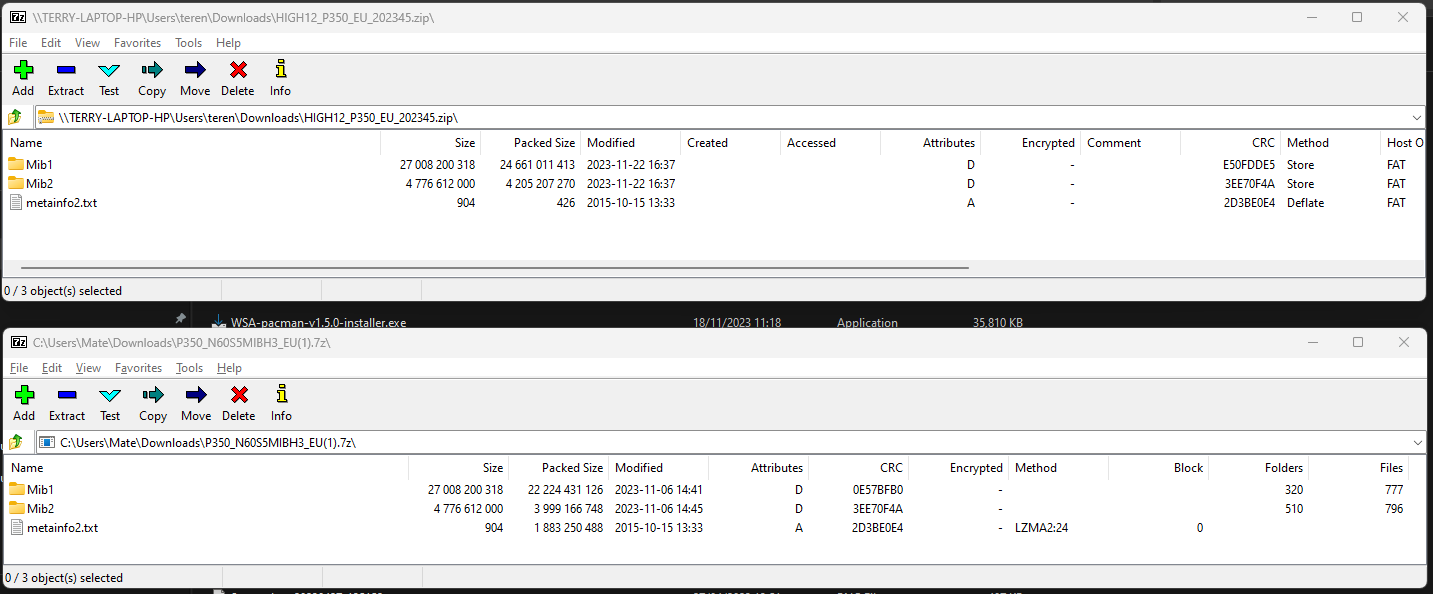
As posted on the other thread I can confirm the two downloads are different. The Skoda one still has an issue from reports. They have managed to get the byte size identical but the contents are different when you run a check. That's not supposed to happen. VW file is the way to go.
-
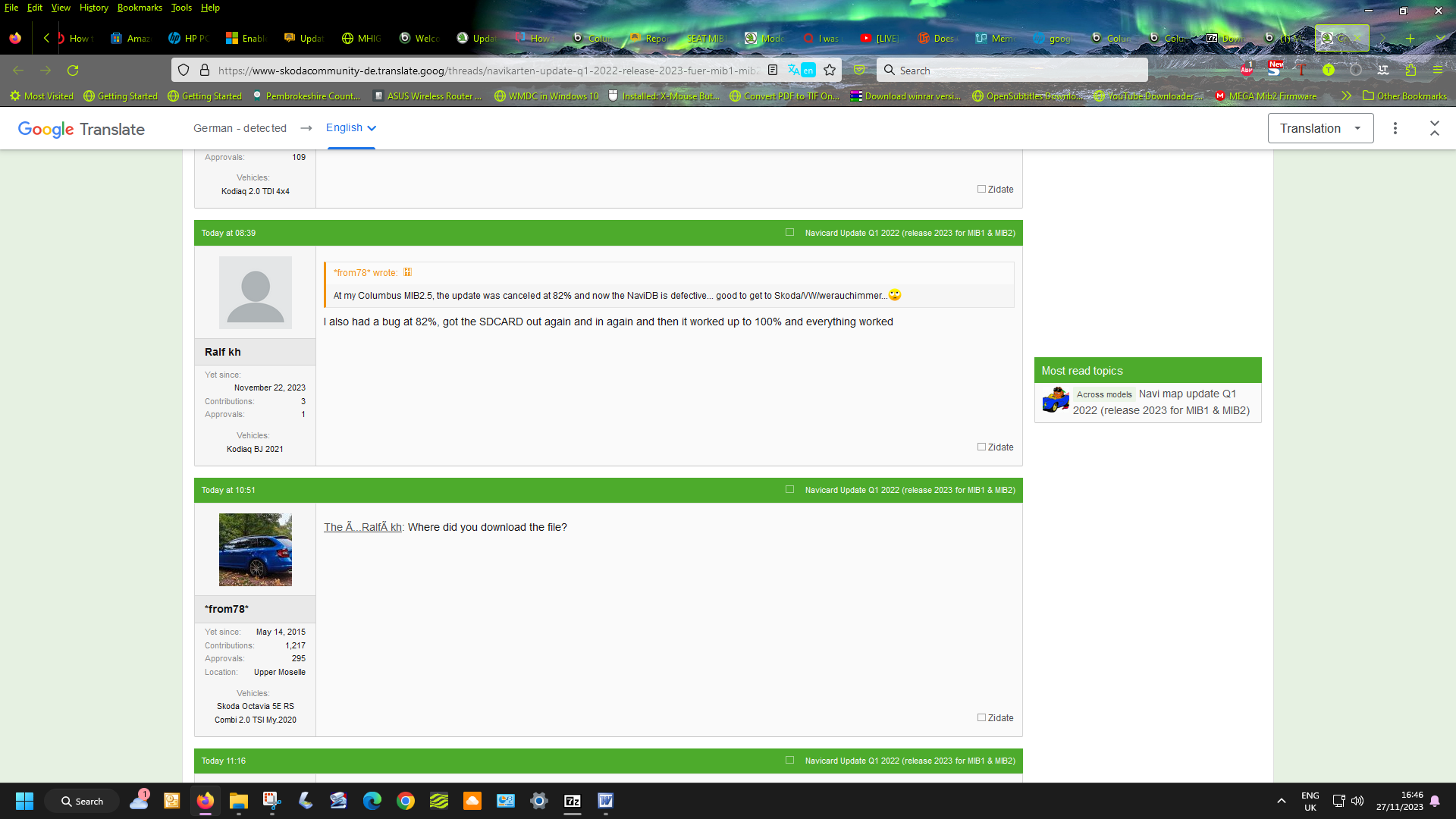
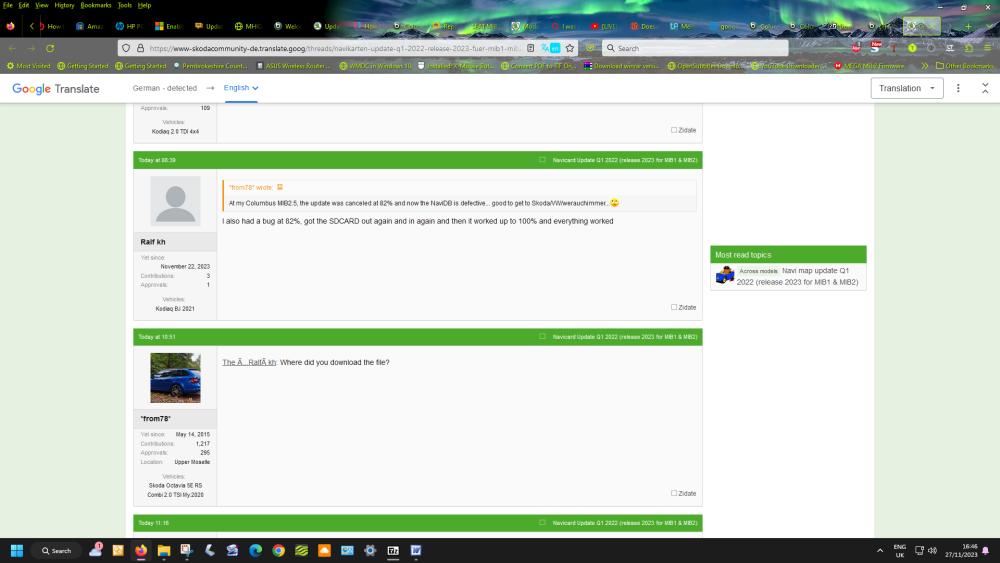
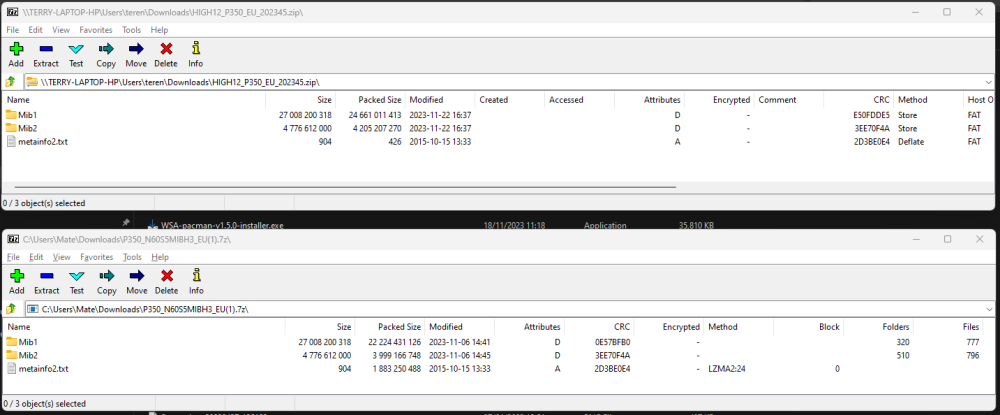
I did do the SHA256 check on the groups of files, and they are different 🙄. Basically the byte size is identical but the contents are different between Skoda and VW. What I get on the VW one using the 7zip CRC check. Scholars of this process you use It's like a constructed finger print of the files.... they are different. Probably Skoda has yet to fix the issue ?. Interesting page on the German Skoda board,,, failing at 82% on the Skoda file is common... pull out and push the SD card back in :). I'd stick to the VW link. The fun.
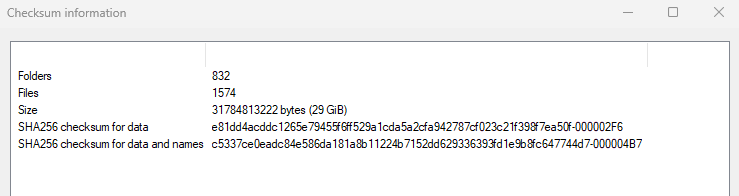
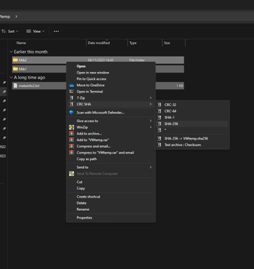
- 142 replies
-
- columbus
- discover pro
- maps
- mib
-
Tagged with:
-
Feels like a duff SD card or the infotainment system playing up. I aways do the update on the backend SWDL menu that you have to enable with VCDS / Obdeleven etc. It does show you what it's doing. Exfat should be the format for over 32gb. Fat for the 32gb cards. On the Skoda German board with the Skoda zip issue they ended up loosing the maps. I'd try the Audi 350 file on a 32gb card. Mibsolution.one had that linked up but taken down now whilst you have MartiniB's mega link of that. Just a question of getting that downloaded. Booboo, Pcbbc and I, I reckon have been using that one without issues for 6 weeks or so. Or MartiniBs solution above.
-
Did you use a Mac.... although I don't reckon it's that since it would fail the signature check early on if there was random characters in the file unless the integrity is checked as it's progressing. Suppose to use CleanMyDrive if using a Mac that gets rid of the random characters that Mac's put on. You run that against the SD files once copied. You got the VW link to try and the Audi one. The Audi one because Mib1 files are stripped out is smaller so less fiddling with big downloads. The 64gb SD card can be in exFat as it came pre-formatted. No advantage in NTFS. I'm sticking with the Audi one.
-
Here's my unscientific quick and dirty comparison between the Skoda and VW files: Unzipped the file size is the same which suggests it's the same file. You then have to workout the SLA1 check....
- 142 replies
-
- columbus
- discover pro
- maps
- mib
-
Tagged with:
-
Unzipped without errors here using 7zip https://www.7-zip.org/download.html Windows 64 bit. The built-in Windows 11 7 unzip function turned into a disaster, said it was going to take a day. Reverted to trusty 7zip which you are supposed to use based on VW recommendations. MartiniB I think you once had a transmission error that caused you difficulties in the past 🙄.
- 142 replies
-
- columbus
- discover pro
- maps
- mib
-
Tagged with:
-
The first one is trundling away at 30+MB/sec.... the second VW link think there is an issue with it. ok VW portal: https://vw-maps-cdn.lighthouselabs.eu/vw-maps/P350_N60S5MIBH3_EU.7z not ok at the minute VW portal: https://navigation-maps.volkswagen.com/vw-maps/P350_N60S5MIBH3_EU.7z
- 142 replies
-
- columbus
- discover pro
- maps
- mib
-
Tagged with:
-
It probably emulates the over the air update, assuming you got the off line usb plugged in. If its true the car has to be static and perhaps ignition on / entertainment running. Probably for over the air they want a quality signal so may follow the same process. Assume 23.6 will be Skodas latest if you didn't take it from VW ?.
-
They have fixed the un zip error now on the Skoda link Opening up without an unzip error now MIB2 High: https://infotainment-cdn.skoda-auto.com/base/maps/HIGH12_P350_EU_202345.zip Feel free to check it. I'm not going to re-install the same maps - I'm happy with the Audi ones.
- 142 replies
-
-
- 1
-
-
- columbus
- discover pro
- maps
- mib
-
Tagged with:
-
Opening up without an unzip error now MIB2 High: https://infotainment-cdn.skoda-auto.com/base/maps/HIGH12_P350_EU_202345.zip Might be fixed.
-
The VW one any time soon. All eyes on MartiniB. I've been checking the German Skoda board, they have not found the file link yet. Unless there is a delay it should be arriving in the next week or so.
- 98 replies
-
-
- 3
-
-
- amundsen
- discover media
- maps
- mib
-
Tagged with:
-
Well if VW don't slip their schedule backwards you should see it any time soon. In the past they leave from work on a Friday early (a German thing) and the maps just appear on the servers but not linked to the webpage yet. Might be this Friday or next, you never know. Often the weekend is the period when they get spotted. MartiniB I'm sure is running his sniffer code as others. The VW release is the gold standard. Skoda and Seat have historic releases sometimes that VW don't have / markets that VW don't operate in. Whilst Audi keep theirs under wrap, VIN protected via a login with the mapcare three year imposed just to get in knowing what the user has purchased. That's why we see Audi drivers on Skoda boards they are running long life FeCs and are outside of the imposition Audi apply via the website (all in one custom firmware with long life navigation FeCs / mib 2 high tool box adjusted FeCs). You learn something almost every day. Was nice to see the November 350 released by the back door from Audi. That's perfectly good to use at this time. I wont be updating to the VW / Skoda one this year November since I've got it already. They are common releases across platforms so one is equivalent to the other except in this case Audi have their own mib 2 high only one, mib 1 high only ones splitting out the combined release. Probably done to keep within the 32gb card limit. Audi are indeed the brains of the Vag group. Well if we discover the Audi release is significantly different to the VW / Skoda / Seat release would it be worth re-installing it again. Hence a comparison file check when we see it.
-
You won't get it to install it's protected with those signatures. @Pcbbc alluded to a way of making small changes. I've seen talk before. You are reverse engineering the like that GCHQ do. More here when I went to the experts https://reverseengineering.stackexchange.com/questions/15992/defeat-rsa-hash-verification-qnx-working-example Basically the public key is published and known. It's on that thread, it's in the mib2 boxes. It's the private key that isn't or might be. It's the same public and private key across the firmware and map releases. I checked using that code fragment and downloads for maps and firmware. The whole subject came up when people were trying to modify the firmware in these boxes. Then it came to pass there was a backdoor left open via the POI import method. Anything placed after the signature got imported in. Like running behind someone at a turn stile tube gate. How the all in one software works found on enthusiasts sites. More tricky with map imports @pcbbcsays. I'd notice they had more security in them having played about with the mib2 high map files before. In 2018 discovering it was the navigation FeCs that needed to be changed and worked out the Seat ones after a unscrupulous retrofitter was selling navigation FeCs for life that turned out to be for one year. Getting pricey. Only payed once and got them to correct their scam least for me they were peddling. Four night away from home on that one visiting said retrofitter miles away. The tool boxes you see and the modded firmware all use the POI import fragment of code at the start. You can visually check this software since the firmware isn't signed at the end. No bank of four signature lines. This is how you know the Audi 350 map isn't hacked. That's signed unless like the Sony film studio someone got in and nicked the crown jewels. Suspect they guard the private key well but you never know. Brute force can be used and you need Cray computers a few years back. This is where they upped the industrial standard of sla1. 256 to 1024 or something. There were published papers saying the industry better use longer keys since computer power was catching up on brute force hacks. Bread and butter stuff of GCHQ but you wouldn't want hobbyists doing it. Interesting subject.
-
I had a Citreon alarm that was always doing it. The battery voltage dropping can also do that. You might want to check the quality of the battery. They are designed to pick up voltage loss which means the car is being messed about with. Fours years old, out the battery. Stop start can tax them into shorter life. The double click is the best you can do for a temporary solution till it's diagnosed properly.
-
Skoda knows they messed it up. They removed the Vin to map file lookup to revert back to the June release. If you use the one published by MartiniB to the Skoda servers you get the corrupted one at the minute. Mib2 highs on the import run an SLA1 signature encryption check so it will grind to a halt on the import if one character is wrong.... probably a lot more than one character out with their zipping error. The German Skoda board bless them don't understand this.... was reading their musing today to check whether it had been fixed yet. The integrity of mib2 standard files isn't protected from being messed about with but mib2 high is by that signature you see on the bottom of the meta file. That bank of four lines on the txt file at the in each directory. That seals it from tampering. Crafty way of protecting it but also protects the data from Skoda making a fool of themselves, not. Zip files themselves when unzipped if they complain means it's corrupted. The SLA1 signature is an over kill since the extraction if zipped does that. It's only sole purpose is to stop users hacking it the way they use it. If it was copied unzipped then the corruption check in transmission which it's claimed for would come in but it's use stops tinkering. To be fair it stops rubbish being loaded on to the system. So it does to that 😀. Bottom line, corrupted zip file you won't get the unit to touch it.
-
They will call it something else. The same time they lost that six months, they also changed the naming convention. Cue MartiniB. Traditionally, the high version in November was named for the following year. 2024 now. The last June release was the year and next year 23/24 etc. When VAG lost that year on the standard release, when they came back with something that worked, they changed the standard naming convention. I just call the June and November now and VW is best for the source least for the standard maps since they are six months ahead of Skodas.
-
Yes they have put out the old VW one from six months ago so it's a waste of time if you like to be up front. A few years ago Skoda lost six moths in a hiatus of a technical issues. Think VW just didn't publish but Skoda went onto the six month lags. It's this https://infotainment-cdn.skoda-auto.com/base/maps/STD2_2110_EU_A1_202345.zip which is "old" in our terms but new for Skoda 😁. I got it from here... always interesting to read the German posts... a little green on knowledge. They have hissy fits etc translated to English. https://www.skodacommunity.de/threads/navikarten-update-q1-2022-release-2023-fuer-mib1-mib2.103181/page-192
-
Dancing on a pin. Reckon 32gb card off ebay is a lot easier. As the maps increase in size as more detail is digitised fiddling to get it to work becomes more tricky with each release. There are tricks you can do to fit RoW maps onto European cards and vice versa for export cars and infotainment units which are a god send for people with these units but other than that. Quite an export market of European cars to North Africa, Middle East. Some to Australia and I've come across a US Golf brought to France.
- 98 replies
-
- amundsen
- discover media
- maps
- mib
-
Tagged with: