Breezy_Pete
Sponsor
-
Joined
-
Last visited
Everything posted by Breezy_Pete
-
Your car manufacture date is on your car data pdf (which you have), but all that tells you about engine manufacture date is that it can't be later than that.
-
The car's battery isn't the factory original is it? I don't see why low voltage would cause comms issues, but the pump is quite current-hungry when steering enthusiastically.
-
Temp sensor is in the black plastic coolant flange from which the radiator hoses emerge. Gearbox end of engine head. With a 6-valver misfiring on one cylinder unattributed to plug or coilpack I would encourage you to have the cylinder compression checked before much else is done.
-
PAS module (control circuitboard) is inside the aluminium case of the pump. It communicates with other modules on the same bus by CAN. I think coding won't be required. Let us know how you get on please. Have you been through deep standing water recently?
-
Unfortunately getting to it to hit it will take some time. Miles easier on 9N Polo equivalent, but I doubt that's any help!
-
If it doesn't leak, leave well alone.
-
Less forward displacement than I remembered: "Push the middle and rear silencer forward until the dimension -a- = 3 ... 7 mm is obtained on the retaining strap/middle silencer." I suppose it's so that when the exhaust heats up, expansion means the hanger ends up vertical/neutral.
-
The workshop manual for the mk1 suggests pulling the rear section forward until its hanger has a 10mm forward displacement or some such. That results in the pipes pretty much meeting in the middle of the clamp, I think.
-
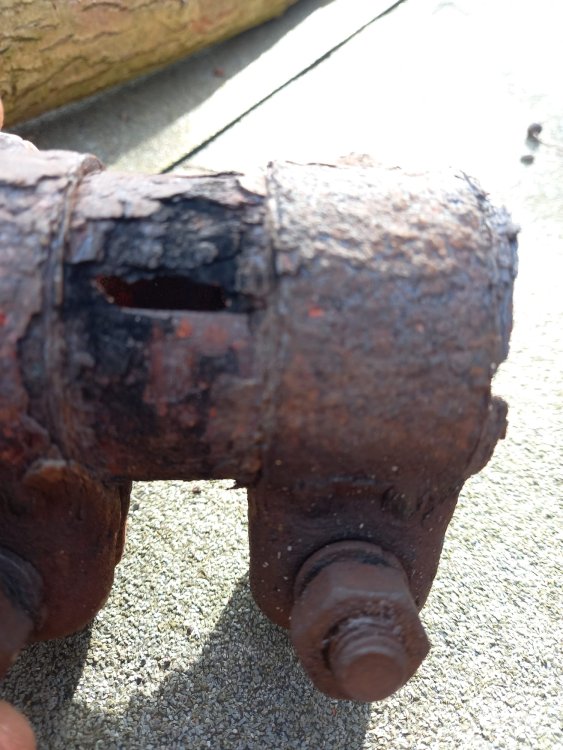
Last one I took off was consistent, sleeve just as bad as the clamps! Can't remember if it was a genuine one unfortunately:
-
👍
-
The actual exhaust pipes. By eye, they don't look in line, and if I hold a ruler up to the screen there's a fair angle. Is there a (designed) kink in the end of the right-hand/rearmost section? Looks even worse on your photos pre-fix TBH, so possibly a photographic artefact.
-
Relay within onboard supply control unit welded its contacts in 'on' position at a guess.
-
No problem with axle stand there. Did you use any exhaust paste? Reckon it may leak if not. You'll soon see from black soot stains. The two bits don't seem quite aligned either?
-
If it seems to work as a technique, maybe pop a link in here? Do you know for sure which resistor type your car needs? Climatronic A/C system has a transistorised thing with a metal heatsink, Climatic has a wirewound resistor. Not in the same place I believe.
-
7th and 8th characters in the VIN are the key to definitively identifying it if you don't know all the visual cues. Mk2 = 5J, Mk3 = NJ. Can't help with the real question though, but identifying the vehicle accurately is always a good start.
-
Document S0057020020. Search for copies 'wild' on the internet, or pay a small fee to download from erWin Skoda.
-
You should not have to, the workshop manual doesn't mention doing so.
-
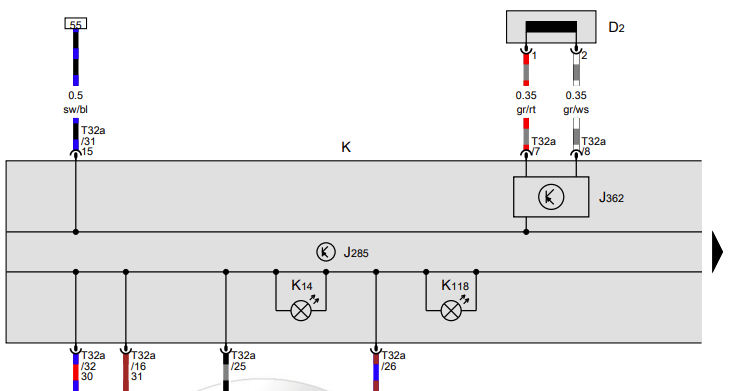
Pins 7 and 8 of the 32-way connection, grey/red and grey/white wires. D2 is the immobiliser pick-up coil around the ignition lock, J362 is the immobiliser control unit within - K - the instrument cluster electronic board.
-
MOT and service are very different. If you wish to see what is tested at MOT, here is the manual: MOT inspection manual: cars and passenger vehicles - Guidance - GOV.UK (www.gov.uk) As an example, MOT doesn't care anything about how the engine is in terms of oil, filters, etc. as long as the emissions from the tailpipe aren't beyond limits.
-
You may well find that this autolocking can be configured differently via VCDS even if it isn't apparent how to do it via the inbuilt user interface.
-
Understood. Sorry for your loss.
-
Picture of dog please.
-
Does each illuminate if you park up and switch off engine/remove key from ignition with indicator stalk left up or down?
-
Anyone acquiring a new-to-them vehicle with an internal combustion engine will do well to keep an eye on oil levels by use of the dipstick every few weeks until familiar with rate of oil consumption. Waiting for a warning light is not optimal. There was a similar story on another model subforum a couple of days ago. I forget which else I would link to it.
-
I thought same!