




langers2k
Resident Member
-
Joined
-
Last visited
Everything posted by langers2k
-
VAG have a feature where the wiper park position will move slightly. The idea is the wiper rubber will last longer as it's not always on the same position. Certainly doesn't look massively out of place to me...
-
You'll need to upgrade your CAN gateway firmware to get the that working. I had similar issues on a MY18 Octavia - few details in this thread: https://www.briskoda.net/forums/topic/479137-infotainment-lighting-query/ Short version, flashing the gateway from SW:4326 to SW:4344 solved it. After flashing it will need parameterising with a new dataset... No issues with component protection As you have SW:5323, you would need to find a suitable 5xxx firmware version, probably from a MY19 or newer car and dataset to fix it 👍
-
TPI 2049459/14 (05-Oct-2021) covers the MIB2 update. Customer statement: Customer may complain about one of the following phenomena: • ABT display failures (black screen). • MIB switching off, restarting – with a connected mobile device with the IOS operating system. • MIB without sound, or sound cannot be controlled, voice control malfunction. • MIB sporadically switching off or gets frozen while calculating route or while navigating. • MIB does not allow the lower menu bar to be automatically hidden in the navigation mode. • MIB does not allow the activated additional information window to be closed. • Virtual Škoda Surround not working. • Radio is playing when customer comes to the locked vehicle. • Deactivating auxiliary heater pre-selections. • Changing time indicator. • The hands-free function is not available; displayed is the indication „Phone not available“ and Bluetooth does not work. Workshop findings: • The customer statement can be reproduced. Technical background Faulty SW MIB Standard (Amundsen, Bolero) in vehicles manufactured in the period from CW 22/2016 to CW 45/2020. Production change Modified MIB control unit Generation II with new SW version introduced since CW 45/2019 Measure • If the customer complains about one of the above symptoms, perform the update of SW MIB Standard (Amundsen, Bolero) to the new SW version. • Updating procedure of the MIB control unit using the application SD Creator – see Service Information No. 2034053. • To download the SW 369 (to be applied to vehicles manufactured in CW 22/2016 – 22/2017), enter Part No. 5FM.IB2.STD.369 in the application SD Creator • To download the SW 480 (to be applied to vehicles manufactured in CW 23/2017 - 45/2020) enter Part No. 5FM.IB2.STD.480 in the application SD Creator Important notes: If the following instructions are not observed, the updating process may be stopped and the navigation unit blocked. Warranty costs will not be accepted in such a case. • The respective flashing data can be used only for vehicles manufactured in the periods mentioned (SW 369 for CW 22/2016 - 22/2017, SW 480 for CW 23/2017 - 45/2020). You should contact a dealer for the update... If you'd like to update it yourself, add your system details to this following thread and hopefully someone will provide the update to 0369 for you:
-
@enisz - it'll probably work on a MY18... No idea how you do backup/restore with OBDeleven but as long as you make a note of the coding/adaption channel values before you make changes, you can set them back to the original values 👍 On a MY18, you should be able to get custom colours for each driving mode but you may have issues with individual mode. When coded properly and individual selected, my car would keep flipping between two colours - namely the one I last choose in manual and the one set in the adaptions. You can workaround this by tweaking the config so individual mode has a preset colour rather than trying to use the last set one. I was able to fix this properly by updating my CAN gateway firmware to 4344 - not possible with OBDeleven/VCDS. Everything now works correctly as it would in a MY19 car Few more details in this thread:
-
If it's in the boot, it's probably an aftermarket towing kit...
-
Looking at the picture, the headunit is trying to start CarPlay. If this were a FeC issue, I would expect a message saying contact a dealer. Bored of guessing now given this thread started two months ago! Find a friend(s) with an iphone and a working CarPlay enabled car... You can then try all combinations to narrow this down: - Your car, your phone, your cable - Your car, your phone, their cable - Your car, their phone, your cable - Your car, their phone, their cable - Their car, your phone, your cable - Their car, your phone, their cable - Their car, their phone, your cable - Their car, their phone, their cable That will tell you exactly where your problems is likely to be... Alternatively, maybe try a headunit firmware update but I'd be surprised. Not much more I can add.
-
Assuming it's a manual... That sounds like you cooked the clutch.
-
As I mentioned above.... VCP or ODIS-e and directly edit the lighting configuration.
-
Are you sure the sensors are original and not an aftermarket kit fitted by the previous owner? We don't have the Ambition in the UK but for example, I believe the base spec 'S' model did not have parking sensors as standard.
-
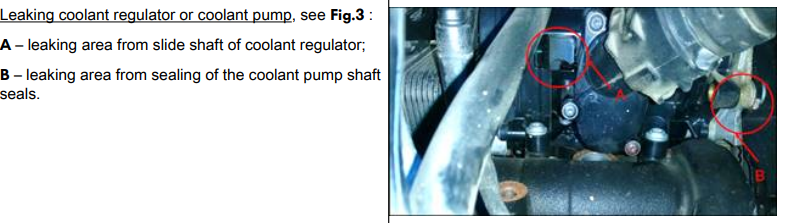
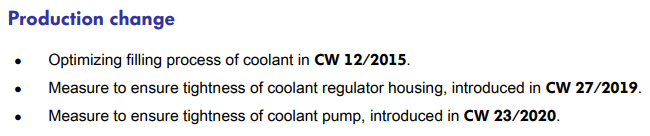
I had a similar leak on my second-hand 2018 vRS 245 which was fixed under warranty. You might want to try taking it to a Skoda garage as there is TPI 2049121/4 related to this. Including changes to how they were fitted: Even if they won't cover the full cost, you might get some good-will if it does match with the TPI
-
Without diagnostics, you would just be guessing and throwing parts at the car... I don't know where you're based but plenty of members here have VCDS or OBDeleven and should be able to perform a scan pretty easily: - map: https://www.briskoda.net/forums/topic/224376-vcds-owners-map/ - list: https://www.briskoda.net/forums/topic/262215-list-of-vcds-owners-previously-known-as-vag-com-vcp-owners/
-
You should get it scanned with VCDS or similar, that should help narrow down the problem pretty quickly. A failed sensor or even buzzer can cause the park pilot to stop...
-
I think switching the front/rear fog light wires at the switch is the only way to achieve this 👍
-
If you have future issues, you'll need to take the fusebox apart to clean the contacts. I'd suggest keeping your eye on it as it can melt the fusebox due to the heat
-
Yes - check the fuse I mentioned...
-
Possibly the CAN-bus gateway? They tend to be quite reliable but you'll need to check which version you have before buying a replacement. It'll also need coding in after replacing.
-
You might need a little more description than 'the thing' 🤣 The ECU will connect to various sensors and controls on the engine. It'll also connect on to the powertrain CAN-bus which is how it communicates with other modules in the car, including the immobiliser and steering wheel controller to start it.
-
It'll be the normal issue that causes this Check the 30a fuse 16 in the engine bay fusebox. It tends to corrode causing overheating, bad connections and will disable all the lights you've mentioned. Ideally, you need to open the fuse box, clean/tightening the fuse terminals and possibly replace the fuse👍 Random example:
-
It is much more expensive over here unfortunately. Comparing direct vs Spain vs UK for example: 3-VIN HEX-V2 - $199 (€182) - €299 - £225 (€259) 10-VIN HEX-V2 - $299 (€273) - €399 - £299 ($345) Guess that makes the Spanish licence approximately €50 or so. Just be careful, anything significantly cheaper than that is likely to be a cloned interface which is not supported by Ross-tech. If you know anyone that's going to be in the US soon, they could bring one back for you 😉
-
Official distributor list is here: https://www.ross-tech.com/distributors.php If you want it in Spanish, you'll need to buy directly from one advertising it in Spanish (it will also include the English version): If you buy from an English distributor, it will only work with the English VCDS version as it's the distributors who create the translated versions
-
Reversing can also sometimes dislodge a stuck stone (assuming it's that).
-
As above, the chamfer is completely normal... Random new example pads:
-
Probably worth getting the cars scanned with VCDS or similar to give some better clues
-
I think I used Fuelly in the past but at the moment I'm using Fuelio https://www.fuel.io/
-
Cornering fogs were an option but the headlights also have a cornering light function. It's not massively bright or obvious so you've probably missed it 👍


