langers2k
Resident Member
-
Joined
-
Last visited
Everything posted by langers2k
-
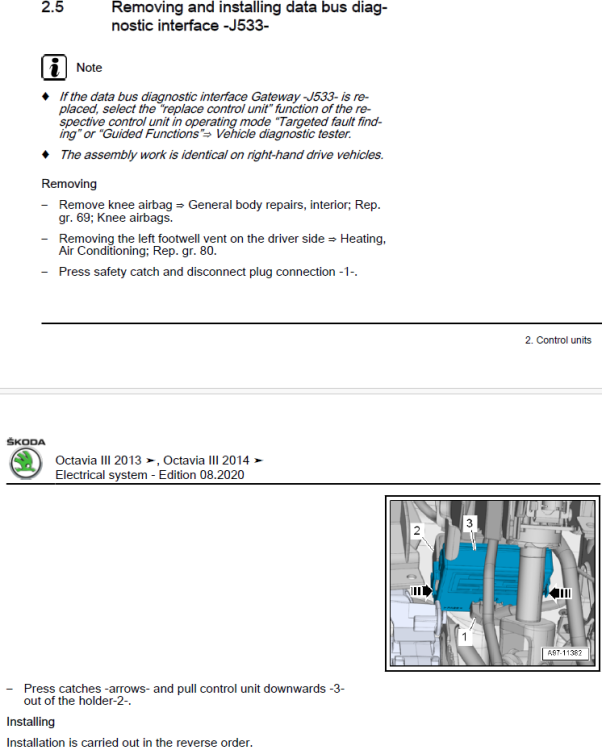
Might be worth grabbing a workshop manual for your Superb. Example page for removing the CAN-gateway on a similar Octavia:
-
Maybe post a full autoscan along with the instructions you followed
-
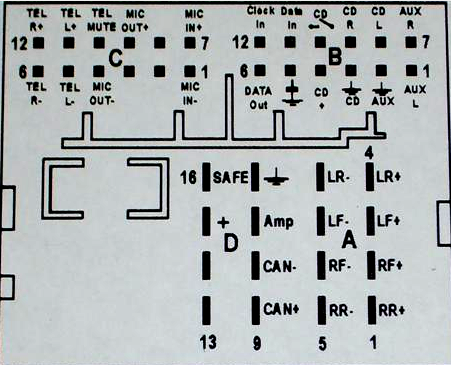
Did you look at the diagram I posted? That shows all the wires on your connector... From your picture, my best guess of wire colours and functions are. Black block: - Big red/white stripe are both permanent power - Big brown is ground - Thin orange/brown stripe is CAN low - Thin orange/purple stripe is CAN high Brown/beige block: - Brown/white stripe is front left speaker minus - Blue/white stripe is front lift speaker plus - Brown/red stripe is front right speaker minus - Red is front right speaker plus
-
Black block is power/ground/CAN. Brown block is front left/right speakers.
-
A 2007 Octavia and 2019 Superb are completely different electrically as they are based on different platforms... Take a look at the adaption channels in 09 on your Superb: ENG141656-ENG116604-Außenlicht_uebergreifend-Coming-home Einschaltereignis,Driver door That seems to be the 'activation' reason for coming home so maybe see what options you have
-
Oh - your using a mac... That will mess things up as OSX add extra files which stop the SD card working. If possible, use a PC otherwise I think you'll need to use a program like CleanMyDrive on the SD card after extracting. Top level directory should just have a directory called maps and no other files.
-
You're using Columbus instructions on your Amundsen. Try following these instructions instead. You can use the file you've already downloaded
-
-
Maybe add an adaption map from 09
-
Pretty sure it's part of the ECU output... Whoever did the tune should have updated the maximum output from the ECU at the same time. It's not a feature of the cluster to choose the power...
-
Please install the latest English VCDS version from here: https://www.ross-tech.com/vcds/download/current.php It can be installed at the same time as the Czech version you currently have. Then post a full autoscan and an adaption map from 09. The picture you've taken will not help
-
I wonder if that's an OBDeleven vs VCDS thing? AFAIK, 76 was for older modules (circa 2009??) and 10 is for more modern ones. Example VCDS scan with the same module as you have on address 10: https://forums.ross-tech.com/index.php?threads/16113/#post-144479
-
U101300 is a fault code and isn't specific to a particular module. It typically means whichever module is displaying the code hasn't been coded. I can't think of any obvious reason for this to occur during a parking sensor bracket replacement. Park assist does use data from the ABS module to determine direction and other a few other things. Still, that doesn't confirm which module has flagged the code up 🤔
-
Maybe start by posting an full autoscan and an adaptation map from 09...
-
No mk3 or mk3.5 had wireless AA or wireless car play. The radio hardware doesn't support it... Your only option is an aftermarket dongle 👍
-
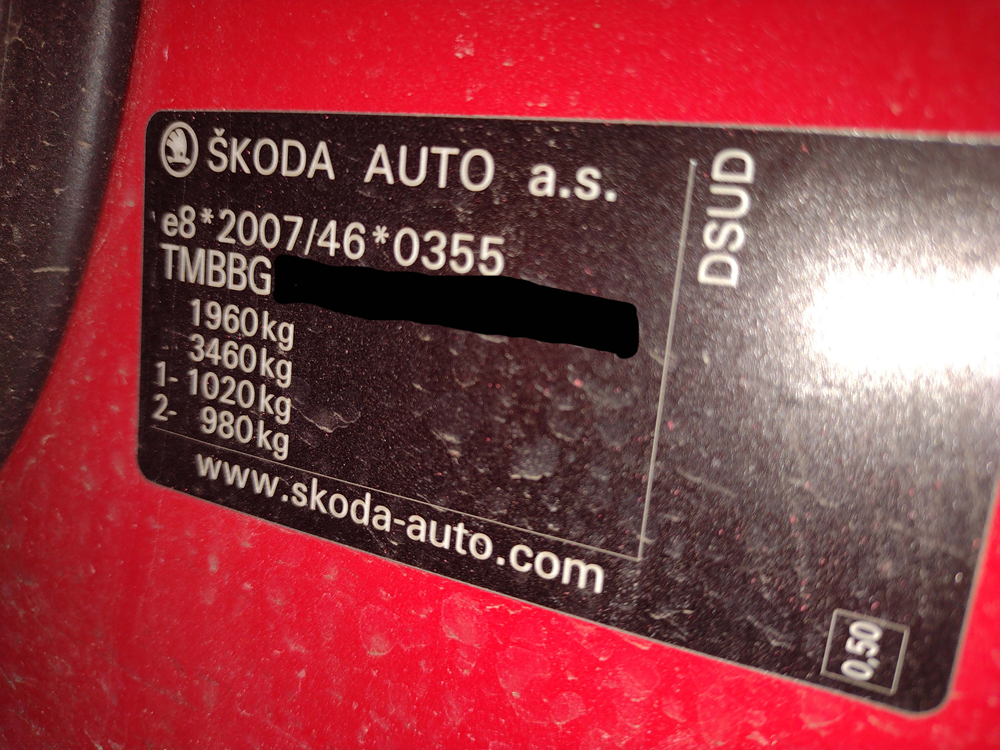
Pretty sure that's normally on the B-pillar, probably on the passenger side. You'll need to open the front passenger door to find it. Should be similar to this: Where the towing weight would be the second number minus the first. So in the example above, 3460kg - 1960kg to give 1500kg max towing weight.
-
Just to point out, cars like the Yeti don't have a strong concept of date/time so it's normally pretty safe to ignore that and rely on the milage instead. I also wouldn't expect a dealer to be bothered to clear codes during a service either As above, I'd save a scan (feel free to post it) and then clear all the DTC's to see which, if any, come back.
-
The Golf probably has slightly more damping/sound deadening so any noise/vibration may be less noticeable.
-
All sounds normal to me...
-
Welcome. You need to find out your gearbox code as that'll then give some pointers Looking at the workshop manuals I've got: - some have filler holes - some go via the reverse light switch - some have a special filler hole which require an adaptor
-
You'll need to add the headlight range control module, level sensors to the suspension and extra wiring to fit them. Along with headlight washers if you haven't got them... After that it's coding and alignment.
-
I'd guess at a failing joint inside the instrument cluster It was common on some older Octavias...
-
Surely you mean it's set up for RHD which would be normal in the UK...? Left hand traffic, right hand drive
-
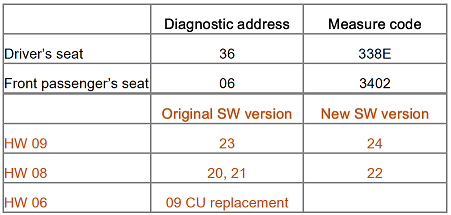
I expect you need the seat controller updating by a dealer. Technical product information Transaction No.: 2049942/3 Storing seat memory positions not working Release date: 07-Feb-2019 Customer statement: • Storing driver’s seat or front passenger’s seat positions into memory is not working. Service centre findings: • Entries „no basic setting“ concerning seat adjusting motors are stored in the event memory of the seat control unit. Measure • Online update of the memory seat control unit SW using the diagnostic tool ODIS via the measure code. • If the fault „Data set invalid“ is logged, check the SW version. It has always to be the latest SW version, i.e. SW 22 or 24. • In the case of the version SW 22 or 24 with the fault entry „Data set invalid“, carry out only the parametrization of the memory seat control unit using the software configuration (SWK).
-
I'd suggest googling for: vcds "address: 8c" As that will at least give you an idea of what Ross-tech believe the module would be. In this instance: - Address 8C: HV Battery (J840) - Address BD: Hi Volt. Batt. Charg. (J966)