




langers2k
Resident Member
-
Joined
-
Last visited
Everything posted by langers2k
-
Might be worth grabbing the factory wiring diagram. That confirm all connections and which pins on each connector etc...
-
In what way are they troublesome...? Reading between the lines, I think you might want aftermarket pads with more initial bite which may give you a better braking feel. This shouldn't cause any warranty concerns as the pads and discs are normally wear and tear items anyway. If you haven't already, you may also want to consider better tyres too 👍 It also sounds like you need to realise a Superb is not a light, nimble, sportscar and slow down for the three worse corners. Which will save you the expense and potential hassle of modifying your car along with the earache from your wife!!
-
Have you actually had braking issues with the original pads apart from how quickly they wear out...? I only ask as the stock system is more than capable of locking the wheels and is not the limiting factor in how quickly you can stop. On track with repeated acceleration and heavy braking it's possible to overheat them etc. I'd be surprised if you're able to do this on roads with normal traffic and speed limits.
-
Certainly doable but not easy or cheap To give you an idea, someone did it to a similar golf here: https://www.golfmk7.com/forums/index.php?threads/dcc-retrofit.378431/ Bllstein also have their B16 ridecontrol kits which is an aftermarket DCC system. Not sure if they have one for the Octavia though.
-
Bolero has no satnav. Amundsen does have satnav. The other likely option would be a Columbus but I'm pretty sure that would have been an optional extra on a SE tech.
-
Welcome. I'm afraid your headunit is unable to update itself via the internet no matter what version it's running. I'm guessing you have either a Bolero or Amundsen fitted, in which case the latest update is from late 2021. Given the age of the MK3 Octavia, I would be very surprised if another update is released now. If I were you, I'd do the update myself. Plenty of other folk already have, just add your details to the following thread and I'm sure someone will provide you a download link:
-
Pretty sure it's either black & white or full colour rather than just red & white. Looking a the April 2016 brochure, only the L&K had the full colour as standard. However, it was an option on the SE and SE L. Can't see any mention in the July 2017 brochure so the full colour may have become standard over the range. superb0717.pdf superb0416.pdf
-
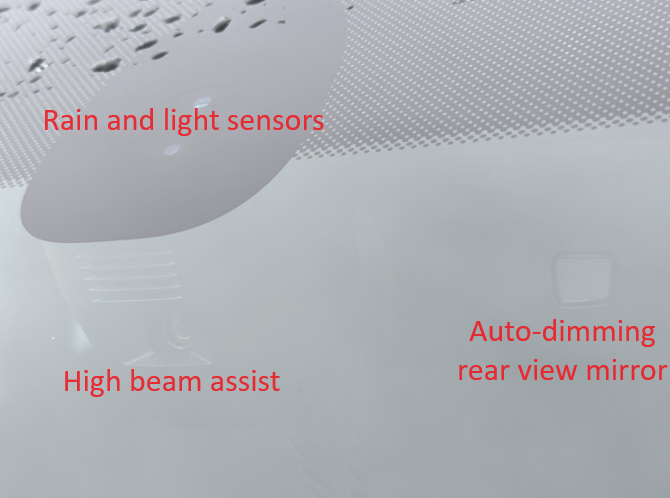
The sensors touching the glass are light and rain (auto-headlights and auto-wipers). High beam assist uses the obvious camera looking thing built in to the lower part of the mirror mount. Unfortunately, it does not support TSR or lane assist.At least in the UK, all 2017 models had hill hold as standard, including manuals. It's probably already working but only lasts a couple of seconds. Lane assist will depend on the front facing camera you have. Given you don't have TSR or LA, you will likely need a new camera and windscreen as the mount is different. Digital cockpit is easy on a MY18 car, it might be harder on a MY17 depending on various firmware versions. It's also incredibly expensive to buy a cluster. You'll also need a dealer to sort the immobiliser and component protection during the install.Most folk seem to use any cheap Chinese LEDs. I would not recommend it... If your car is on the Phillips compatibility list and it's legal in Denmark, that would be the most obvious route to LED headlights.It depends if you want brighter headlights or just an LED look. For example, the H7 versions are rated at 1550lm which is the same as a halogen equivalent.I wouldn't bother with the nav upgrade for tsr... Just use Waze via android auto or carplay. That'll give more accurate results although it'll only be shown on the radio screen.Led headlights can be fitted but you also need the level control system and headlight washers. This may also require a new bcm or can gateway making it very expensive. Skoda don't provide a changelog. The list of fixes tends to be very vague and helpful. TSR needs nav to work properly... Yes, you can replace the mirrors with motorised versions. You might need new door controllers which support them. ACC is also possible assuming your ABS module supports it. All the above retrofits could be quite expensive and complex so you might want to consider swapping your car if they are important to you...You can certainly get that effect from coding... Can you post a full autoscan and also an adaption map from 09 please.You can find the full TPI by signing up for an hours access to erwin: https://erwin.skoda-auto.cz/erwin/showHome.do That will probably tell you any extra steps required along with any symptoms you may experience due to the fault. A bad flash might mean your engine won't start. You may also need a dataset or immobiliser work afterwards. The latter will require genuine licenced ODIS install with online access. The last paragraph from the drive2 page states if the error remains after updating, the cluster should be replaced. Based on that alone, I would very much suggest getting a dealer to do this for you. Given it's a known issue it should be free and they can be responsible for a replacement cluster if needed...I don't think it's TPI 2041445/2 based on this page: https://vwts.ru/articles/tpi/tpi-2041445_2.html There will probably be another TPI specific to your cluster. ODIS-e can normally perform updates offline. It may then require a dataset etc afterwards. Assuming there is a TPI, I'd suggest you have a local Skoda dealer perform the update for you and not risk damaging the cluster... :)Latest Amundsen MIB2 maps: Latest Columbus MIB2 maps:I think you've misunderstood... A headlamp will be type approved for a specific light source. Replacing that light source for any other should cause an MOT fail. This applies to: - Halogen headlamps with either HID or LED lights fitted - HID headlamps with either halogen or LED lights fitted - LED headlamps with either halogen or HID lights fitted However, it does allow for swapping the entire headlamp with type approval for a different technology assuming the other requirements are met. Not that this is particularly relevant to yourself but it could be important for other UK folkWhat camera and can you post an auto scan?I'm not really sure what else to say at this point. No amount of pulling the door handle will unlock the car. I obviously haven't seen the footage but they must have done something at the same time to get access - maybe something a simple as a bend coat-hanger but this is not a place to be discussing car entry methods. Once they have physical access to the OBD port then probably possible to bypass the immobiliser. This is not a unique problem to Skoda or VAG, lots of cars are vulnerable to this style of attack. You really should take the car to a Skoda (maybe a VW) dealer to see what state the electronics are in. It might need modules restoring to the factory settings and various things updating. If nothing else, they should be able to repair to the stage where the locks, immobiliser and alarm (if fitted) work. Some modules may need replacing depending what happened when the car was stolen. Your best next steps are to contact the repairer and you insurance stating it's not been repaired to suitable standard. If that doesn't work, you may need to seek legal advise and take it further.Apply heat, penetrating oil etc and hope it comes out... If not, add more torque until it either comes out or snaps. Once it snaps, drill out and heli-coil itForum guidelines state we can't have content that "promotes illegal activity or infringes on the legal rights of others" so until you have a genuine cable, I won't be able to help... Ross-tech do great work so if you find their product useful, you really should buy a genuine versionYeah, that'll be a challenge! Can you install the latest English VCDS version from Rosstech: https://www.ross-tech.com/vcds/download/current.php You can have both languages installed at the same time without issueIf it's been previously stolen, it's probably had various modules messed with to disable the immobiliser. You might need a new ECU, instrument cluster etc... I'd suggest speaking with your insurance and let them know the car has not been repaired to a satisfactory state. At a guess, it might need to go to a Skoda dealer for various replacement modules along with the appropriate coding/parametrisation.


Important Information
Welcome to BRISKODA. Please note the following important links Terms of Use. We have a comprehensive Privacy Policy. We have placed cookies on your device to help make this website better. You can adjust your cookie settings, otherwise we'll assume you're okay to continue.