langers2k
Resident Member
-
Joined
-
Last visited
Everything posted by langers2k
-
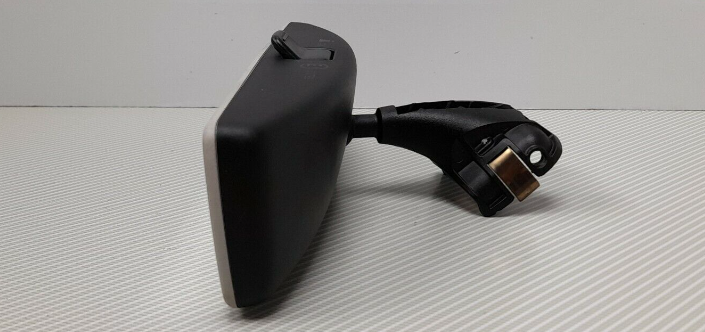
Sorry, given you have auto wipers that suggest a RLS (rain light sensor) is fitted and I wasn't aware of any non auto-dimming mirrors that would fit over a RLS. Turns out there is... Back to the point: - If you're lucky, a previous owner has replaced the mirror and the wiring should be present somewhere... - If you're unlucky, the car never had a auto-dimming mirror and the wiring won't be fitted...
-
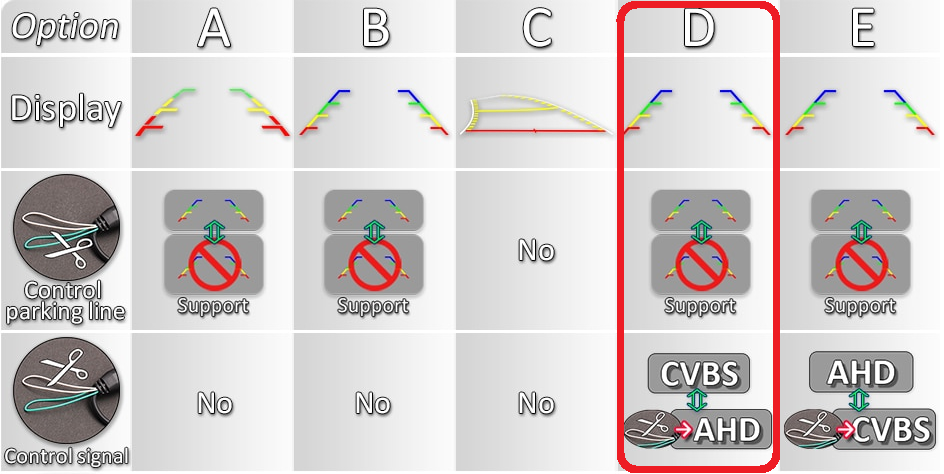
I think something is getting misunderstood... OE highline camera - First link I posted: https://www.aliexpress.com/item/4000197729171.html - Only fits in the larger boot handle hole - Needs the coding I posted in the other thread - Supports different the view modes I posted Chinese style highline camera - Second/third link I posted: https://www.aliexpress.com/item/4000230897829.html - Options for both sized boot handle holes - No coding required, they some how automatically recode the headunit - Only supports moving guidelines, no other view modes are supported Chinese style lowline camera This is the camera you've installed, there are lots of variants which all behave slightly differently so it can get confusing. Based on the link you posted, option D has two wire links (image below): - Green turns the static parking lines on/off - White changes the output format between CVBS and AHD I would suggest either cutting or re-joining the green wire should enable parking lines You can also fit a 'Chinese style highline camera' but you'll need to un-code the lowline camera and run a new wire from the headunit to camera.
-
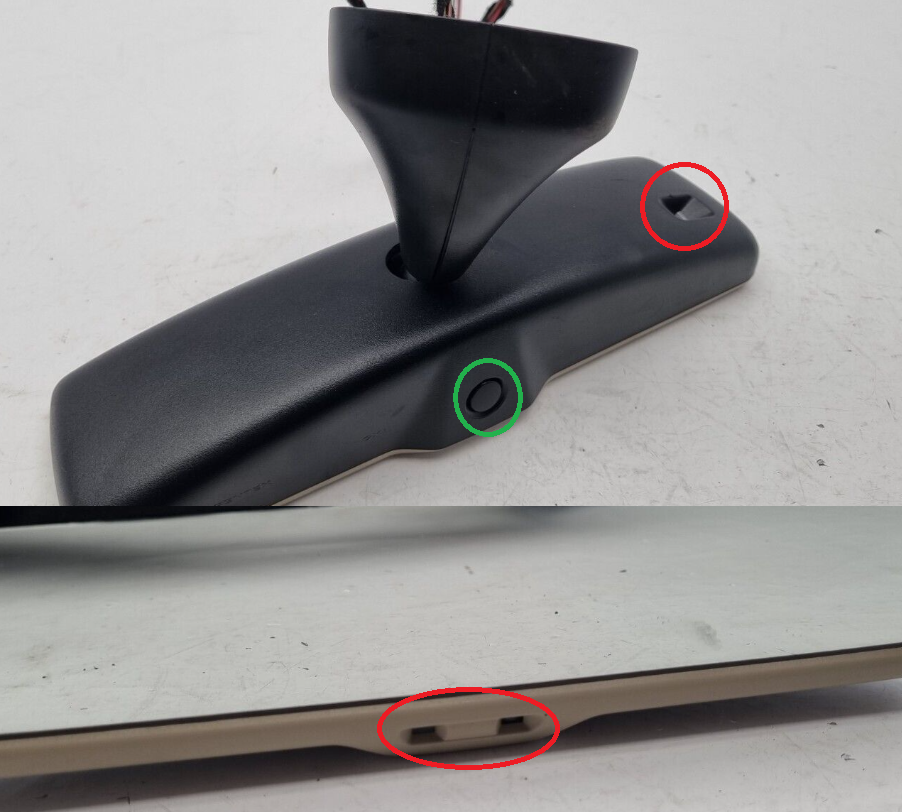
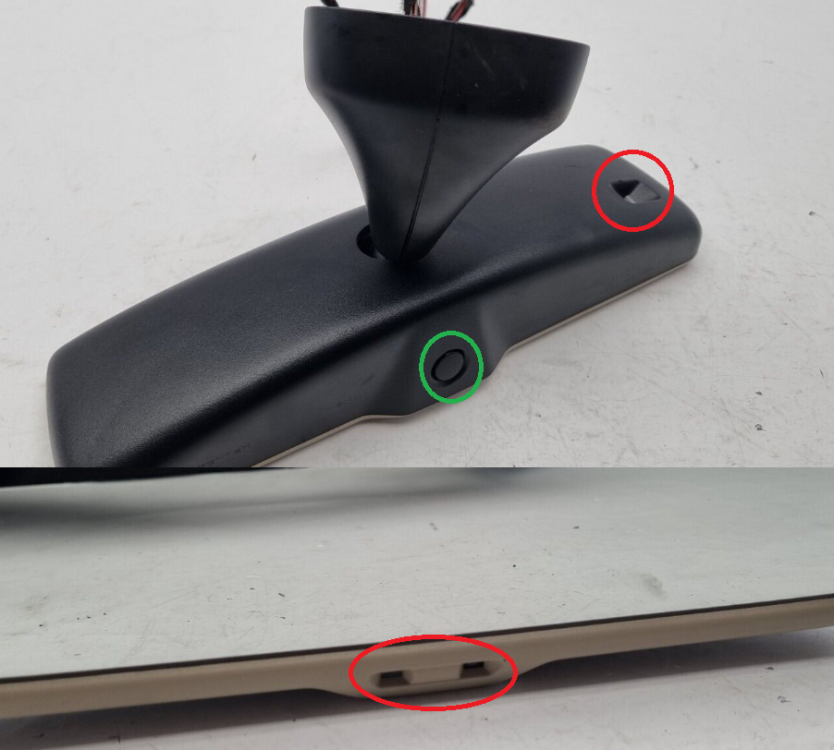
Take a look at your existing mirror, if it has the two sensors circled in red, it's an auto dimming mirror. The dimming can be turned on/off using the button circled in green.
-
I prefer OE/OEM solutions, that's why I fitted an original camera using the factory wiring diagram. This gives me all the features of a factory fitted camera including a washer jet. It's also fully diagnostic compatible and allows calibration. They are currently about £70 on aliexpress. For example: https://www.aliexpress.com/item/4000197729171.html Wayland (the OP from that thread) choose a Chinese self programming cameras as it's a plug and play job. Plenty of people use this style as there is no coding required. This makes them easier to install and slightly cheaper, about £40 on aliexpress. For exmaple: https://www.aliexpress.com/item/4000230897829.html (MQB-CAM A) As to which you should fit, that's completely down to you. The only obvious issue is early MK3's had a small boot handle switch so the OE camera won't fit, in which case the Chinese solution makes more sense. For example: https://www.aliexpress.com/item/4000230897829.html (MQB-CAM E) Please double check before buying that's it's correct for you car... It might be worth adding a link to the camera you have installed as that might give some clues as to your installation issue
-
Then I expect you shouldn't have. I'd try reconnecting the wire. Using highline coding on a lowline camera will cause lots of fault codes. It won't solve your problem.
-
I think the guidelines are generated by the camera so coding won't help. What camera did you install? If it's aftermarket, there is sometimes a wire link that needs cutting to enable them...
-
I fitted a 'new' cluster and had it programmed but it had a backlight fault so I had to remove it for repairing. When it came to refitting, I need to increase the mileage to account for the time when it had been removed. The software I used was: https://mhhauto.com/Thread-MQB-VAG-Virtual-cockpit-Editor-EXTENDED-VERSION although it was cheaper when I bought it. If you do need the mileage increasing, I'm happy to help as per this post: https://www.briskoda.net/forums/topic/489327-mqb-instrument-cluster-odometermileage-increase-service/ Yes, up is easy but possibly time consuming. As mentioned before, I've heard rumours there is a down solution but I've no first hand experience. I expect it's fine but I'm no expert on VC. Most my experience comes from retrofitting the one in my Octavia. I've certainly used Aliexpress to buy various other modules without problem in the past. If you currently have a rear washer jet, you just need to T into the existing pipework. Not sure where the washer jet is on a Superb so you may need to replace the pipe for a longer one. On a 2019 Superb, there is no wireless Carplay option. If you already have Carplay, there are a number of 3rd party adaptors that connect to the cars USB socket to add wireless Carplay or Android Auto. I've never used any so I don't have any recommendations.
-
There are a number of things that need programming after a cluster swap: - component protection (this is the Skoda/VW anti-theft solution) - immobiliser to allow the engine to start - odometer to keep it correct - coding/adaptions to match how your car is configured ODIS is the Skoda/VW factory software that's normally used to program all the above during a cluster swap. Pretty sure both new and used clusters are fine. The only issue is ODIS can only set the odometer if it's a 'new' cluster, this roughly translates as less then 100km if I remember correctly. If it's above this, you'll need 3rd party tools to change the odometer. For example, when I retrofitted my VC, I bought a tool that increased the mileage at ~4000 miles per day. This is fine for smaller increases but obviously not be great for larger corrections. Other points: - generally speaking, it's not possible to reduce the mileage - I believe there is one company that can reset the mileage to allow ODIS to set a new one, I don't have any further details on who or the pricing - I've also heard rumours that ODIS may refuse to code a cluster marked as stolen so be careful when sourcing second hand items
-
Welcome I believe the attached PDF is correct for a MK3 Octavia hatch. 5E5071126.pdf
-
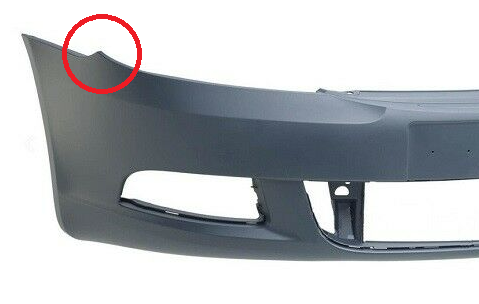
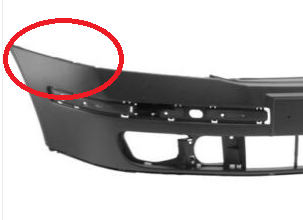
Not really... You will need to modify the bumper to fit around the pre-FL lights. There is a bump on a FL bumper which isn't there on a pre-FL bumper.
-
It has been done but there isn't much info: About the only post that mentioned it was:
-
Online parts catalogues might help but they don't give as much information as the proper Skoda system - at least not without subscribing. Having multiple parts for a single year/model is normal. Each part will have different PR-codes so you use those to narrow it down. Can you post an autoscan of your car using VCDS or similar? It might help to see what you currently have installed...?
-
https://erwin.skoda-auto.cz/erwin is the official source
-
That VCDS page doesn't apply to the rack used in the cars you've mentioned. At least I can't see any autoscans online where a Golf has 1B fitted... You need to find a VIN from a similar Superb with PR-1N7. Just as a random example: https://www.autogids.be/detail-id--8200921--skoda-superb-wagon-sportline-1-5-tsi-110-kw-7-speed-auto/tweedehands.html With the VIN, you should be able to find the steering rack part number. A decent retrofitter should also be able to use the VIN to pull a Superb specific dataset for the module edit: Here is an example Superb with the same rack as my Octavia vRS: https://forums.ross-tech.com/index.php?threads/24676/ Address 44: Steering Assist (J500) Labels:| 5Q0-909-144.clb Part No SW: 3Q0 909 144 M HW: 3Q0 909 144 L Component: EPS_MQB_ZFLS 507 5082 Coding: 81170000 Shop #: WSC 00033 790 00150 ASAM Dataset: EV_SteerAssisMQB 015157 ROD: EV_SteerAssisMQB_015.rod VCID: 3C20CD16F6E65AFB4EB-8068 No fault code found. I'd take note of that VIN (TMBBM7NP9L7012977) as both the UK and Australia are RHD. Hopefully a retrofitter can find an appropriate dataset for you
-
And the MK3 Octavia vRS as that's how I found the PR-code 😉
-
I think it's PR-1N7 for dynamic steering you're interested in. Take a look at some part catalogues and see what racks they offer for each pr code 👍 @numskull for the Skoda's, I think it's a variable ratio rack. It gives a more direct/sporty feel without making it twitchy or heavy in the center.
-
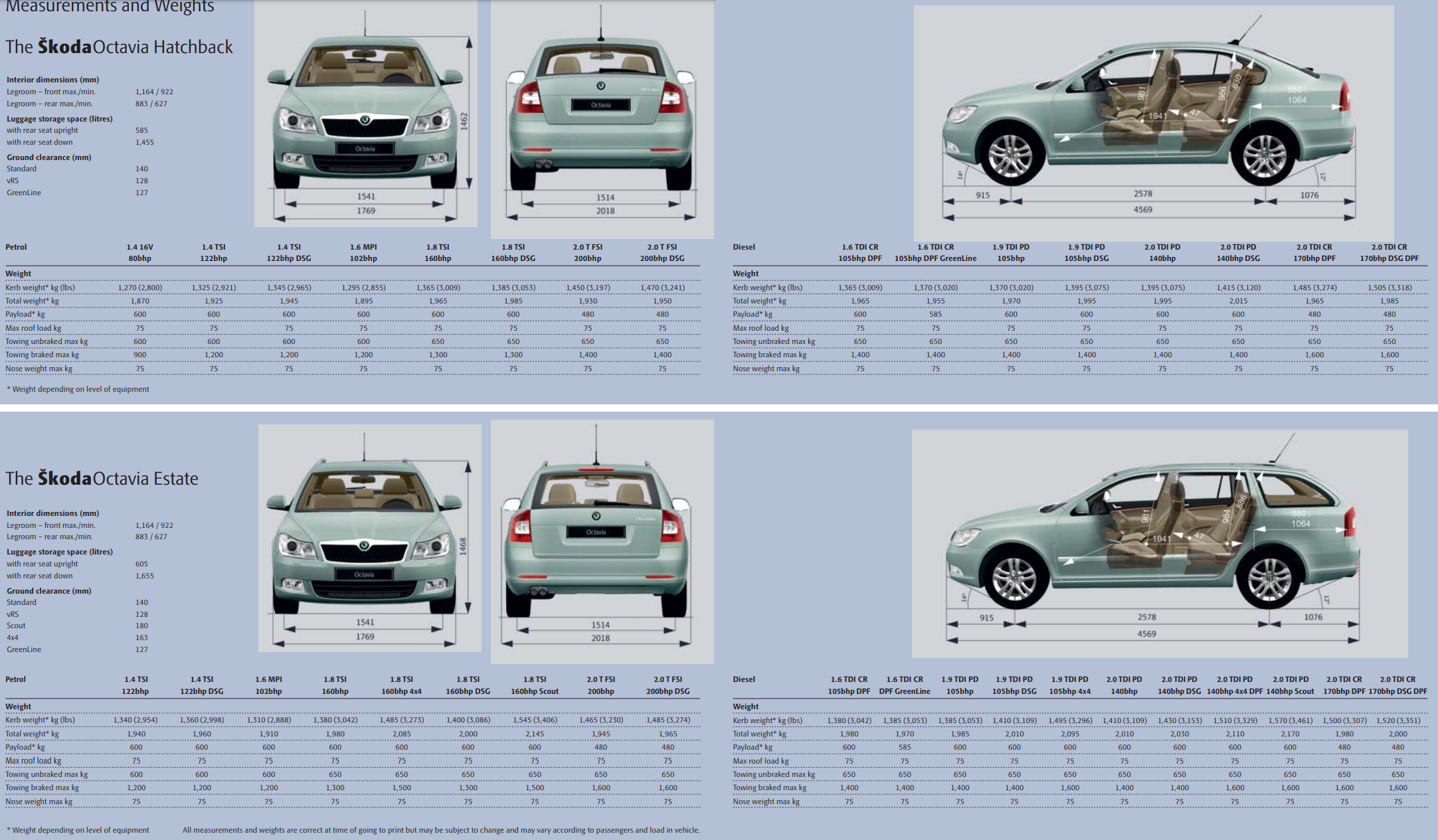
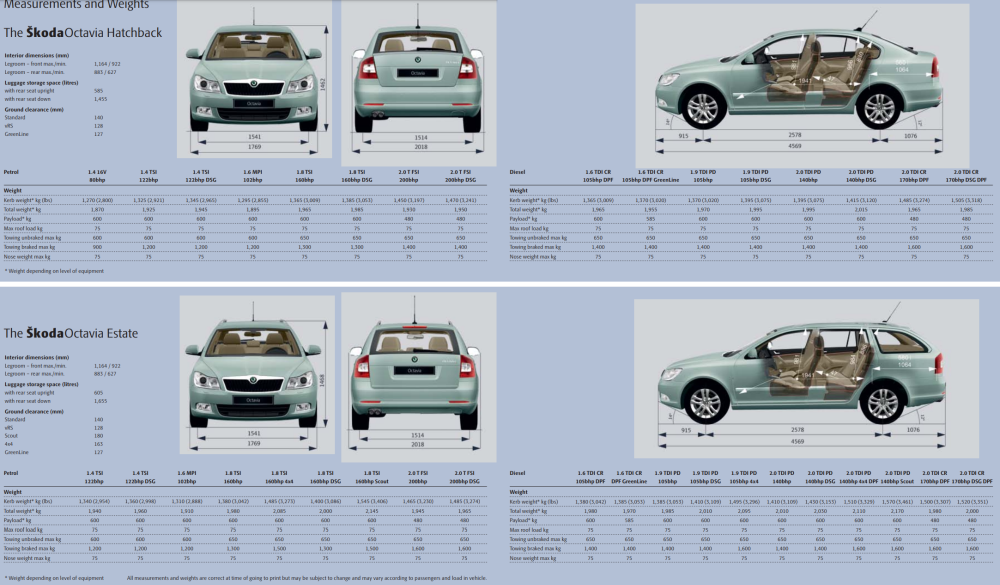
As above, the actual weight depends on a great number of factors. Both the 10/2009 and 01/2010 brochures show the following table which suggests the estate is ~15kg heavier in it's 2.0l TDi form:
-
No experience yet... Most my journeys are an hour plus so wireless AA would destroy my battery life. Much easier to just plug it in and have a fully charged phone when I arrive 😉 Pretty sure others have used it and a few other brands. Hopefully someone will be along with first hand experience 👍
-
No wireless AA or CarPlay support on a MIB2.5 Amundsen I'm afraid. The only option is a 3rd party dongle such as AA wireless
-
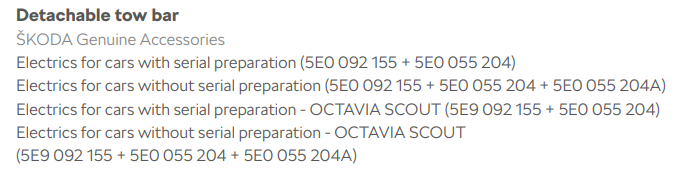
A very quick google suggests: - 5E9 parts are for a Scout (4x4) - 5E0 are for 'normal' models I'm not sure what the difference between 5E0 804 875 and 5E0 804 875 C is though... I'd suggest you contact Skoda to see what part they suggest for your VIN Taken from an accessories pdf:
-
A quick google suggests: P2000 - NOx Trap Efficiency Below Threshold Bank 1 P0237 - Manifold Pressure / Boost Sensor (G31): Signal too Low U11F5 - Likely DPF related? P0641 - Sensor Reference Voltage "A" Circuit/Open P0651 - Sensor Reference Voltage "B" Circuit/Open P0697 - Sensor Reference Voltage "C" Circuit/Open If I were you, I'd get a local VCDS user to perform a scan. At the very least that will give you a little more information including if the codes are current or historic and when they last occurred. Can you elaborate what the issue was and how you fixed it? Might help someone in future
-
Pretty sure that stopped being possible on some models starting around 2010. For instance, the early MK2 Octavia could be done by changing an adaption channel but the late ones need a new dataset uploading. Taken from http://wiki.ross-tech.com/wiki/index.php/VW_Golf_(1K)_Steering_Assist Saying that, I just came access the following which suggests there is one setting that might make is slightly more assisted, try looking at this: https://www.vwvortex.com/threads/diy-permanently-increase-steering-weight-via-vcds.8410537/ No idea how noticeable it'll be when set to comfort
-
I don't think you'd be able to a 'light' setting to the menu. In theory, you should be able to change the assistance for one mode though. A while back some folk were able to extract the data from parameter files but I've no idea if they went far enough to create custom versions: https://skodapilot.com/2016/09/25/harakteristiki-rulevogo-upravleniya-chast-3-mqb/
-
Pretty sure it's a dataset/parameterisation job to change the steering assist curve these days. It's not something VCDS or OBDeleven can do. You'll need something like ODIS or VCP
-
Firstly, can you update to the latest VCDS version, it can be downloaded here: https://www.ross-tech.com/vcds/download/current.php Secondly, can you post an autoscan as the files you uploaded aren't one. There is a youtube video on this post showing how to: https://forums.ross-tech.com/index.php?threads/101/