langers2k
Resident Member
-
Joined
-
Last visited
Everything posted by langers2k
-
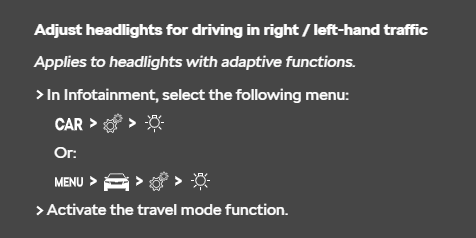
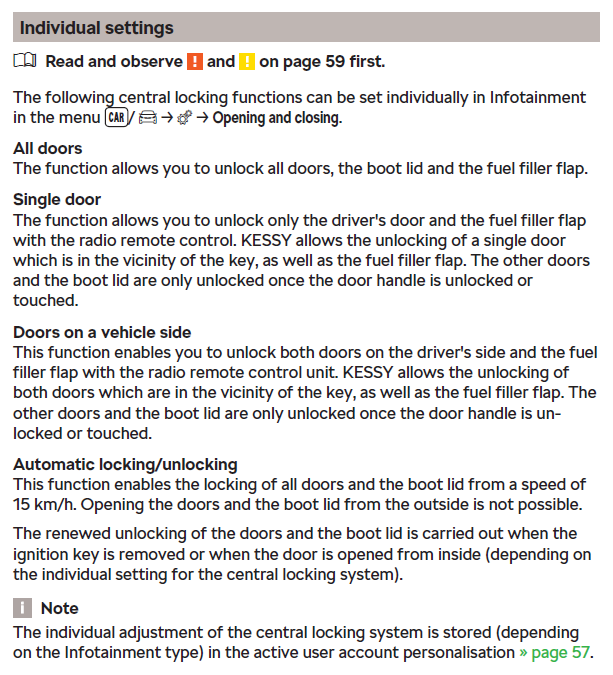
If the boot handle has suddenly stopped working, then it's probably the microswitch that's failed The only setting that's related is this: So I'd check that before replacing the boot handle
-
A VCDS autoscan might give some clues, or at least confirm which ECU and SW version you currently have.
-
A quick google suggests you probably need to update the ECU firmware, assuming an upgrade exists
-
Nor what country you're in... At least in the UK, I very much doubt that is counted as road worthy...
-
-
There is no security chip... It's just the CID (Card ID, sort of like a serial number) that needs to be present on the allowed list. You can't wipe the CID during a format and generally speaking, it's impossible to change the CID Formatting is absolutely fine as per this guide:
-
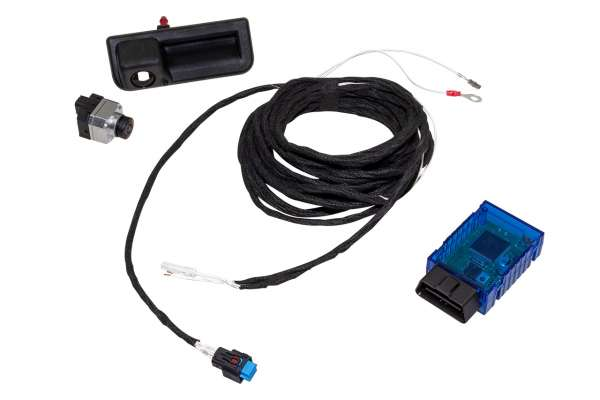
The "intelligent Parking Assist System" module seems to be pretty generic too, these both look near identical but are being sold for BMW or Mercs: - https://www.alibaba.com/product-detail/Car-Camera-Interface-Used-for-BMW_1600108377604.html - https://www.alibaba.com/product-detail/Camera-Interface-for-Mercedes-BENZ-NTG_1600129774946.html Completely different to the OEM system which is just a camera and wire, for example this from Kufatc: No idea how well their 'coding dongle' works but you would need either OBDeleven or a dealer to unlock SFD first. While I agree that the coding could be lost if a dealer does a reset. I don't think I've heard of a OTA update resetting coding changes yet...
-
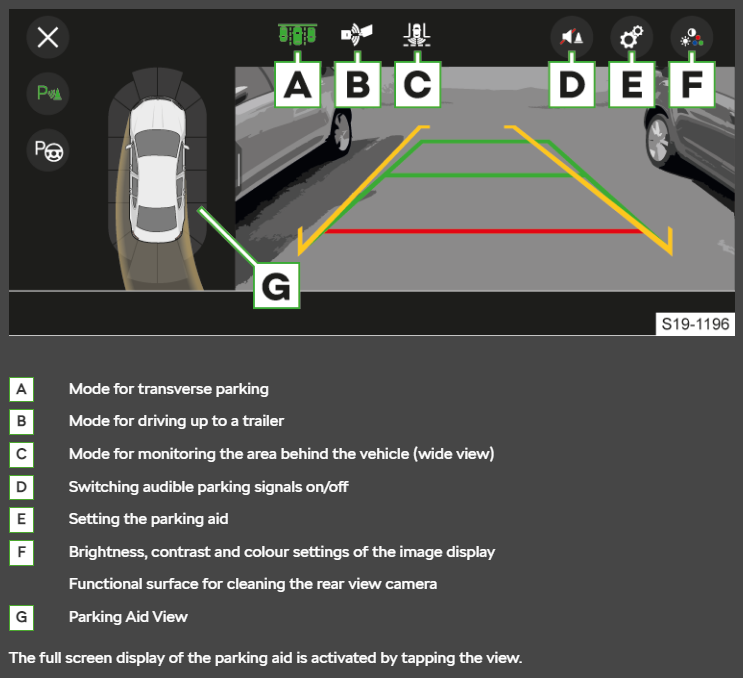
I just had a second look at the in-car-install kit as I was curious how it could work without coding. It's basically looks like a £30 Chinese camera (based on the connectors) and a LVCDS display switcher. The silver box connects between the headunit 'brains' and the display. It normally passes the video signal straight through. When it gets a CAN-bus message to say reverse is selected, it takes over the display to show the reverse camera output. Based on the images, it probably also understands the parking sensor/steering CAN-bus messages to give the proximity overlay and moving guidelines. In short, it means you will only get an image but there will be no controls or adjustability like an OEM camera: It's down to you if you're happy with that level of functionally
-
https://erwin.skoda-auto.cz/erwin/showHome.do Yup, that's typically a Columbus. Mid would be the Amundsen
-
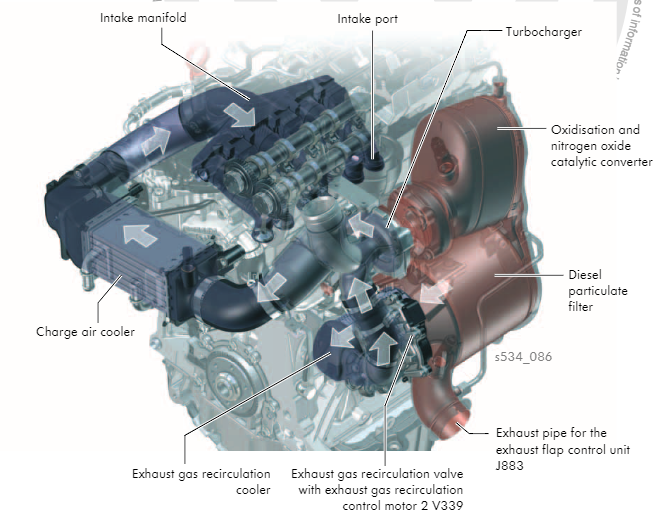
Google? Super easy: - Wiki gave me a couple of likely engine codes for a 2016 1.4 Tdi Fabia: CUSB or CUTA - A quick search suggested the correct VAG Self Study Program (SSP) for those engines would be 534 - A second search found SSP 534 and I scrolled down until I found a useful image
-
That's another aftermarket kit. This is an example of the OEM version: https://www.carsystems.eu/skoda-octavia-nx-4-gen-rear-high-line-camera-kit-retrofit,id4406.html Please note, they do various camera versions depending on LHD/RHD, which headunit you have and if you want a washer jet. I'd also expect it to be cheaper from other suppliers
-
Yup, it's on the back of the engine. Image from SSP 534:
-
I've used various Google PIxel phones with Android Auto over the years and they've been fine for me. I would expect most major brands (Samsung etc) to work perfectly. I think Huawei has issues since the US ban, although saying that, I think the P30 predates that...
-
Larger rotors won't help you stop any quicker as the stock brakes are more than capable of locking the wheels... If you're doing repeated, high energy stops (like on a track) then yes, larger rotors will help with heat management. For normal street use, unless there are signs you're overheating the brake system, I'd stick to the stock size
-
Odometer changes can only be done using official tools when the cluster is 'new', below around 100 km iirc? This is not the dealers fault, it's just a limitation of the tools they have available. There are 3rd party tools that can adjust the odometer on used clusters. You'll need to find a decent auto-locksmith to do it for you On this age of cluster, it should be possible to increase or decrease the mileage. On some newer MQB clusters it was only possible to increase it but I think the latest 3rd party tools may have gotten round that.
-
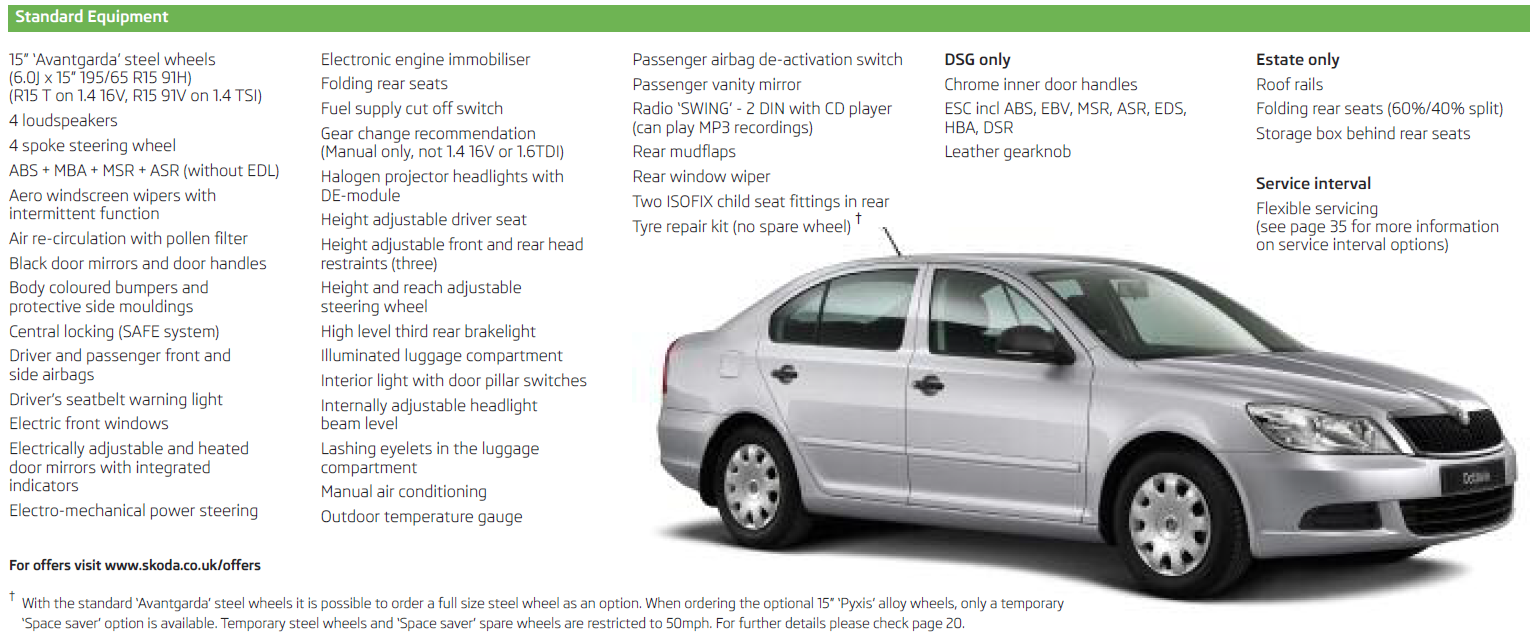
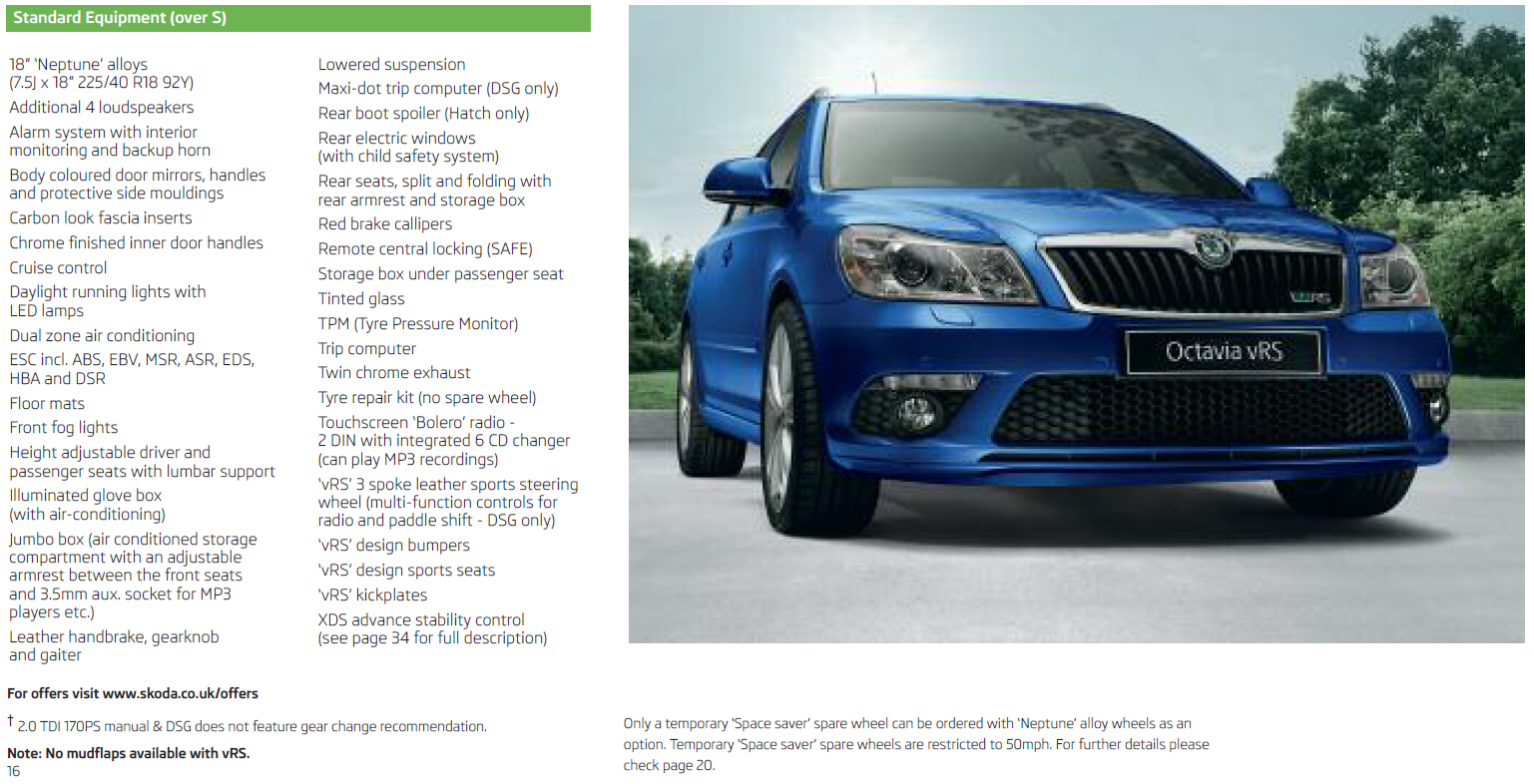
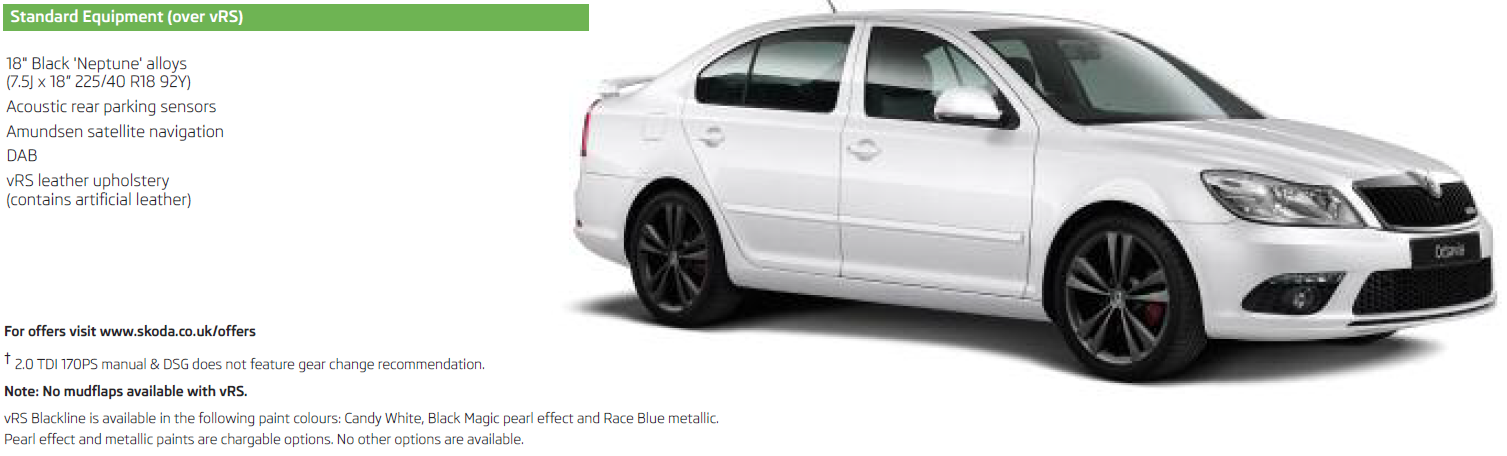
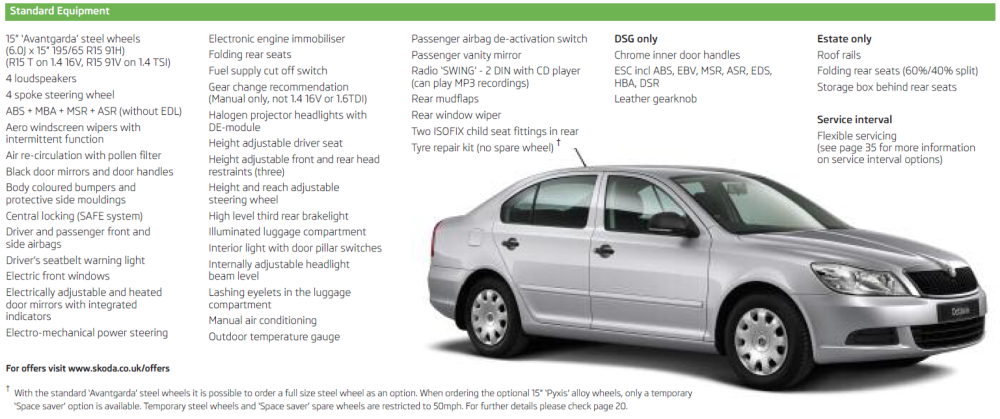
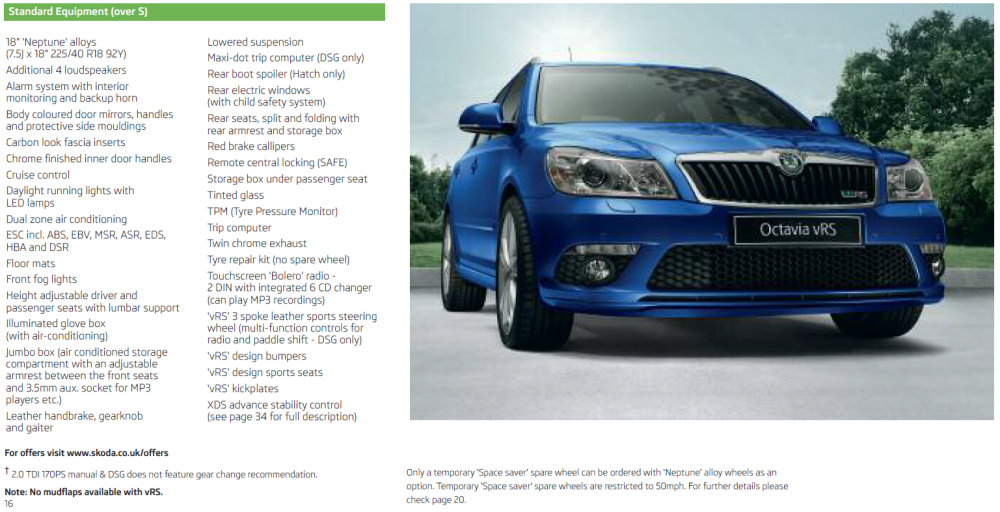
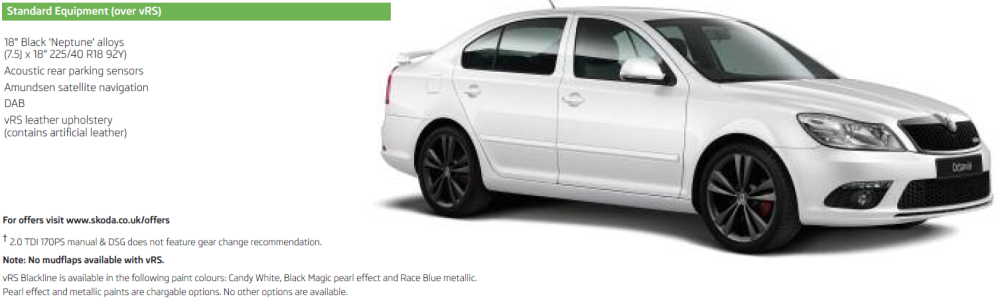
Extra power is the obvious difference. A non-vRS 2.0l TDi Octavia would have either 140ps or 110ps, only the vRS gets 170ps Few images from a late 2012 brochure for a more detailed answer are below. The base model 'S' gets: The vRS gets the following extras: The Blackline vRS also gets:
-
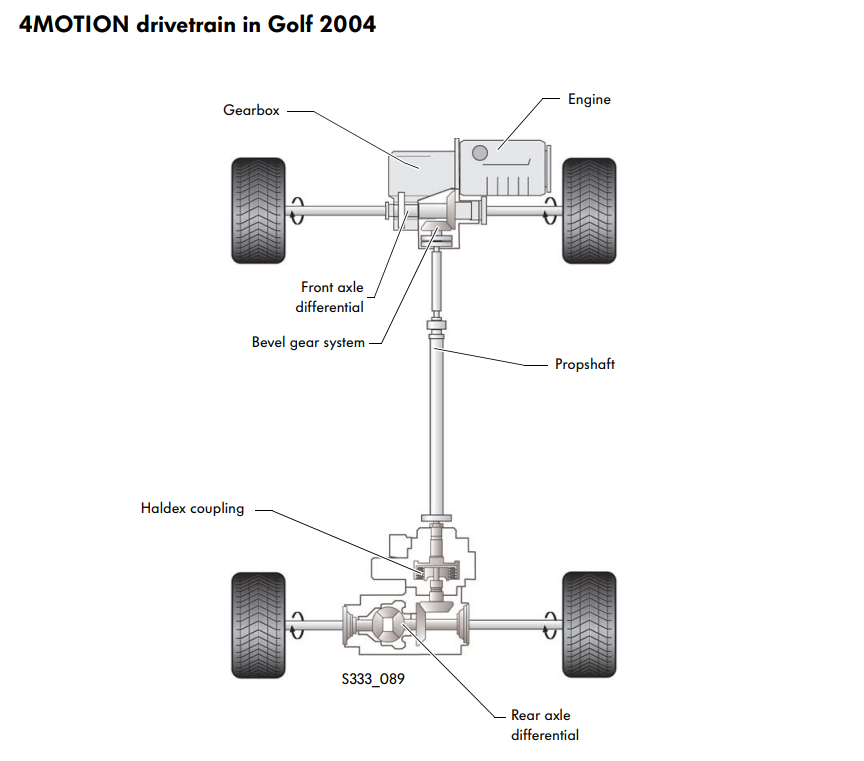
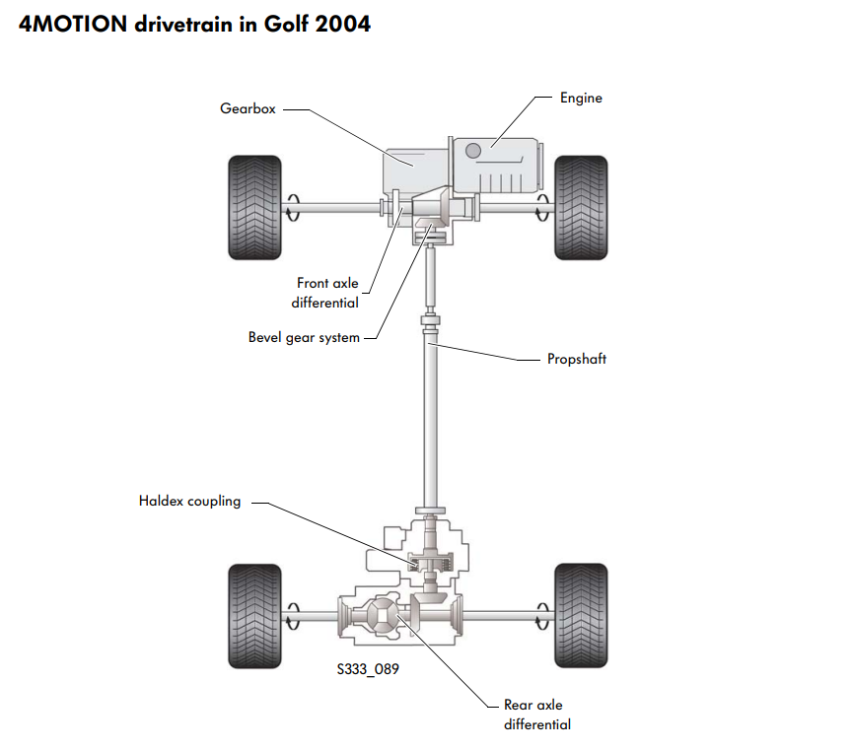
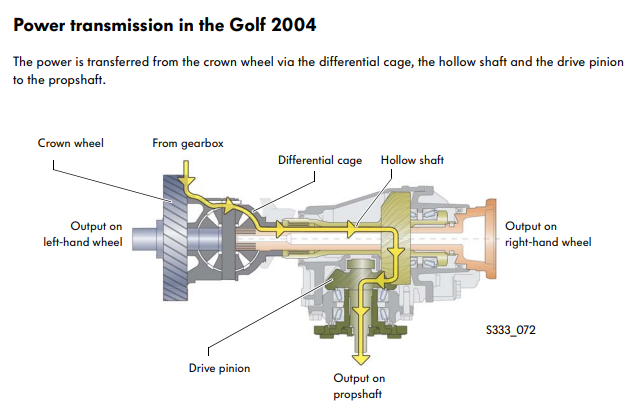
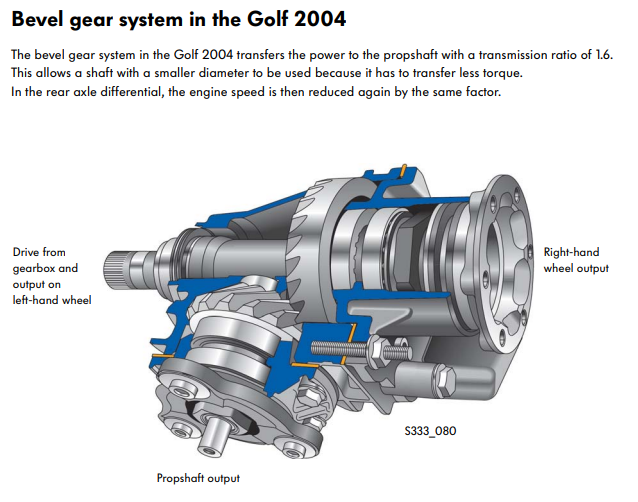
Likely a misprint. Front and rear differentials have different ratios. The wheel speed should be the same as there will be an extra set of gears where the prop shaft attaches. The haldex doesn't have any gearing up/down, it's just a hydraulically controlled clutch to adjust the amount of torque to the rear wheels. Image below from an old Golf SSP showing the prop shaft is not 1:1 with the front axle. The ratio may have changed on the Superb but I expect it's a similar layout:
-
At least on my MY18 Octavia, it was pretty much as I mentioned above... Basically: - Ran an extra wire between the 4 footwells for LIN-bus and connected it the existing ambient lighting LIN-bus (BCM connector C, pin 29). - Moved the footwell lighting power feed from the BCM to a permanent live used for the existing ambient lighting. - Replaced the two pin footwell connectors for four pin versions: - 2x 8K0 973 754 - 2x 8K0 973 754 A Pinout for the lamps is: - pin 1: positive/power - pin 2: LIN-bus - pin 3: LIN-bus (identical to pin 2) - pin 4: ground/earth New footwell lamp part numbers are: - 8W0 947 415 A - front left - 8W0 947 415 B - front right - 8W0 947 415 C - rear left - 8W0 947 415 D - rear right At this point, it's was just coding to get everything working, some of this post might help: https://uk-polos.net/viewtopic.php?p=581341&sid=09d240bf5c72251932bcb0470c453f34#p581341 The important thing is the car has a BCM which supports ambient lighting. From factory my car had 5Q0 937 084 CQ which made this much easier 👍
-
I think it has the ability to do a backup. If so, that's probably a good starting point 👍
-
You might want to post an autoscan and adaption map for 09
-
Not sure about ecp but there are plenty on Amazon. Just be careful as there are a few 12 pointed drive types which are pretty similar but have different angles in the points. Pretty sure VAG tend to use XZN/triple square (90' points) rather than double hex (120' points) or 12 spline (60' points) 🤣
-
I assume you mean a XZN aka triple square? If so, they are available in the UK from numerous suppliers 👍
-
Sounds like a damaged wiring loom... Likely either between the car and door or the door and mirror
-
It probably needs a firmware update as mentioned here:
-
I'd suggest looking under the car to see what it's attaching to the underside... I can't imagine it's a factory thing so a previous owner or garage have done something stupid by the looks.