Breezy_Pete
Sponsor
-
Joined
-
Last visited
Everything posted by Breezy_Pete
-
I'm not sure that your car will have a G260 sensor either from a quick glance at parts info.
-
Gonna take a wild stab in the dark that your car doesn't have electric height adjustable rear seats, therefore they've made a mistake. Check with them again whether they meant to say G260, or N280.
-
Don't block the entry point where it goes into the airbox though. Can't remember the arrangement on the MPI, but on airboxes that have a thermostat for incoming air source, they tend to default to 'all warm' if/when that thermostat fails. If you block that entry you'll find the car goes even worse!
-
Solenoid valve N280 maybe?, not sensor G280 as there's no such thing to the best of my knowledge. Check wiring to it as a first step. The only wires that go to the compressor. No configuring required as far as I know, but it does require the refrigerant to be extracted before it can be changed.
-
You don't need it. It's just a warm air feed to the airbox, no?
-
-
-
That doesn't sound helpful, I would suggest ripping all the tape off and just using cable ties every 100mm or so to hold the cabling together. Find and inspect that intermediate connection, it may be that water has run along wires and into the connector housings.
-
Pinout is as follows. 1 - 66 2 - 30 3 - 17 4 - 83 A black intermediate 4-way connector is shown, where the wires from pins 1 and 2 of the sensor connector both change colours (yellow to red/grey, and brown to brown/grey respectively); have you found and inspected that plug/socket connection, it's mounted on gearbox apparently. I would expect the intake air temperature sensor (output on pin 2) to be the bottom half of a potential divider, so with sensor disconnected it would naturally float up to the voltage rail supplying the divider. Not sure if the same applies to the output of the pressure sensor part on pin 4, but something similar may well apply, like a pull-up resistor as mentioned by @J.R.
-
Something is wrong with your car. 9km per litre is about 11 litres per 100km. You're a little worse than the worst of the 335 Karoqs with same engine reported there.
-
Litres per 100km I would imagine. Did you see the average, minimum and maximum info towards the bottom of the page.
-
https://www.spritmonitor.de/en/overview/45-Skoda/1636-Karoq.html?fueltype=2&vehicletype=1&power_s=150&power_e=150&powerunit=2
-
Fan, not fans, why do so many people use the plural?
-
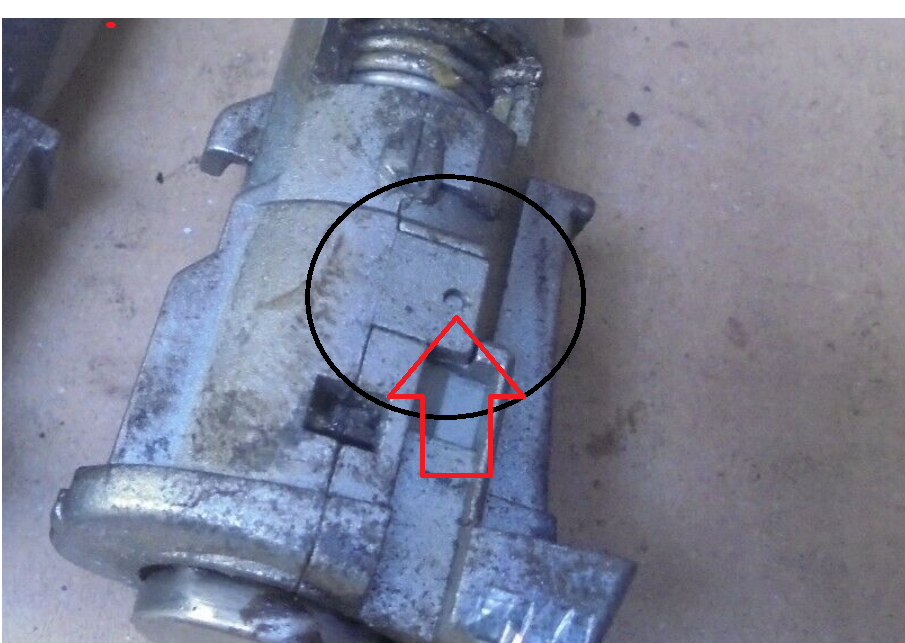
Looks to me like this flap of metal must bend upwards off the 'pip' of the other half that's in that hole, and probably a symmetrically opposite one on the other side, then the whole thing falls apart??
-
Yes.
-
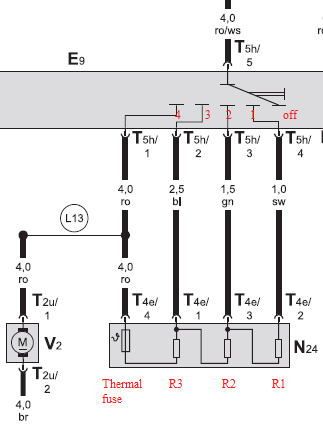
You don't, look again at where they are connected. Perhaps I should have said four non-zero speeds? 😆
-
Close, but three, as there are four speeds in total (unless that's another mk3 cost saving):
-
Blue/green wire from pin 14 of the 28-way at the door disconnect shorting to chassis ground would do this, probably.
-
Photos may be useful for others if you can take a few as you go. 🙂
-
Dunno how it comes apart. Hopefully by experiment on that one you can discover how to do it non-destructively and then do yours.
-
Considering that earlier fan designs with just a single wirewound resistor inside the housing have proved unreliable, this seems like a very bold design idea. Or strategic?
-
No. There are no pressure sensors, just pressure switches. All these do is change from non-conducting to conducting at their respective pressure thresholds; these changes being monitored by the warning system circuit. There's nothing that actually reads a pressure value.
-
Have a look through these listings to see if any seem compatible skoda door lock barrel repair kit: Search Result | eBay
-
Set yourself up with VCDS lite (free download from ross-tech.com) and a suitable kkl cable (cheap) then you can probably see from the compressor shutoff code in HVAC module measuring blocks what is inhibiting the cooling. Here are the Compressor Shut off codes, not sure if universal across all models, but quite possibly: (Check your repair manual or Measuring Value Block pop-up) - 0 = Compressor ON - 1 = Compressor OFF: Refrigerant Pressure too high (> 32 bar) - 2 = compressor OFF: Basic setting not performed - 3 = Compressor OFF: Refrigerant Pressure too low (< 2.0 bar) - 5 = Compressor OFF: Engine Start Detection - 6 = Compressor OFF: ECON Mode active - 7 = Compressor OFF: A/C System / FAN OFF - 8 = Compressor OFF: Outside Temperature too low (< 3.0 °C) - 10 = Compressor OFF: Vehicle System Voltage too low (< 10.1 V) - 11 = Compressor OFF: Engine Temperature too high (> 118 °C) - 12 = Compressor OFF: Shut-Off requested by Engine Control - 13 = Compressor OFF: Vehicle System Voltage too high (> 17 V) - 14 = Compressor OFF: Evaporator Temperature too low - 16 = Compressor OFF: Compressor Activation faulty - 17 = Compressor OFF: No or implausible Signal Pressure Sensor - 18 = Compressor OFF: Vehicle Speed Shut-Off - 19 = Compressor OFF: Shut-Off requested by Central Electronics Control (Load Management) Not sure what you mean when you write ECM? Engine ECU? That doesn't control the A/C.
-