langers2k
Resident Member
-
Joined
-
Last visited
Everything posted by langers2k
-
@Sammy-8989 - if it's a 2011 Superb as per your profile, it'll depend what BCM you have as it's around then that LED support was added. If the BCM is too old, no amount of coding will help. Unfortunately, VCDS isn't going to help you. It'll be a job for ODIS-e or VCP to directly access the lighting config section of the BCM EEPROM. Somewhat more advanced than most folk are capable of...
-
Yes - that is correct and expected 😉 Almost every consumer in the car will use one of the many earth points around the chassis for the ground/negative which is what I expect your dashcam does.
-
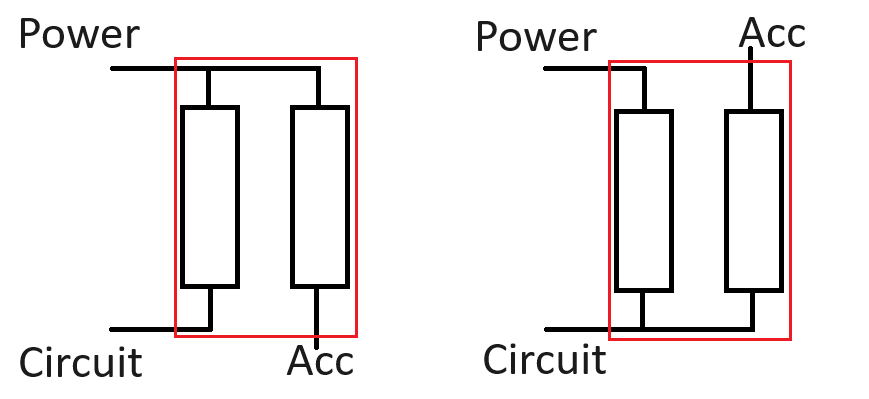
The tail is always fused... The only difference between the orientations is whether it goes through one fuse or two: Agreed - however in most circumstances, having both loads through the original fuse will cause no issues.
-
It really didn't make much difference. I posted a couple of pics previously here https://www.briskoda.net/forums/topic/516544-dash-cam-fuse-orientation/#findComment-5787064
-
UK spec vRS didn't get electrically folding mirrors as standard, only some special editions if I remember correctly. Sasha added a guide ages ago and also mentioned the part numbers for mid/high door controllers along with the coding:
-
You probably want something starting with 565035020 or 565035021. The last letter doesn't matter as they can all be updated to the same software version. The difference is that 021 parts also have a SIM slot and antenna connecters. You're car wont have the wiring so it won't add anything useful unless you're planning to add GSM antennas. The 3V0 versions listed in the thread posted by PetrolDave are MIB2 and will need converting to MIB2.5 before they support the 9.2" screen. I have no details on how this is achieved...
-
I recently swapped my MIB2 Amundsen for a Columbus. Yes, you will need both the screen and the glovebox unit. You will need to modify the display Farka connector on both ends as they are keyed and the new screen uses a different key. Trimming the connector with a sharp knife is easy enough. The other connectors/wiring will fit without modification. After fitting, you will need to remove component protection, add FEC/SWAP entitlements, upload the correct dataset and also rode the new glovebox unit to suit your car. If you go down the unofficial route, you can remove CP and add all FEC/SWAP codes with various free tools. However, you will be left with component protection fault codes in the headunit and CAN gateway which I don't believe effect anything. If you go down the official route and use ODIS online, everything will work apart from navigation as your cars VIN only has entitlement for MIB2 std maps. You can use the same free tools to add the MIB2 high map entitlement, it's also worth doing Gracenote and Electronic Voice Amplifier at the same time. This will leave you with no fault codes if done properly.
-
It's all included in the normal owners manual: https://ownersmanuals.blob.core.windows.net/ownersmanuals/en/Octavia_5E/07-2018/OwnersManual.pdf
-
Yes - It doesn't matter what tool you use as long as you make the correct changes. Just be aware that some of the channel description/names vary slightly between tools so be careful when searching. That's not entirely true. VCDS will work on SFD protected cars but doesn't provide the token for unlocking, you'll need to source that yourself: https://www.ross-tech.com/vcds/tour/sfd.php
-
The white/purple/pink thing is a telephone antenna :) The blind spot unit is the black square thing above and to the right of it.
-
I have never used OBDeleven so I don't know... However, their website says it is a feature: https://obdeleven.com/supported-vehicles/history?srsltid=AfmBOopwkNikygcEnaYlfAXb_Z5oi-479YmM_QDyBrBw3jn3ABFVOpxc If you can't find it, the OBDeleven forum or their support team can probably answer 🙂
-
What coding tool did you use? Most have a log or history file to show any changes you've made.
-
Based on "Please upgrade to a current Ross-Tech interface." and "[New feature! Extended UDS fault detail is only supported by current gen. interfaces]" I'm afraid to say that is not a genuine Hex-V2...
-
Yes... All they do is add wireless AndroidAuto/Carplay to systems that already support wired AndroidAuto/CarPlay.
-
Maybe post a full autoscan from your legit HEX-V2 and the latest 25.3 VCDS version... It will probably give more information.
-
Latest maps for a MIB2 Amundsen which is what I assume the OP has based on the VIN year identifier can be found here:
-
I only have WM and XE (and now AH thanks!). If I see any other versions I'll let you know. Some of the remote coding services might be able to help if you can provide an Arteon R vin number 🤔
-
Quick google... V03935274AH Diesel Arteon: https://vagcode.info/en/brands/volkswagen/arteon/3H7/log-462.html V03935316RN Diesel Arteon: https://forums.ross-tech.com/index.php?threads/44580/ Petrol Arteon: https://forums.ross-tech.com/index.php?threads/39880/ V03935290WM - labelled as Passat V03935317XE - labelled as Arteon Not sure if that helps or not. Please can you upload V03935274AH as I've not seen that file online yet.
-
Can I suggest you do both an autoscan and then also make adaptation maps for all modules. If nothing else, just for your own records. Having a back up can really help in the future if things go wrong 👍
-
Maybe start with the obvious and post an autoscan from VCDS? That will show exactly what modules you have and what might be possible :)
-
https://skoda.erwin-store.com/erwin/showHome.do at a guess :)
-
The cracked orange/yellow thing is a bump stop. Very unlikely to make a noise though... It is dense foam to take impacts towards the end of the suspension travel. They are cheap but the labour makes it an expensive swap unless you're having the strut out for other reasons.
-
You can download older ones direct from Skoda: https://www.skoda.co.uk/apps/manuals/Detail?model=Superb_3V&edition=11-2018&market=&manualLang=en Seems like it changed between the versions for 11-2018 and 07-2019.
-
Plenty of folk seem to have issues based on Amazon reviews. Feels like you should contact byteware for advice, they claim to respond within 18 hours...
-
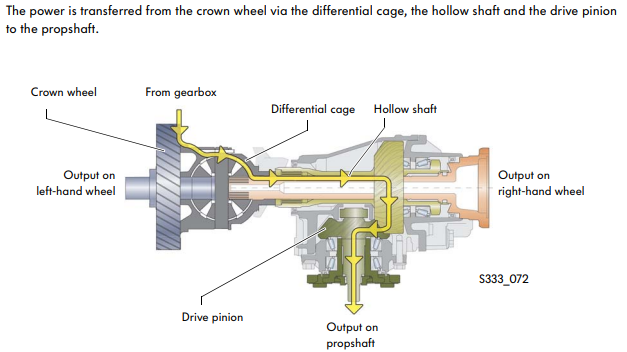
Pretty sure the power to the rear goes via the front diff cage as per this SSP: Therefore, it cannot be a gearbox issue. To me, the only plausible reason would be a front diff failure...