langers2k
Resident Member
-
Joined
-
Last visited
Everything posted by langers2k
-
-
Few similar cars: - https://forums.ross-tech.com/index.php?threads/25322/ - https://forums.ross-tech.com/index.php?threads/22380/ - https://www.briskoda.net/forums/topic/368574-vcds-options-on-superb-iii/?do=findComment&comment=4775818 Seems they all use different coding for 55 though 06DA00003F010000 Your coding 06EA00003F010000 06D202003F010000 06D202003F010000 That suggests you should check bytes 1, 2 and 3. No idea what those bytes control as I haven't got the same module in my car. Have you found the OBDeleven history function yet? https://forum.obdeleven.com/thread/97/history
-
Erm, seems so. I can't say I'd ever noticed the limitation until you mentioned it...
-
You need to use VCDScripter: https://forums.ross-tech.com/index.php?threads/16993/
-
No idea, I've never used it. I think there is a history function which might show the original coding?
-
I don't think so... If it will physically fit, the software is unlikely to be compatible with a MK3... Pretty sure the MK4 no longer uses MOST (optical) between the cluster and headunit so you'll never get map display etc to work either
-
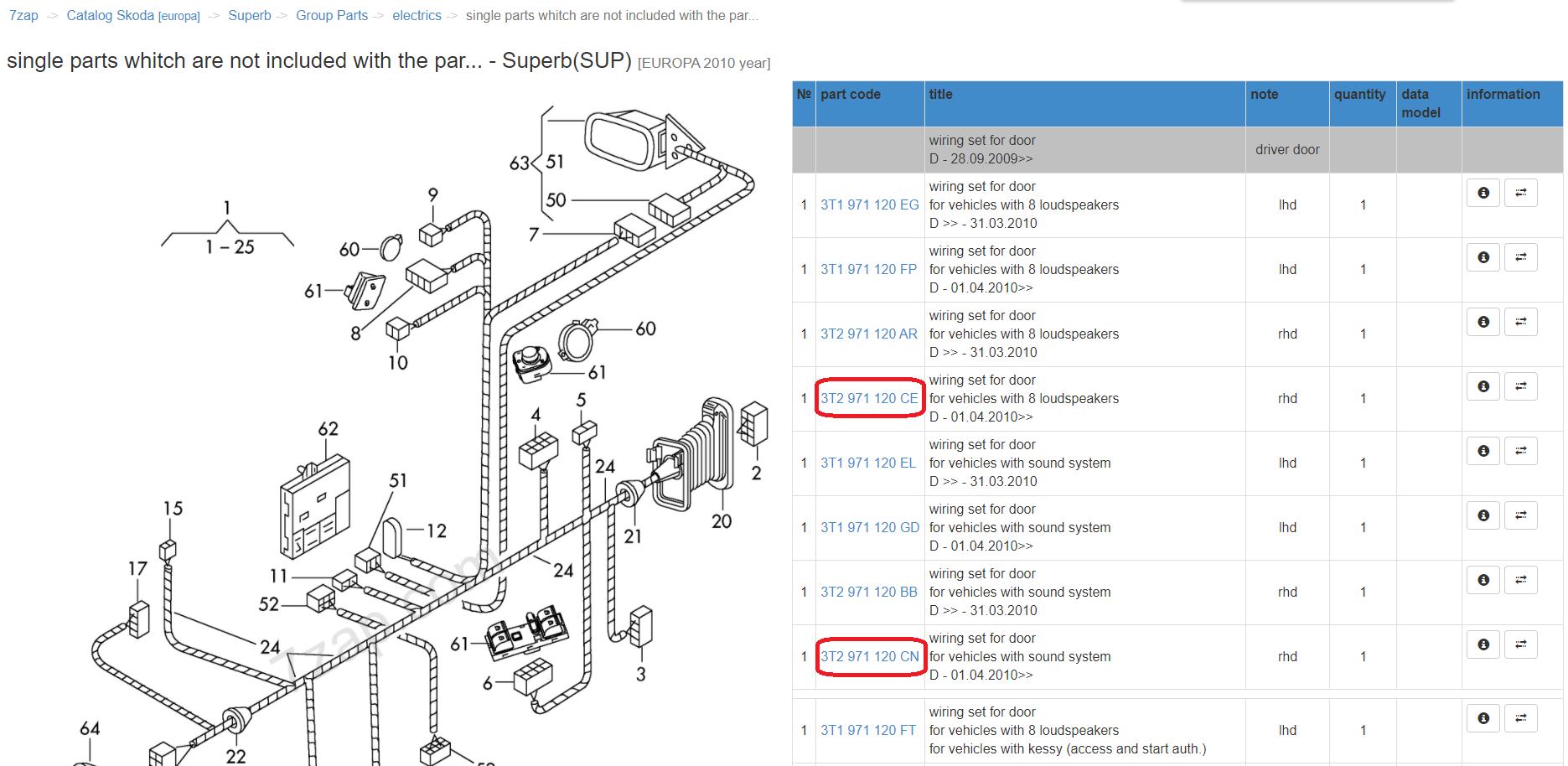
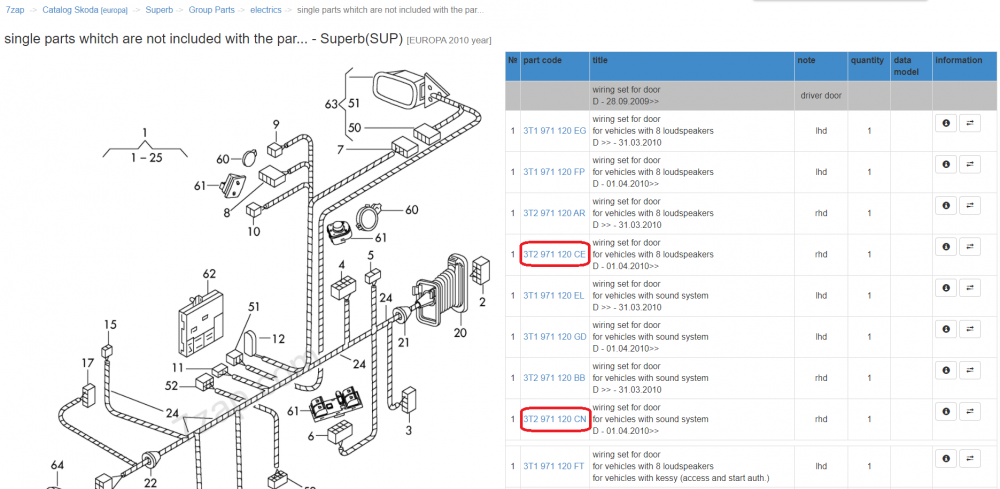
Yup, looks like you got the wrong part I'm afraid. CE seems to be for car with 8 speakers rather than the 12 speaker sound system. This page also show that B looks to have been superseded by CN: https://www.skoda-parts.com/spare-part/3t2971120cn-electrical-wiring-installation-bundle-for-the-door-skoda-40119.html
-
It's done by changing the BCM adaption channels. You can either do it manually but it'll take a while as there are almost 200 channels that need changing or use VCDScripter along with scripts on the previous page:
-
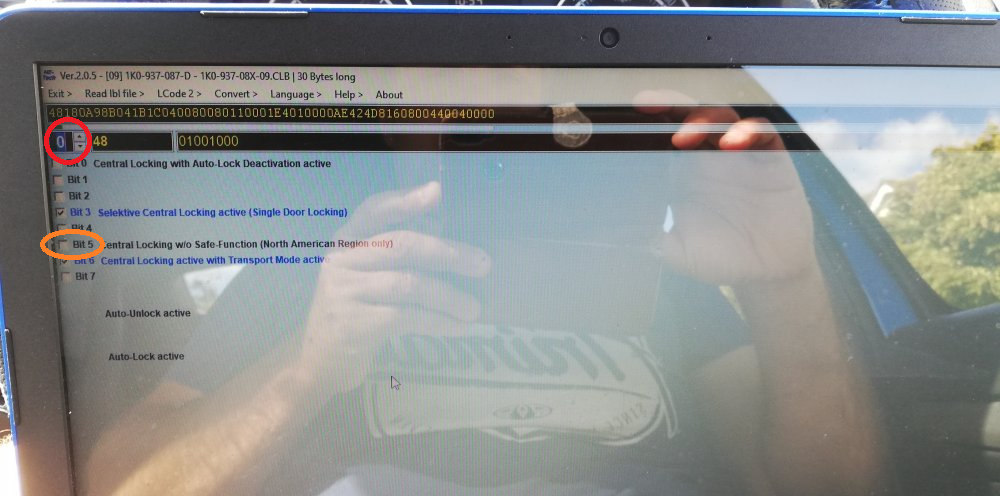
I'm not sure how the base level vRS would have been configured. Typically, the maxidot (fancier instrument cluster) just allows access to turn things on/off, I think it's normally possible to do it using VCDS or similar when a stock cluster is fitted. Yup, more or less: - start VCDS - click select - click 09-Cent Elec (aka BCM) - click Coding - click Long coding helper You can then select the byte by using the buttons in the red circle and then tick/untick whichever bit in the orange circle. Finally, close the long coding helper by clicking the X in the top right corner and click 'Do it' to apply the new coding. If you get a message like this: I typically click 'No' but some modules can be fussy so if it fails, try again and press 'Yes'. Adaptions are slightly different but I haven't got time this morning to explain it. Similar sort of deal, click adaptions, change the channel until you find the right one and make the change The changes you've mentioned should be pretty safe. Especially as you've got an autoscan so you know exactly how the modules were coded to start with.
-
Hey @pab567 - did you get anywhere with 0480 for the MIB2.5 Amundsen units. I think another member was going to try and contact you with it...?
-
I'd try ticking BCM (09) > byte 3 > bit 5 (Comfort Operation via Remote Control active). If that doesn't work, maybe untick BCM (09) > byte 4 > bit 4 (Power Windows/Sunroof disabled after door Opening). There's also adaption channel 06 in the BCM which looks to be "comfort remote control" which might need turning on.
-
Get the workshop manual and wiring diagrams from the link I posted above...? That'll show both where the speaker wires are connected and how to remove any trim/parts to access them, simples.
-
A good starting point would be to get it scanned with VCDS or similar for fault codes
-
Then my only advice would be to: - buy 5l of G12evo coolant - top-up the coolant before each journey with G12evo (not water) - try and stick to short journey's - check the oil regularly for any signs of coolant mixing Not much more you can do I'm afraid... I've had to do it for the last two weeks on my car and will continue for the next few weeks to confirm the repair as good.
-
Pretty sure the EA211 is the 1.5l petrol
-
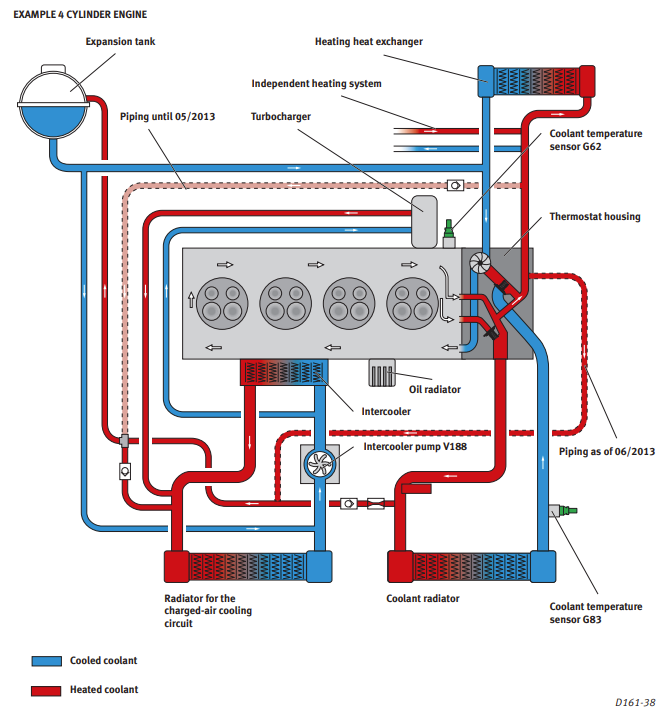
Both Looking at Seat SSP 161 for the EA211 and EA288 engines, there is the main coolant pump driven by the timing chain and a secondary electric one for the turbo/intercooler.
-
Given the amount you're topping up, if coolant is getting into the oil, I'd expect a white mayonnaise like substance to be visible on the dipstick and oil filler cap. If the oil still looks like oil, it's much more likely to be the common coolant pump or regulator housing issues and it's just a coolant leak. Have you got the car booked in for investigation and repair?
-
Where are you adding the water? If you're adding water into the coolant expansion bottle and the coolant level keeps dropping to the point that the low coolant light is coming on, this is not normal and highly suggestive of a coolant leak... Or am I missing something obvious here...?
-
It's a MIB2.5 Amundsen headunit and screen What does VCDS or similar say? Can it communicate with the headunit? Still, this isn't a MK4 Octavia issue so I'll ask an admin to move the thread
-
If it's reconditioned I'd defiantly contact the supplier. Depending on why it was sent for reconditioning it feels like: - this is the original fault with it and it's not been repaired properly - it had a different issue and it's just chance that it's got a second one Either way, it's seemingly faulty so hopefully can be exchanged for a working one. I imagine it's a good chunk of work to replace it again though
-
At a guess, it doesn't have a 4th temperature sensor hence the nonsense reading On my old MK2 Octavia, it had 4 exhaust temperature readings but number 2 was always 0'C... What's the fault code you've got?
-
A quick google suggests most people who get B200ff0 and B2000f1 then replace the rack... Given you've recently bought it and it had a new rack fitted just prior to that, I'd suggest contacting the garage who did that work as hopefully it'll still be in warranty. At least assuming those are the only two codes. I can't see how removing a door would cause a steering rack issue so I'd probably not mention that
-
Do you mean you've had to top up the coolant expansion tank for the 5th time? In which case yes, you likely have a coolant leak... - you should be using G12evo to top up rather than water - I'd suggest topping up before each drive, hopefully your drives are short enough so you don't need to top-up mid drive to avoid dealing with a hot/pressurised system - if it isn't already, get it booked in for investigation A coolant leak shouldn't cause an issue unless it gets low enough whilst driving to cause overheating. The steps above should minimise that risk but won't remove it completely. I've had a coolant leak fixed under warranty today, initially it was a pretty slow leak but this week the coolant would visibly drop after a 30-40 mile drive. There are a couple of common coolant leaks which have TPI 2049121/3 assigned to them: Customer statement: • Warning light on instrument panel is on: Coolant low level. • Coolant level is at the minimum mark or below. • Customer had to refill coolant already several times. • Traces of coolant are on cooling system parts or under the vehicle. Findings of the service centre: • The statement of the customer can be reproduced Production change • Optimizing filling process of coolant in CW 12/2015. • Measure to ensure tightness of coolant regulator housing, introduced in CW 27/2019. • Measure to ensure tightness of coolant pump, introduced in CW 23/2020. Checking coolant parameters and cooling system tightness: • Checking frost resistance of the coolant according to instructions in Elsa ⇒ Maintenance – Detailed instructions. • Checking cooling system for tightness according to instructions in Elsa ⇒ Workshop Manual. • Checking cooling system visually for possible leakages:
-
You shouldn't be able to damage anything by doing an autoscan or adpmap. They are designed to show exactly how the car is currently configured rather than changing anything. I always do them before making any changes so I always know the starting point Once we can see how the car is configured, it might be possible to suggest changes to get the remote close working
-
Quick FYI thread as I didn't find much when I googled for this fault code I had pop up last week: Address 44: Steering Assist (J500) Labels:| 5Q0-909-144.clb Part No SW: 3Q0 909 144 L HW: 3Q0 909 144 L Component: EPS_MQB_ZFLS 507 5081 ASAM Dataset: EV_SteerAssisMQB 015157 ROD: EV_SteerAssisMQB_015.rod 1 Fault Found: 24320 - Steering C10AC 07 [009] - Mechanical Failure [Belastungszähler hat 99% überschritten Belastungszähler hat 100% erreicht] Despite the rather worrying statement that there is a 'mechanical failure', it turns out at least in some cases, it can be resolved via a simple software update. TPI: 2056240/2 Customer statement: - Power assisted steering efficiency decreased. - Red power steering warning light is on in the instrument panel. Workshop finding: - Customer statements can be reproduced. - A static entry with one or several symptoms mentioned is logged in the event memory of the power assisted steering control unit (address 44): C10AC07 – Steering mechanical malfunction Symptom 24320 (05F00), or 24321 (05F01), or 24324 (05F04) Production change - Find out the current SW version of the power steering control unit (diagnostic tool ODIS, diagnostic address 44, identification of the control unit). - If the SW version of the power steering control unit found out is identical with the data shown in the Table (current control unit), choose the proper measure code and update the software Current control unit Measure code Updated control unit 5Q0909144AA / SW1081 34EC 5Q0909144AB / SW1082 3Q0909144L / SW5081 34FC 3Q0909144M / SW5082 5QN909144A / SW5081 34FC 5QN909144B / SW5082 5QF909144A / SW5081 34FC 5QF909144B / SW5082 My local dealer did the update for me earlier and I'm pleased to say the fault code has gone Address 44: Steering Assist (J500) Labels:| 5Q0-909-144.clb Part No SW: 3Q0 909 144 M HW: 3Q0 909 144 L Component: EPS_MQB_ZFLS 507 5082 ASAM Dataset: EV_SteerAssisMQB 015157 ROD: EV_SteerAssisMQB_015.rod No fault code found. Hopefully this helps someone else with a similar issue in the future, other brands may have a different TPI number