langers2k
Resident Member
-
Joined
-
Last visited
Everything posted by langers2k
-
Some crash faults can be removed but I think the general VAG/Skoda stance is probably to replace it. Have you contacted your insurance or the garage that did the repairs? Feels like it's gonna be linked to the original accident...
-
Taillights are super easy to remove and replace. It's covered in the owners manual as they need to be removed to replace the bulbs 👍
-
Try: Address 55: Headlight Range (J745) Labels:. 5M0-907-357-V3.clb Part No SW: 5M0 907 357 F HW: 7L6 907 357 C Component: AFS-ECU H05 0111 Revision: -------- Serial number: -------------- Coding: 03DA00003F000000 Shop #: WSC 73430 790 00999 ASAM Dataset: EV_HeadlRegulVWAFSPt 002016 ROD: EV_HeadlRegulVWAFSPt_VW32.rod VCID: 3753CA688EDD69FCD6-8062 Left_headlamp_power_output_stage: Subsystem 1 - Part No: 1T0 941 329 B Labels: 3D0-941-329.CLB Right_headlamp_power_output_stage: Subsystem 2 - Part No: 1T0 941 329 B Labels: 3D0-941-329.CLB No fault code found. From: http://webcache.googleusercontent.com/search?q=cache:69KCEZrWhrQJ:community.dieselschrauber.org/download.php%3Fid%3D12611+&cd=2&hl=en&ct=clnk&gl=uk
-
That's a common misconception The satnav checks the SD card CID which cannot be changed or erased during a format
-
That sounds like you're not extracting the maps? Try this guide:
-
The latest full Europe maps no longer fit on a 16GB card Obvious options are to buy a 32GB Skoda/VW card or use a map version with fewer countries installed so it's smaller. I think some files can be removed to make it fit on a 16GB card but I can't remember which...
-
That's my understanding
-
@EnterName - I'm still on the original double walled tank with silica in place at the moment Once I know my coolant leak is solved, I'll probably be switching to a single walled tank without the bag so I may consider it then.
-
My understanding is on a non-DCC pre-FL is that: - You only have two level sensors, both on the passenger side (front and rear), these connect into the AFS master - The headlights will have two motors (up/down , left/right) each to move the xenon projector. These connect to the AFS slave attached to the headlight body - There is a twisted pair for CAN-bus comms between the AFS master and each AFS slave I think given the access cover came off, you almost certainly have water damage to either the AFS slave or electronics inside the headlight... If you can, it's definitely worth checking the AFS slave is clean with no corrosion. It might be worth getting the car scanned with VCDS or similar as that should confirm if it's a level sensor or something around the headlight
-
In age order... G12++, G13, G12evo 😉 If your car says G13, you should be topping up with either G13 or G12evo. G12++ is compatible but you may have reduced corrosion protection.
-
Unplugging the three BCM connectors is pretty simple and that should reset it... But as you've had the battery out, I'm not super hopeful it'll help
-
The AFS module doesn't control the headlight brightness.... It's done by the BCM and your lighting channels look normal to me: Leuchte6ABL LC5 Lasttyp 6 3 - Xenon Abblendlicht Lampendefektbitposition 6 36 Fehlerort mittleres Byte DTC-DFCC 6 1A Lichtfunktion A 6 Abblendlicht links Lichtfunktion B 6 Lichthupe generell Dimmwert AB 6 127 Lichtansteuerung HD AB 6 always Lichtfunktion C 6 nicht aktiv Lichtfunktion D 6 nicht aktiv Dimmwert CD 6 0 Dimming Direction CD 6 maximize Lichtfunktion E 6 nicht aktiv Lichtfunktion F 6 nicht aktiv Dimmwert EF 6 0 Dimming Direction EF 6 maximize Lichtfunktion G 6 nicht aktiv Lichtfunktion H 6 nicht aktiv Dimmwert GH 6 0 Dimming Direction GH 6 maximize Leuchte7ABL RB1 Lasttyp 7 3 - Xenon Abblendlicht Lampendefektbitposition 7 40 Fehlerort mittleres Byte DTC-DFCC 7 1B Lichtfunktion A 7 Abblendlicht rechts Lichtfunktion B 7 Lichthupe generell Dimmwert AB 7 127 Lichtansteuerung HD AB 7 always Lichtfunktion C 7 nicht aktiv Lichtfunktion D 7 nicht aktiv Dimmwert CD 7 0 Dimming Direction CD 7 maximize Lichtfunktion E 7 nicht aktiv Lichtfunktion F 7 nicht aktiv Dimmwert EF 7 0 Dimming Direction EF 7 maximize Lichtfunktion G 7 nicht aktiv Lichtfunktion H 7 nicht aktiv Dimmwert GH 7 0 Dimming Direction GH 7 maximize It's more likely the xenon bulbs are getting old (372624 km?) and need replacing as they do fade over time... When you replace them, make sure the project lenses and reflectors are in good condition. If they are dirty or burnt, it will reduce the amount of light output.
-
It'll depend on the multi-meter and the frequency of the PWM Some will probably be close enough, others might not be and some may confused if there is any back EMF from inductors etc in LED drivers
-
I think it's down to how computers store numbers A value of 127 is 100% and a value of 100 is ~79%. That being said, it's been suggested that the brightness will depend on both the type of light set and the brightness number. Namely that with: - halogen lights there is no difference between the 100 and 127 settings - LED lights there is a difference between the 100 and 127 settings Until someone gets a scope to check the PWM duty cycle it's hard to confirm this and it may also be dependant on the LED driver. I was hoping to find a graph online of lumen output vs PWM duty cycle for a halogen bulb but my google-foo has failed me
-
Are you sure? I only ask as I've just been on the connect portal and it offered me a one month trial for the infotainment online stuff so I thought I'd try it... - checked the stats in the app, 18 days old - jumped in the car and turned on the ignition - phone connected via BT but wasn't wired in via USB - tried to use connect, as expected it was sad - poked the headunit until it connected to home WiFi - connect worked although underwhelming - checked the app, stats have updated! That suggests to me that the stats were updated via WiFi. It's possible it used BT so I'll try something similar tomorrow but with BT disabled to rule that out...
-
Surely that would mean there are at least three/four variants then...? - Connect (free edition) - Infotainment online (subscription based after free period) - Care connect (assuming hardware is installed) - Connect lite (using the dataplug) Anyway, despite those differences, both the OP and I are getting the same frustration with Connect or Infotainment online - the vehicle stats aren't updating in the app... - The OP has tried using a hotspot which should work perfectly but seemingly isn't. - I find it disappointing that it doesn't update using my home WiFi at the end of a journey or offer to use USB tethering to get data from my phone. There's no point having the stats (fuel level, odometer, time until service and current fault codes, etc) if they are weeks or months out of date
-
The wires from the stalk/switch go to the steering wheel control unit. The steering wheel control module will then send a CAN message to the BCM asking it to activate the rear wiper. The long coding helper will help explain the long coding Just for fun, I'd try disconnecting the main battery for a while to see if that helps reset things...
-
The MySkoda app is pretty useless I have the same headunit/firmware in my 2018 vRS. At least for me, it can show fuel level, odometer, time til service and that's about it. It used to show service history but Skoda removed it. I think the paid for service gets a little more and the OP might be in their free period? I use AndroidAuto almost every journey but it never updates any info in the MySkoda app. The only time I've had it update is when I manually force the headunit to connect to my home wifi and sit there for 10 minutes. That's despite the car being parked in wifi range every night... Skoda/VAG do a carstick to give the car it's own LTE/3G connection which may help it stay online and update the info. However, given there is only one USB port and it won't let you use a normal USB hub, it doesn't feel that helpful if you use AA/CarPlay.
-
When I had my VC fitted, they did component protection, odometer (new cluster), immobiliser and the key pairing using ODIS (remotely using a VAS5054a). Might be worth checking if the company are using ODIS and will do all the above...?
-
There will be differences between the old/new suspension arms and the new bushings will also cause them to move. It's very unlikely you've managed to get the inner adjustment bolts in the same place either, all of which will cause the alignment to change. Assuming it was even correct to begin with... Plenty of garages will do a free alignment check so I agree with the above and would start there. If anything is obviously wrong, badly fitted or broken, they should be able to tell you.
-
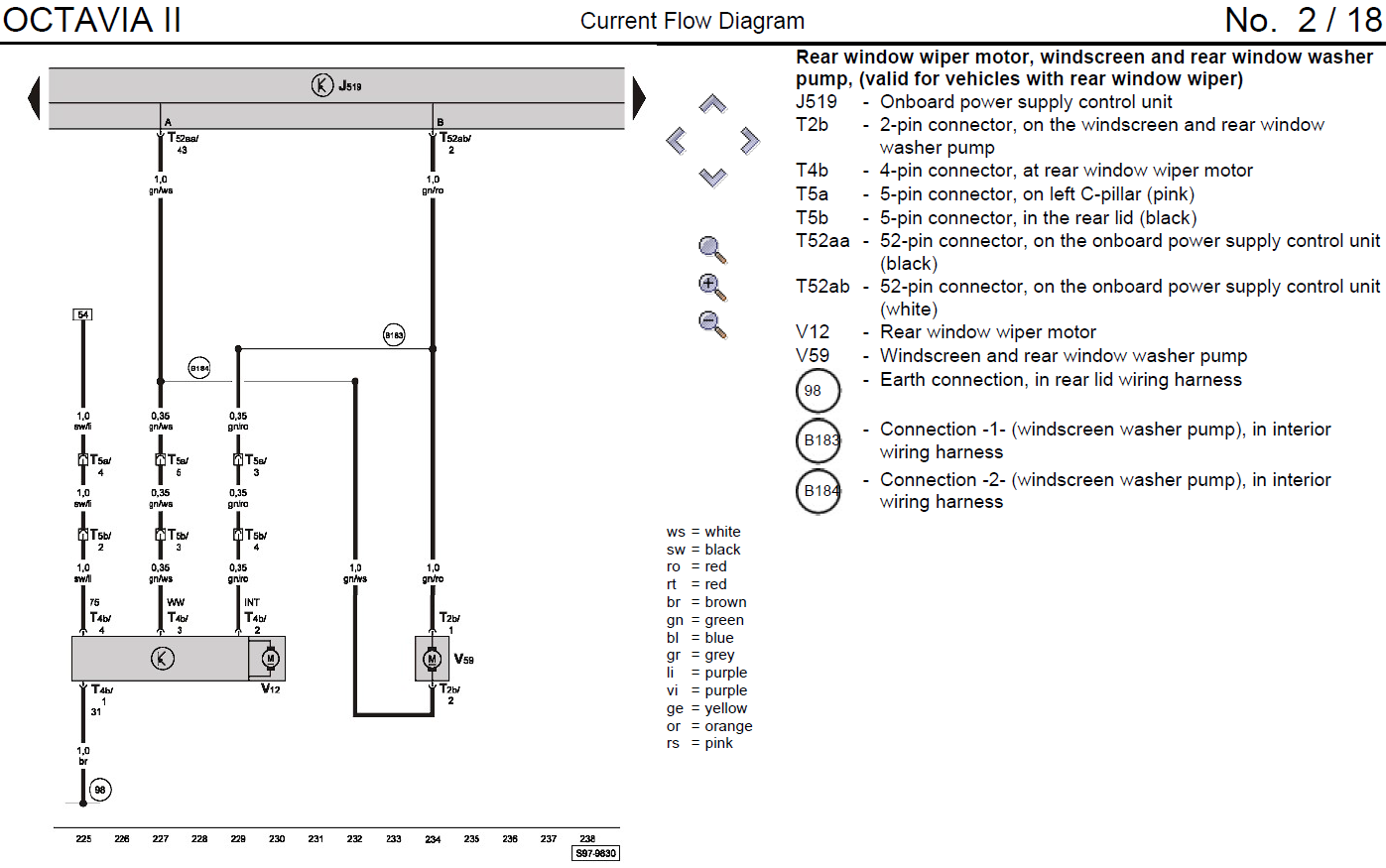
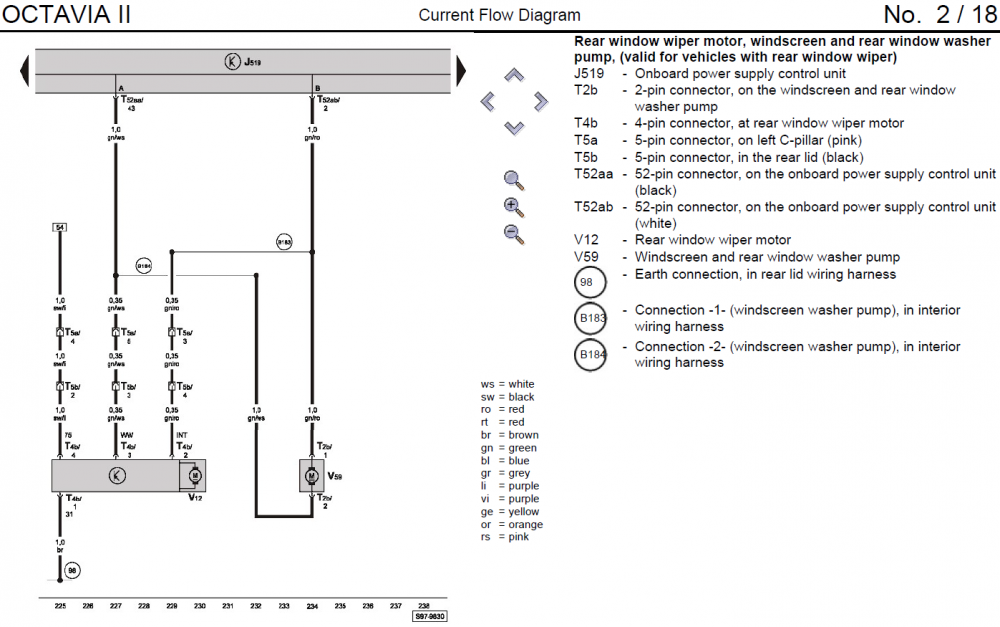
No idea I'm afraid. The wiring for the rear wiper is pretty simple and the washer pump is the one for the front wash but used in reverse. It'll be similar to this (maybe different colours depending on year): Not sure what signals the BCM uses to control the wiper/washer but maybe take a look with a multimeter when you do the output test and when you the wiper stalk? Do you have any other faults? - I think you've replaced the ignition switch? - Did the rear licence plate lights error get cleared? - What about 00323 - Vehicle Inclination Sensor (G384) ?
-
Pretty sure the Bolero and Amundsen use the same wiring. What do the diagnostics say?
-
There are various wiring kits which might help, for example: https://www.aliexpress.com/item/32864943136.html
-
If the measuring blocks show the switch is working and the output tests let you activate the washer, it feels like everything should work... I think the rear wiper coding is in byte 21, yours looks to be 6D which seems sensible enough - assuming I can count The only thing that springs to mind is a dodgy boot switch or something like that...
-
If you have lane assist or traffic sign recognition, you should have the A5 camera. I can't see it in the OBDeleven output... Are you asking if I have a list of stock adaption values for your car? In which case no I don't... The original values will depend on when the car was built and exactly which options were fitted. The only proper way to make sure you have the stock values, is to find someone with ODIS online access to get the original config from the Skoda/VAG servers.