langers2k
Resident Member
-
Joined
-
Last visited
Everything posted by langers2k
-
Erm, not quite... To autoscan: - start VCDS - click 'Auto-Scan' - click 'Start' - click 'Save' - click 'OK' To adpmap: - start VCDS - click 'Applications' - click 'Controller Channels Map' - enter 09 for address - select 'Adaptions' and 'CSV file' - click 'Go' You should now have two files in C:\Ross-Tech\VCDS\Logs: - Log-VIN-Xkm-Xmi.txt - adpmap-09-1K0-937-087-D_VIN-X.CSV Where the VIN is your vin and the X's are some number, please attach them to your next post
-
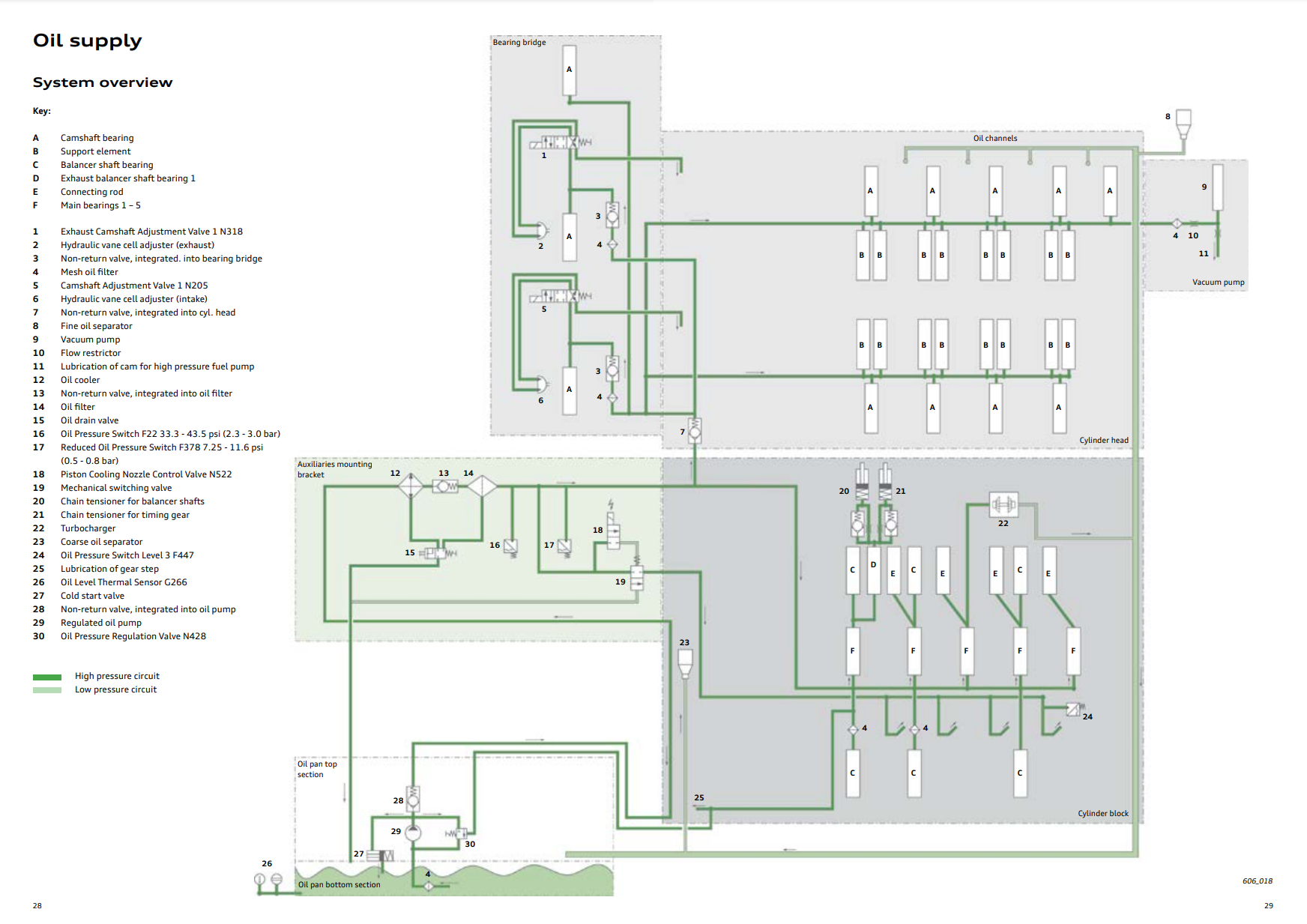
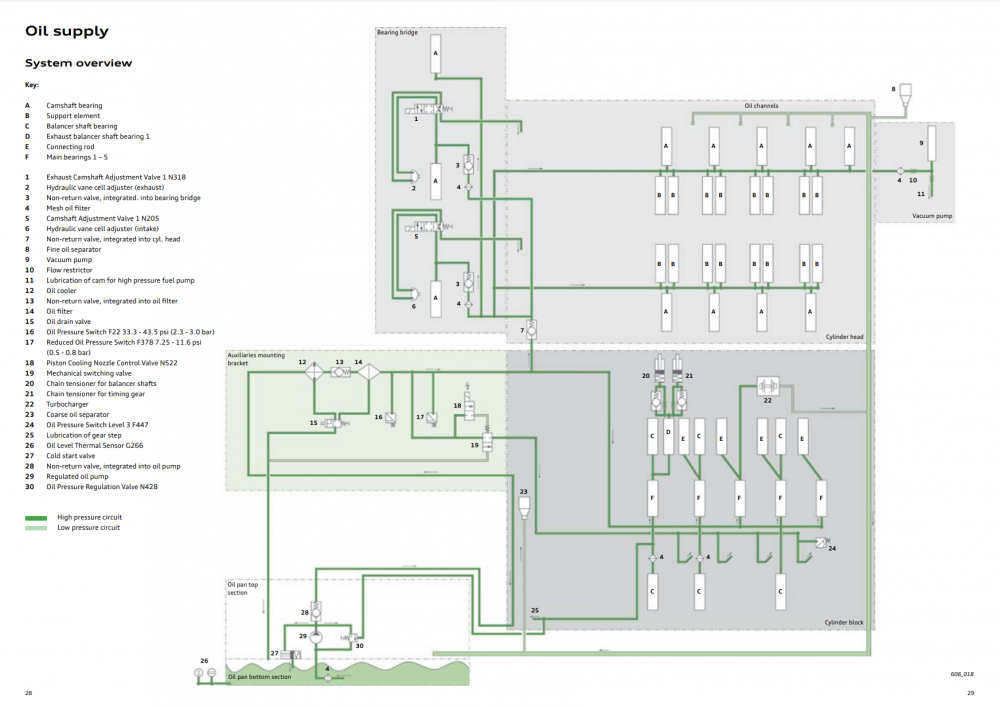
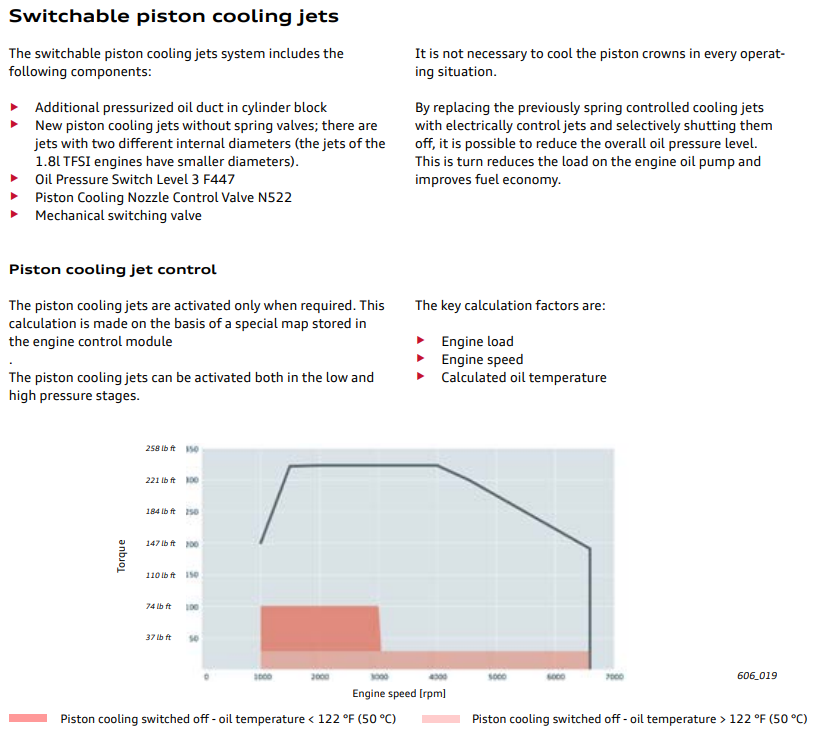
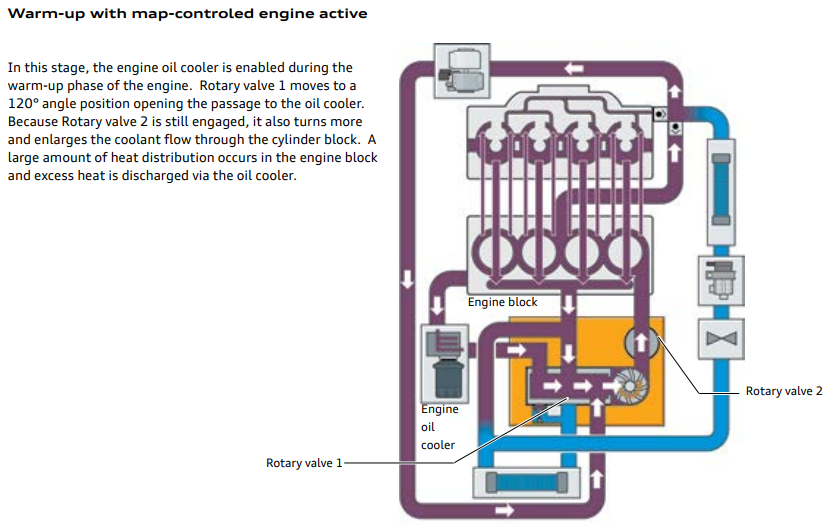
This is my take, feel free to correct any mistakes or misunderstandings I've made I couldn't find anything Europe EA888 Gen 3b specific but I did find "eSelf-Study Program 920243" for NAR EA888 Gen3 engines which is where the below pictures etc are from. In regards to the "oil circuit", ignoring the usual pressure valves, the only obvious change in oil distribution I can see is for piston cooling using 18 and 19: Which are activated as per this schema suggesting it's only for fuel economy rather than decreased warm-up time: The coolant circuit is a completely different beast and that definitely changes flow paths depending on temperature. There are too many modes to explain in detail but as @flybynite mentioned, it does use the "oil cooler in reverse" to warm up the oil: This doesn't mean reversing the oil or coolant flow as @J.R. understood it. Rather that the "oil cooler" heat exchange direction is reversed to normal so it's being used as an "oil heater". The fluid flow direction through the "oil cooler" haven't actually changed, just the function
-
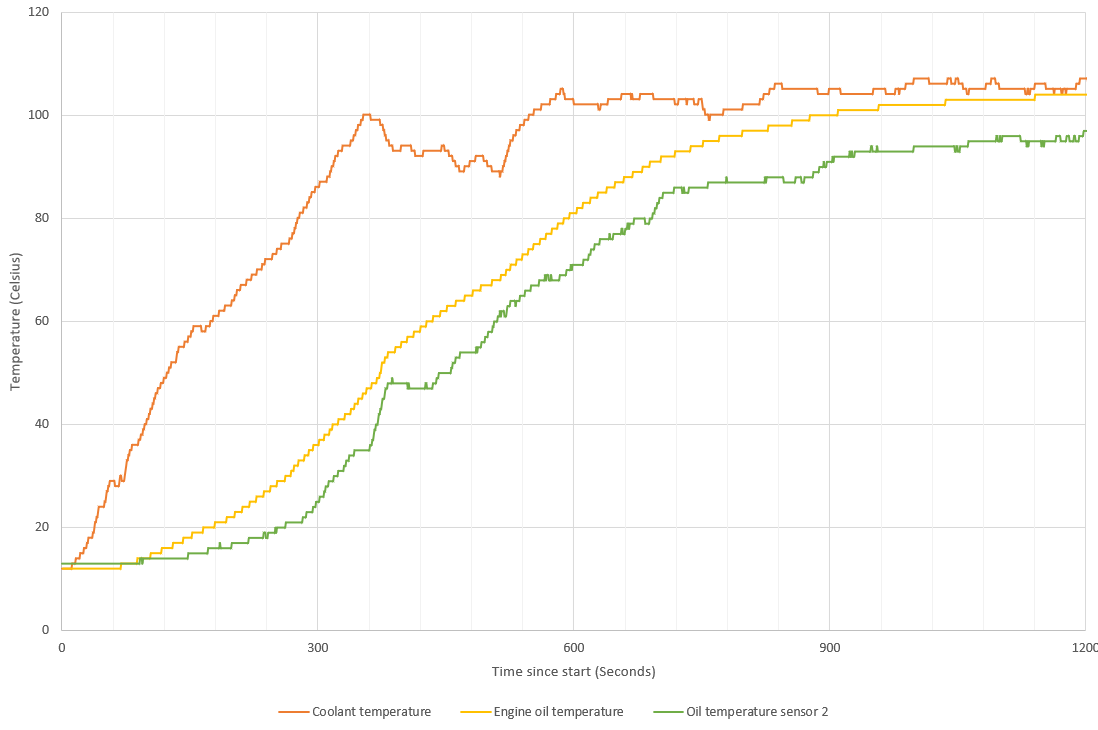
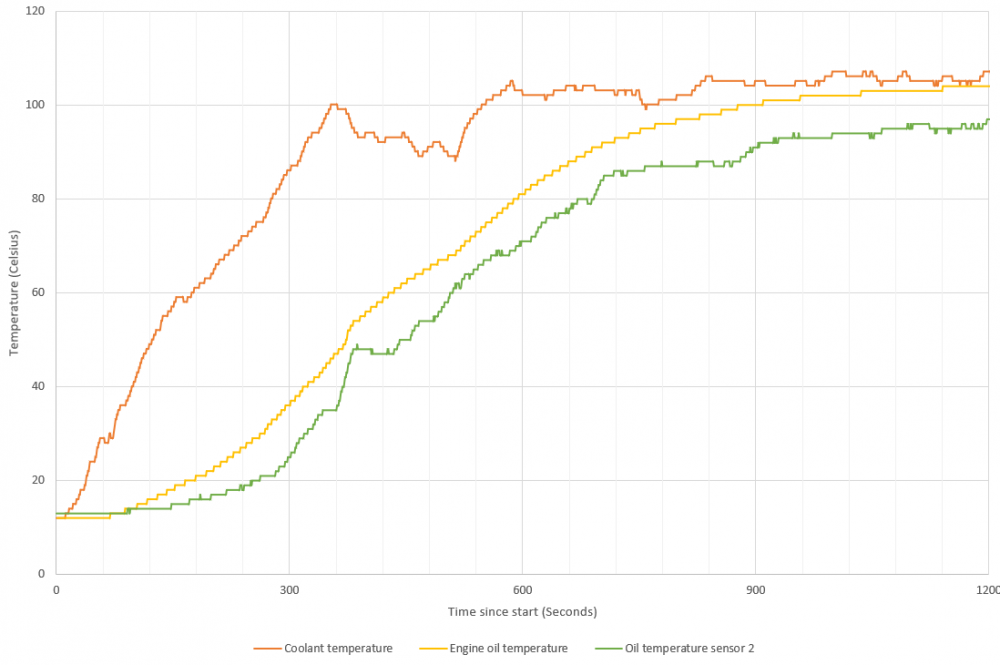
I did a quick log of my vRS 245 temps this morning: - ambient was around 12-13'C - it only idled for a few seconds before setting off - first four minutes were through town at 20-30mph - after that is was 50-60mph with a few roundabouts/villages - super relaxed journey given traffic I do have a coolant leak (hopefully fixed today!) so the coolant temps might be slightly off but still, it warms up quite quickly
-
As @Wino posted, the MOT is a relatively basic set of safety checks. Passing the MOT doesn't mean a car is road worthy or meets all requirements to be on the road The headlight beam pattern/intensity will mostly depend on the projector design in a car with xenon's. The outer lens will have some effect depending on it's shape but it's probably quite small. If you can find out the manufacturer/model of the xenon projector you have, it might be possible to find a datasheet for it, at a guess it'll be a Hella unit? VAG use a variety of different xenon projectors so there will be a difference between car models
-
Can you post an autoscan from VCDS and an adpmap from 09 please? That should help clear things up
-
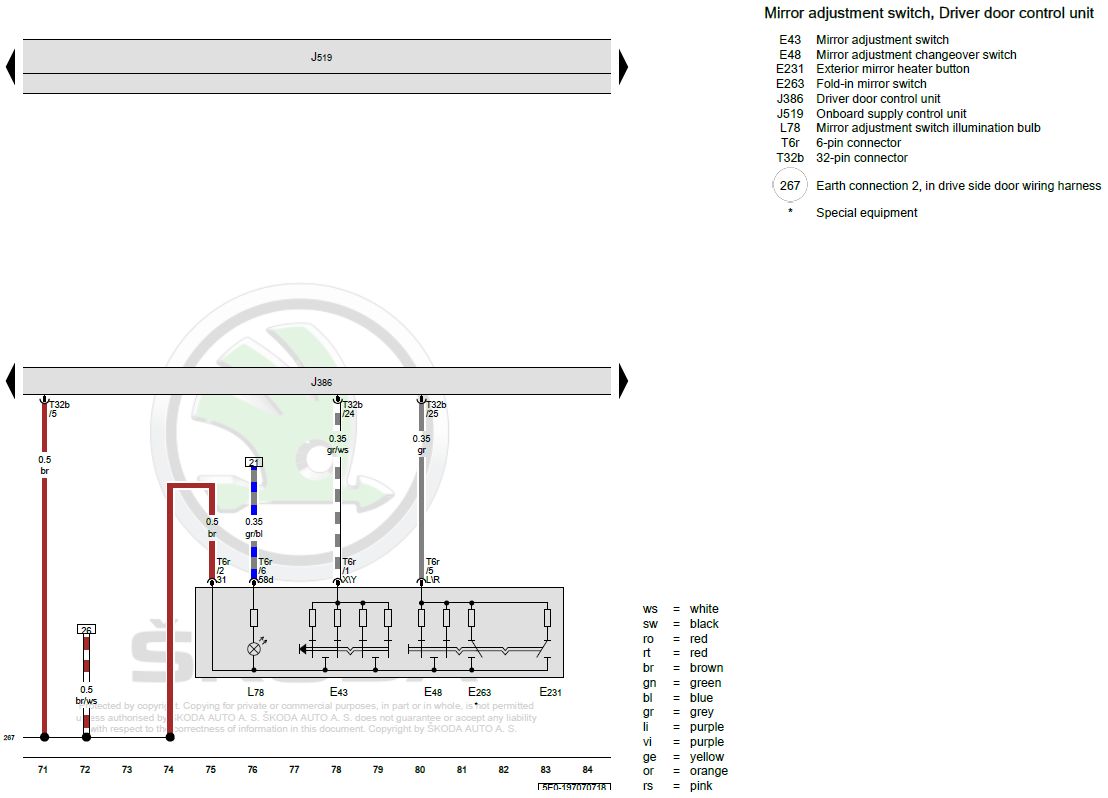
At a guess, it'll be a broken or damaged wiring loom. Take a look at this guide:
-
Maybe try some other apps too? If it's streaming then it might be using a low quality file until it's had time to download a better one.
-
It scares me the way the Chinese cameras seem to code themselves in and seemingly even mess with the diag comm's from 5F. Sure, the OEM cameras are more expensive but they avoid these issues I don't think I have much to add I'm afraid @Vahids - assuming you've got a scan and adpmaps from before you tested it, my only suggestion would be restoring everything then connecting it. Might be worth contacting the seller too. Not sure if you know anyone with a HEX-V2 or HEX-NET to find out more detail for some of those errors?
-
The car probably hit a soot threshold which cause the warning light to show, basically asking you for help to regen. During that mile, It may have gotten the DPF hot enough to start burning off the soot and once it dropped below the threshold, the light extinguished It's just a theory as unless the car now has a fault code stored, it's impossible to tell.
-
The fan should only normally stay on if you've interrupted a regen cycle and the engine bay is super hot. It shouldn't be a common occurrence or happen every time you stop the engine... How long are your journeys and what mileage has the car done? If it's been sat around a while it might just need a decent journey to fully clear the DPF out, if it's a higher mileage car the DPF may be getting full with oil ash. Might be worth adding where you're based as a local member with VCDS/OBDeleven can check for fault codes and the soot/oil ash loading in the DPF
-
The part number should be on the rear of the old ones. I think it's 6U0 601 151L
-
9977 is a 'fixed' ECU software version I think there is also 5751 and 9978 available for that ECU. The former is pre-fix and as far as I know, can be flashed using ODIS but I've never tried to downgrade an ECU. It's certainly worked for other modules. No idea what a tuner would charge, probably £100-£150 in the UK?
-
That's not the case with steering modules, although the higher letters are typically newer, it doesn't mean they will support the same features/functionally... There is a helpful page from rosstech: http://wiki.ross-tech.com/wiki/index.php/Steering_Wheel_Control_Module_Versions#Part_Number_5K0-953-569 Bare in mind, that is just the HW part number so you should also consider the SW part number too.
-
What number are you using? 5K0953569E brings back loads on both eBay and Aliexpress... edit: It might be worth reconnecting it and get a scan with VCDS or similar. This is for two reasons: - to confirm the SW part number - to backup the existing coding This is the module from my old Octavia, it shares the same HW part number as your Yeti but I expect the SW is different Address 16: Steering wheel (J527) Labels: 5K0-953-569.clb Part No SW: 5K0 953 521 BN HW: 5K0 953 569 E Component: LENKS.MODUL 014 0140
-
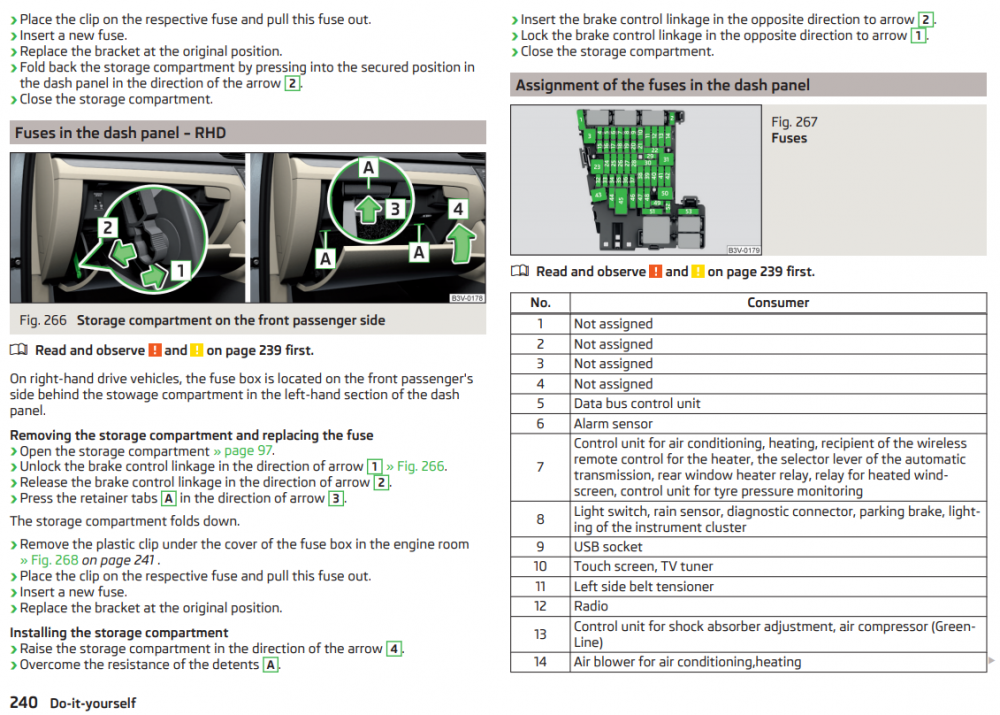
From the owners manual:
-
Physically it might, although the A4 camera will have a different parameter/dataset on it so it may not work properly given how different the MMI and MIB radios are. I got the one for my Octavia from this seller who was quite helpful: https://www.aliexpress.com/item/4000197729171.html There was spare length in the loom so I just cut it down to size
-
Nope, the diesel vRS is a 184 The 220/230/245 is the power output in pferdestärke aka PS or metric horsepower. Therefore, if you have 217BHP then you have the 220ps edition
-
Surely you can just connect it to an appropriately fused, switched ignition live and the problem is solved...?
-
-
You'll need to add a wiring loom for the camera The camera wash tee's off the existing rear washer.
-
Pretty sure it's behind the glovebox... It should be described in the owners manual how to access it
-
Are you able to share the update?
-
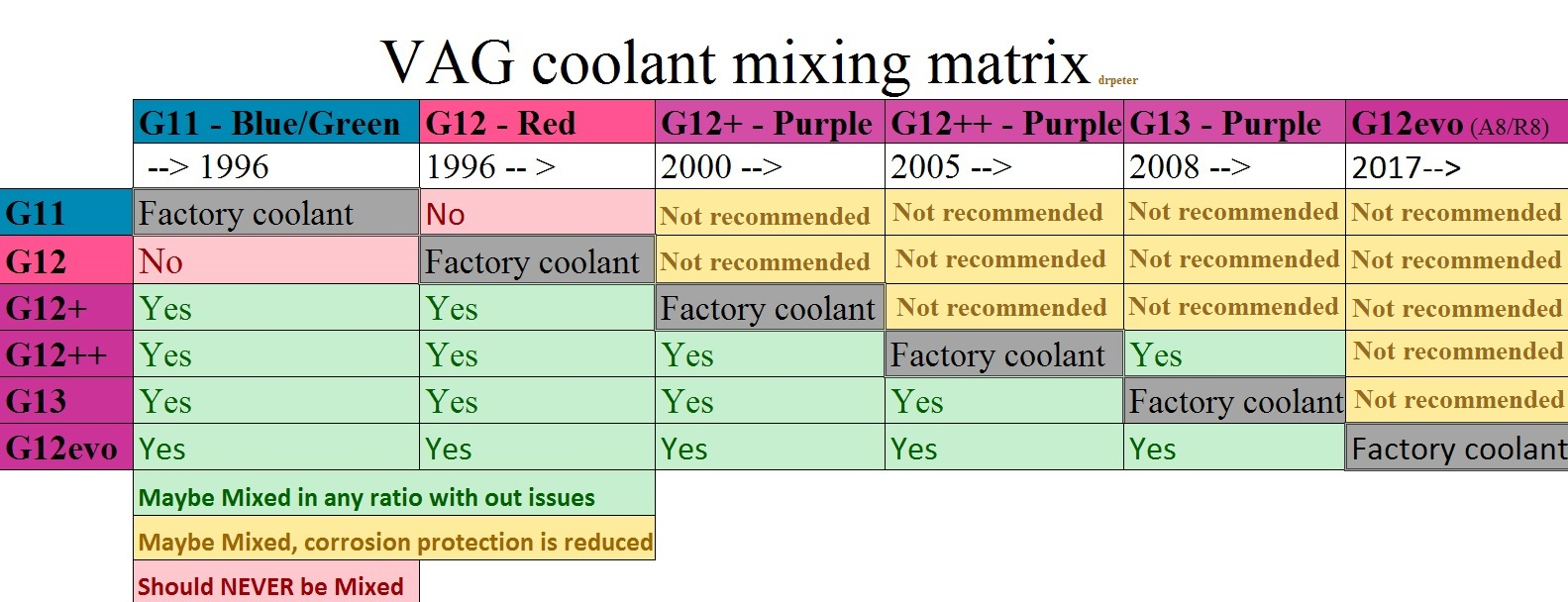
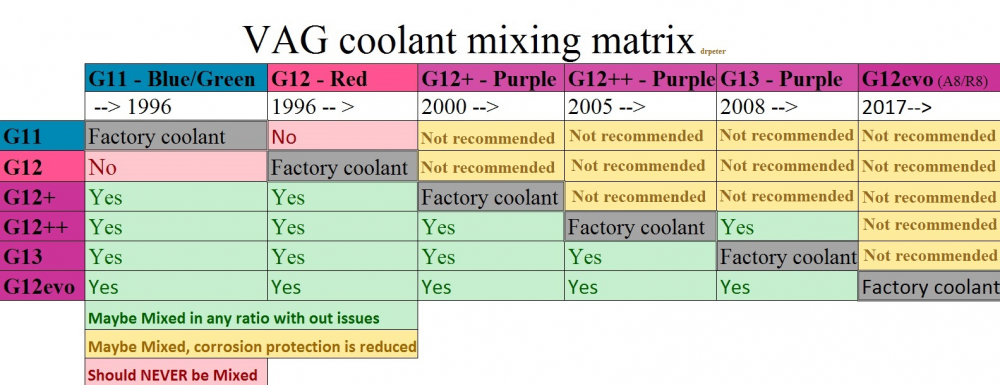
I prefer the chart from the rosstech thread I posted although it basically says the same thing with G12 evo added: What your car has is along the top axis, what you're adding is along the left axis. For a car with G11 originally, look down the left hand column: - G11 is factory - G12 is not compatible - G12+, G12++, G13, G12evo are all mixable with G11 and will protect as well or better In my case, I'd look down the 5th column: - G13 is factory - G11, G12, G12+ are not recommended due to reduced protection - G12++ and G12evo are both mixable with G13 and will protect as well or better
-
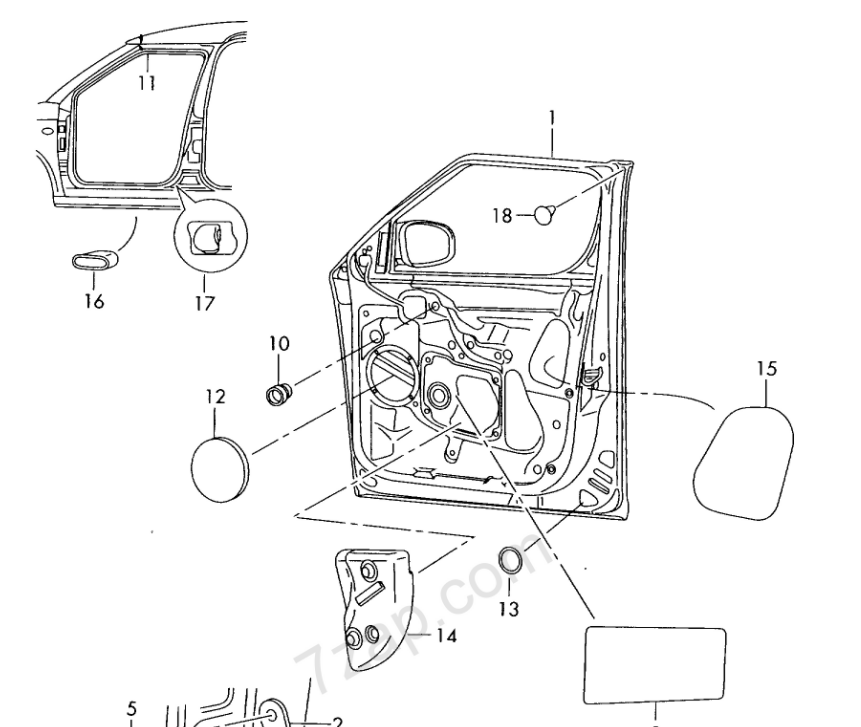
At a guess, it's 5J7 868 522 which is part 14 here:
-
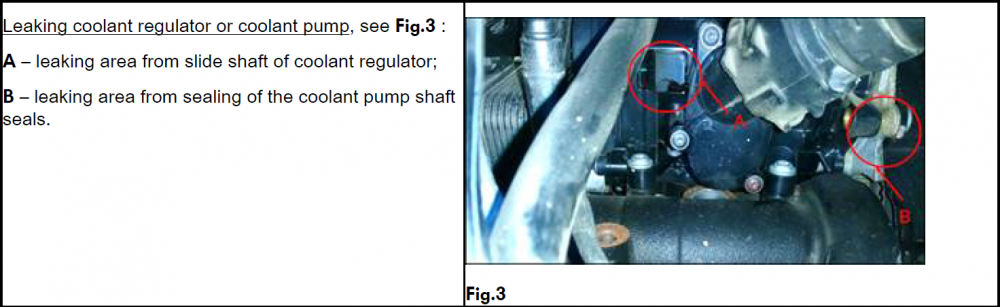
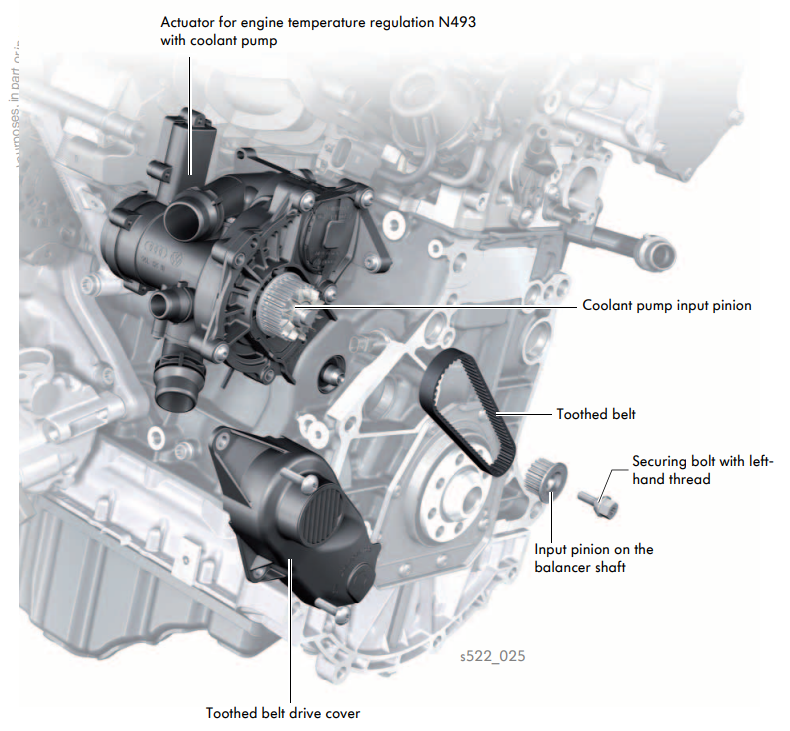
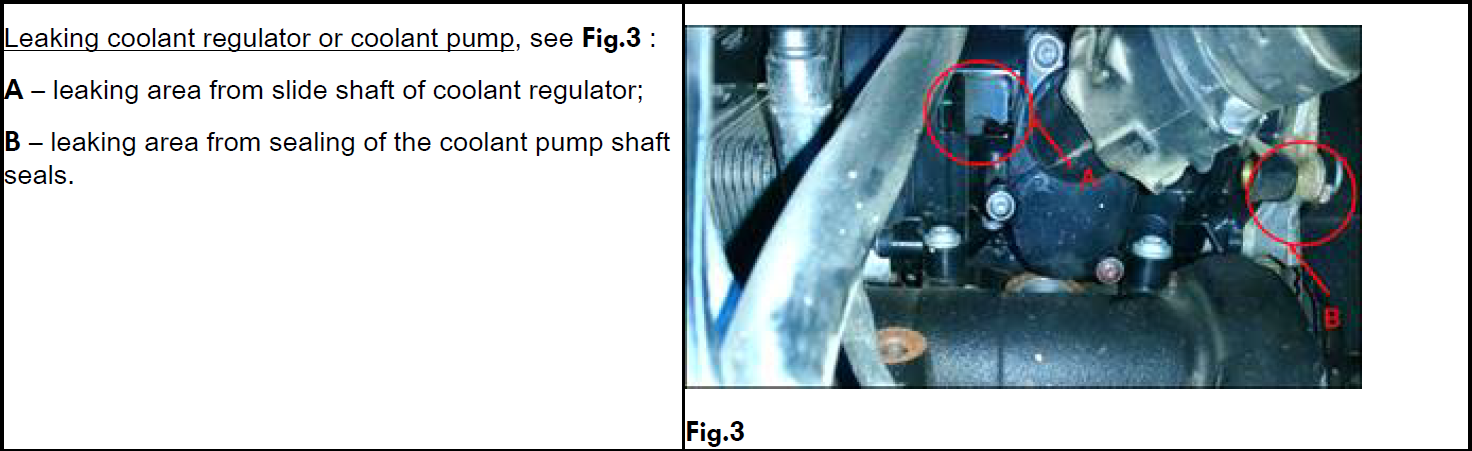
I think they have a 2014 petrol vRS looking at their old posts. My FL 2018 vRS is loosing coolant so it's not just the pre-FL... it drops from max to min in about 3-4k so it's going in for investigation next week under warranty, the dealer mentioned they had coolant pumps in stock without prompting so it must be pretty common TPI 2049121/3 covers coolant loss and a few of the production changes they've made: • Optimizing filling process of coolant in CW 12/2015. • Measure to ensure tightness of coolant regulator housing, introduced in CW 27/2019. • Measure to ensure tightness of coolant pump, introduced in CW 23/2020. Not that the TPI gives much clue as to exactly where the pump is: This might help though: