




langers2k
Resident Member
-
Joined
-
Last visited
Everything posted by langers2k
-
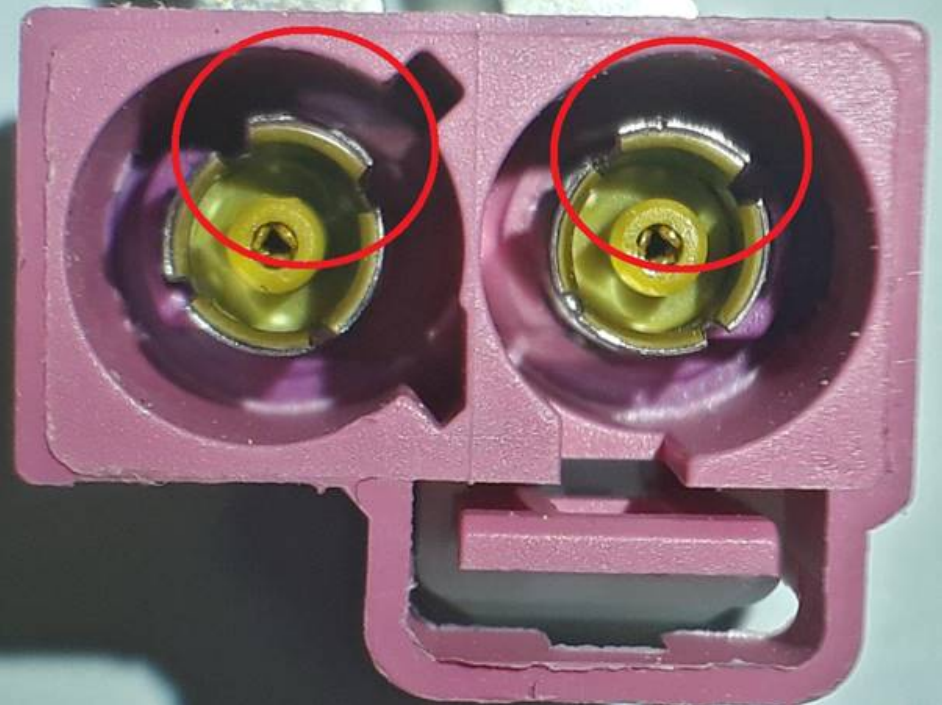
I assumed Android Auto always used the phone GPS. Just had a quick google and it seems that AA can request the car GPS data (where fitted). Google maps supported it first and Waze users have requested it as an improvement. It was a while back so I'm not sure if they've actually added support yet... It can only be the GPS antenna, wire or the headunit/software that's at fault. Seems like they've ruled out the GPS antenna so that leaves the wire or headunit/software. At this point, if I were you I would: - Make sure the software on the headunit is fully updated - Buy a cheap fakra GPS antenna from eBay and try that (eg: https://www.ebay.co.uk/itm/224465036559) Assuming you're fully updated, if the GPS antenna fixes it, the wire in the car is causing your issues. If it doesn't, it's more likely to be a hardware issue in the headunit Oh, actually, I just remembered a TPI regarding damaged GSM/GPS fakra connectors - so check those are in good condition too. In the example below, the circled tangs need pushing inwards to repair the connector:
-
The fuse is only to protect the downstream cable... I'm sure 5a is fine in most instances, it's certainly what I've used a few times
-
To erwin? Sign up, pay some money (€7 + tax for an hour), enter your VIN and download everything you can It should be possible to get all the workshop and wiring diagrams for your car in that time with a decent internet connection.
-
Neither 409 cables or VCDS lite will support you car. You need 'normal' VCDS along with a hex-net or hex-v2. The older discontinued hex-can and micro-can should be fine too. Just make sure you're buying from somewhere reputable as a cloned device may cause issues.
-
Correct The wires to the water pump may be damaged or disconnected. That's certainly where I'd start checking.
-
You can get the offical WD from: https://erwin.skoda-auto.cz/erwin/showHome.do
-
VCDS lite doesn't support CAN based cars like your 2007 MK2 Octavia. You'll need a newer VCDS interface for your car I'm afraid... If it's just an airbag light, check the VCDS owners section as someone local will probably do it for free or beer tokens. Otherwise, consider buying a genuine VCDS cable. If it's too expensive, OBDeleven is a popular alternative and I believe Carista is also an option
-
Yeah, I think that's the basics, it's a while since I've needed to tweak the service/oil mileages You need to change the oil quality and then go through the SRI/FIX/ESI channels and set them to what you need. Definitely take a 17 adpmap before you start just so you know where you started from...
-
If you have a sharkfin with a whip on the roof, it's probably from there. Drop the rear of the headlining or use a borescope to take a look which fakra connectors are coming out of it: - black is DAB - white is am/fm - blue is GPS - purple is GSM
-
Take it to a friendly mechanic with the right tools to check and correctly align your headlights...? If you can, watch them while they do the adjustments and you'll know how it works in the future It should be pretty obvious when the adjuster moves the light: - cover up one light - find and mark the cut off on the floor/wall with tape (5-10m away) - put a couple of turns on one adjuster - see where the cut off has moved There are plenty of tutorials on youtube showing how to roughly set the lights up.
-
You can see a clear cutoff shape on the left headlight, a bit like this: ______ ______/ There is no such clarity on the right headlight. It just looks like a circle of light with no obvious cutout, much like a torch although it could just be down to the picture exposure... I'd suggest you go to a garage with a headlight alignment tool and have it checked. At least in the UK, it's a pretty quick and cheap process.
-
Interesting, any pictures/autoscans from units running it? Everything I can see online suggests 0480 is only a MIB1 software. I've just checked erwin and TPI 2049459/10 shows 0367 and 0478 as the latest versions.
-
I haven't seen anything higher that 0478 for the MIB2.5 Bolero/Amundsen. What do you think the newer version is?
-
It's from around MY19 or MY20 if I remember correctly rather than during a model change 😕
-
I'd suggest you contact whoever made your headunit There might be a guide or some hidden codes to change the behaviour.
-
Parking ticket holder
-
It makes me wonder if they just replaced the clock spring or actually did both the clock spring and the steering control module. If it's the latter, it could easily be miscoded or even the wrong part for your car... Any chance you could find a local member with VCDS to do an autoscan for you? It'll certainly help with next steps etc
-
@Michaeldavis39 posted an image with the part number 5E0035842A which is a MIB1 Bolero. Looking at the ones on eBay, they have production dates from late 2013 to early 2015 which makes sense and means it can't support Smartlink/CarPlay/Android Auto. If they did have display from their phone, the only plausible option would be Mirrorlink Looking at the G50 spec, there is no mention of Mirrorlink in the screen sharing section so that would certainly explain the behaviour reported: https://www.phonearena.com/phones/Motorola-Moto-G50_id11670
-
Changing the offset from 51 to 48 will cause the wheel to sit 3mm further out. So that's either 3mm per side or a 6mm total track width increase, https://www.willtheyfit.com/ is a handy site for comparing alloy/wheel sizes. I doubt it's enough to cause any major issues
-
It's unusual for a dashcam to need three power connections. I'd be tempted to trace those wires to find out what they're feeding. Does it have a towbar?
-
At a guess, @Michaeldavis39 was previously using Mirrorlink but their new phone doesn't support it. Assuming I'm correct, I don't think much can be done to add Mirrorlink to their new phone
-
No coding needed for the ignition switch. There not an uncommon failure as I had to replace the one on my old Octavia. There are a few styles so if possible I'd check what you have before buying a replacement. I think the steering controller is fine given the faults you have.
-
They look like themisto alloys to me. A dealer will probably charge £250-300 per wheel for a new one so a set of four will around £1000... A proper acid strip and single colour refurb will be probably be £60-90 per wheel for a 18" depending on condition. Maybe slightly more in London? That's probably around £300-350... I'd be looking for some local firms to do a refurb and see what they can do for you
-
Assuming those codes are coming back when they are cleared, it suggests: - you need a new ignition switch - there is still an issue with the CC switch I'd probably start by replacing the ignition switch and while the steering cowl is off, check the connections for the stalks are in good condition.
-
Yup, you might need to slide a purple plastic lock mechanism out the way before inserting the crimp. It should be a permanent live. If you used a switched live you'll get fault codes complaining of a lack of comms. The owners manual for a 2016 Superb page 212 suggests fuse 18, which happens to match what I used on my Octavia: https://ws.skoda-auto.com/OwnersManualService/Data/en/Superb_3V/05-2016/Manual/Superb/B8_Superb_OwnersManual.pdf I think the crimp might be too big for that slot so you may need to use an alternative slot.

