




langers2k
Resident Member
-
Joined
-
Last visited
Everything posted by langers2k
-
Smartlink activation shouldn't require anything disconnecting. It's just a code that'll allow ODIS to apply the appropriate license or FeC to your headunit via OBD. There is a chance they will have reverted the headunit to it's original factory coding/adaptions which may disable a retrofitted RVC. Can you post an autoscan and adaption map for 5F?
-
There's a much longer thread here: https://www.vwvortex.com/threads/logging-direct-throttle-vcds-obdeleven-tweak.9392853/ It also shows the difference changing "driving profile switchover" does make - namely to how the driving profile changes as it's name suggests There is a youtube clip here too:
-
Why not just use VAG brake fluid? I think it's part number: B000750M3
-
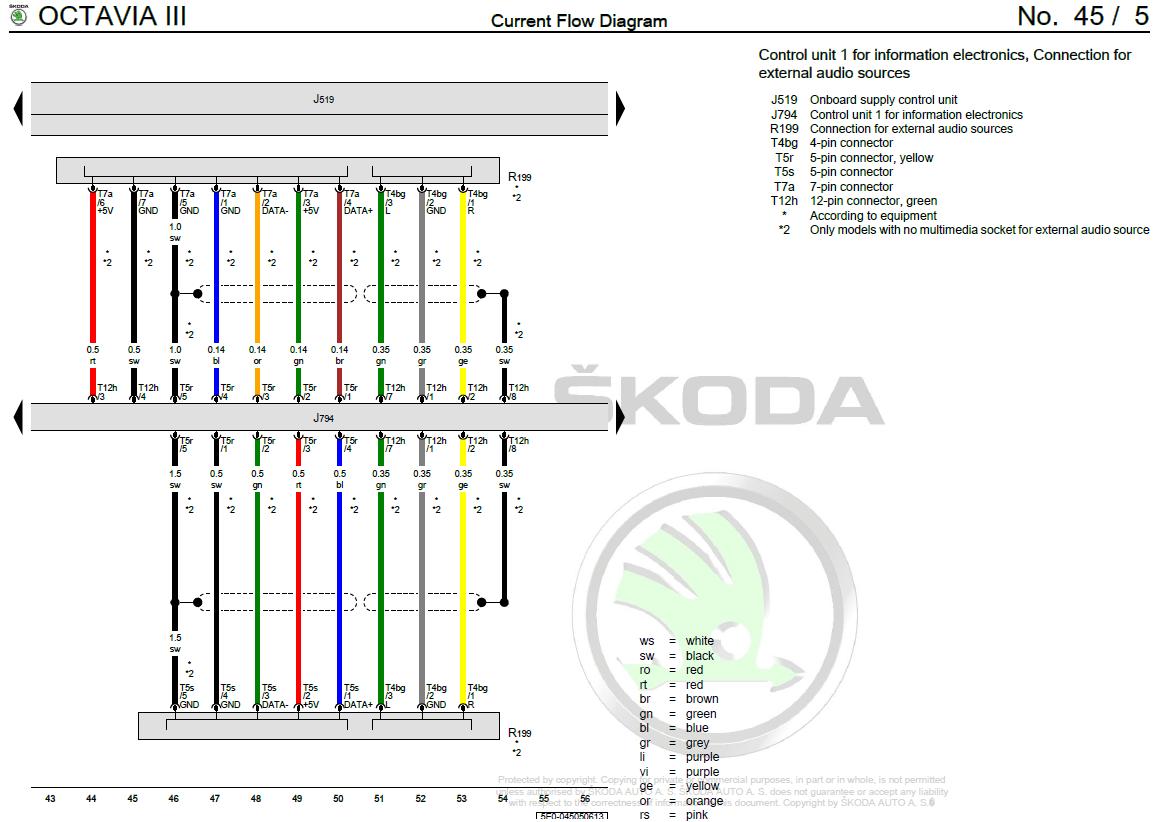
Example WD from an Octavia... Colours seem to match up and show black as the shield: In the past, I'm sure shield would be connected to pin 4 of the aux socket. Much like this pic:
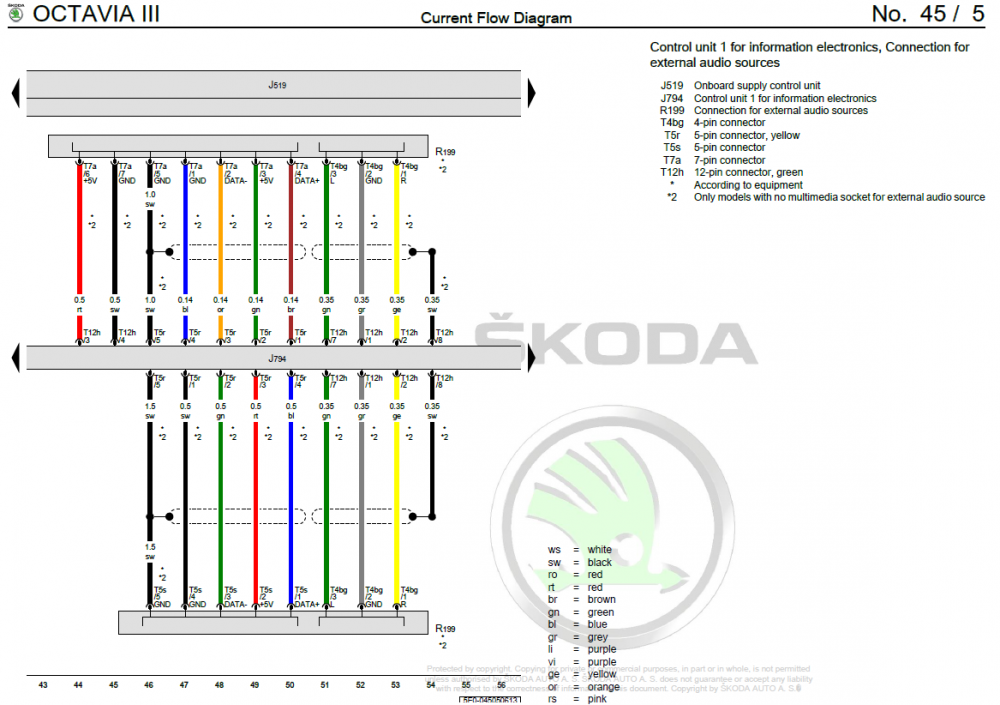
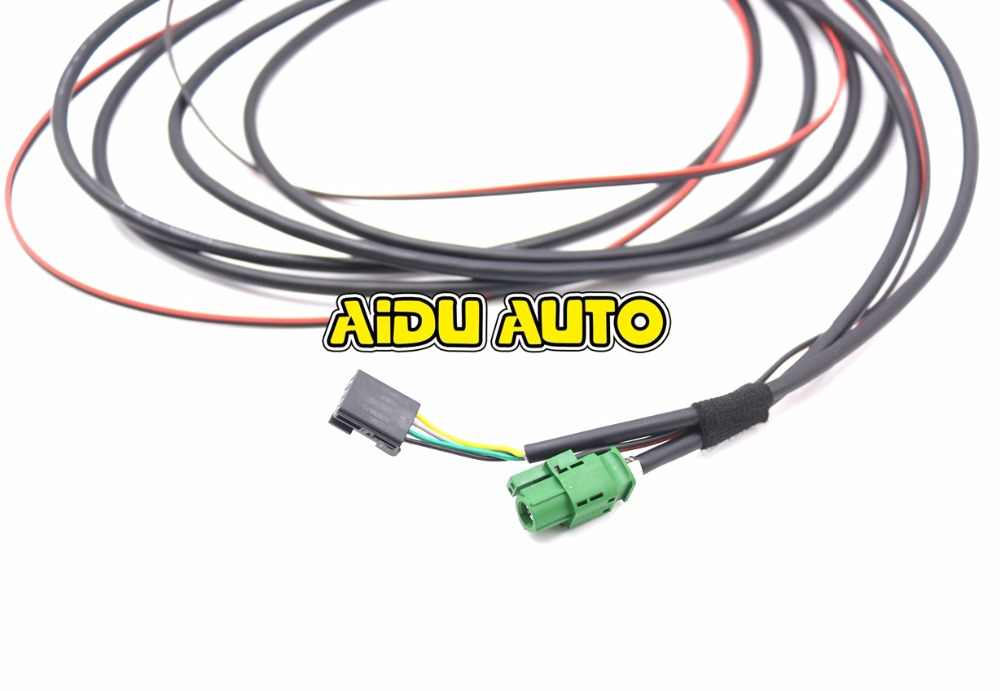
-
The headunits can be programmed to either use the internal amp or an external one. Pretty sure this applies to all MIB1/2/2.5 Bolero/Amundsen/Columbus headunits... The external amp is normally marketed as Canton and gives you some extra speakers along with a sub in the boot. Any chance car scanner can show the fault codes and current long coding for 5F?
-
Sounds like car scanner did manage to change something... Might be worth trying to find a VCDS or ODBeleven user to take a look? At a guess, you have an amp aka Canton? If so, it's not compatible with the surround/virtual sub coding so you should undo the change and restart the headunit by holding the power button for 10-15s
-
At a guess, it'll be the unused pin on the black connector... There won't be any solder as VAG don't solder connectors on. Instead, the wire has probably pulled out of it's crimp and the crimp is still in the black connector
-
I don't believe your car supports any USB CD drive I'm afraid 😞
-
At least based on some of the posts in this thread: https://www.vwroc.com/forums/topic/30625-i-know-this-sounds-ridiculous-but/ It doesn't seem the driving profile switchover actually changes the throttle response
-
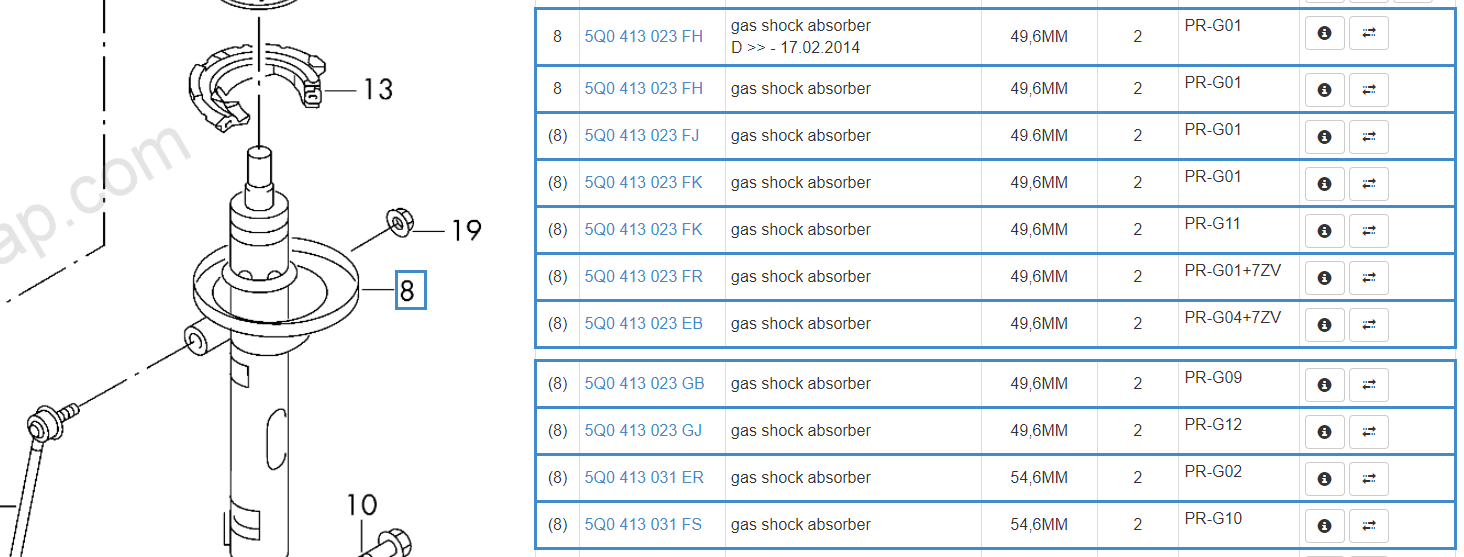
There are plenty of parts where the letter(s) at the end denote the revision but for something like shocks, that's not normally true. The F certainly doesn't mean front either... Instead, the FH will denote the variant which is likely to be a specific weight range and with PR-codes to match your vehicle build spec. Just as an example, these are some of the options listed from an online catalogue - the FH and FS versions are completely different diameters and certainly not interchangeable: @Carlston tends to know suspension part numbers so may have some insight? Personally, unless it's been obviously superseded, I'd stick with the original part number and definitely keep the both sides matching
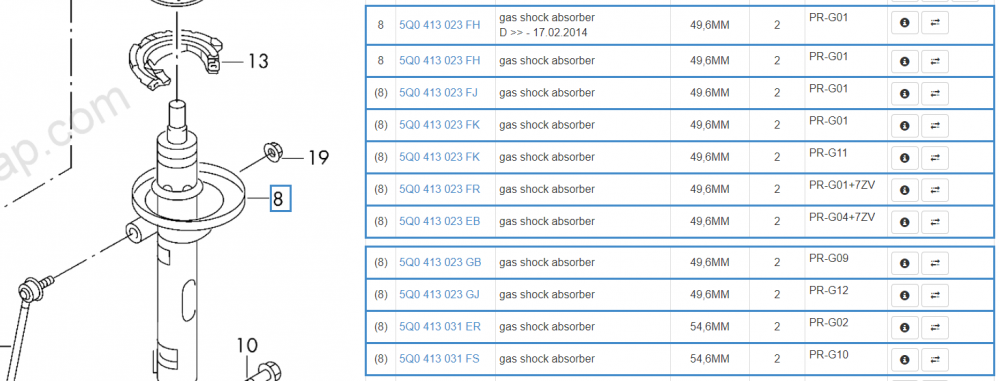
-
Plenty of hits on google! For example: And this video: Or this one:
-
1) Possibly, press the FM button and see what happens 2) The best way would be to swap the headunit for a DAB version, I've no idea if 3rd party solutions exist 3) It's a Bolero, more specifically a MIB STD2 PQ style Bolero 4) Smartlink can be activated by a dealer, you'll only get Android Auto and Carplay if the build date is after May 2015 If you check the system information for a part number, that'll help answer some of your questionsThe 'cd drive' is the headunit whereas the display side is just a screen with a touchscreen If I remember correctly, the connectors are: - white fakra for AM/FM - black fakra for DAB - pink fakra for the screen - yellow fakra for the USB port - blue fakra for GPS (not fitted above) - purple fakra for GSM (not fitted above) The quadlock has connections for: - power/ground - CAN-bus - speakers - microphone - a few other things depending on equipment You'll need to run most of those wires to your new headunit so maybe consider getting a quadlock extension or similar to make life easierThere are various technologies at play here, such as: - Mirrorlink - Android Auto - Apple CarPlay Depending on your phone, it may support one or more of the above to connect with the radio in your car. To use them, you just need to connect your phone with an appropriate USB cable and follow any onscreen setup instructions. You should then be able to use various music and navigation apps from your phone on the radio display. Skoda tend to group the above together and call it Smartlink. Smartlink+ is an extension which means if your car is connected to wifi or a 3G/4G modem, it can report various stats back to Skoda including fuel level and fault codes. You can access this data either via the MySkoda app or the Skoda Connect website. Skoda Connect are the online services which allow news, weather etc on the radio. Again, it'll need an internet connection and there is also a yearly fee to use it. Personally, I feel Skoda Connect and Smartlink+ are pretty useless. I use Android Auto via Smartlink all the time and it's greatPretty sure the footwell light fuse is also used by some exterior lights so no, it's not that simple afaik...I assume that's a 2018 so it'll have a MIB2/MIB2.5 Amundsen fitted. In which case, yes, the only check is the CID is valid but this only applies to the navigation SD card. For music, you can use any SD card and given it has two SD slots, have both the music and navigation cards in at the same timeI used the more expensive OEM version to get that factory feel. I don't like the fact the Chinese one can recode modules to install itself.... I'd much rather do that myselfWhat kind of Amundsen is this for? Your profile suggests a MK2 Octavia but I think you've sold it...Some camera's have a little washer jet attached: When you activate the rear window washer jet, it'll also spray water on the camera lens to remove dirt/grime. it's not 100% effective but tends to work relatively well if the car isn't completely covered in dirt
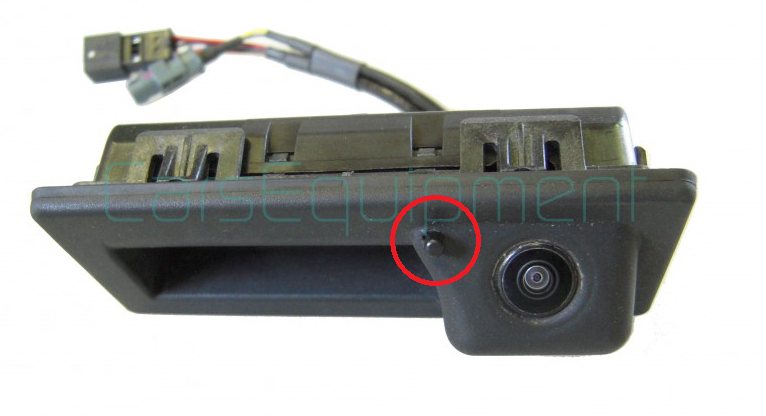 Then you only have a basic instrument cluster so you won't be able to change the footwell brightness. You'll either need someone with VCDS or similar to do it for you or remove the bulbsCan you post an autoscan so we can see what's what?Assuming you fit an OEM camera, it should be pretty much the same as my 2018 Octavia. Coding is super simple and OBDeleven should easily be able to do it. More details here: https://www.briskoda.net/forums/topic/485897-how-to-reverse-camera-fitting-guide/?do=findComment&comment=5456364It also says connect a battery charger... I wouldn't want a battery charger connected to a running engine. I expect the battery charger instructions say the same 🤣Might be worth posting an autoscan @SKD_VRS to give an idea of any fault codes and how your car is configured...


Important Information
Welcome to BRISKODA. Please note the following important links Terms of Use. We have a comprehensive Privacy Policy. We have placed cookies on your device to help make this website better. You can adjust your cookie settings, otherwise we'll assume you're okay to continue.