Breezy_Pete
Sponsor
-
Joined
-
Last visited
Everything posted by Breezy_Pete
-
£54 completely wasted.
-
More specifically, it will be the brown/green wire that goes to pin 2 of the white A-pillar connector that has the issue.
-
Broken wire or corroded connection at one of the A-pillar connectors, I imagine.
-
Welcome to Briskoda.
-
Or screenwash.
-
It's red in that situation I think, J.R.
-
Got any reference to back up that statement, please? I can look up what battery your car was built with, given the VIN.
-
Fingers crossed.
-
How do you know?
-
Pad wear indication, I think.
-
Lots and lots of people get that code, and it's always the strip fuse in my recollection. Could equally be a bad contact somewhere between rear connection of that fuse and the contact of the connector at the ABS module which that thick red/green wire goes to. Measure the voltage at that connector, relative to the thick brown earth that will also be on that connector somewhere. Can find more details tomorrow.
-
Have you tested the radiator fan(s)? Inability to sink heat out of the condenser might be why it works under non-challenging conditions, but switches off when ambient temps are higher? Somewhere in the measuring blocks of the HVAC module you should see a so-called 'shutoff code' that may give you useful info about why the A/C is switching off, if it is actively being commanded to. Lots of related info here: https://forums.ross-tech.com/index.php?threads/633/
-
CO2 is neither measured at, nor relevant to MOT. CO, carbon monoxide, is measured at MOT against limits on petrol cars only, and is often muddled with CO2, carbon dioxide by folk on forums.
-
There'll be one somewhere, probably obscured by 'stuff' in the bay. If it can't be seen without disassembly (or doesn't have a smoke figure, or it is unreadable), again you're probably in the clear.
-
That off-straightness in your pic is a giveaway that the mechanism on one side is seized. Probably the pivot point of the lever within the drum that the cable pulls on. If it was earlier in the day I could tell you which side to find the problem, probably left/nearside.
-
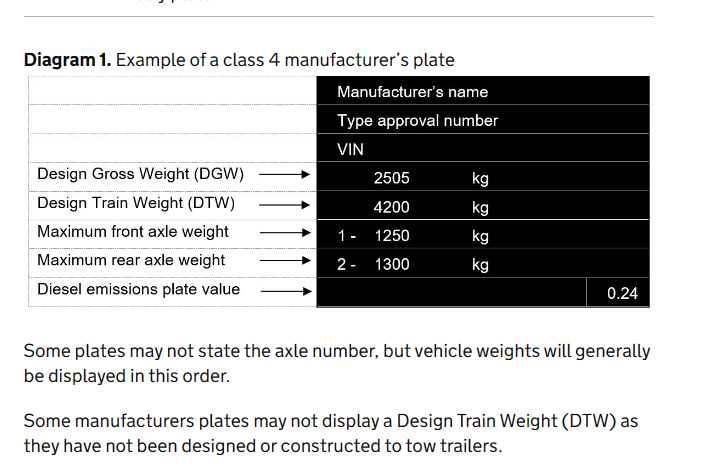
The wording of the manual doesn't give any latitude to do anything but use the smoke figure off the plate if found, or the default 3.0 (for your turbodiesel) if not. This is the example plate they mention, with smoke figure in bottom right corner:
-
No, that's just the aircon refrigerant spec. If I were you I'd have a really good look around the bay in daylight, and find the manufacturers plate, try nearside towards the front, but could be anywhere. It may or may not have a smoke figure on it. If not, you may be OK.
-
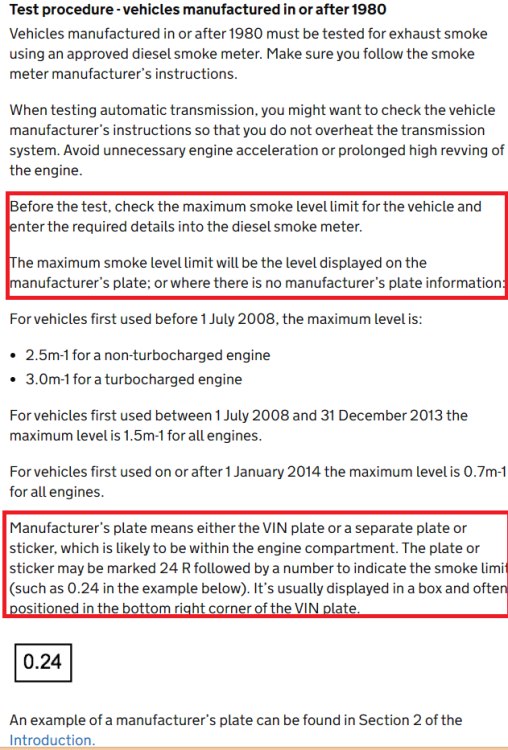
This is the relevant page from the test manual, with some relevant-to-you bits highlighted. If there's no manufacturer's plate with that 0.8 on it, it should have been tested against 3.0 per meter standard, as I read it.
-
Is there a manufacturer's plate visible in the engine bay with this value written on it?
-
-
Don't bother with the timing belt and water pump change. You're at the point where the risk/benefit/cost equation makes it not worthwhile. Shop around for brake pipe replacement, after getting independent confirmation that it's even necessary. Plod on.
-
Don't change anything without having a record of how it was originally.
-
Use VCDS to look around module 09 (Central Electronics/BCM) to see what adaptations are available relating to the DRLs.
-
The wiring info for your car suggests that there are separate lights for 'sidelight' and daytime running light (DRL) functions, fed by two different wires from the Body Control Module (BCM). On the left side of the car the sidelight wire goes into pin 10 of the 14-way connector at the light unit, and is grey/black On the left side of the car the DRL wire goes into pin 4 of the 14-way connector, and is blue/yellow On the right side of the car the sidelight wire goes into pin 10 of the 14-way connector, and is black/green On the right side of the car the DRL wire goes into pin 4 of the 14-way connector, and is blue/green See which ones of these wires have 12V on in various conditions? If you can do anything to change the DRL behaviour, it will be via the BCM coding/adaptations.
-
If you message me with the VIN, I may be able to look up at least which module is in control of them.