Everything posted by Breezy_Pete
-
Part cost and labour time both sound high to me, particularly the former.
-
Normal cambelt is on same (UK drivers) side of the car as the aux belt. Water pump toothed belt, and waterpump on opposite, gearbox end.
-
All the relevant (genuine) part numbers should be in whichever of these diagrams relates to JCZ (which includes the first, where I surmise from the part number of the whole thing that it is an 02R type box). gearbox Fabia (FAB) [EUROPA 2008 year] (7zap.com) There may also be some cross-references to aftermarket parts using the 'aftermarket' button (left/right arrows) in the rightmost column. View on a computer rather than phone if you don't see all the info you need, phones often seem to drop useful columns.
-
Should be pins 20 and 33 at the ABS module connector. Pin numbers (ends of rows) should be marked somewhere on the connector. Count carefully! Link those with a piece of wire, then test continuity between the pins (with wires fitted into connector if probes don't make reliable contact) at the loom connector for the rear left sensor. If you get a beep, that shows both wires make it. Test also that there is no short to chassis from that loop.
-
I can't help you any more I'm sorry to say Raky. I don't have enough time.
-
Do you have any record of either engine thermostat or engine coolant temperature (ECT) sensor ever having been replaced since the car was built 15 years ago? Change both if not. On the basis of your diagnostic app temperatures, the engine is not getting hot enough for any problem, nor any fan function, but the app might be getting bad info from the engine ECU (which directly reads ECT sensor) if that ECT sensor is reading wrongly. The radiator thermoswitch actually has two independent switches inside, with different temperature thresholds, for activating each speed of fan operation by causing the relay coils in the FCM to be grounded and so energised. These thresholds are approx 95 and 102C. No ECU nor other 'intelligent electronics' is connected to the thermoswitch in any way, hot coolant is the only thing that can make it switch. By loom testing you have proved that if those thresholds are reached and the switches activate, the relays inside the FCM will turn on to power to the fan. There are no electronics within the fan. Until the thermoswitch area of the radiator is reaching these high temperatures, no fan operation should be expected. If the engine shuts down unexpectedly after a few minutes of idling, there must be some other problem completely separate from any of this stuff, I think.
-
Yeah, I think so. Advantage of the precat is faster action from cold start, but MOT works with warmed up engine, so no problem.
-
I think all the aftermarket ones will just have the one, main cat. Should still be OK. BKY engine, right?
-
Me too.
-
Is it a 1.0 or 1.2 engine?
-
Which corner of the car is the fault?
-
I have a new favourite. Everyone should watch this.
-
Skoda Parts catalog - ETKA Online, Skoda EUROPA, original Catalog Skoda EUROPA (7zap.com) I'm not aware of any downsides to letting the MOT expire. You'd need to have a pre-booked one when you want to drive the car to get it done, but that's probably normal for most people anyway.
-
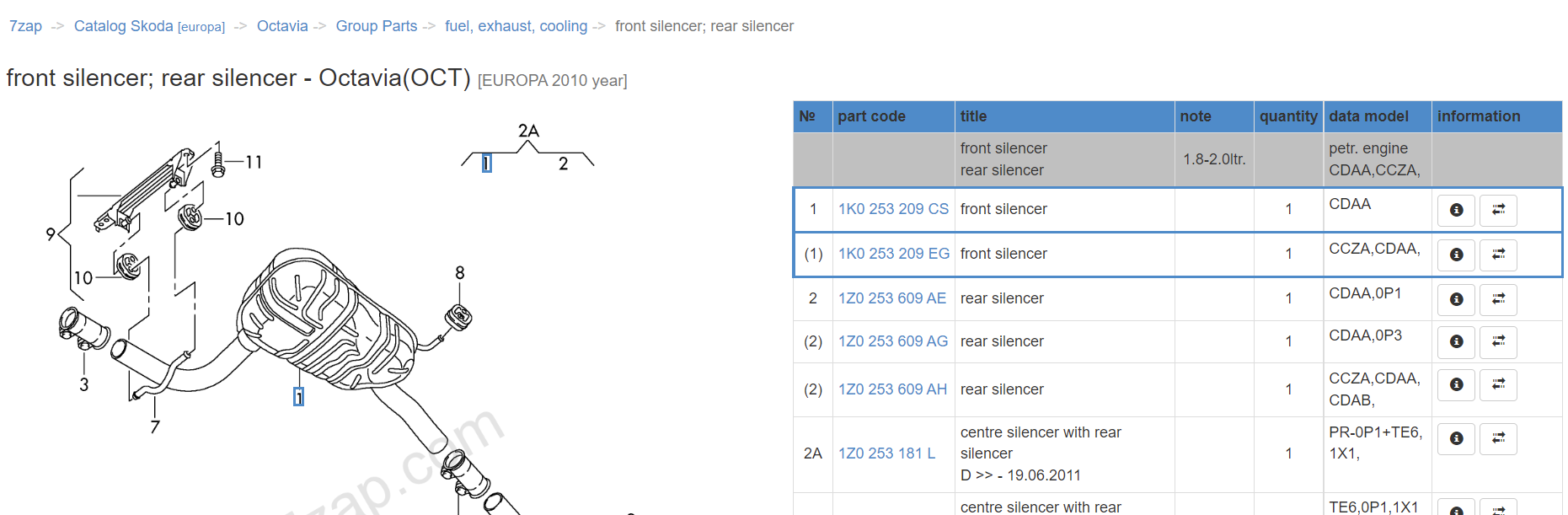
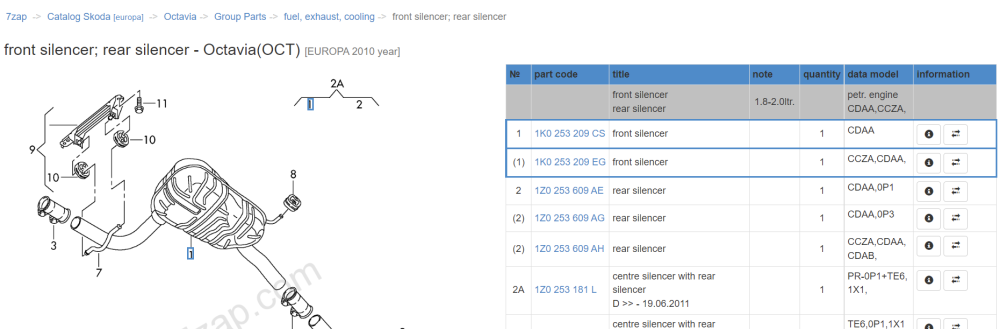
A quick glance at these two part numbers on ebay (minus the spaces) shows a few 'aftermarket equivalent' results, admittedly all from mainland europe. This one includes delivery price which suggests they can/will ship to you? Muffler Silencer/Muffler MSD for Skoda Octavia II 1.8 TSI | eBay
-
Might be an interesting conversation if you call them up and play along. "I thought I had 4 years warranty but I can't quite remember, would you check for me, please" If they come back with anything other than the truth, give em hell.
-
Anyone thinking about 'especially good' journeys with respect to fuel economy should try to consider wind direction and strength during that trip. As aero drag dominates fuel use at higher speeds, a favourable wind can be like walking on a travelator at an airport in terms of impact.
-
Good point. 🙂
-
Or a chunk departing and getting blown into someone behind's windscreen and possibly making them flinch and brake sharply etc.
-
No, as I said, it's more likely to be a problem with the engine thermostat. Flushes never really work on things that are blocked, because there's no flow to take the flushing agent there if it's blocked! Try the thermostat.
-
Pull off any loose bits you can reach.
-
It sounds like not enough coolant is circulating through the radiator. I would change the engine thermostat rather than the radiator, as this is cheaper and much easier.
-
A little further than 1-2 miles, maybe 3-4 to be sure that the thermostat should have opened.
-
Both radiator hoses get hot? You said hose, not hoses?
-
.
-
ABS light probably from messing with its strip fuse, most other codes probably from disconnecting and reconnecting things. Clear all and see what, if anything returns. A/C codes probably recirculation flap problem (standard on most Fabias of this age, largely irrelevant unless stuck shut), and low refrigerant causing G65 one.