Breezy_Pete
Sponsor
-
Joined
-
Last visited
Everything posted by Breezy_Pete
-
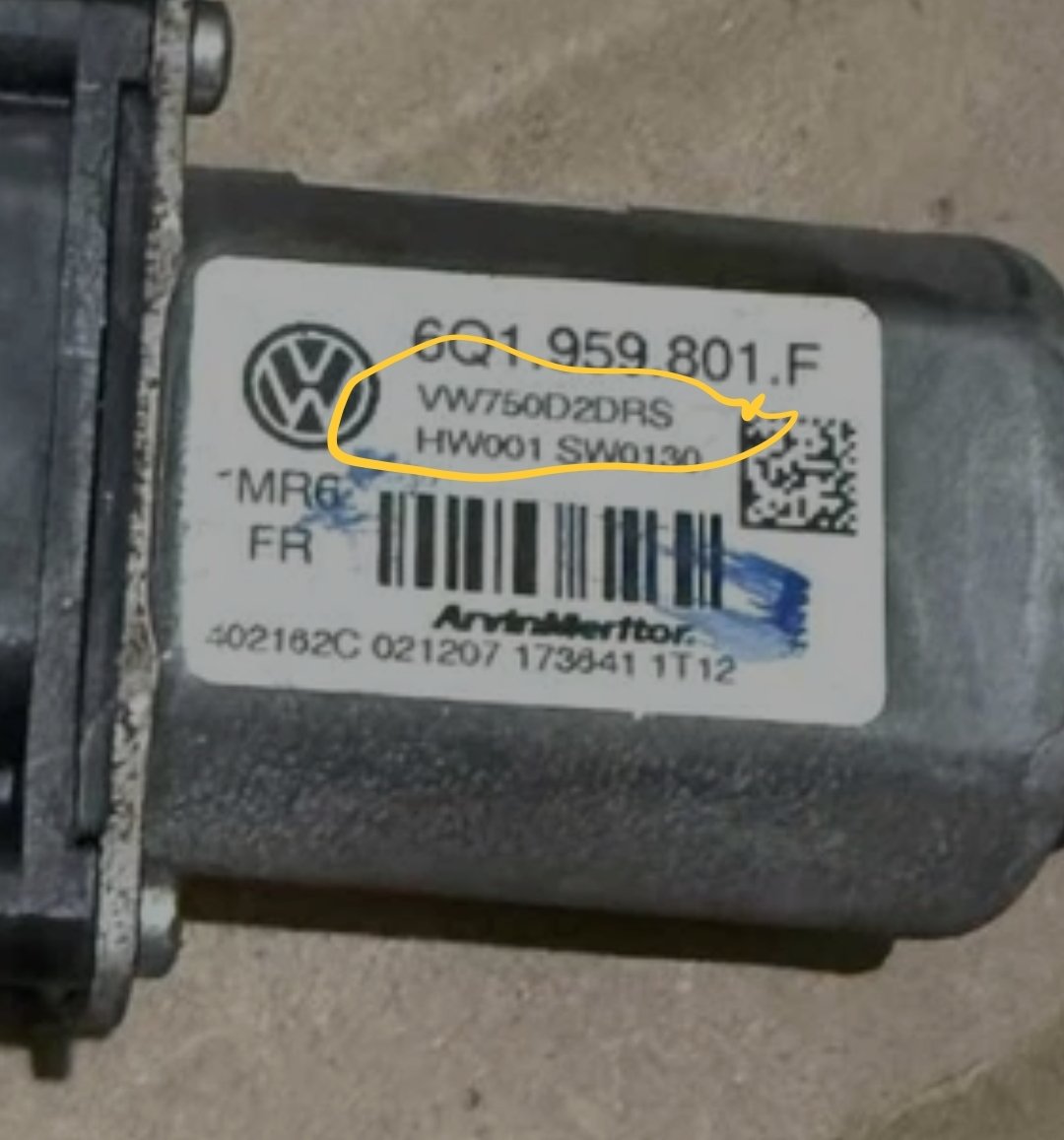
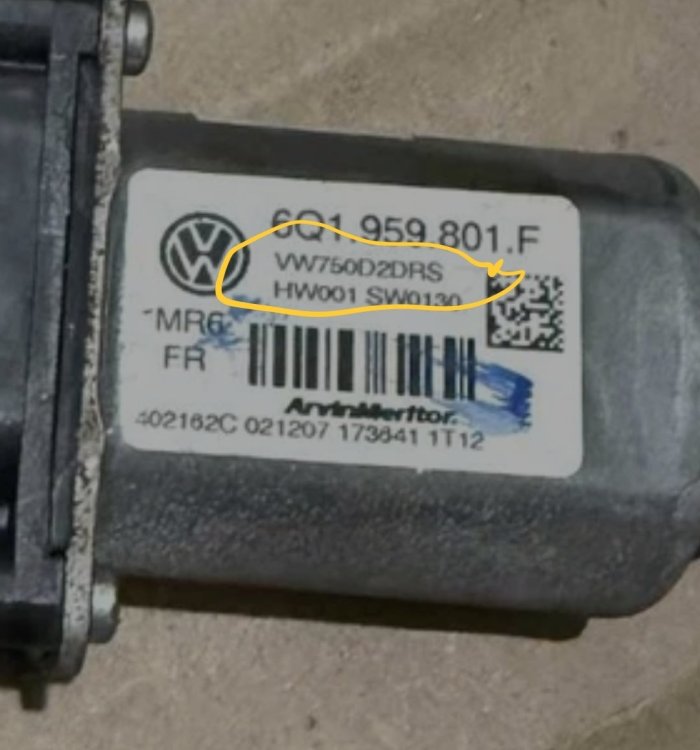
The VW/SK info is there on the part number label. Generally best to go by the label rather than sellers' descriptions, hardly anyone really understands the interchangeability, or lack of, amongst these units. I'll message you shortly, and I may make a little 10 or 20 second video showing how to disassemble these units without damage.
-
Breezy_Pete replied to TonyW1967's topic in Skoda Favorit, Skoda Felicia, Skoda Fun and Skoda FormanI wouldn't worry about a big of sludge in a dead-end like this on an engine of this age. Fix the leak and keep fresh oil in it going forward. May be worth checking all breather hoses for blockages, as poor crankcase ventilation tends to increase the likelihood of oil leaks.
-
Diagnostics won't see these motor modules since they only have (LIN) data connection to one another, not to any central control units. The 6Q1959801F units can fail in the same way as the preceeding 6Y... series units from facelift mk1 and 2007 mk2 Fabias, as well as a few new ways. Beware - unlike the 6Y modules, it's quite easy to cause irreparable mechanical damage to these 6Q...F variants just by taking them apart with insufficient care. After unclipping the connector adapter, and removing the four screws, it is essential to 'help' the circuitboard to come out with the main motor chunk by levering gently against the board-mounted connector as the shaft is extracted. Failing to do so will tend to drag bits apart and motor brushes may get damaged or completely ejected. Not much to see if you did disassemble though, so not really worth attempting. Secondhand units on ebay can be found at prices competitive with repair, but be alert to the fact that the same base part number 6Q1959801F is used also on some VW models, where they are mounted differently. Compensatory software differences mean that Skoda and VW ones aren't functionally interchangeable, despite physically fitting. Up and down will be reversed relative to switch inputs if mixed heritage parts are fitted. VW parts will have a number under the 6Q1959801F that begins VW240 (Polo) or VW750 (T5). Skoda versions have SK250 (mk2 Fabia) or SK258 (Roomster). Get the correct one if going for second-hand. New are still available, not sure on latest prices. Are you anywhere near Highworth/ Swindon?
-
If a new one was fitted recently and you don't know for sure that it was a correct match to the VW group number I posted above, I wonder if you got the wrong type installed.
-
Was a new crank sensor fitted recently, or not since 2 years ago?
-
Did you definitely buy the correct crank and cam sensor replacements? Cam sensor = 045 957 147B Crank sensor = 045 957 147C As far as I can see, for BNM engine in 2007.
-
Dunno, never tried it on a known working system.
-
No need for VIN. That previous linked thread established engine code, crank sensor type and wiring info to engine ECU. Check continuity of the two wires from pins 1 and 2 of crank sensor loom connector back to engine ECU pins shown in that top diagram.
-
We've been here recently... Crankshaft Sensor 2.5V - Skoda Fabia Mk1 (1999-2007) - BRISKODA
-
I think it's probably two signal wires and one that connects to cable screen/shield. Knowing the engine code or VIN if unsure, would allow me to confirm.
-
I think there's a later type with a hall effect crank sensor which has 5V supply, but I think this one is probably a variable reluctance type where 2.5V may well be correct.
-
First things first, which sensor did you change? The one on top of the manicat, or the one further down, at the start of the front section of the exhaust? Fault codes point to the second of those. Wiring: blue/red wire on pin 1 of the 4 way is a switched 12V from fuse 31 (heater supply power) brown/white wire from pin 2 of the 4-way goes to engine ECU pin 13 on the 52-way conn. (modulated earth for the heater) grey/white wire from pin 3 of the 4-way goes to ECU pin 21 grey/red wire from pin 4 of 4-way to ECU pin 47 Those are the colours on the loom side of the 4-way connector pair. The sensor wires are probably different colours for the section to sensor itself.
-
That's a well calibrated set of eyes you have. 😆
-
Front brake PR is 1ZA, 312x25mm.
-
I doubt you'll find one anywhere on a 2018 car, and even if there is one, it almost certainly won't include front brake PR code. Message me with your VIN and I can look it up for you.
-
Oh, that would be handy. My registration got cancelled. Didn't expect to be able to use it again.
-
@Binx1310 unfortunately erWin stopped offering registration and usage by private individuals just before Christmas.
-
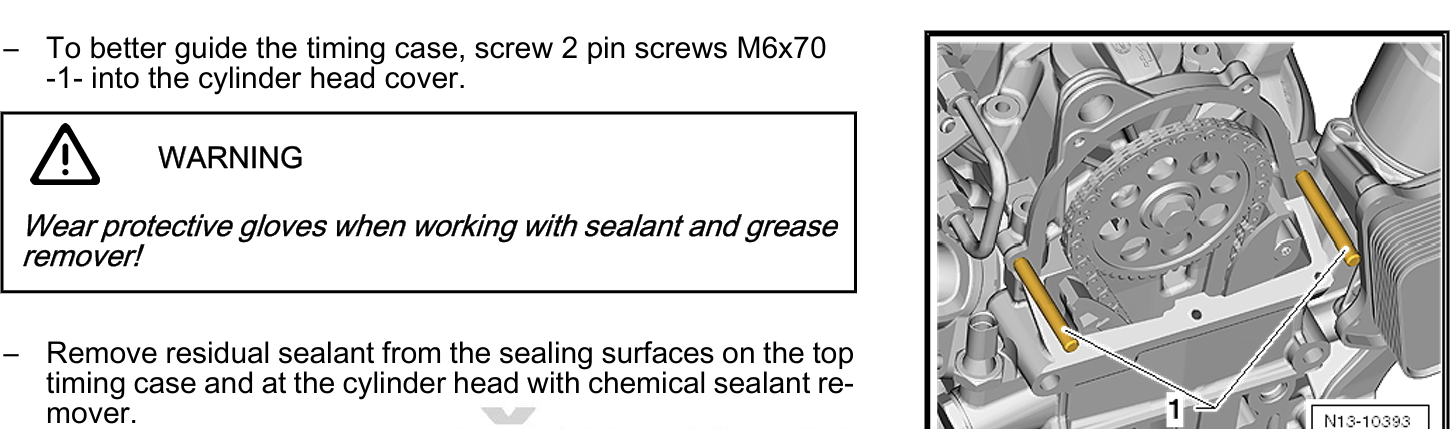
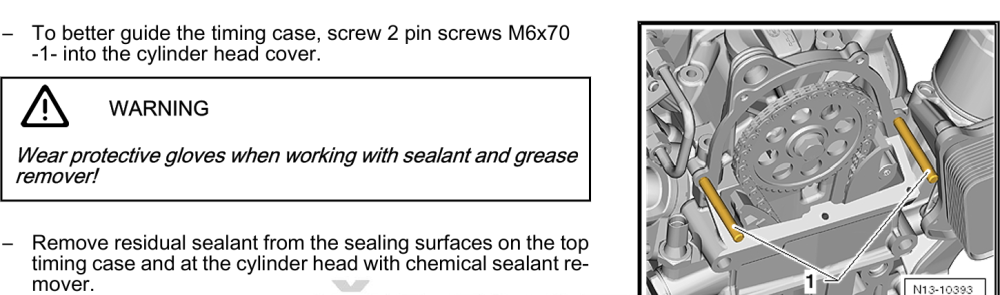
Thanks Lee, I soon discovered that they are in fact pins to help locate the upper (plastic) timing cover whilst refitting with sealant gasket on two surfaces: I guess they guide the cover into just the right spot at the first attempt, preventing squidging of sealant into places it shouldn't be. Insert all the other screws, then remove these pins to fit last two screws. I've used similar, but homemade things when refitting sumps with liquid gaskets. Will be helpful now that I know what they are. 🙂
-
-
I'll see if they get mentioned in the workshop manual. Cheers.
-
Possibly. What would they lock though?
-
Doubt it, but no idea really.
-
Lower dash trim removal on right side should give enough access. BCM is above accelerator pedal, firewall connectors up deeper behind. The firewall connectors are a pain to access from cabin side.
-
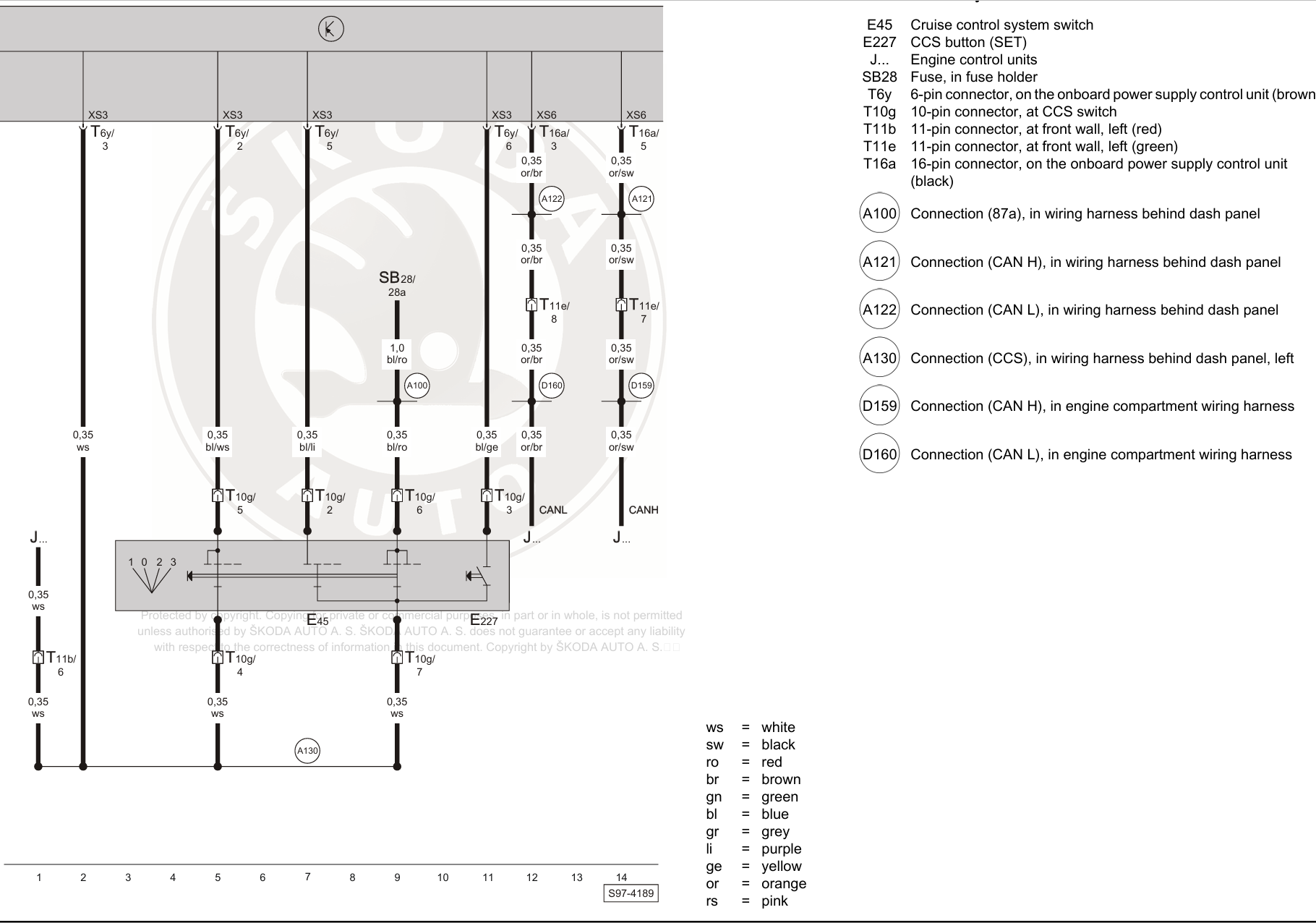
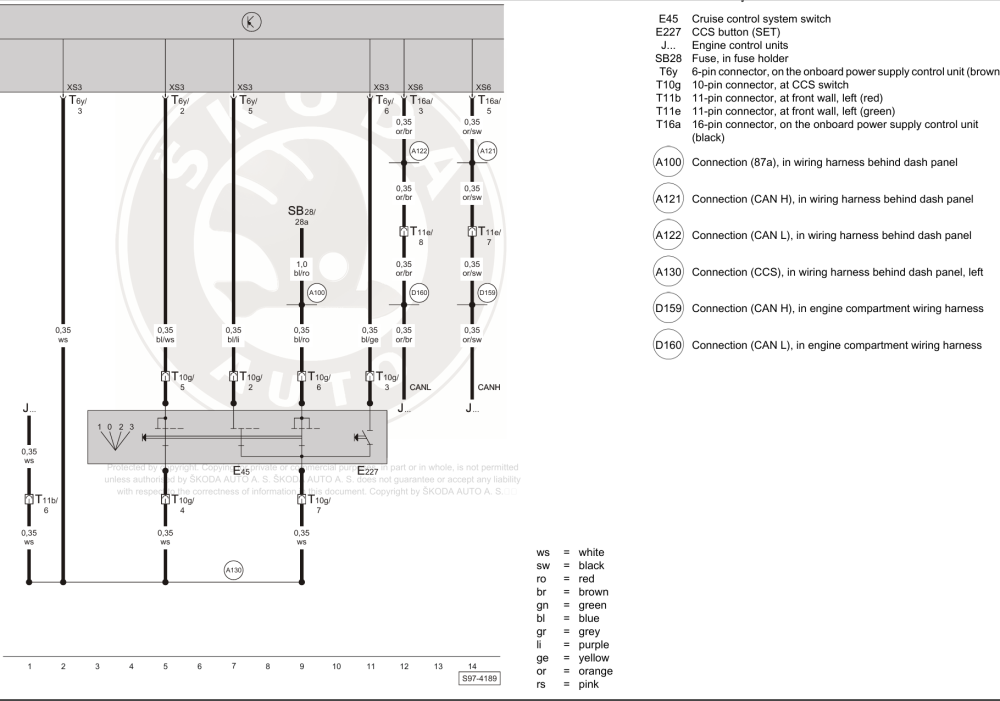
BCM (onboard supply control unit in terminology of the time) at the top. Don't worry about CAN wires on the right, they're just shown for information, no need to add or touch those.
-
Will stick the wiring info up here in a bit, just got to do something for the next hour or so. Pin 6 of the red 11-way connector at the firewall seems to be the way through to engine ECU. Think I've got the bits to make up all the wiring somewhere.