




langers2k
Resident Member
-
Joined
-
Last visited
Everything posted by langers2k
-
Not quite... The same steering rack is used in many car models so there are a selection of datasets available. A dealer would normally use ODIS with an online connection so it'll select the correct dataset based on your VIN. It won't offer the dealer a choice. However, the datasets are also available for offline use (some dealers may have poor internet) so if you find the dataset you want, a dealer could do an offline line update to use it. I doubt many dealers will want to do this for you though... There is more info here: - https://skodapilot.com/2015/12/25/harakteristiki-rulevogo-upravleniya-pq35-chast-1/ - https://skodapilot.com/2016/09/07/harakteristiki-rulevogo-upravleniya-chast-2-go-deeper/ Rough idea of how to do the update and parameter change using: - VAS (old dealer software) https://skodapilot.com/2014/02/10/steering-curve-audi-tt-rs/ - ODIS (current dealer software) https://www.drive2.ru/l/473929369941705132/ - VCP https://www.drive2.ru/l/538914630311870716/
-
Yup. I've used it a few times to get wiring diagrams, service manuals and TPI/TSB's, If I recall, it's €7 + tax for an hour, other time periods are available too: https://erwin.skoda-auto.cz/erwin/showHome.do If torque will give the SW and HW part numbers along with the SW version, that should be enough.
-
You should check Erwin as that'll give you the TPI/TSB for your car. If there are any engine software updates, that's where you'll find the information. Once you know a TPI/TSB exists, then you might have more chance at a dealers to get it done. Without seeing an autoscan or similar, I can't suggest any likely updates...
-
You need to flash a new dataset. It's not possible with VCDS, you'll need something like ODIS or VCP.
-
As above, this is almost certainly a thermostat issue, not a sensor. You might be confusing the garages if you're using the terms interchangeably...? It could be either stat but given the DSG stat is much cheaper and easier to replace, it's typically a good plan to swap that first. It'll be a similar procedure to other VAG cars, for example: - https://www.briskoda.net/forums/topic/445467-dsg-equipped-cars-second-thermostat/ - https://www.mk5golfgti.co.uk/forum/index.php?topic=78341.0
-
I think you give me too much credit If it's in the lcode, then it'll be pretty hard to find without seeing the byte descriptions which I won't have access to. If it's an adaption channel, it might be guessable depending how obvious VAG have made it. It's not a module I'm particularly familiar with so I'm not even sure if such a thing exists yet
-
There might be an adaption channel or part of the ACC lcode that changes this... As I mentioned above, I haven't got ACC so I can't check on my car I'm afraid 😕
-
@purephotoni - you need to get the value from your headunit, xor it with C9 D2 and then enter the resulting value. It's mentioned in the video description. It's very unlikely to match the value in the video
-
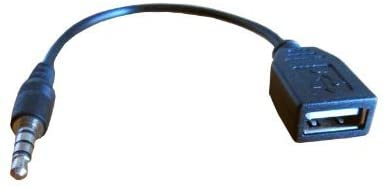
Something like this? No, I can't see that doing anything in an Octavia. You should get a small MP3 player or similar and use that instead. The alternative would be to retrofit an MDI kit which will give you the option to connect a USB stick
-
Wow, we must have very different driving habits or roads... On my 245 vRS, the last three fill-ups have been 424, 418 and 430 miles apart running 95 fuel, pretty sure the last two fill-ups have been E10 too
-
Nope, if it's says "lo" it's at maximum cooling, much like "hi" is full heat Still, it saying "lo" doesn't mean there is any fault or issue, just that someone has set the AC to max...
-
Looks like the engine and steering wheel? Unfortunately, I doubt you'll get any idea from just that image. There are many different reasons/faults which could cause them to show. Even the description may not be super useful... The only way to find out is to read the fault codes from the car
-
The Bolero doesn't have inbuilt BT. Instead, BT is handled by a separate module which is normally under one of the front seats (passenger side??). To start with, I'd be checking to see if a BT module is fitted
-
Can't say it's something I've noticed on my Octavia either. At a guess, it might be linked to the ACC/front assist radar unit (assuming it's fitted) which is something I haven't got...
-
What difference were you expecting after filling with E10? Depending who you believe, it may drop your MPG by 1-3%, that's between 4 and 12 miles a tank less. Having some fun on a nice day will probably make more impact to the range
-
Depends what satnav you have... The Columbus (RNS-510) uses a DVD but can copy them to the internal storage. The Amundsen+ (RNS-315) takes an SD card which it copies to the internal storage and wipes. The Amunsen (RNS-310) used to use a CD but the later versions are on an SD that must be left in the unit.
-
Yup, perfectly normal. From the owners manual: In short, if it's dark outside and you've not put the low/dipped beams on, it'll dim the cluster to remind you
-
A switched live should be fine for a dashcam, the switched just means it'll turn on/off with the key - not with the engine. My dashcam is completely happy on a switched feed. In this instance, it's probably a bad dashcam power supply that can't deal with the voltage drop during cranking
-
A H4 and H7 bulb are completely different! - A H7 has one filament and 2 connectors - A H4 has two filaments and 3 connectors
-
Even when your phone is wired up for Android Auto, it'll still use bluetooth I'd either put your music on your phone or transfer it to an SD card and use that...
-
The date doesn't help as it's not a software version You currently have SW 0061 installed, as mentioned above, I believe this is the newest. There aren't many software updates for the MK2 and for a Bolero, it's only going to be minor bug fixes rather than new features. You can check Skoda for a TPI/TSB which may confirm what software it the latest. It's a pay per access service here: https://erwin.skoda-auto.cz/erwin/showHome.do
-
Yup, I think the hardware is probably similar although the firmware will be brand specific
-
Based on your autoscan in other threads, you have: Address 56: Radio (J503) Labels:. 5M0-035-1xx-56.clb Part No SW: 1Z0 035 156 F HW: 1Z0 035 156 F Component: BOLERO 010 0061 Which as far as I'm aware, is the newest SW version for that headunit
-
-
Try changing byte 17, bit 3 in 09 (Central Electronics) Should be called coming home via fogs active or similar IIRC

