langers2k
Resident Member
-
Joined
-
Last visited
Everything posted by langers2k
-
VCP can extract the lighting configuration as a bcm1 file. You can then tweak it with vaghelper https://skodapilot.com/vaghelper/?lang=en Then use VCP to upload them new dataset. It's not hard, just make sure you keep a back up of your official config 😉
-
While that is correct, I don't believe the op has a vrs nor has one been mentioned 👍
-
You can do a complete swap for a FL frontend. If I remember correctly, you'd be looking at replacing the: - bumper - headlights - wings - grill (but not the bonnet...) This post has a little more info:
-
Nope... You might be able to modify it to make it fit but it's certainly not a direct swap as everything will be different shapes.
-
It's certainly possible as I tweaked my MK2 to do the same - you can do it with or without the rear lights being on. However, it's not something VCDS can do. You'll need something that can tweak the BCM EEPROM such as VCP or ODIS-e and someone who understand the lighting configuration section
-
I'm sure there is a BMW round here with something similar. It certainly doesn't look bad for it but I think they have a few other fluorescent bits to help tie the wing mirrors in. Erm, why would the police care? AFAIK, there is nothing wrong with fluorescent colours or wraps being used on UK cars. As it's only the wing mirrors, there is no need to tell the DVLA of a colour change but the OP would have needed to inform their insurance. If you start fitting retro-reflective materials then I believe those are subject to various restrictions
-
The only obvious missing fuse is slot 18. If you look carefully, you'll see it's got contacts at both the top and bottom of that slot which suggests it's missing it's fuse There are a few with contacts at just one end (ie: 7, 8, 9, 10) which is normal as there is a busbar running along the top. As it's just a single contact, there is no need for a fuse 👍 Quite a few of those look like replacement fuses so it might be worth checking each one in turn is still OK.
-
I think the inbuilt satnav will normally take over and show directions when you set a route. However, once the directions are shown, you can change the information shown back to speed using the normal methods (steering wheel buttons etc)
-
The steering rack might need re-calibrating to learn where the middle is. Certainly on my MK2 Octavia if this was done incorrectly, it would cause the car to pull in one direction even if the alignment etc were correct. It might be G85 calibration IIRC...?
-
This page suggests it's the same thing - or at least shows both part numbers for one item https://www.skoda-parts.com/spare-part/6v0955485-windscreen-washer-tank-cap-skoda-37322.html
-
Seconded... If you haven't got stop/start (or battery monitor) then no need to code the new battery
-
Yup, on the back of the unit in the glove box. I think it's probably the yellow fakra IIRC. I can't see any reason for them to have disturbed the connector below the climate panel 😕 Might be worth contacting the fitter and asking them to check for you?
-
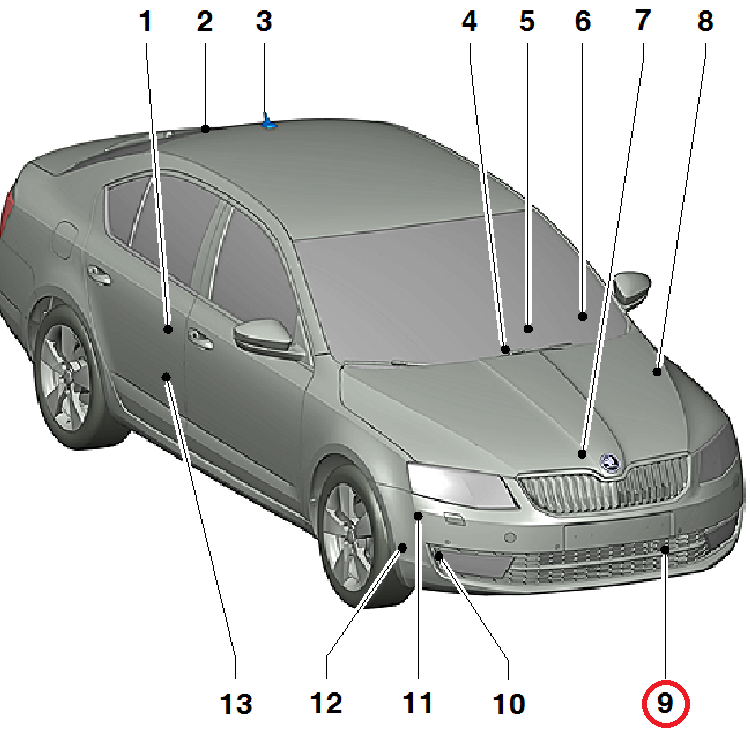
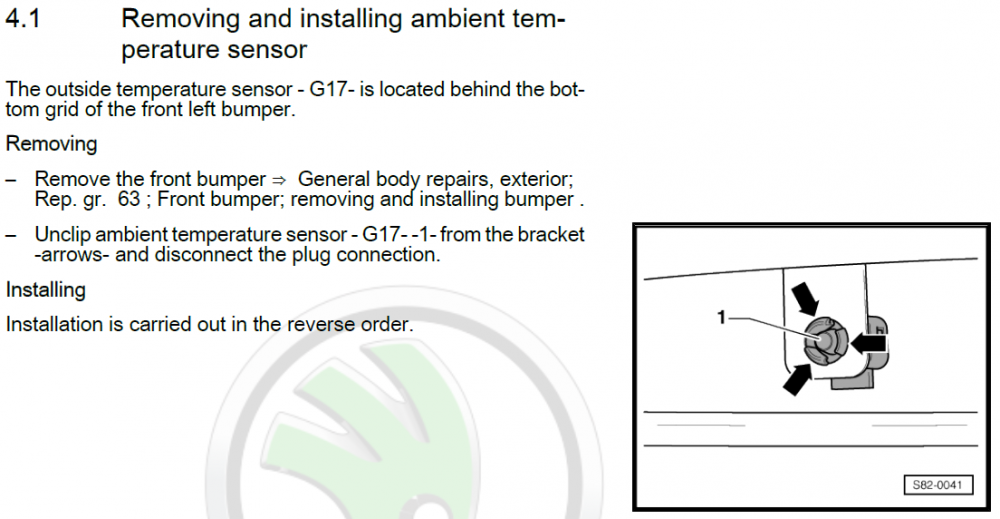
Based on the workshop manual, it's in the normal VAG location (number 9): It also suggests the front bumper needs removing to access it but you might be lucky and not need to:
-
At a guess, the fakra connector for the USB socket isn't correctly attached. They probably removed the headunit for better access to the fuse box. The USB socket uses a fakra for power/data but there is also a second power feed to allow for faster charging etc which ties in with your symptoms assuming the first isn't connected
-
I'd assume they'd use the part catalogue from Skoda to find the 'correct' part for your car. If it's been superseded you might get something newer but I doubt they'd take your word a 3QF is compatible over the part catalogue guidance. They have nothing to gain and risk not being able to code/parameterise/calibrate the 3QF version if the software they use doesn't recognise it as valid for your car. You could ask for a settlement figure and then find a garage to do the work for you with a part you supply...?
-
It's pretty unusual for VAG to fit wires that aren't used so I'd be very surprised if the wiring for heated jets is present on a car with unheated jets...
-
ACC doesn't need the front camera... It uses the radar unit If you already have front assist, then you'll probably need to switch the radar unit, possibly add some wiring then it's on to coding/FeC codes. If you don't have front assist, you'll need some radar mounting parts, a radar and to add the wiring too. edit: ACC doesn't 'need' the A5 camera but I think if you have an appropriate A5 camera then you'll get pACC (predictive adaptive cruise control).
-
Depends what you count as expensive...? Genuine highline cameras are about £75 and there are various aftermarket Chinese cameras for about £30. It'll be very similar to fitting a camera to an Octavia:
-
Maybe the trip has rolled over. There is a max distance/time it can record and then it'll reset. Maybe check the distance driven and driving time to see if they are quite low...?
-
Could you ask him exactly what he changed? Curious as I also have a 245 vRS and didn't need to do anything special when retrofitting the VC. I still get oil temperature too 😕
-
Good luck! I probably have the update files somewhere but you'll need to find someone with ODIS or VCP to flash them (VCDS can't).
-
If I remember correctly, no blackline got bluetooth as standard so the 'Phone' button working as mute is completely normal... That being said, they normally have an Amundsen+ (RNS-315) fitted - most of these do have the BT hardware installed but disabled. If you want to check, remove the headunit from the car and look for a sticker with a MAC address. If it's 00:00:00:00:00:00 then it doesn't have BT built in, if it's any other numbers, then you're in luck. Assuming that's the case, you just need to add a microphone and enable BT in the headunit coding This thread might help:
-
Due to the new engine parts he had fitted
-
Those HW/SW part numbers match up with some autoscans online: Address 01: Engine (CAX) Labels: 03C-906-016-CAX.clb Part No SW: 03C 906 016 AK HW: 03C 906 016 C Component: MED17.5.5 G 5295 There are three likely update files: 9970 9059 8177 9970 matches in to the post you mentioned and examples can be found online: Address 01: Engine (CAX) Labels: 03C-906-016-CAX.clb Part No SW: 03C 906 016 AK HW: 03C 906 016 C Component: MED17.5.5 G 9970 So yes, I'd agree that 9970 is probably the latest SW version for you car and the dealer is being rubbish... I'd be tempted to grab the TPI from erwin and present that to the dealer assuming your symptoms match the ones in the document
-
I think they want to add lane assist (uses the A5 camera) rather than lane change assist (blind spot assist) via radars. @Dajver - it'll depend exactly which camera you have but this post might help: