langers2k
Resident Member
-
Joined
-
Last visited
Everything posted by langers2k
-
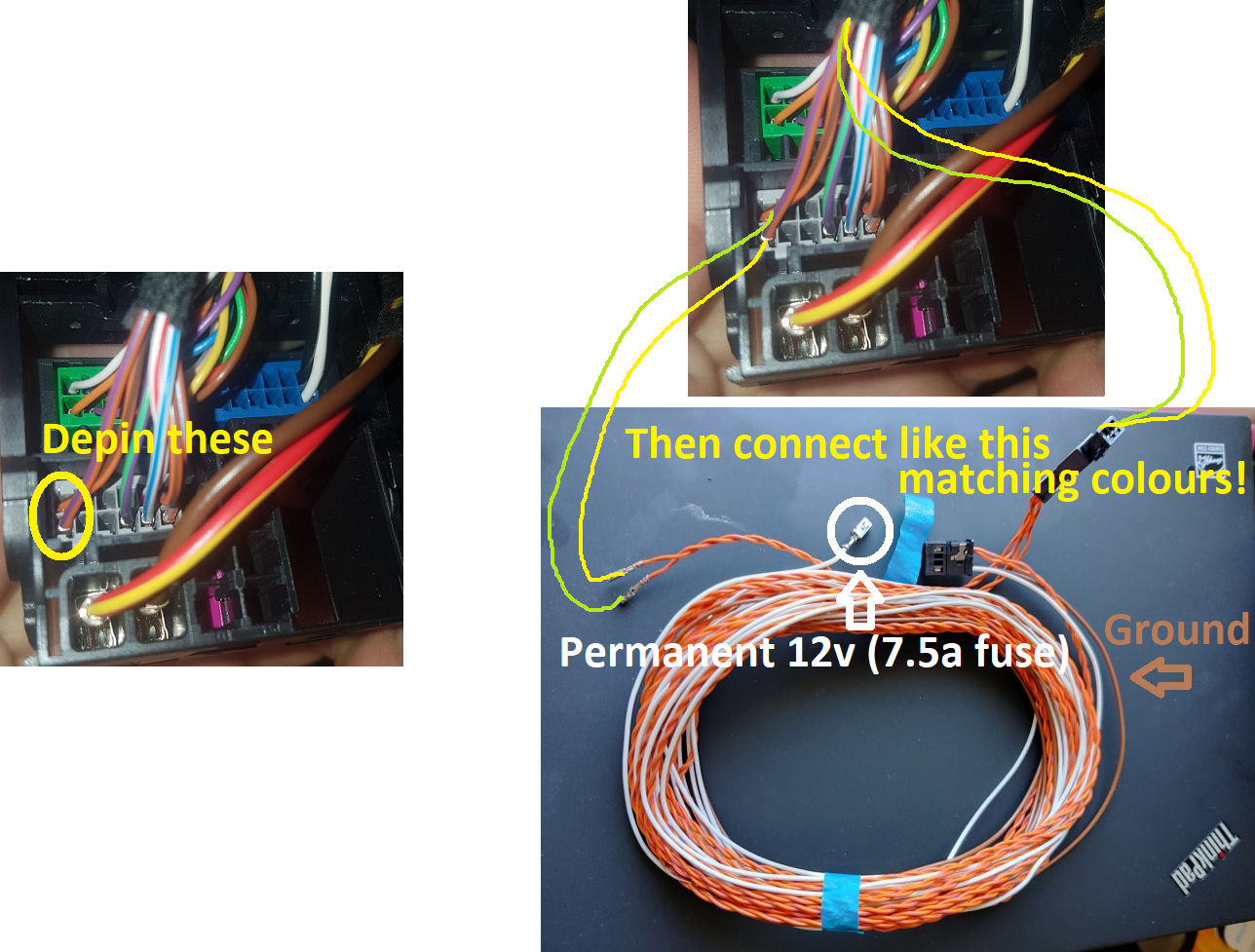
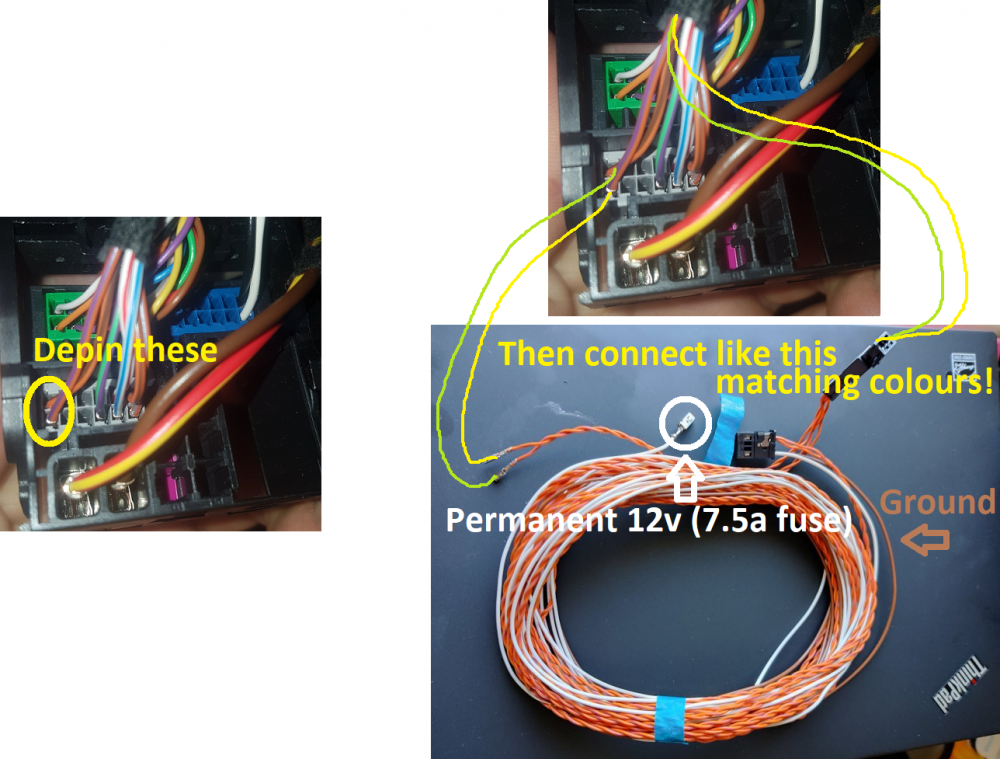
The cables look identical to the ones I used when I added a RVC to my MK3 Octavia here: https://www.briskoda.net/forums/topic/485897-how-to-reverse-camera-fitting-guide/?do=findComment&comment=5456364 Only the images in the link I posted above. There isn't much to it really, you have 6 wires you need to connect: - white is permanent 12v, it should have it's own fuse (probably 7.5a in position 18) and the crimp maybe the correct one to slot into the fuse board - brown is ground, it probably has a ring crimp and any ground point it fine - the two twisted orange (and brown/purple) cables are CAN-bus and need matching to the existing colours - the separate black wire is video, black is likely ground and white is signal, it connects to the blue socket as shown in the image you posted The coloured sockets are removable from the quadlock and will slide out when you push the locking tab. Once they are out, the sides flip open allowing you to add or remove wires. For the CAN-bus: - the original CAN-bus wires will need removing from the grey socket - they will now go to the new black connector included in the pack, it's probably loosely slotted in - the two new wires can then slot in to the grey socket - connect the black connector up So it'll look sorta like this:
-
A Skoda dealer will only be able to apply the FeC's applicable for the VIN so they won't be able to change the map region FeC for you. @pab567 might be able to help though...
-
I think the map region is protected by a FeC which Skoda won't sell you... You will probably need to find someone who can hack the headunit and add the appropriate FeC for you
-
The white wire will be power
-
-
Yup, how quickly the AFS functionally works for cornering lights.
-
It changes the throttle response, the steering assistance, the speed of the lights etc etc...
-
Yup...
-
Disconnect the three plugs on the BCM and see if anything changes with the voltage to the door controllers. You should perform an autoscan while it's disconnected too. I'd be very surprised if the BCM was causing your issues though as it's not in the power path for the door controllers.
-
You need nozzles and a wiring loom. The wiring loom needs to get from the nozzles to the BCM and connected to the correct pin. The last stage will be coding with VCDS or similar. Example from a MK7 Golf: https://www.golfmk7.com/forums/index.php?threads/heated-washer-jets.314963/#post-6511128
-
This thread might help:
-
This might help:
-
You might want to look at this thread: https://www.briskoda.net/forums/topic/445299-installing-speed-cameras-on-the-amundsen-mib2-free-database-and-quite-simple-to-do/ The latest version is here: https://www.briskoda.net/forums/topic/445299-installing-speed-cameras-on-the-amundsen-mib2-free-database-and-quite-simple-to-do/?do=findComment&comment=5546902 That being said, I think the warning sound is pretty quiet so I'm not sure how useful it is... I assume you probably have an Amundsen headunit so you won't be able to add these to the normal nav SD card. You'll need to use a second SD card in the other slot
-
Pretty sure that's an allen key to remove the rear lights
-
You should update your VCDS to the latest version: https://www.ross-tech.com/vcds/download/current.php As for your problem, the boot handle has probably failed. You should check it and replace if needed
-
The headunit in a MK2 Superb only has permanent live feeds. There is no switched live... The Connects device might create a switched live from the CAN-bus messages? I'd check the the manufacturer.
-
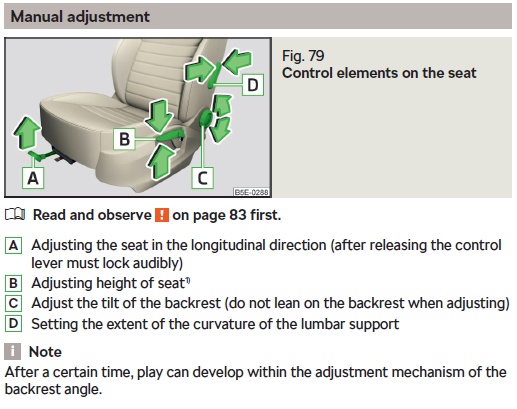
I'd agree with that: It seems the OP doesn't have the folding option. I think the best bet it to turn 'C' and see how much angle you can get on it
-
Both should be permanent live so 12v regardless of the ignition switch. At a guess, you have a damaged wire or joint and when you're moving the loom, it's making a high resistance fault. I'd probably try measuring the voltage while moving the loom around next.
-
I think it needs to be a separate SD card iirc. At least for the Amundsen
-
That's too low... It should be very close to the battery voltage so above 12v. I would check the battery voltage and check the voltage either side of fuse F8 to see if you can narrow down where the voltage drop is happening. I'd also try a different ground point to make sure it's not the ground path that's causing issues.
-
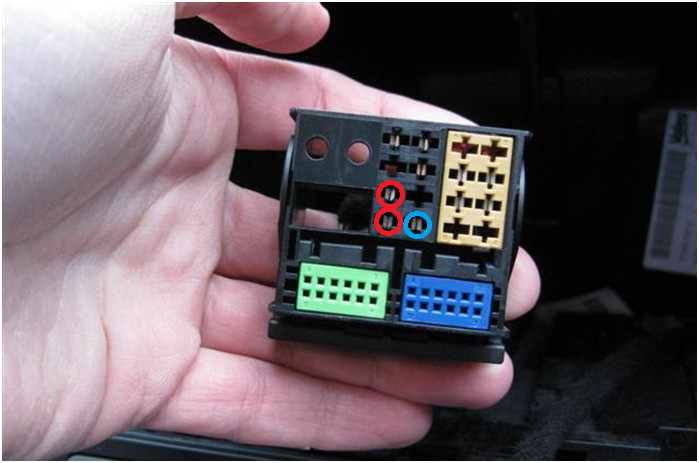
Oh, sorry, I misunderstood. I read it that the old headunit still worked when you refitted it. If neither are working, then it's likely you've popped a fuse somewhere... To start with, use a multimeter to check you've got 12v and ground on the quadlock connector in the car. The two circled in red should be power, the one circled in blue should be ground: I would then only connect the quadlock and see if either headunit will powerup using the button as that should work regardless of if the CAN-bus side is working
-
The antenna uses 'phantom power'. That means the headunit is applying power to the same wire that the antenna is using to provide the radio signal. If the headunit isn't turning on and you're sure it's getting 12v, then there is a chance you've damaged something in the headunit...
-
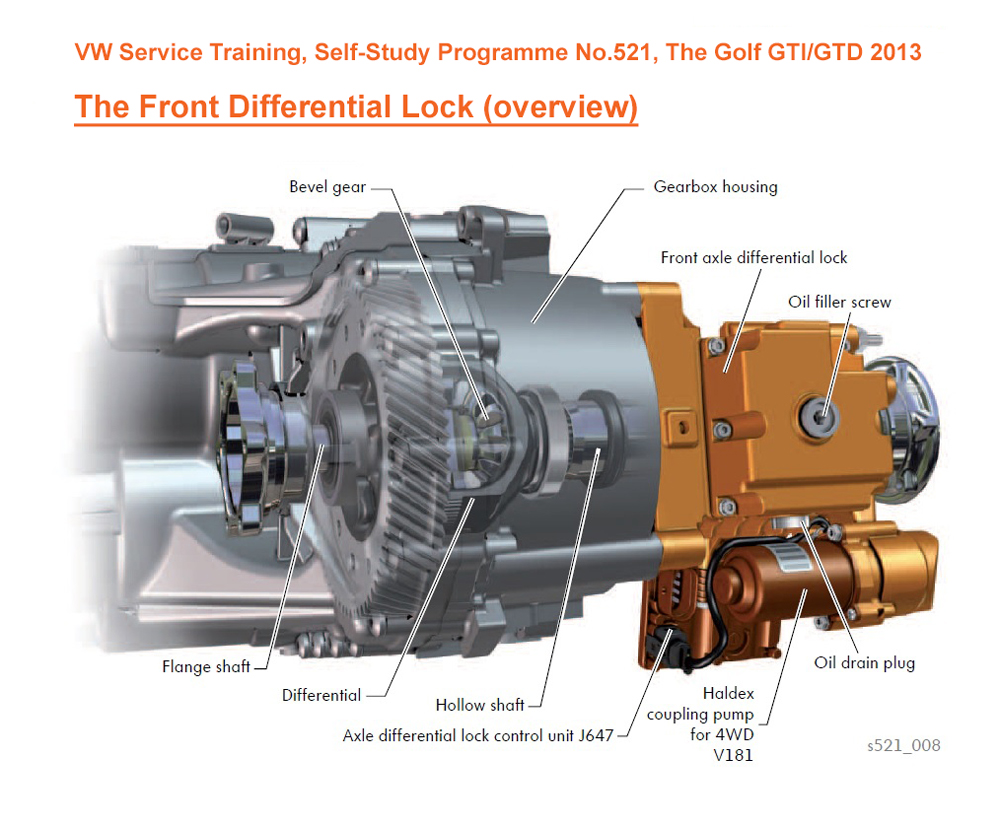
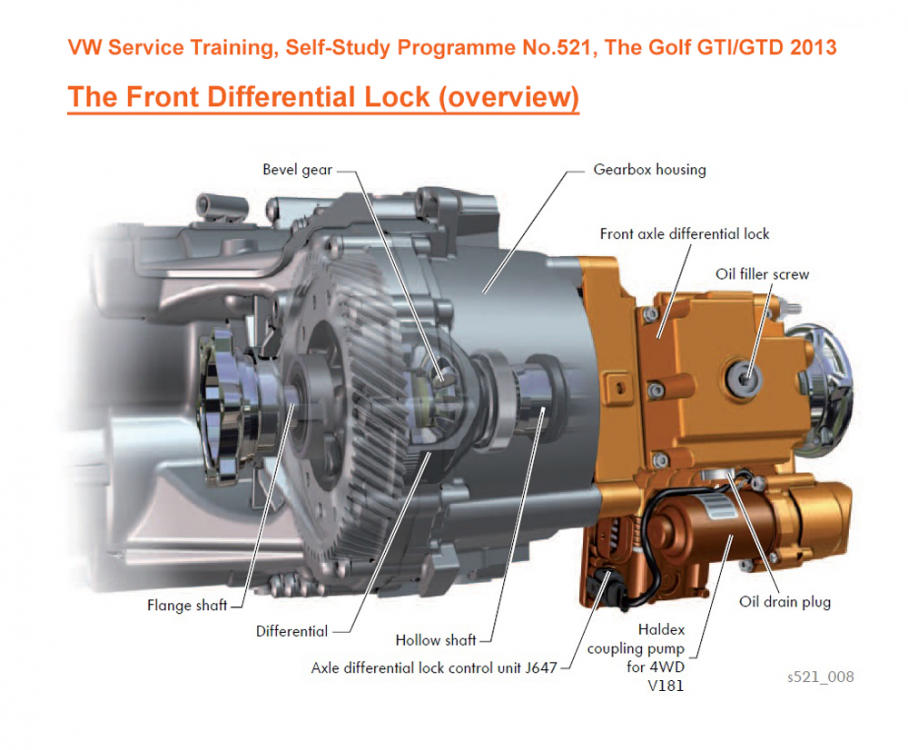
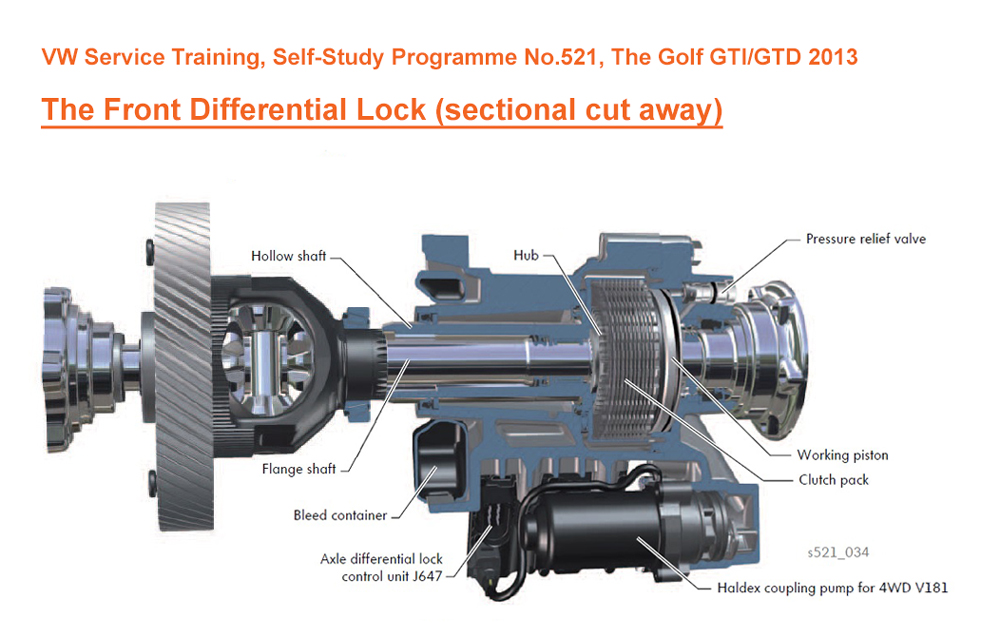
Had a quick google over a morning coffee. Yes, I'd say the front diff and VAQ haldex oil are separate. When the dealer says the diff oil need replacing, they actually mean the VAQ haldex Few images for those not familiar with the VAQ. Nice to see the SSP still names it "Haldex coupling pump for 4WD V181" even though there is no 4x4 involved Anyway - the important notes are: - if you have a VAQ fitted, it will need the haldex fluid replacing periodically - It's around 3 years/30k miles but if you drive hard, do it earlier - Much like a rear haldex, the haldex pump should be removed and the strainer/mesh cleaned The last point is the important one as I expect many dealers won't do this as standard given what I've read of people rear haldex experiences
-
I'd suggest checking the wires in the gator between the door and car body. Probably worth checking both the front and rear on the same side
-
The OP asked about the VAQ electrically adjustable LSD (aka the trick diff). It uses the same haldex style clutch system to adjust how locked the front diff is as you'd traditionally find on VAG 4x4 models to do front/rear power transfer. Therefore it's subject to similar servicing requirements 👍 I'm not sure if it's got separate fluid for the diff and haldex clutch pack but I'd assume it would. I think when it comes to servicing the VAQ the terms get used interchangeably (rightly or wrongly)... I need to have my VAQ serviced soon so it's something I'll be looking in to in more detail.