




langers2k
Resident Member
-
Joined
-
Last visited
Everything posted by langers2k
-
When they clone a key, it has exactly the same UID in the immo chip so the car can't tell the two keys apart. This means that if either of the two keys are lost, you can either: - remove the UID meaning neither can start the car - leave the UID meaning both can still start the car The former sucks as you then need two new keys, the latter sucks as someone may use the lost key to steal the car Depending how the key was lost, the latter may not be an issue... If it's newly cut and not pre-coded, with the right tools it should be possible to correctly pre-code it. However, a dealer can't... As mentioned in the article I posted, pre-coding came in around 2006 so your keys will definitely use it.
-
I'm not super familiar with a 2016 Rapid so this isn't gospel... - The remote fob is usually pretty easy. Tools like VCDS (probably OBDeleven) can ask the BCM to relearn them by pressing the lock buttons one by one. - The immobiliser (immo) chip is harder. You'll need a decent auto-locksmith with the right (specialist) tools and knowledge for your vehicle. At least when I was messing with stuff on a 2012 Octavia, there were two parts to the immo chip coding: - the immo chip is 'precoding' to the vehicle, this can only be done once and if a dealer orders a key, it'll come 'precoded', they can't do it themselves - the immo chip needs 'pairing' to the vehicle, this is normally done using Skoda's servers and can be done by a dealer using ODIS Whether the key you have will work, will depend on: - if it's not 'precoded', it's probably usable - if it's 'precoded' to your car, it should be fine - if it's 'precoded' to a different car, it's probably useless I think some 3rd party tools might be able to re-apply the 'precoding' but a dealer certainly can't. The other gag is that many auto-locksmith's simply clone an existing key rather than creating a new unique ID. This means that if you do misplace a key, you can't remove it from the car unless you replace both keys! I'm not 100% but I think the latest cars actually need a connection to Skoda to pair keys, not sure when this came in but I don't think a 2016 car will be effected. Basically it's all just a game of cat and mouse between VAG and the 3rd party tool creators. VAG make it harder for third parties to create/add keys, the 3rd parties reverse engineer the new immo version forcing VAG to change again, repeat, repeat... One take on a brief history for VAG immo and the 3rd party workarounds: https://lockmedic.com/2018/02/08/a-long-explanation-of-why-we-dont-do-vw-audi-keys-or-how-i-learned-to-stop-worrying-and-love-the-war/ Sorry - that seems to have gotten a bit long winded! In short, yes, immo work needs a good specialist: - if you're lucky, you may be able to reuse the existing spare - if not, you may need to order one from a Skoda dealer and have them sort it
-
Welcome @Steve001001 Can you post a VCDS autoscan along with an adaption map from 09 and I'll take a look
-
There are a few parts to the key: - the key blade which needs to be correct for the locks - the immobiliser chip which needs to be paired to the car and should never become unsync'ed - the remote fob which uses rolling codes and can become unsync'ed if used out of range repeatedly The remote fob is the only part that uses the battery so even if it's been removed or flat, you can unlock and start the car with it. Given only the key blade seems correct, it feels like a previous owner lost the original spare and did the bare minimum (eBay used key + new blade) to avoid fees when they handed the car back? Assuming you bought it from a dealer, you should go back and ask them to resolve this for you...
-
Yeah an ignition cycle is just turning it off and back on with the key. I'm not expecting it to help with the door controllers but it should get the BCM (address 09/46) communicating again
-
I haven't got a MK4 so I've not spent much time on this but given some of those costs I had to take a quick look... There is this kit which is customised by PR code/headunit. Certainly better at ~£350 but I'm not sure what unlocking SFD requires or which tools are needed: - https://www.carsystems.eu/skoda-octavia-nx-4-gen-rear-high-line-camera-kit-retrofit,id4274.html Otherwise, there are a couple of options on Aliexpress. The first is advertised for a MK4 but no mention of PR code or coding help, it's not a seller I've used: - https://www.aliexpress.com/item/1005002357151512.html The second seems to be identical although advertised only for an A3. This is a seller I have used and found helpful in the past: - https://www.aliexpress.com/item/1005002348625696.html If I were doing this, I'd probably contact Audi Auto to see if the A3 camera can be used/parametrised for a MK4 Octavia and if they know about the coding/SFD unlocking. They certainly seem to do the loom for an Octavia: https://www.aliexpress.com/item/1005002504963576.html
-
The missing 09 and 46 isn't unusual, probably just needs the car locking/unlocking and an ignition cycle. Even if the BCM is dead or removed, you should see the door controllers. Still feels like a power supply issue to me... You mentioned previously the voltage was low even after you ran a temporary feed. That suggests either a bad ground or that the power supply has chaffed and is now being earthed somewhere. Hopefully you can get a wiring diagram and start checking the power/grounds out to narrow it down. It's possible that one of the four door controllers has failed and is pulling the power supply down but that's a bit of effort to remove all four door cards to unplug them all while you test. I'd be tempted to replace the fuses to rule out any micro-fractures. While you're doing this, check the empty fuse slots only have a single contract to make sure none are missing.
-
Pretty sure 18" Gemini were standard on the FL vRS. There were a couple of special edition 245's which got a few extra's including 19" xtreme alloys as standard, namely the '245 edition' and 'challenge edition'. As for brakes, I think all 245's got the same: - 340x30 vented (PR-1LG) fronts - 310x22 vented (PR-1KW) rears Plenty of info in this thread:
-
Can't say I ever tried locking myself in the car then trying to get out It feels like normal behaviour due to the deadlocks though. As John mentioned, double tapping the lock button within 2 seconds should prevent the deadlocks but you may need to pull the door handle twice to get out. It's all covered in the owners manual under 'safe securing', might be worth a read to compare with your cars behaviour.
-
'Poor oil quality' just means your on fixed rather than variable servicing. It has no relation to the actual oil quality. There is no alarm siren in your car so you won't be able to have lock/unlock chirps. You might be able to use the horn instead but I wouldn't recommend it as it's loud compared to the chirps Yes, if you want proper CH/LH lights you need an auto light switch and possibly an extra wire between it and the BCM. You should then be able to code them in.
-
What does the bottle say? At a guess, you'll probably want it 1:1 for the UK:
-
Maybe you should post an autoscan from VCDS so we can see how your car is equipt and configured
-
Quick few hits from google for 2013/14 Octavia scan: - https://forums.ross-tech.com/index.php?threads/8738/ - https://forums.ross-tech.com/index.php?threads/15643/ - https://forums.ross-tech.com/index.php?threads/5516/ - https://forums.ross-tech.com/index.php?threads/8855/ As you can see, the BCM coding is quite different in each case. The scans are all from Rosstech's site so you may want to consider supporting them by buying a genuine VCDS cable in future.
-
I would imagine the Snap On tool can do it although I've no idea how as I've never used one... The garage might need to contact Snap On for support
-
There is a sticker in the boot area which will give you a subset of the PR-codes but it's not a full list unfortunately. Even so, there are many different spec levels such as an S, SE, Scout, L&K or vRS etc. Each will have different equipment and therefore coding. Are you still using the pirated/cloned VCDS cable or have you changed tools since this thread: https://www.briskoda.net/forums/topic/491099-vcds-rod-file-missing-sk37/
-
The autoscan will be different depending on spec, which options it has and exactly when the car was made. You might be better to post your autoscan and adaption maps so people can take a look for anything obvious...
-
Pretty sure the only difference is DAB radio: - 5Q0035864C has no DAB - 5Q0035874C does have DAB
-
-
@AlVal - Can you look at byte 22, bit 0 in the 5F coding? I think it needs to be unticked and the headunit rebooting. If it rejects it, you might need to flip byte 19 first then try both at the same time.
-
Not sure if it's possible. It's down to the trailer module to decide if the lights should be on... Maybe have a look at it's coding and adaptation channels.
-
Nope... If you have ACC then it's always adaptive I'm afraid.
-
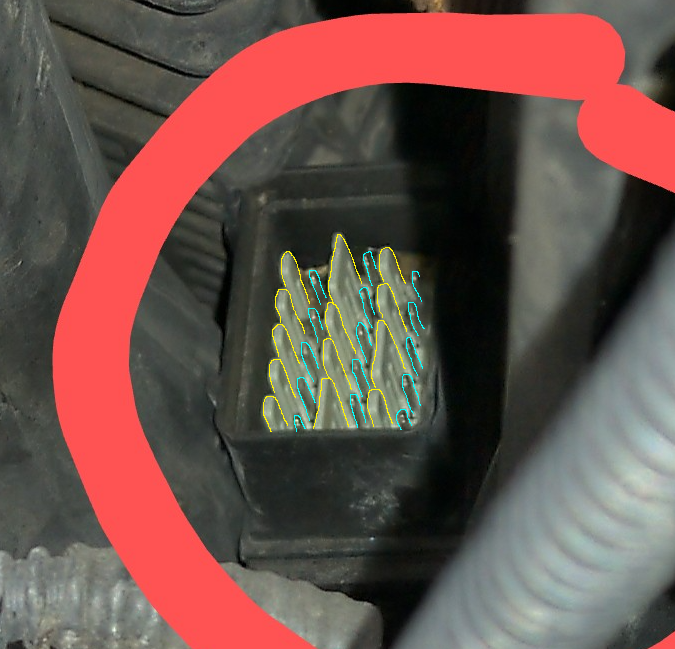
It was the 'blades' that made me think it wasn't electrical. There seem to be 13 larger ones I've marked in yellow, 3 of which are huge. Then another 15 small ones I've marked in blue. It feels too many given the scale and in quite a random layout to be a normal connector... A clearer picture might help but I think you're going to need a borescope or mirror to see what and how it attaches to the car...
-
-
The initial 01435 code can be various things: http://wiki.ross-tech.com/wiki/index.php/01435 A full VCDS autoscan would confirm which and give a better idea as to what is needed to fix it. The three new codes could just be a lack of adaption/basic settings. Again, a full autoscan would give a better idea. At a guess, you need to figure out what's causing the 01435 code and then follow this: http://wiki.ross-tech.com/wiki/index.php/VW_Golf_(1K)_Brake_Electronics_(MK60EC1)
-
Heh, yup, I found an Octavia video but nothing for a Superb. Hopefully it will be similar



