varaderoguy
Resident Member
-
Joined
-
Last visited
Everything posted by varaderoguy
-
To show you the understeer and oversteering problems..... (at 36psi/2.5bar) video.mp4
-
Gents. Just checked....all 4 directions are correct. I'm going out to record a little video on my favourite road and put it up.
-
Good news - I'm booked into ATS Euromaster for diagnosis and assistance on Wednesday. More news to follow soon.
-
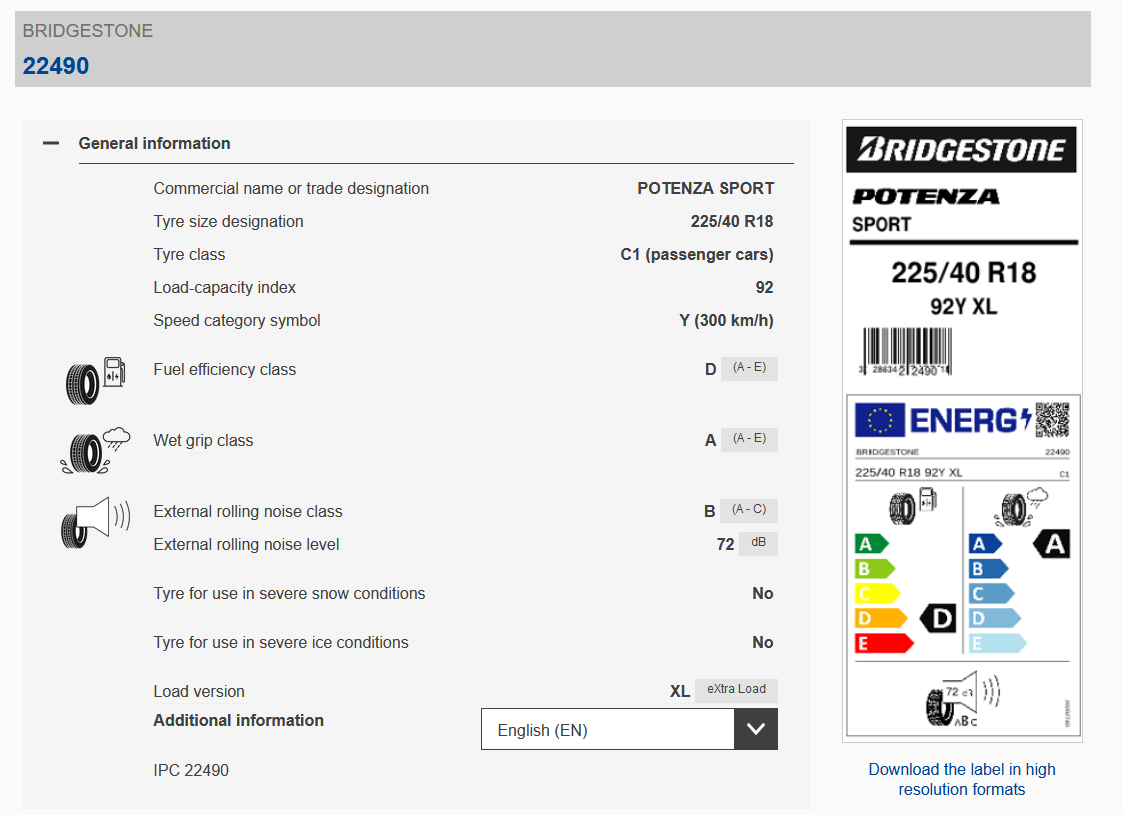
old tyres:
-
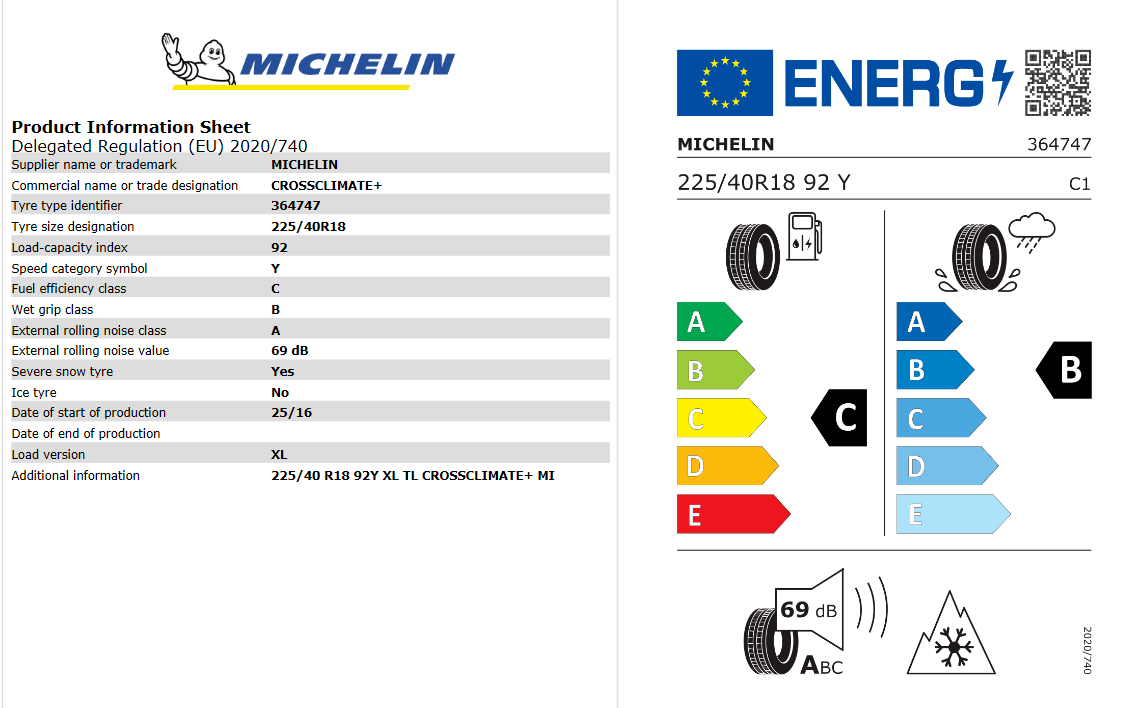
Folks, As always - this is a sounding board. My (project) Diesel Octavia 3 VRS (4x4) have just had a set of Bridgestone Potenza tyres replaced - with a set of Michelin CrossClimate + tyres. I am not a hooner (generally) and very careful how I scrub in tyres (ex.biker). I've done about 100 miles, but I have to report that I am extremely disappointed with the CrossClimate tyres. They are downright dangerous on my VRS. My complaints are: 1) They are unpredictable - they either oversteer or understeer when turning into corners. 2) The tyres have ruined my MPG (from a healthy 45mpg at normal driving) to a disasterous 30mpg. I have complained to both Michelin and also the tyre dealer who fitted them - the tyre dealer is trying to fob me off saying "they've never had any issues before". Michelin want me to go to an ATS Euromaster garage to get the tyres investigated. They don't inspire confidence. Before anybody asks, Yes - I have checked the tyre pressures and the tyres which are a 225/40 R18 92Y tyre - are all running at between 2.4 and 2.5 bar - about 35 to 36psi (which is standard pressure). I know that the VRS's are hard on their tyres, but I would have to say to avoid using these tyres of these cars - its not a good combination.
-
For this, there needs to be some detective work. The fusebox on each year of Octavia is slightly different, so first - identify each fuse position number and the cross-reference it against your owners manual. We can then decide which is used for what. Is there no Micro-USB connector poking out of the headlining for your car?
-
I suspect that one is for a dashcam, the other for a towbar but the third....that's unusual.
-
You could do worse by starting to have a look here: pinned to the top of the MK3 Octy forum: At least you can get your head around what the process is on known mods - a smattering of German helps (as the coding is partly in English and partly in German)
-
I remember another thread that had the same problems with the updates not working; its in essence one of two possible problems. 1) The firmware of the MIB system is stopping you from updating the maps 2) VW stopped supporting the MIB1 last year, so the 2020 maps were the same as the 2019 maps. As to fixing this; you could try to see if you can get hold of a firmware update - @pab567 is your man who can hopefully advise here. Failing that, you are into a new MIB2 system (or a rebuilt unit that is made into a MIB2.5 unit) with a new head unit and touch screen. What you will need is an admap scan of your car of the appropriate 5F module, send it to @pab567 who can hopefully build you a new system. The touch screens will need to be ordered directly from Skoda UK. Please see the following thread for information:
-
-
I can confirm that this firmware version tweak works just fine - I've done it on two systems.
-
Applogies - please look at:
-
Perfect. You need 0478 which should fixed those niggles. Are you relatively IT literate? You can either find my guide on how to do the update yourself or PM me for further help.
-
It's a pillar clip from the A Pillar.
-
Can you take a picture of the front of your system and also PRESS AND HOLD Menu button,go to software/Firmware and then Software Firmware Version and post those details too. You probably just need a firmware update to 0478.
-
If you speak with Skoda Finance and see if the warranty is a genuine Skoda Warranty or not. Yes, you can also extend the warranty with Skoda for your car (will cost 300-400 pounds) which can be done on the Skoda UK website.
-
You can go for a Bolaro MIB 2.5 unit with an 8.5" buttonless system for very reasonable money. Again, speak with @pab567 who can assist with prices and units.
-
Welcome: Sounds like you need a nice MIB2 system (which your car should have anyway) - but it maybe as simple as a FeC (Feature Code) to get MirrorLink and Android Auto to play nicely (about 150 ukp from your dealer). If you want the facelifted buttonless system, then you need to chat with @pab567 who can probably sort you out a new Bolaro system from a facelifted car. For steering wheel controls, please chat with @SashaGrace who can assist with tell you what bits to get and how to code it up.
-
@GavChap Can you PRESS and HOLD the Menu Button, Go to Software and Software version and give us the info your system. This will probably be a firmware niggle on your Amunsden stopping Android Auto and Bluetooth from working properly. Depending on how IT literate you are, you can do this yourself or you can play the game "lets try and find a fault issue with the MIB system" with your local Skoda dealer (its a waste of time). PM me if you want some assistance.
-
@J.R. - listen 2 seconds into the video - there is fairly pronounced 'clonk'
-
The fitting of the unit is not the big issue here - its more to do with the coding of the unit. Each car is configured slightly differently - this makes a difference because the features a car comes with (or not). I can point you in the direction of @pab567 who might be able to assist with a refurbished Bolaro/Amunsden or Columbus system. For that to happen, you need to find a friendly Briskoda member with VCDS who will scan your car and hopefully be able to get the config of the 09 unit (MIB) system for you (its called an Admap). Sending that over to Pawel and he will configure you up a unit configured for you car. BTW - the fitting takes less than an hour (unless you have melted the wiring loom which is a whole different problem). Good luck.
-
I had another user recently who had wiring their dash-cam into an "always live" fuse which drained their battery v.quickly. If you have a dash-cam, move the dash-cam and share the power from "Rear Wiper Motor" (the fuse number is different depending on the year of Octy MK3)
-
Arh - difficult one this. Your "Car Scanner Pro" has obviously upset something in the coding of the MIB system. I am assuming that this is the product: https://www.carscanner.info/coding-mqb/ This is one of the lesser known products I've heard of & I've seen/heard other similar products have similar results (ie they mess up the coding). This is why it is generally recommended that you stick with either ODBEleven (Pro) or get a genuine copy of VCDS. If you can remember what coding you did (if it was in an App Form), then try and de-select the options you chose. Failing that, you are into a world of trying to find a similar car (spec wise) to yours. Other than that....I would budget about 2hrs with either a VW Specialist or your local Skoda Garage and try and get them to redo the settings via ODIS. Copying in @langers2k to see if he can assist (as he is the keeper of car configs).
-
To try and extend on @langers2k's consise and to the point - previous answer (because he's such a wag :-) ) - yes, it can be done - there are generally two ways - you can either get a new front bumper with the sensors built in, then its just a case of retrofitting the loom back to appropriate control unit or you can get them retrofitted on your existing bumper (the less expensive route) and put in the wiring loom afterwards.
-
Yes - okay - I suggest you take it back to the folk who did your steering geometry and get them to check again as it sounds they haven't aligned up something properly.